
Printhead Basics — 10-Part Comprehensive Guide
Quick finder table included · Ink jetting principle → Resolution concept → Spec interpretation → Brand-by-brand head summary
Many printer users — and even service engineers — hold misconceptions about print heads.
“This is a 6-pico head, so the resolution must be great, right?”
“They say it’s the same head but it can do 2400 dpi?”
“Does the head have a lifespan? Is a warranty possible?”
“What’s the difference between a KM1024i and a KM1024?”
“They say it’s the same head but it can do 2400 dpi?”
“Does the head have a lifespan? Is a warranty possible?”
“What’s the difference between a KM1024i and a KM1024?”
The print head is the core component of a UV printer. Once you properly understand jetting principles, resolution concepts, spec interpretation, and brand-specific characteristics, your judgment on everything from equipment selection to troubleshooting will fundamentally change.
If you understand only the content explained here, you will know more about inkjet heads than the inkjet manufacturer salesperson or equipment distributor engineer.
If you understand only the content explained here, you will know more about inkjet heads than the inkjet manufacturer salesperson or equipment distributor engineer.
Goal of this article: To organize all 10 parts of printhead basics by topic, so you can quickly find the information you need and apply it in the field.
Who should read this?
- Those who want to compare equipment by reading head specs before purchasing a UV printer
- Those who want to know the exact meaning of “6-pico head”
- Those confused by terms like variable dot, grayscale, and multidrop
- Those curious about head lifespan and warranty conditions
- Those who want to understand the differences between Ricoh, Konica, and other brand heads
Precautions
- Pico liters (pl) represent ink drop volume, not the value that directly determines resolution. Resolution is determined by the diameter of the ink drop on the substrate.
- Max jetting frequency on the spec sheet differs from actual operating frequency. Do not mistake spec values for real-world performance.
- Head warranty is currently almost impossible. Negotiations were possible in the past, but manufacturer policies have changed.
- New heads like MEMS and KM800/1600 are not yet field-verified. Always confirm real-world usage from other manufacturers before adopting.
Key Summary (5 Points)
- Ink jetting works by applying an electrical signal to channels inside the nozzle to push ink out. Force and timing determine straightness, speed, and stability.
- In “6-pico head,” the omitted unit after pico is liter (volume) — resolution is determined by the ink drop diameter on the substrate.
- Variable dot (multidrop) is a technology that jets different-sized ink drops from a single nozzle to improve print quality.
- In head specs, prioritize checking NPI (nozzle density), jetting frequency, and ink volume.
- Konica naming convention: KM (manufacturer) + number (nozzle count) + i (Independent) + S/M/L (volume) + H (heater)
I. “I Want to Know About This” — Quick Finder Table – Printhead Basics
Find the article you need based on what you want to learn about print heads.
Click a reference number to jump to the detailed guide below.
Click a reference number to jump to the detailed guide below.
Recommended Learning Order
Jetting Principle (①) → Resolution Concept (②) → Variable Dot (③) → Lifespan & Warranty (④⑤) → Reading Specs (⑥⑦) → Brand-by-Brand Summary (⑧⑨⑩) — this sequence is the most efficient.
Jetting Principle (①) → Resolution Concept (②) → Variable Dot (③) → Lifespan & Warranty (④⑤) → Reading Specs (⑥⑦) → Brand-by-Brand Summary (⑧⑨⑩) — this sequence is the most efficient.
| Question | Key Terms | One-Line Summary | Ref. |
|---|---|---|---|
| How does ink come out? | Nozzle, Jetting, Electrical signal | Electrical signal → wall movement → ink ejection | ① |
| Does 6-pico mean high resolution? | Pico liter, dpi, drop diameter | Pico is a volume unit; resolution is determined by drop diameter on substrate | ② |
| What is variable dot? | Grayscale, Multidrop | Technology that jets different-sized drops from a single nozzle | ③ |
| Does the head have a lifespan? | Head lifespan, Warranty period | Manufacturers listed it in the past but no longer do | ④ |
| Is a free warranty possible? | Warranty request, Manufacturer response | Negotiations were possible in the past, now almost impossible | ⑤ |
| I don’t understand spec terminology | NPI, Frequency, Ink volume | Every spec term from the brochure explained one by one | ⑥ |
| What should I look at in specs? | Practical points, Brochure reading | Key points and meanings explained using an actual brochure | ⑦ |
| What Ricoh heads are available? | Ricoh, Gen5, TH series | Complete Ricoh head lineup summary | ⑧ |
| Are Gen5i and Xaar1201 the same? | Ricoh, Xaar, OEM | Logical explanation of why they are the same head | ⑨ |
| What do Konica model names mean? | KM1024i, Independent, Shared wall | Naming rule: KM + nozzle count + i + S/M/L + H | ⑩ |
II. Category Classification Table (Structural Overview) – Printhead Basics
A classification table for understanding the overall structure of printhead knowledge.
Learning in order — jetting principles → spec interpretation → brand-by-brand summary — is the most efficient approach.
Learning in order — jetting principles → spec interpretation → brand-by-brand summary — is the most efficient approach.
| Category | Topics | What’s Covered | Characteristics | Ref. |
|---|---|---|---|---|
| A. Jetting & Resolution | Ink jetting, Resolution, Variable dot | Jetting principle, dpi concept, grayscale & multidrop | The most fundamental knowledge for understanding heads | ① ② ③ |
| B. Lifespan & Warranty | Head lifespan, Free warranty | Manufacturer lifespan claims, actual warranty request cases | Realistic warranty possibilities with past case studies | ④ ⑤ |
| C. Spec Interpretation | Spec terminology, Brochure reading | NPI, frequency terminology explained, key points identified | How to judge head performance from brochures alone | ⑥ ⑦ |
| D. Brand-by-Brand Summary | Ricoh, Xaar, Konica | Ricoh lineup, Gen5i=Xaar1201, Konica naming convention | Major industrial inkjet head comparison and summary | ⑧ ⑨ ⑩ |
III. Printhead Basics — 10 Detailed Guides
Printhead knowledge guides based on field experience. Click each card to read the full article.
A. Printhead Fundamentals
— Essential knowledge for understanding heads: jetting principles, resolution concepts, and variable dot technology.
— Essential knowledge for understanding heads: jetting principles, resolution concepts, and variable dot technology.

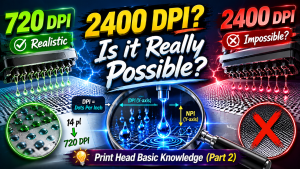

B. Head Lifespan & Warranty
— Realistic information on head lifespan standards and free warranty possibilities.
— Realistic information on head lifespan standards and free warranty possibilities.


C. Spec Interpretation
— How to understand brochure spec terminology and identify the key points that matter.
— How to understand brochure spec terminology and identify the key points that matter.


D. Brand-by-Brand Head Summary
— Comparison and summary of major industrial inkjet heads: Ricoh, Xaar, and Konica.
— Comparison and summary of major industrial inkjet heads: Ricoh, Xaar, and Konica.


IV. UV Printer Basics · Troubleshooting · Product Guides
We have organized our UV Printer content below. Click an item to read the full post.
1) Ink Supply
23 articles on ink supply issues, including cleaning and pumping
2) Print Head Issues
12 articles on head-related problems, from replacement methods to symptoms
For deeper printhead study: Printhead Basics — 10 Articles
3) Electronics / Software Issues
4) Mechanical Issues
5) Sai Flexi RIP Installation, Spot Color, Troubleshooting
6) UV Printable Products — Full Summary
V. ARTJET UV Printer
After selling and maintaining ARTJET UV printers for over 5 years, we have learned one vital lesson.
The most important factor next to product stability is accumulating troubleshooting data.
Problems can occur with any equipment depending on the environment, working conditions, and user skill level.
What matters in the field isn’t “trouble-free equipment,” but:
What matters in the field isn’t “trouble-free equipment,” but:
How fast and how accurately you can find the cause and solve the problem when it occurs.
ARTJET continuously collects and organizes real-world problem data from the field to support faster and more accurate problem resolution.
🎥 View Print Quality Samples
🧾 Full List of UV Printable Products

* Note: Exterior design has been updated.
※ This article is based on actual field cases. Results may vary depending on the environment and equipment configuration.
핑백: Head problem Y-axis banding ARTJET 2025
핑백: Alcohol cleaning of ink contamination at head cable connection area ARTJET 2025
핑백: A certain color is over sprayed ARTJET 2025
핑백: Solid color banding color channel swap Tip ARTJET 2025
핑백: Printing but nothing comes out ARTJET 2025
핑백: Following actions do not work when connecting SW ARTJET 2025
핑백: When the cleaning wiper does not move ARTJET 2025
핑백: When Anti crash sensor is jammed in the Captop ARTJET 2025
핑백: Reset SW to default settings ARTJET 2025
핑백: Touch panel does not turn on ARTJET 2025
핑백: Just press the print button and SW will close ARTJET 2025
핑백: Start position keeps getting moved while printing ARTJET 2025
핑백: White lines appear at the end of the printed page ARTJET 2025
핑백: Driver and basic settings after installing Sai Rip ARTJET 2025
핑백: How to adjust colors in Sai Rip ARTJET 2025
핑백: Rip security key not found ARTJET 2025
핑백: White lines appear during printing ARTJET 2025
핑백: How to work with Sai Rip Spot color Ai file ARTJET 2025
핑백: Sai Rip Installation Spot Color ARTJET 2025
핑백: Expressing gradients and three-dimensionality with white ARTJET 2025
핑백: Mask printing is not possible with a UV printer ARTJET 2025
핑백: Leather UV Printing Precautions ARTJET 2025
핑백: Slanted material UV printing ARTJET 2025
핑백: Screen Printing vs. Inkjet Printing Comparison Explained ARTJET 2025
핑백: Is the round bottle zig okay ARTJET 2025
핑백: Canvas UV printing ARTJET 2025
핑백: Making Equipment Button Name Tags with a UV Printer Laser ARTJET 2025
핑백: Making a keychain with a UV printer laser ARTJET 2025
핑백: UV Print with Jig ARTJET 2025
핑백: One color channel doesn't come out at all ARTJET 2025
핑백: UV printer old model refurbished ARTJET 2025
핑백: UV Printer History and Future Part 1 of 5 ARTJET 2025
핑백: UV Printer History and Future Part 3 of 5 ARTJET 2025
핑백: UV Printer History and Future Part 2 of 5 ARTJET 2025
핑백: Is the Chinese UV printer OK ARTJET 2025
핑백: Why XP600 is a Good for small UV ARTJET 2025
핑백: Roland UV printer sum up ARTJET 2025
핑백: Cleaning Problem Summary 1 Captop Lower Tube
In what way working with an government benefits disability legal professional proves to be helpful is a step often considered. The SSA oversees various support systems designed for individuals who are unable to maintain employment due to long-term medical conditions. Since the claims system includes technical procedures, working with someone experienced often helps with preparing information accurately. A knowledgeable benefits-related representative often helps with paperwork, health documentation, and responding to agency requests. If a application is denied initially, they can outline available options and support hearings, strengthening the chance of a successful decision.
[url=https://tnc-ab.de/2025/05/09/hallo-welt/#comment-75361]Why Securing the Counsel Experienced in Disability Law Is Essential[/url] ce3ae60
핑백: Cleaning Problem Summary 2: How to Replace the Captop
핑백: Damper Sum up
핑백: Damper UV printer cleaning issue sum up part 3
핑백: Pump Motor Printer Cleaning Issues Part 4
핑백: Captop and head position _ Printer Cleaning Issues Part 5 ARTJET 2026
핑백: Aligning the Captop and Head Position - Printer Cleaning Issues Part 6 ARTJET 2026
핑백: When the capping station level is not correct
핑백: Captop surface drying - Printer Cleaning Issues Part 8 ARTJET 2026
핑백: Ink that has deteriorated inside the captop - Printer Cleaning Issues Part 9 ARTJET 2026
핑백: Time for ink to fill the damper
핑백: Ink tube torn
핑백: How to Replace a Motor Pump Tube - Printer Cleaning Issues Part 12
핑백: Why White Cleaning Doesn't Work Well - Printer Cleaning Issues Part 13 ARTJET 2026
핑백: Why it's important to replace the yellow tube and captop
핑백: Head protection plate crumpled
핑백: Head protection plate cracked
핑백: When ink runs out during printing
핑백: The color has faded - Printer Cleaning Issues Part 18 ARTJET 2026
핑백: White flies around the image
핑백: When to replace the damper
핑백: How to Find the Problem Color When the Color is Strange
핑백: Problems that occur when ignoring the low ink alarm
핑백: White cleaning methods that might clogged - Printer Cleaning Issues Part 23 ARTJET 2026
핑백: Head DATA cable contamination
핑백: Results after cleaning 17 heads with alcohol
핑백: Certain colors are printed strangely
핑백: Can I print on reflective material _Head related issues 4 _ ARTJET 2026
핑백: Recovering a UV White Print Head After 1 Month Idle (Real Field Case, XP600)
핑백: Print Head End-of-Life Symptoms
핑백: Solid Color Banding Fix Tips
핑백: When Printhead DATA Cable Is Connected Incorrectly
핑백: Print Motion but No Ink Output (Head Issue #9) _ARTJET 2026
핑백: Symptoms of a Cracked Ink Channel Inside Print Head
핑백: Printhead Replacement Video and Precautions _ Head related issues 11 _ ARTJET 2026
핑백: How to Connect a Printhead DATA Cable
핑백: Printing in the Wrong Position _ Board/Software Issue (Part 4) ARTJET 2026
핑백: When the Anti-Crash Sensor Gets Jammed in the Captop — Mechanical Issues (EP.9) ARTJET 2026
핑백: Initial Setup After Installing Sai Rip — Sai Rip Troubleshooting (Part 1) ARTJET 2026
핑백: How to Create Spot Colors in Flexi RIP and Fix Common Problems — Sai RIP Issues (Part 3) ARTJET 2026
핑백: Printing Two Images at Once in Flexi RIP — Sai Flexi RIP Tips (Part 9) ARTJET 2026
핑백: UV Printer Braille Printing White and Varnish Layer Settings Guide — UV Printer Products (Part 1) ARTJET 2026
핑백: How to Flip the Substrate and Align Front-Back Printing — UV Printer Products (Part 2) ARTJET 2026
핑백: How to Print on Slanted Substrates — UV Printer Products (Part 8) ARTJET 2026
핑백: How Laser Cutters Use Cameras for Precise Alignment — Making Products with a UV Printer (Part 15) ARTJET 2026
핑백: UV Printer nozzle is normal, but a specific color is missing during printing ARTJET 2026
핑백: White lines appear when Y-axis exceeds 600mm