
If you run a UV printer, you’ve probably heard comments like these:
“The moment I press print, the software closes.”
“I’ve rebooted and the same problem keeps coming back.”
Replacing the wrong part based on a mistaken guess wastes both time and money.
- Anyone whose touch panel won’t turn on, or whose program freezes during initialization
- Anyone whose software closes on print, or who’s seeing double printing along the X or Y axis
- Anyone who needs to align the head and set up offset in the correct order after a head replacement
- Anyone dealing with unexplained recurring symptoms that persist after rebooting or power cycling
- Anyone who needs to reinstall the printer program after a PC replacement, or who needs remote support
- Engineers/operators who need to quickly tell whether an issue is ink/head-related or control board/software-related
- Always uninstall the existing program before reinstalling. Skipping this step can cause conflicts.
- Without the config file (.ini), all settings reset to defaults after software installation. Always keep a backup.
- If your PC shows signs of instability, back up the ARTJET folder on the desktop immediately — it contains everything needed for reinstallation.
- Skipping head alignment before setting the offset means you’ll never get sharp printing, no matter how precisely you tune the offset afterward — alignment always comes first.
- When using remote support (AnyDesk), never click on ad buttons, and always approve the connection request yourself.
- For control board issues, check in the order of power → communication → board.
- For software issues that a reboot doesn’t fix, try uninstalling and reinstalling the program first.
- Double printing has different causes and checks depending on whether it’s along the X-axis or Y-axis.
- Head offset must follow this order: straight-line alignment → left/right → bi-directional → vertical.
- The config file (.ini) holds every setting you have — always back it up.
- For unexplained recurring symptoms, reinstalling the program is often the fastest fix.
I. Detailed Guide — UV Printer Electronics Software Issues 12 Articles by Symptom
The reference tables below (II, III) link back to these same items by number.
① Print Motion Runs But No Ink Comes Out

② How to Restore Software Settings to Factory Defaults

③ Touch Panel Does Not Turn On When Powered

④ Printer Starts Printing From the Wrong Position

⑤ Software Closes Every Time the Print Button Is Pressed

⑥ Double Printing in the X-Axis Direction

⑦ Double Printing in the Y-Axis Direction

⑧ How to Align the Print Head in a Straight Line

⑨ Head Offset Precision Tuning

⑩ White Lines Appearing at the Edge of the Print Area

⑪ X-Axis Start Position Keeps Shifting

⑫ How to Reduce Varnish Banding

⑬ How to Reinstall the Printer Program

⑭ Alignment Test Lines Printing Mid-Job

⑮ When Initialization Fails (USB Driver Reinstall)

⑯ How to Install and Connect Remote Support (AnyDesk)

II. Symptom-Based Reference Table (For Immediate On-Site Response) – UV Printer Electronics Software Issues 12 Articles by Symptom
Click the reference number in the table to jump to the matching item in the detailed guide (I) above.
Control board issues tend to show up as power/communication symptoms, while software issues tend to occur only during specific actions.
| Symptom | Characteristics | Likely Cause | Quick Check | Ref. |
|---|---|---|---|---|
| Print motion runs, no ink output | Head board LED blinking | Head Board signal fault | Check Head Board LED status | ① |
| SW settings drifted | Differs from initial install values | Software settings changed | Restore defaults via config file | ② |
| Touch panel unresponsive | Screen stays off when powered | Touch panel board fault | Check cable connection | ③ |
| Printing starts at the wrong position | Start position keeps drifting | SW start-point setting error | Reset start point or restore config | ④ |
| SW closes on print button | Repeats every time you try to print | Software conflict / error | Check ripped image file name | ⑤ |
| Double printing along the X-axis | Blurring/overlap left-right | Bidirectional pin value (offset) error | Readjust bidirectional pin value | ⑥ |
| Double printing along the Y-axis | Blurring/overlap up-down | Y-axis feed setting error | Re-check Y-axis feed value | ⑦ |
| Overlapping text / rough images after head replacement | Doesn’t improve even after offset tuning | Head straight-line alignment skipped | Perform mechanical H.Align first | ⑧ |
| Head pin value (offset) drifted | White/Color slightly misaligned | Head offset setting error | Run precision pin value tuning | ⑨ |
| White lines at the edge of the print area | Regular pattern, only at the edge | Liner scale contamination or SW setting | Clean liner scale, check settings, inspect for thread-like dust under head | ⑩ |
| X-axis start position keeps shifting | Start point differs each print | Liner scale contamination | Inspect liner scale and reader | ⑪ |
| Heavy Varnish banding | Countless streaks on Varnish surface | Varnish lamp position / density setting | Set lamp to Position 1 + density 40% | ⑫ |
| Unexplained recurring symptoms | Reboot / power cycle doesn’t fix it | Accumulated software error | Uninstall and reinstall the program | ⑬ |
| Alignment-test line prints with margin images | Occurs irregularly | Leftover data in flash memory | Adjust Flash before print value (3000→0) | ⑭ |
| GUI fails to initialize (Z-axis homing failure) | Power cycling / USB reconnect doesn’t fix it | USB driver (YiLi-USB3.0) missing | Uninstall and reinstall the USB driver | ⑮ |
| Need remote support but don’t know how | — | — | See the AnyDesk installation and connection guide | ⑯ |
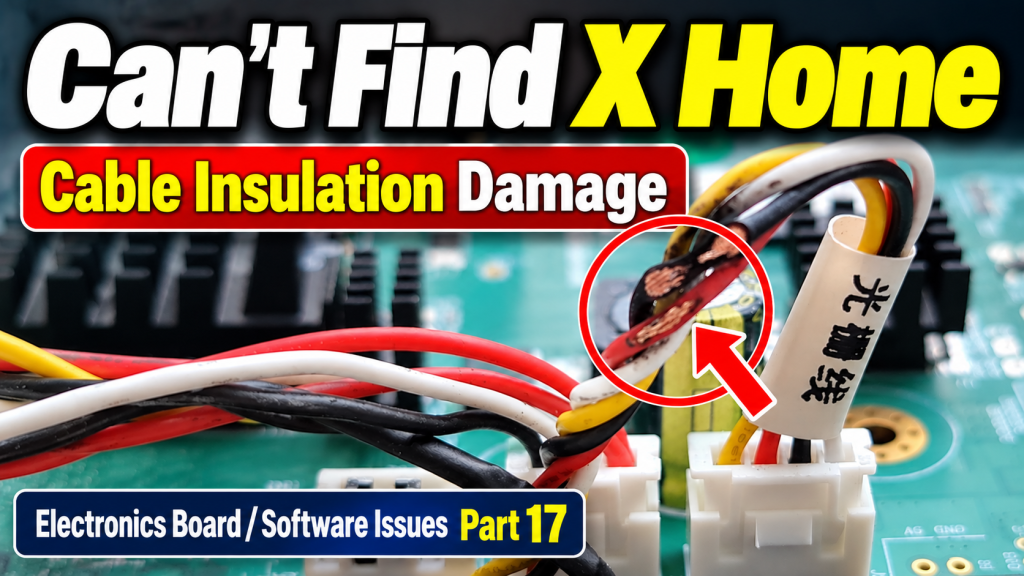
| X-axis fails to find home during initializing | Keeps advancing one way; recurs after reboot | Damaged insulation on encoder reader sensor cable | Check cable insulation → replace cable and sensor together | ⑰ |
III. Root-Cause Classification Table (For Understanding the Underlying Structure) – UV Printer Electronics Software Issues 12 Articles by Symptom
When the same symptom keeps coming back, sorting causes into these categories is the fastest path forward.
| Category | Main Cause / Factor | Typical Symptom | Characteristics | Ref. |
|---|---|---|---|---|
| A. Control Board Fault | Head Board, touch panel board, USB driver | No ink output, touch panel unresponsive, initialization failure | Power/communication-related, reboot doesn’t help | ① ③ ⑮ |
| B. Software Error | SW conflict, accumulated errors, leftover Flash data | SW closes on print, unexplained recurring symptoms, alignment line with margin images | Occurs only during specific actions | ⑤ ⑬ ⑭ |
| C. SW Setting Error | Start point, offset, config error | Wrong print position, double printing, offset drift | Often fixed by restoring the config file | ② ④ ⑨ |
| D. Double Printing | Different causes by X/Y-axis direction | Blurring or overlap, left-right or up-down | Checklist differs by axis direction | ⑥ ⑦ |
| E. Head Mechanical Alignment/Offset | Missing straight-line alignment, offset error | Overlapping text, rough images, pin value drift | Alignment always precedes offset | ⑧ ⑨ |
| F. Liner Scale Contamination | X-axis position recognition error | Start position shift, white lines at print edge | Often resolved by cleaning alone | ⑩ ⑪ |
| G. Varnish Configuration | Lamp position / density error | Heavy banding, no Glossy effect | Cannot be fixed without a dedicated lamp | ⑫ |
| H. Cable / Sensor Damage | Damaged insulation on the encoder reader sensor cable | X home not detected, carriage board LED blinking | Replacing the cable alone is not enough — the sensor must be replaced too | ⑰ |
IV. ARTJET UV Printer
What truly matters in a real production setting is not “a machine with zero problems” — it’s:
the cause can be identified and resolved.
