
- Printing always starts at the wrong position when the print button is pressed
- The same symptom persists even after restarting the machine and reloading the config file
- White ink is ejected all at once across all nozzles before the bed start point
- You’re not sure whether it’s a software error or a board issue
- Printing in the wrong position is usually not a hardware failure
- Don’t arbitrarily remove the board or forcefully disconnect cables
- This is often caused by an incorrect software message selection — always check settings and message selection first
- Unnecessary software reinstallation or board replacement wastes both cost and time
- Selecting “Yes” in the message dialog before printing resumes from the last print’s end point
- If you select “Yes” after powering the printer off and on, it incorrectly recognizes the current Y-axis position as the start point
- This causes all nozzles to fire simultaneously before the bed start point
- When reprinting the same image, always select “No (N)” to print from the correct position
- This is a software setting selection issue — not a board failure
I. Symptom — Printing in the Wrong Position
This is a common question from users who aren’t yet familiar with the machine shortly after installation. First-time users often describe the problem over the phone without sending any photos.
Here’s the exchange from that phone call:
Without photos, we couldn’t identify the exact symptom and were beginning to consider a software malfunction — even a software reinstall.
Before going that far, we asked the customer to send photos.
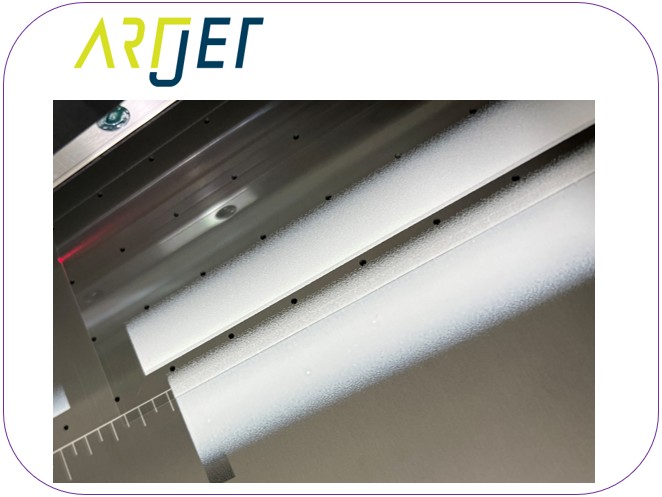
Printing in the wrong position
The photo made it immediately clear what was happening.
Under normal conditions, white ink is applied gradually in small amounts. In this photo, white ink was ejected all at once from all nozzles — and printed before the bed start point.
A moment later:
Printing in the correct position
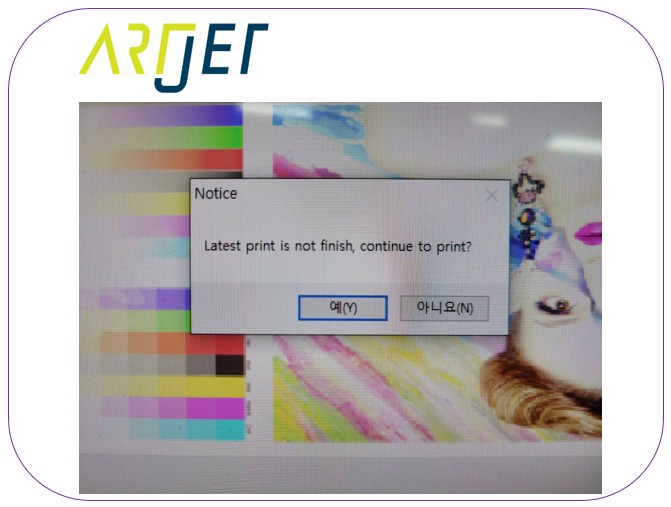
II. Understanding the Message Dialog — Printing in the Wrong Position
[Latest print is not finished. Continue to print?]
This message appears whenever you stop a print job midway and attempt to reprint the same image.
Selecting “Yes” resumes printing from the point where the previous print ended.
- At the start of a print, ink jets only from the beginning zone. As printing progresses, ink is distributed across all nozzles according to the pass ratio
- When all nozzles fire across the full zone, printing in the wrong location results in the wide, blotchy output seen in the photo
- This feature is designed for situations where cleaning is needed mid-print, or something goes wrong and you need to pause and restart
- However, when the printer is powered off and back on, the flatbed returns to the zero start position
- Clicking “Yes” at this point causes the software to treat the current Y-axis position as the print start point
- The software then prints continuously from what it thinks is the previous end point — which is why the start position is wrong
- and all nozzles fire at once, producing a wide, blotchy print
Whenever you stop a print and want to reprint the same image, always select No (N) in this message dialog.
This message dialog is a feature that is rarely needed.
The software is a unified platform, and this function is essential for roll-to-roll printers — but it isn’t needed for flatbed printers, especially those where the bed moves front and back.
That said, it can occasionally be useful when a minor error requires restarting a print job, which is likely why the manufacturer kept it in the software.
IV. ARTJET UV Printer

핑백: X-Axis Start Position Keeps Shifting — Electronic Board / Software Issue (EP.10) ARTJET 2026