
- Users seeing White lines repeating at regular intervals at the edge of the print area
- Users who have tried cleaning and replacing heads or boards but the same symptom keeps recurring
- Users experiencing ink misting or scattering around the image during White or Varnish printing
- Users who want to understand how dust contamination affects print quality
- Don’t immediately replace the board, head, damper, or ink when White line symptoms appear. Always check for dust contamination first
- The underside of the head carriage and the Anti crash bar must be inspected visually. Raise the head height and carefully look for thread-like dust attached to these areas
- Static electricity, low room temperature, excessive head height, and end-of-life White channels can all cause similar symptoms — check each in order
- If White lines appear at regular intervals → dust contamination on the head carriage underside or Anti crash bar is the likely cause
- Solution: raise the head height and remove thread-like dust from the carriage underside and Anti crash bar
- The same symptom during Varnish printing has the same cause — clean the surrounding area the same way
- If symptoms persist after dust removal → check nozzle condition, room temperature, static electricity, and head height in that order
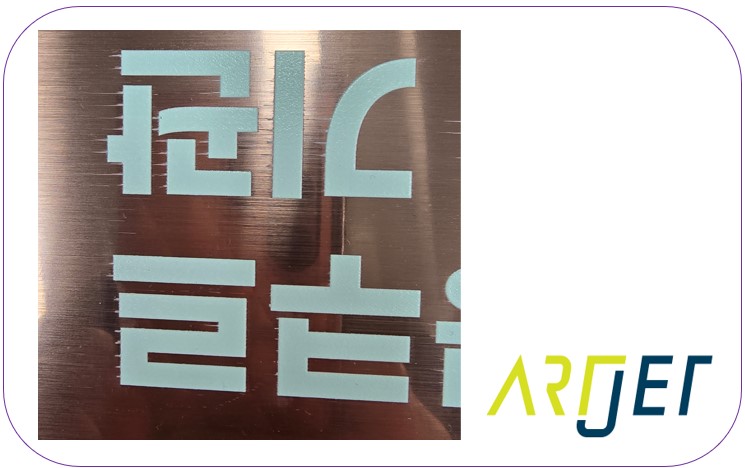
I. Symptom — White Lines Appearing at the Edge of the Print Area
The symptom is as shown below.
Having encountered the same issue before, we were able to resolve it immediately once the case was reported. However, the first time we encountered this problem, it took us over 8 hours to identify the cause.
We’ll walk through the diagnosis step by step.
II. Cause and Resolution — White Lines Appearing at the Edge of the Print Area
A short while later —
The following symptoms aren’t identical to the photo above, but share a similar appearance and underlying causes.
If one or more White print head nozzles are clogged or in poor condition:
- White ink will scatter and fall around the image, as shown in the photo below
- In this case, cleaning must be performed until all White nozzles are firing properly before the issue will disappear
If the room temperature is too low, the same issue can occur.
- The room temperature should be raised to between 18–25°C, and additional warm-up time should be allowed for the ink to reach operating temperature
- If you touch the main ink tank at the back, you’ll notice it feels very cold — operating in this condition will produce the symptom shown in the photo below
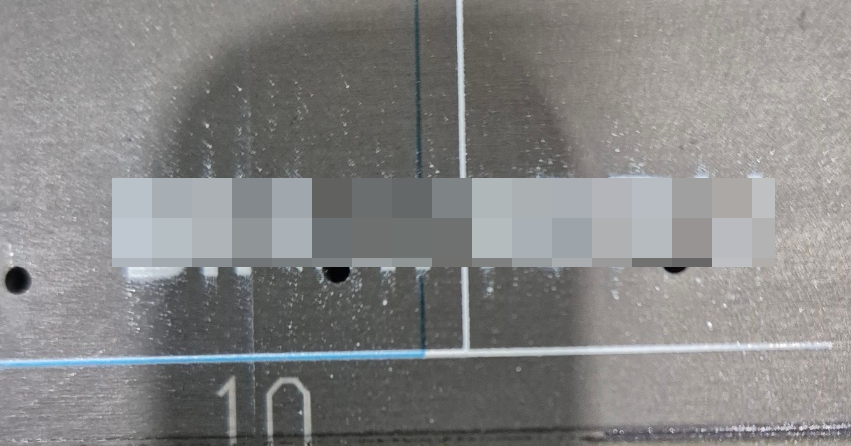
When static electricity is severe:
- White ink may suddenly scatter across the acrylic surface in a hazy cloud (suspended droplets all falling at once)
- Those floating droplets can also clog the print head nozzles, causing White lines to appear during printing
Excessive head height can also produce symptoms similar to static electricity issues.
Additionally, if one of the White channels (out of 6 total) has reached end of life, similar symptoms may appear.
Let’s take a closer look at the problem photo.
- Look closely at the spacing of the White lines protruding at the edge of the print area — there’s a clue here
- The intervals are extremely regular
- During printing, the head carriage moves back and forth along the X-axis, while the Y-axis flatbed advances incrementally between passes
- Looking carefully at the intervals where White protrudes, the White lines repeat at exactly the distance the Y-axis flatbed moves in one step, then gradually fade.
After extended use, dust contamination accumulates throughout the printer.
- The print head itself is kept clean through automatic cleaning cycles or regular manual wiping — so the head surface is generally free of dust
- However, the mechanical components surrounding the head are often left uncleaned
- Over time, dust accumulates on the underside of the head carriage or on the Anti crash bar beside the head, eventually forming thread-like strands that hang down
UV printer ink requires multiple lamp passes to fully cure on the substrate.
- Thread-like dust near the head — positioned at the same level as the head — will sweep through ink that hasn’t yet fully cured
- With each Y-axis flatbed advance, the dust drags through the uncured ink, leaving White lines across the print surface once printing is complete
If the White lines protrude at consistent, equal intervals as shown in the photo above, you should clean the head carriage underside and the Anti crash bar.
This same issue has also occurred in environments printing Varnish — and is resolved in exactly the same way, by cleaning the dust from the surrounding head area.
For the customer case, we resolved it immediately thanks to prior experience.
But the first time we encountered this symptom, it took over 8 hours of testing before we finally identified the cause.
Dust was the last thing we suspected — we tried everything else first:
- Thinking it was a static electricity issue, we tried changing the substrate material
- Suspecting the damper had reached end of life, we replaced the damper
- Wondering if it was a data issue, we swapped out the board
- Considering whether the head itself was malfunctioning, we replaced the head
- Even suspecting ink degradation, we replaced the ink
Nothing worked — until, almost as a last resort, we raised the head carriage and looked at the underside and Anti crash bar. There it was: thread-like dust.
Only then did we realize it wasn’t the board, the head, the ink, or static electricity — it was simply thread-like dust sweeping across the print surface that had been causing the entire problem.
IV. ARTJET UV Printer
