
- White or Varnish appears misaligned or doubled only in the start zone along the vertical (feed) direction
- The issue occurs only in bidirectional printing, while unidirectional printing is fine
- The symptom keeps recurring even after addressing it as a head/ink issue
- The symptom started after a recent software restart or setting change
- Even if symptoms are present, don’t replace the head or head board first. Checking the SW speed settings first can save significant cost
- Changing speeds arbitrarily can cause secondary issues such as print stopping or forced shutdown
- Run tests using the same file and same conditions — changing RIP/file conditions makes it difficult to identify the cause
- After changing settings, verify with a short test (start zone) first, then proceed with actual work once confirmed normal
- Symptom: Y-axis double printing only in the start zone; occurs only in bidirectional mode
- Hypothesis: Scan speed (X) and Feed speed (Y) are set to different levels
- Check: confirm that Scan/Feed speed are on the same level (Fast=Fast, Normal=Normal, Slow=Slow)
- Resolution: set both to Normal → short test → confirm normal → proceed with work
I. Symptom — Double Printing in the Y-Axis Direction
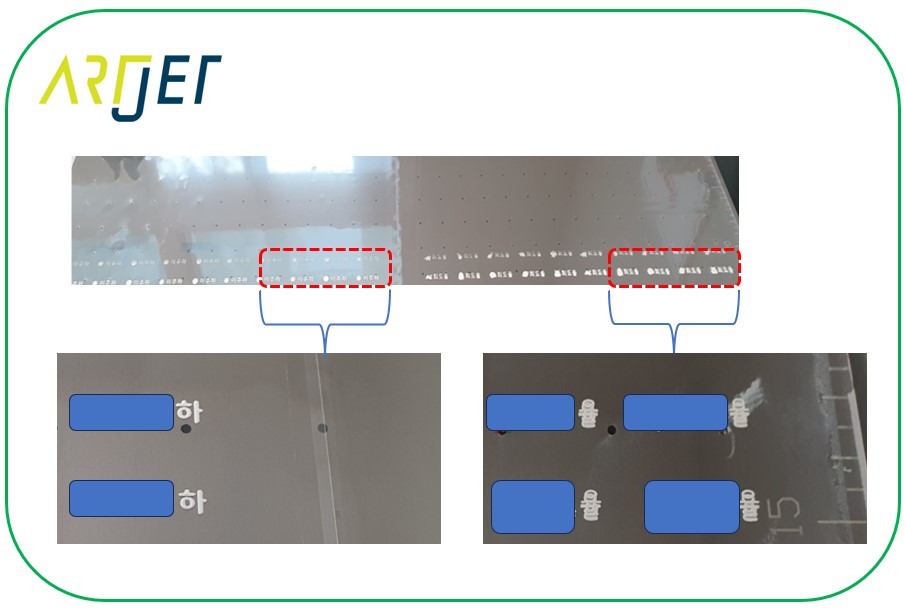
This is a 600 × 900 mm flatbed UV printer.
As shown in the photo below:
- White is double-printed vertically (Y-axis), not horizontally (X-axis),
- the problem only appears in the start zone — it prints correctly as you move further along the X-axis.
- Varnish shows the same behavior as White: misaligned in the start zone, returning to correct alignment further along
- Unidirectional printing has no issue; this problem only occurs in bidirectional printing.
II. Cause and Resolution — Double Printing in the Y-Axis Direction
After trying various things to resolve the issue, the customer called and pointed out the suspected cause:
ARTJET Manual — Page 24
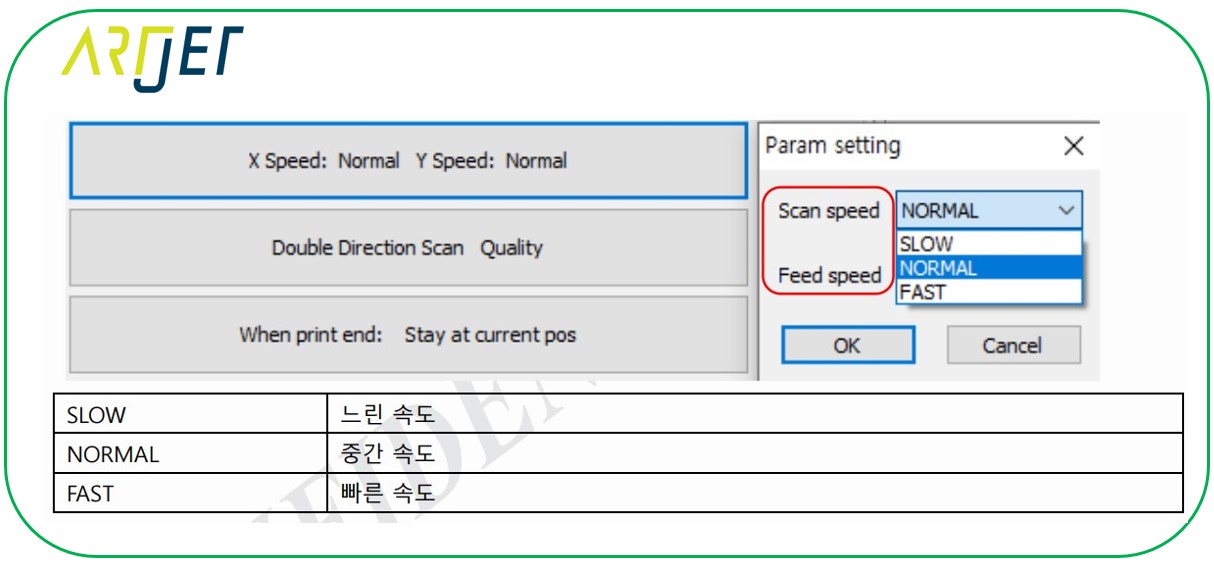
The product manual explains the settings for Scan speed (the speed at which the head carriage moves along the X-axis) and Feed speed (the speed at which the head moves along the Y-axis).
- If these speed settings are incorrect, pressing the print button may result in no movement at all (in which case, force-quit and restart the software)
- or printing may proceed but the head carriage briefly stops at the X-axis end before resuming,
- or printing may suddenly stop mid-job
Here’s an explanation of the X-speed terms in the manual:
- Scan speed is the speed at which the head carriage moves along the X-axis.
- Fast moves the head carriage at approximately 1,000 mm/s,
- Normal at approximately 800 mm/s,
- and Slow at approximately 400 mm/s
Feed speed is:
- the speed at which the flatbed moves along the Y-axis after each X-axis pass of the head carriage.
- Because the flatbed travel distance is very short, an exact speed value can’t be stated,
- but there are slight differences depending on the Fast, Normal, or Slow setting
Scan speed (X-axis travel) and Feed speed (Y-axis flatbed travel) must always be set as follows:
- If Scan speed is Fast, Feed speed must also be Fast.
- If Scan speed is Normal, Feed speed must also be Normal.
- If Scan speed is Slow, Feed speed must also be Slow.
In some cases, when the software is restarted, these settings change and cause the issue described above.
In that case, close the software, set both Scan speed and Feed speed to Normal, and restart.
With Scan speed set to FAST, the head carriage moves quickly along the X-axis, while with Feed speed set to SLOW, the flatbed moves slowly along the Y-axis.
The head carriage doesn’t wait for the flatbed to finish its Y-axis movement — it begins moving as soon as it receives the signal that the flatbed has “started” moving.
- The X-axis is already printing while the Y-axis flatbed is still in motion,
- which causes printing to occur on a moving flatbed — depositing ink in the wrong position,
- resulting in the image appearing doubled in the Y-axis direction
- Once the start zone is passed, the Y-axis movement has completed, so printing occurs at the correct position —
- which is why the Y-axis doubling only appeared in the start zone (the direction in which the flatbed moves)
Theoretically, a vertical offset mismatch should also occur in the opposite direction, but in bidirectional printing, the system appears to treat it as a single continuous motion rather than responding to a signal, causing the Y-axis flatbed to move slightly earlier — which is likely why the vertical offset was correct on that side.
IV. ARTJET UV Printer
