
ARTJET UV Printer Troubleshooting Mechanical 1 _ How to align the print head in a straight line — Control Board / Software Issues Part 13
✅ Who Should Read This
- Anyone experiencing poor print quality after a head replacement and needing straight-line alignment
- Anyone who can’t get sharp text no matter how carefully they calibrate the offset
- Anyone unfamiliar with the correct order: head alignment first, then offset calibration
- Anyone seeing rough output or inaccurate colors on high-resolution images
⚠️ Precautions
- If you calibrate the offset without aligning the heads first, you will never achieve sharp text no matter how precisely you adjust the offset
- You must distinguish between the locking bolt and the adjustment bolt — turning only the adjustment bolt without loosening the locking bolt will not move the head
- After alignment, always re-tighten the locking bolt — printing with a loose bolt can cause the head to shift
🧭 Key Summary
- Print head offset order: Head straight-line alignment → Left-direction offset → Right-direction offset → Bi-directional offset → Vertical offset
- Straight-line alignment is a mechanical task (adjustment bolt + repeated H.Align test image printing)
- Without alignment, offset alone → doubled text, rough high-resolution images, inaccurate colors
📋 Control Board / Software Issues — Full Series List
We are documenting control board (including head board) and software issues in order. This list is updated with each new part.
13How to Align the Print Head in a Straight Line
I. When Should You Align Print Heads? — ARTJET UV Printer Troubleshooting Mechanical 1 _ How to align the print head in a straight line
1. Basic Knowledge
- Normally, head straight-line alignment is performed by the engineer during installation.
- However, if the engineer’s skill level is poor, or if they simply rush through the job, the head alignment step may be skipped.
- In that case, the end user has no choice but to perform the alignment themselves.
- That is why we are explaining head straight-line alignment here.
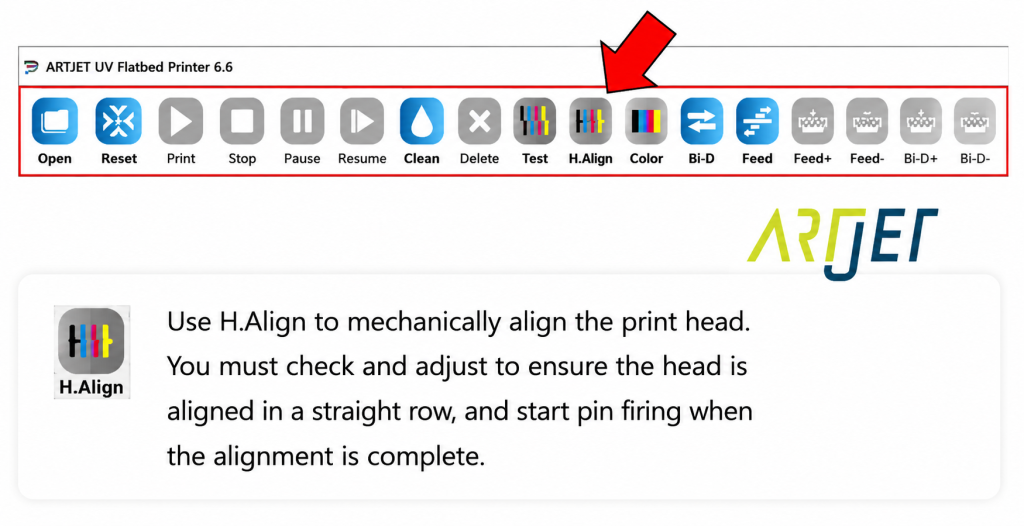
- Every printer’s software program includes a test image for head straight-line alignment.
- On our printer, pressing the H.Align button prints the head alignment test image.
2. Print Head Offset Order
- Once the nozzle test prints correctly and regular images print without issues, you can begin the head offset calibration.
- The first step is head straight-line alignment. Align Color, White, and Varnish heads in a straight line.
- Nearly all printers are designed so that head straight-line alignment is performed mechanically.
- After completing the mechanical alignment, use the software program to:
- Calibrate the left-direction offset for all Colors and White based on the Black head,
- Then calibrate the right-direction offset for all Colors and White based on the Black head.
- Once both left- and right-direction offsets match the Black reference, calibrate the bi-directional offset.
- Finally, complete the vertical (up-down) offset to finish the entire offset process.
- Note: Some printers provide vertical offset adjustment in the software, while others do not.
- For detailed offset calibration steps after head alignment, please refer to the link below.
- Head Pin Value Offset Fine Tuning
3. What Happens If You Skip Alignment and Go Straight to Offset
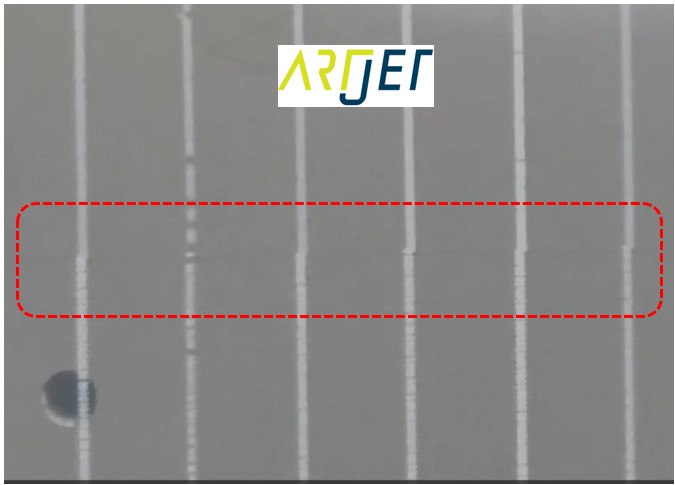
- As shown in the photo below, if you calibrate the offset without first performing head straight-line alignment,
- no matter how precisely you adjust the offset in the following steps, you will never achieve sharp text.
- Because each color lands at a different position, small text may appear doubled or overlapping,
- and high-resolution images may look rough or have inaccurate color reproduction.
- For this reason, head straight-line alignment must be performed before print head offset calibration.
II. How to Mechanically Align Print Heads in a Straight Line — ARTJET UV Printer Troubleshooting Mechanical 1 _ How to align the print head in a straight line
- The method varies slightly from printer to printer, but the logic is the same.
- The head mounting block always has two types of bolts.
- One is the locking bolt that secures the head itself or the head mounting block in place.
- The other is the adjustment bolt that moves the head into a straight-line position.
- Use the adjustment bolt to move the head into alignment, then print an H.Align test image to check whether the alignment is correct.
- If it’s not quite right, adjust again and print another H.Align test image.
- Repeat this process until the head alignment is correct,
- then tighten the locking bolt on the head or head mounting block to finish.
🎥 The video below demonstrates how to align print heads on our printer. The explanation is in Korean, but you can understand the principle just by watching the video.
Watch the Head Alignment Video
Watch the Head Alignment Video
III. UV Printer Basics · Troubleshooting · Product Guides
We have organized our UV Printer content below. Click an item to read the full post.
1) Ink Supply & Cleaning Issues
2) Head Related Issues
For deeper technical knowledge: Print Head Basics — 9 Articles
3) Mechanical Issues
4) RIP Software
5) UV Printable Products — Full Summary
IV. ARTJET UV Printer
Having sold and maintained ARTJET UV printers for over 5 years, one lesson stands out above all others.
After product reliability, the most important factor is the accumulation of troubleshooting data.
Any machine can encounter issues depending on the operating environment, working conditions, and user experience. What truly matters in a real production setting is not “a machine with zero problems” — it’s:
When a problem occurs, how quickly and how accurately the cause can be identified and resolved.
ARTJET continuously collects and organizes real-world problem data from the field to support faster and more accurate troubleshooting.
🎥 View Print Quality Samples
💰 ARTJET Pricing & Sales Conditions
(Note: Exterior design has been updated)
🧾 Full List of UV Printable Products

* Note: Exterior design has been updated.
※ This article is based on actual field cases. Results may vary depending on the environment and equipment configuration.