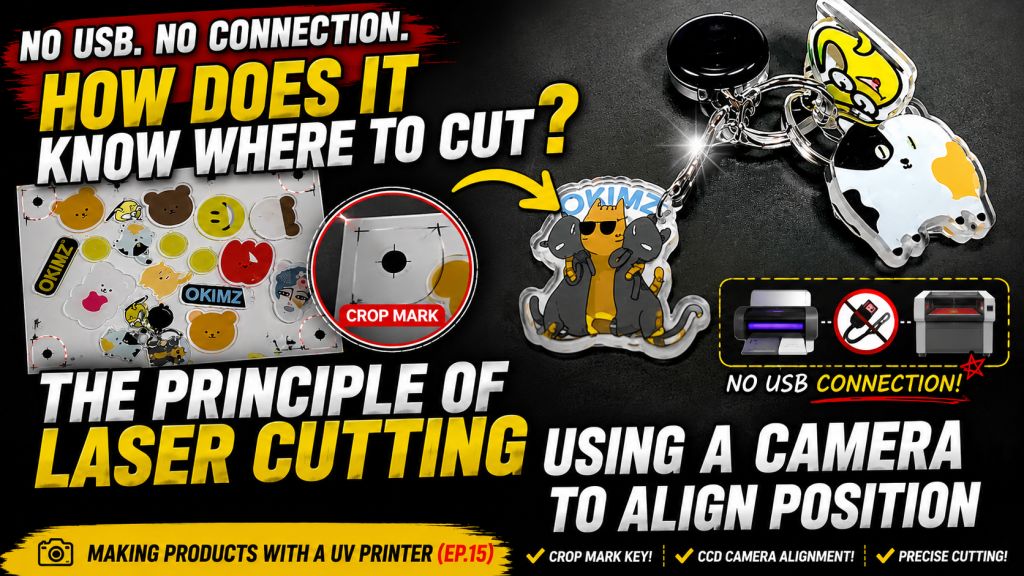
How Laser Cutters Use Cameras for Precise Alignment — Making Products with a UV Printer (Part 15)
✅ Who Should Read This
- Those planning to produce acrylic goods (keyrings, etc.) using a laser cutter after UV printing
- Those curious about the CCD camera cutting principle of laser cutters
- Those wanting to know how to configure Crop mark layers in an Ai file
⚠️ Precautions
- UV printers and laser cutters are not directly connected — the Crop mark layer in the Ai file and the CCD camera are the only link between the two machines
- When creating Ai files, you must configure a total of 4 layers: Color, White, Cutting line, and Crop mark
- If there is an error in the UV print size, the cutter ignores it and follows the cutting file, which may cause offset margins — perform size compensation beforehand
- Laser cutters without CCD cameras have alignment limits, causing shifts at the edges — a CCD cutting feature is essential for new purchases
🧭 Key Summary (Field Insight)
- Core Principle → Crop marks are present in both the UV print and the cutting file; when the camera reads the 4 marks on the print, the cutting position is automatically matched
- Ai File Configuration → 4 layers (Color, White, Cutting line, Crop mark) are mandatory
- Improving Precision → Increasing the number of Crop marks from 4 to 5–8 reduces the error margin; smaller material sizes also favor higher precision
- UV Printer Side → Since print size errors are reflected in the cutting result, prior size compensation is essential
UV Printer Basics · Troubleshooting · Product Guides
We have organized our UV Printer content below. Click an item to read the full post.
1) Ink Supply
23 articles on ink supply issues, including cleaning and pumping
2) Print Head Issues
12 articles on head-related problems, from replacement methods to symptoms
For deeper printhead study: Printhead Basics — 9 Articles
3) Electronics / Software Issues
4) Mechanical Issues
5) Sai Flexi RIP Installation, Spot color, Troubleshooting
📋 Creating Products with a UV Printer — Full Series List
We are documenting printing methods for various products. This list is updated with each new part.
15How Laser Cutters Use Cameras for Alignment
We are introducing products that can be made with a UV Printer.
Today, we answer the common question: “How does a laser cutter align and cut exactly where I printed after UV printing?”
While simple for those in the know, it’s a mystery to many—even for me when I first started selling UV printers. Here is the detailed explanation.
Today, we answer the common question: “How does a laser cutter align and cut exactly where I printed after UV printing?”
While simple for those in the know, it’s a mystery to many—even for me when I first started selling UV printers. Here is the detailed explanation.
I. How Does It Align Without a Physical Connection? — How Laser Cutters Use Cameras for Precise Alignment
- When I worked for a UV printer manufacturer in export sales, I often visited dealer demo rooms.
- I saw high-end cutters like Kongsberg or Zünd cutting perfectly along UV-printed contours and asked:
- “How does it cut so accurately?”
- “It reads those black dots and follows the cutting file,” was the reply.
- At the time, I didn’t understand. Moving a substrate from a UV printer to a cutter naturally shifts the position. How does a camera fix that?
- Without knowledge of Ai files, I just wondered: “Does it automatically recognize the image and cut?” or “Are the machines linked via USB?”
It took over 10 years for me to finally sit down and learn the exact principle of how cutters align with printed material.
II. How Laser Cameras Recognize UV Print Positions — How Laser Cutters Use Cameras for Precise Alignment
1. The Link Between the UV Printer and Laser Cutter
- There is no direct physical connection between a UV printer and a laser cutter.
- The UV printer only handles the printing.
- The laser cutter simply reads the position of the print using a camera and moves according to the Ai file.
- The bridge between the two is the Crop mark layer in the Ai file and the camera on the cutter.
2. The Essential Crop Mark Layer in Ai Files
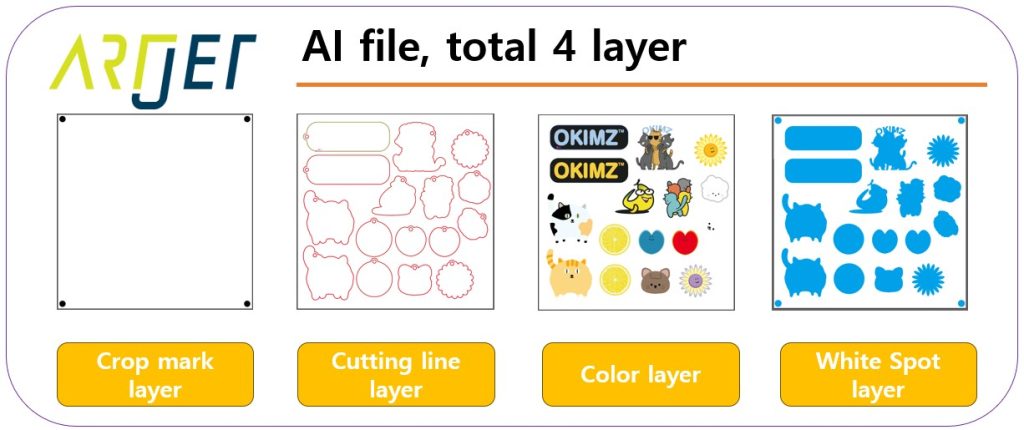
- Laser cutters are popular for making acrylic goods. Usually, White and Color are printed simultaneously.
- When designing the Ai file, 3 layers are obvious: Color, White, and Cutting.
- However, a 4th layer is required for the laser to find the exact spot: the Crop mark layer.
-
How Laser Cutters Use Cameras for Precise Alignment
3. Layers Used by Each Machine
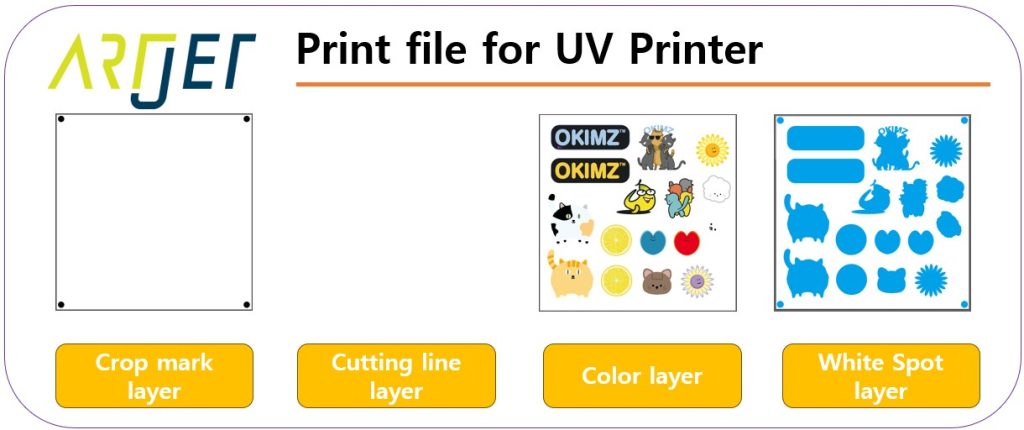
- For UV Printing: You need Crop marks + Color + White. The Crop marks must be printed alongside the image.
-
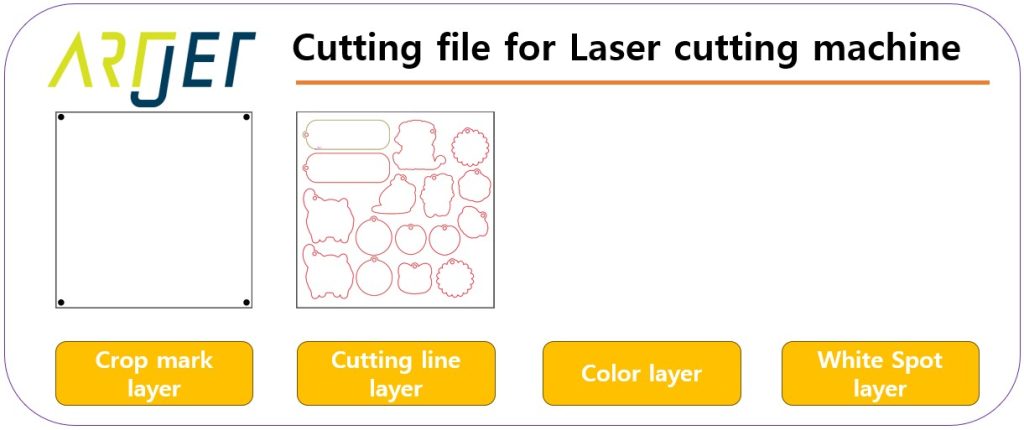
Layers for UV Printing - For Laser Cutting: The machine only uses the Crop mark and Cutting line layers.
-
Layers for Laser Cutting
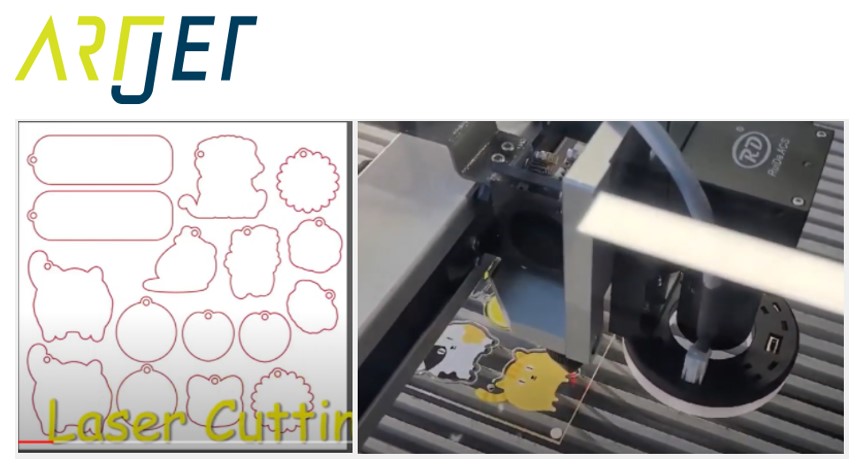
4. Laser CCD Cutting Workflow
- Place the printed substrate on the cutter bed.
- Load the Ai file (Crop marks + Cutting lines) into the laser software.
- Align the camera with one of the 4 printed Crop marks (dots) so it can recognize it.
- Use the software’s auto-recognition to find the remaining 3 marks.
- Once all 4 marks are identified, the laser understands the exact orientation and position of the print.
- Press “Start,” and the laser follows the Cutting line relative to the recognized marks.
-
CCD Camera Cutting Sequence
“So, if I only have Crop marks on unprinted acrylic, will it still cut the lines?”
“Yes. As long as the Crop marks are recognized, the laser will cut the file’s lines regardless of whether there’s an image or not.”
III. Fine Details and Tips — How Laser Cutters Use Cameras for Precise Alignment
1. UV Printer Size Errors
- If the UV printer has a slight size error in its output, the cutter will still read the marks (if within tolerance) but will cut the original file size.
- This results in uneven margins. If this happens, you must perform **Size Compensation** on the UV printer.
- Learn about Print Size Compensation
2. Laser Cutter Precision
- Laser cutters also have mechanical tolerances. To improve precision, some users use 5 or 8 Crop marks instead of 4.
- More marks reduce the error margin, and cutting smaller pieces of acrylic is generally more accurate than large sheets.
3. Buying Advice
- A customer once asked if they could manually align an old laser cutter without a CCD camera. While possible, it’s incredibly difficult to maintain accuracy over a whole sheet.
- “No matter how hard you try, it shifts toward the end…”
- If you are buying a new laser cutter, a CCD camera function is non-negotiable.
-

Finished Acrylic Goods
IV. ARTJET UV Printer
After 5 years of selling and maintaining ARTJET UV printers, we’ve learned one vital lesson.
Beyond product stability, the most important factor is accumulated troubleshooting data.
In production, the key isn’t a “perfect” machine, but:
How fast and how accurately you can identify and solve the problem when it occurs.
ARTJET continuously collects field data to support faster and more precise troubleshooting for our clients.
🎥 View Print Quality Samples
🧾 Complete UV Printable Product List

* Note: Exterior design has been updated.
※ This article is based on field experience. Results may vary by environment and equipment setup.