
When operating a UV printer, these are some of the most common calls we receive about RIP software:
“I set up a Spot Color but the output color is wrong.”
“The print size doesn’t match my file.”
- Anyone getting a “security key not found” error when launching Flexi RIP
- Anyone whose Spot Color output doesn’t match the intended color
- Anyone unfamiliar with ICC profiles and struggling with color management
- Anyone whose print size doesn’t match the file, or who wants to calculate ink cost per image
- Anyone who wants to print two images at once in RIP
- Over 80% of security key errors are PC or USB problems — not printer issues. Don’t assume it’s the machine first.
- When setting up Spot Color, always verify the software version and channel linking sequence.
- ICC profiles must be configured separately for each machine and ink combination. Generic profiles cause color errors.
- Print size errors are almost always caused by resolution or unit settings inside the RIP software.
- Security key error → Try a different USB port first. Check the LED.
- Spot Color issues → Check channel settings and software linking sequence.
- Color mismatch → Reconfigure the ICC profile — fastest fix.
- Print size error → Check resolution and unit settings inside the RIP.
- Two images at once → Use the RIP’s multi-image layout feature to save ink and time.
I. Detailed Guide — Sai Flexi RIP Tips — 10 Articles by Symptom
Each article is based on a real field case.

Symptom: Don’t know where to start after installation
A step-by-step guide covering Dongle USB setup, printer driver configuration, ICC profile application, and basic settings — in the correct order.

Symptom: Dongle plugged in but LED is off
A Windows update caused a SafeNet Sentinel Driver conflict. Remove version 7.6.7 and install 7.6.9 to resolve.

Symptom: Spot Color output doesn’t match the intended color
Step-by-step guide on Spot Color channel setup and software linking to get accurate color output.
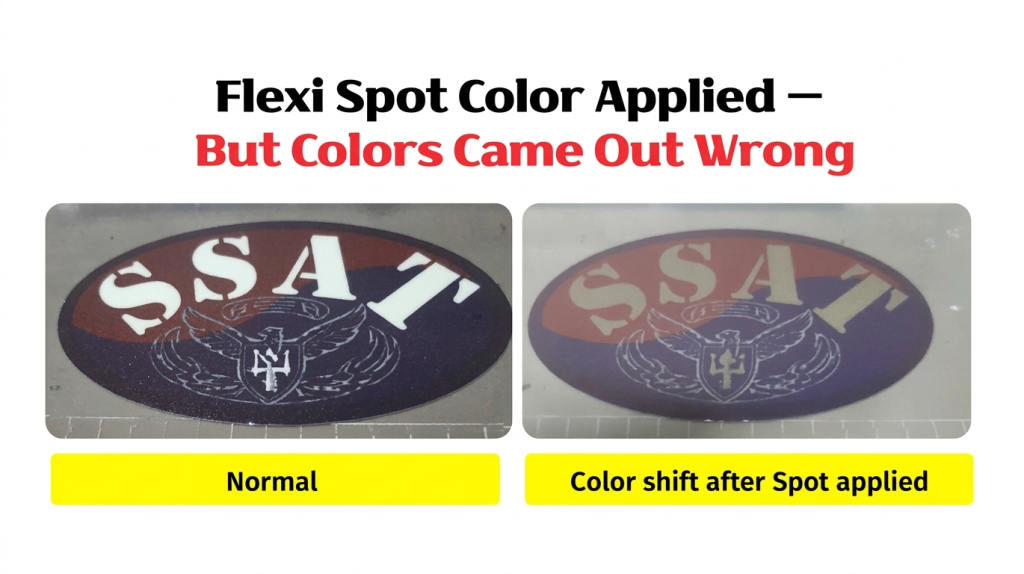
Symptom: Need to modify an already-applied Spot Color
Covers how to edit an applied Spot Color setting with a real field example.

Symptom: Color mismatch after switching machines causes customer complaints
How to use the RIP color adjustment graph to reproduce the color profile of a previous machine.

Symptom: Can’t configure color because ICC Profile concept is unclear
A plain-language explanation of what ICC profiles are, why they matter, and how to apply them correctly.

Symptom: Output size differs from the file size
Almost always caused by incorrect resolution or unit settings inside the RIP. How to identify and fix the setting.

Symptom: Can’t calculate ink cost per image
How to use the ink cost check function inside the RIP to get a real-time cost breakdown per image.

Symptom: Can only send one image at a time — inefficient
How to use the multi-image layout feature in RIP to reduce ink cost and total print time.

Symptom: Security key error persists with Lock key plugged in
The cause is almost always a failed USB port — not a machine issue. Check the Lock key LED and switch ports for an immediate fix.
II. Symptom-Based Diagnostic Chart (Field Reference) _ Sai Flexi RIP Tips — 10 Articles by Symptom
For “won’t launch” issues, check security key and driver first. For “output quality” issues, check ICC profile and Spot Color settings first.
| Symptom | Description | Likely Cause | Quick Check | Ref |
|---|---|---|---|---|
| Don’t know initial setup | Don’t know where to start after installation | Unfamiliar with Dongle, driver, ICC profile sequence | Follow the installation sequence guide | ① |
| Dongle USB not recognized | Plugged in but LED is off | Faulty USB port or SafeNet Driver conflict | Switch to a different USB port and check LED | ② |
| Spot Color output mismatch | Output color doesn’t match the setting | Spot Color channel configuration error | Recheck channel linking sequence | ③ |
| Need to change applied Spot Color | Want to edit an already-applied color | Unfamiliar with Spot Color editing | Re-access the Spot Color edit menu | ④ |
| Color mismatch vs. another machine | Chinese machine can’t match Japanese machine colors | Color adjustment graph not configured | Use the color adjustment graph in RIP | ⑤ |
| Don’t understand ICC Profile | Don’t know what it is or why it’s needed | Lack of basic concept knowledge | Read the concept guide before applying | ⑥ |
| Print size mismatch | Output size differs from file size | RIP resolution or unit setting error | Recheck unit and resolution settings in RIP | ⑦ |
| Can’t calculate ink cost | Don’t know the ink cost per image | Unfamiliar with RIP ink cost feature | Use the ink cost check function in RIP | ⑧ |
| Can only print one image at a time | Sending images to RIP one by one | Unfamiliar with RIP multi-image layout | Use the multi-image layout feature in RIP | ⑨ |
| Security key not found | Error persists even with Lock key plugged in | Faulty USB port (not a machine issue) | Check Lock key LED — switch to a different port | ⑩ |
III. Cause Classification Chart (Structural Reference) _ Sai Flexi RIP Tips — 10 Articles by Symptom
| Category | Key Causes | Typical Symptoms | Notes | Ref |
|---|---|---|---|---|
| A. Setup & Security Key | Dongle recognition, SafeNet Driver, USB port | RIP won’t launch, security key error | Almost always a PC/USB issue — check LED first | ① ② ⑩ |
| B. Spot Color Settings | Channel linking, color editing, cross-machine matching | Output color mismatch, need to re-edit color | Sequence is critical — always check software version | ③ ④ ⑤ |
| C. ICC Profile / Color Management | Machine/ink-specific profiles, color correction | Overall color deviation, inconsistent output | Must reconfigure when machine or ink changes | ⑥ |
| D. Output Settings / Efficiency | Print size, ink cost, multi-image layout | Size errors, can’t calculate cost, single-image only | Mastering RIP features reduces cost and boosts output | ⑦ ⑧ ⑨ |
IV. ARTJET UV Printer

핑백: Precautions for UV Printing on Leather — UV Printer Products (Part 6) ARTJET 2026
핑백: How to Print on Slanted Substrates
핑백: Primer Functionality and Concerns
핑백: Canvas UV Printing Precautions
핑백: Creating Epoxy Effects with Varnish
핑백: Precautions When UV Printing Using Jigs
핑백: Creating Jigs for Pen Printing
핑백: How Laser Cutters Use Cameras for Precise Alignment — Making Products with a UV Printer (Part 15) ARTJET 2026
핑백: How to Use Laser Camera Cutting — Making Products with a UV Printer (Part 16) ARTJET 2026
핑백: Making Phone Grip-Toks with a UV Printer and Laser — Making Products with a UV Printer (Part 19) ARTJET 2026
핑백: Making Acrylic Keyrings with a UV Printer and Laser
핑백: How Much Profit Can You Make Printing Phone Cases — Making Products with a UV Printer (Part 24) ARTJET 2026