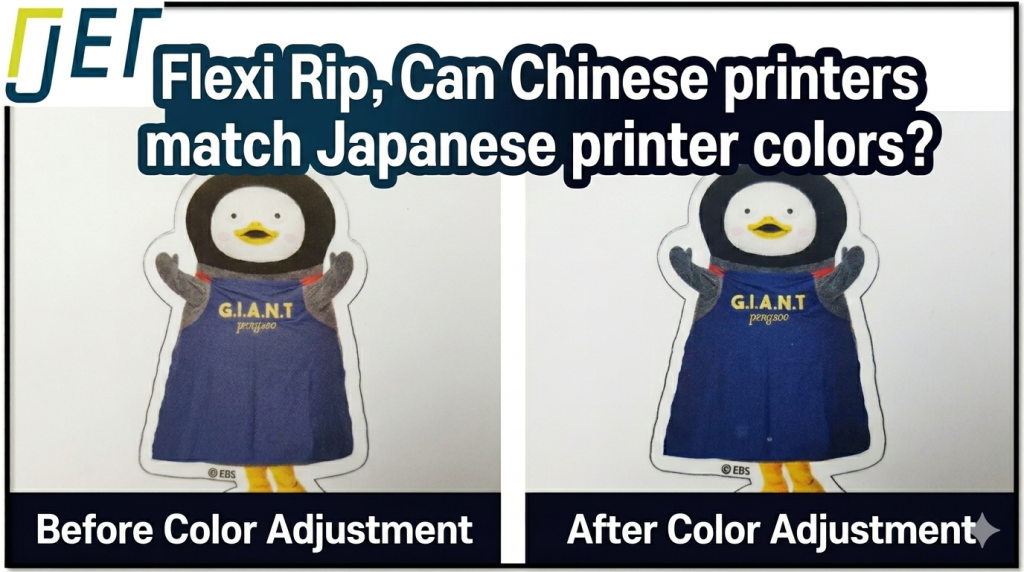
- Anyone wondering whether a Chinese UV printer can produce color output comparable to Mimaki or Roland
- Your default ICC profile print results look weak and you’re looking for ways to improve color output
- You want to learn how to use the color adjustment curve in Sai Flexi RIP
- Specific colors like purple or black aren’t coming out as expected and you need a fix
- You want to save color profiles per customer and manage them individually
- Over-adjusting the color curve can distort all colors. Make small incremental changes and verify the result each time.
- Once a value is changed in the color adjustment tab, it stays applied. To return to the original ICC profile, click the [Reset All] button at the bottom right.
- The color adjustment curve only works properly when the four baseline conditions are met: ink, head, offset precision, and substrate. If the printer’s fundamentals are off, curve adjustments alone won’t get you the color you want.
- Since acrylic transparency affects back-lit print color, always confirm you’re using the same substrate before comparing results.
- Chinese ink quality → Not significantly behind Japanese, European, or US brands
- Print resolution → Comparable to Mimaki (excluding Roland); Lc and Lm compensate for droplet size difference
- Sai Flexi RIP → Developed in Salt Lake City, USA; proven RIP used across Europe for 10+ years
- Color adjustment → Use Flexi RIP’s color adjustment curve to boost specific colors
- Black correction → [All channels] 95% → 97% / Purple correction → [Cyan] 5% → 8%
- Save settings → Save per customer and reload as needed
I. Can We Reproduce Japanese Machine Color Output? — Can a Chinese UV Printer Match the Color Output of a Japanese Machine Using Flexi RIP?
1. What the customer requested
- A potential customer walked in carrying two acrylic prints.
- Both were reverse-printed acrylic samples.
- One had been printed on a Mimaki UV printer, the other on a Roland UV printer.
- Their request was straightforward:
- “Can the ARTJET printer match the colors of the Mimaki and Roland samples?”
- We printed using the printer’s default ICC profile and compared the results. Our output was noticeably weaker in color compared to the Japanese machines.
2. Why colors don’t always match
- Different inks: Each ink has its own color density and gamut. Even with an ICC profile applied, achieving identical color output is not possible when the inks themselves differ.
- Different print resolution: Each print head has a different maximum resolution. Since color reproduction depends on resolution, differences in head specs lead to color differences. For a technical explanation of print resolution, see: Inkjet Printing Resolution — Concepts Explained
- Different RIP software: Image files are converted into printable formats through RIP software. Each RIP handles color conversion differently, leading to differences in color output.
- Acrylic transparency and surface tension: When printing Color + White + Color on transparent acrylic, the color you see on the ink-exposed side differs from what you see through the acrylic. Transparent acrylic isn’t perfectly clear — it carries a slight tint, and the degree of transparency affects the final color appearance.
II. Getting Close to the Target Color — Can a Chinese UV Printer Match the Color Output of a Japanese Machine Using Flexi RIP?
1. Before starting: “Can a Chinese printer really match a Japanese machine?”
“Can a Chinese printer really match a Japanese machine’s color output?”
Ten years ago, I wouldn’t have even tried. But today, I believed it was achievable — as long as a few key conditions were met.
1. Is Chinese ink actually weaker than Japanese ink?
- Matching color output requires many conditions to align, but one of the most important is the color gamut of the ink itself.
- Many people assume Chinese ink is inferior to Japanese ink.
- That assumption falls apart once you look at how Chinese UV ink has evolved.
- Since 2010, China has been the world’s largest consumer of UV ink.
-

Can a Chinese UV Printer Match the Color Output of a Japanese Machine Using Flexi RIP? - Chinese UV printer manufacturing began around 2005, but the ink used was initially Japanese-made Toyo ink.
- Toyo UV ink had a major drawback: colors would fade within 9 months when used outdoors.
- UK-based Sunjet ink then took the top spot for over three years, thanks to its superior adhesion and stability — but its Red was notably weak.
- It was eventually overtaken by US-based Nazdar and Belgian Agfa UV inks.
- Since then, Chinese manufacturers began producing their own UV inks, and today Chinese-made ink dominates the market.
- Global ink companies invested heavily in the Chinese market, raising quality benchmarks significantly. Chinese ink manufacturers then built their products to replace those global brands —
- which is why Chinese ink today is comparable in color gamut and adhesion to global brands.
- In short: “Chinese ink’s color output is not weaker than Japanese, European, or US-made inks.”
2. Print resolution differences
- Resolution ultimately comes down to how small the ink droplet is.
- Roland UV printers use the Epson DX4 print head. Our printer uses an Epson head as well — the XP600, officially designated FA1080-a1.
- The DX4 produces droplets about 0.5–1.0 picoliters smaller than the FA1080-a1, but it’s a 4-color head. The FA1080-a1 is a 6-color head, so the quality gap from droplet size is offset by the addition of Lc and Lm channels.
- Someone who had used both Mimaki and Roland told us: “Roland’s print quality is better than Mimaki’s, but it’s so slow that I switched from Roland to Mimaki.”
- The conclusion: excluding Roland, our printer’s resolution is on par with Mimaki in terms of ink droplet size.
- In short: “Print resolution is similar to Japanese machines, or close enough that the difference is negligible.”
3. RIP software differences
- Our printer uses Sai Flexi RIP.
- Some may assume that because it’s bundled with the printer, it must be a budget or low-quality RIP.

- But it was developed in Salt Lake City, USA.
- Other RIP software companies headquartered in Salt Lake City include Onyx and Wasatch — both well known to anyone who works with large-format equipment.
- Sai Flexi RIP has been widely used across Europe for over a decade.
- In short: “Sai Flexi RIP’s specs are not significantly behind the RIP software used with Japanese machines.”
4. Acrylic transparency differences
- Differences in acrylic transparency are a factor we can’t directly control.
- We set this aside and focused on adjusting the color output.
2. Color adjustment results
There are two approaches:
- Adjusting colors directly in the Ai file
- Using the color adjustment curve inside the RIP software
- If adjusting the Ai file doesn’t get you there, you need to use the color adjustment curve in the RIP software.
- In this case, I skipped Ai file adjustments entirely and used the color adjustment curve built into Sai Flexi RIP.
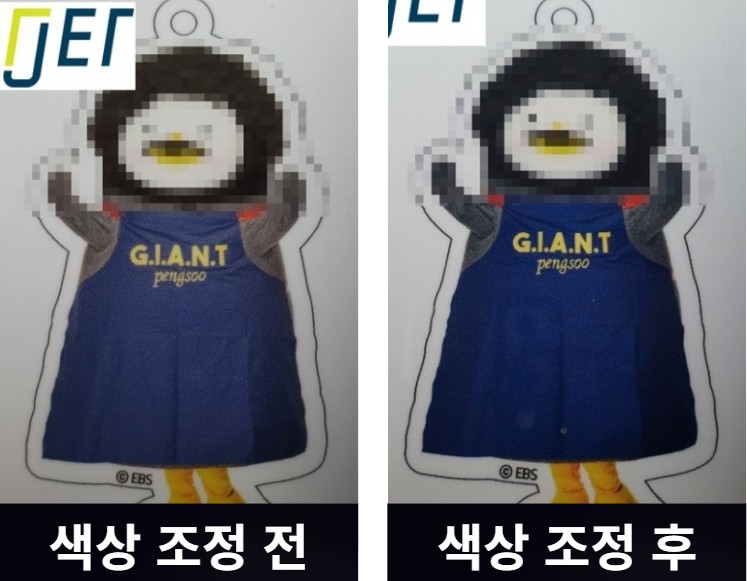
1. Before and after color adjustment — purple tones
- The image on the left below was printed using the default ICC profile only, with no curve adjustments.
- The purple area looks noticeably weak.
- The image on the right shows the purple after multiple rounds of curve adjustment to match the Japanese machine’s output.
- The purple is significantly stronger and more saturated.
-
Can a Chinese UV Printer Match the Color Output of a Japanese Machine Using Flexi RIP?
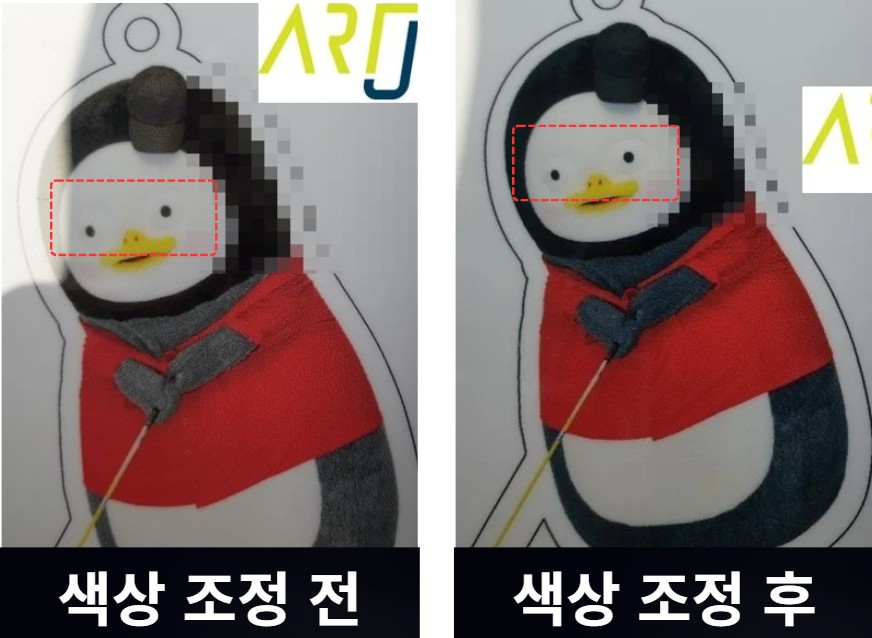
2. Before and after color adjustment — eye outline detail
- Look closely at the eye area marked with the red dotted line — you can see a clear difference between left and right.
- The left image shows a softer, less defined circle around the eye. The right image shows a noticeably sharper outline.
- Not only the Red tones, but the fine detail around the eye is rendered more clearly as well.
-
Can a Chinese UV Printer Match the Color Output of a Japanese Machine Using Flexi RIP?
3. How to use the color adjustment curve in Sai Flexi RIP
I’m not sure how many people actively use this feature.
But operators running our UV printers — and print shops supplying larger agencies — tend to be very familiar with it.
Here’s how it works.
Step 1. Open an image in Sai Flexi RIP and click the seventh icon in the top toolbar. The following screen will appear.
- The numbers along the bottom represent input color values. The vertical axis shows the actual output values that will be printed.
- With no adjustments made, tracing a vertical line from 50% on the bottom axis will meet 50% on the vertical output axis.
- This means without any changes, input and output values are printed at the same ratio.
- In other words, the ICC profile values are printed as-is.

Step 2. Now let’s change input 5% to output 8%.
- The red outlines and red dotted lines inside the graph in the image below were added by me for reference.
- As you can see, the adjustment doesn’t only raise the 5% point — the entire curve shifts into a parabola shape to maintain color harmony across all values.
- Except at 0% and 100%, the output values are all slightly higher than the input values.
- Since output exceeds input across the board while color balance is preserved, the overall result is a richer, deeper color output.
-
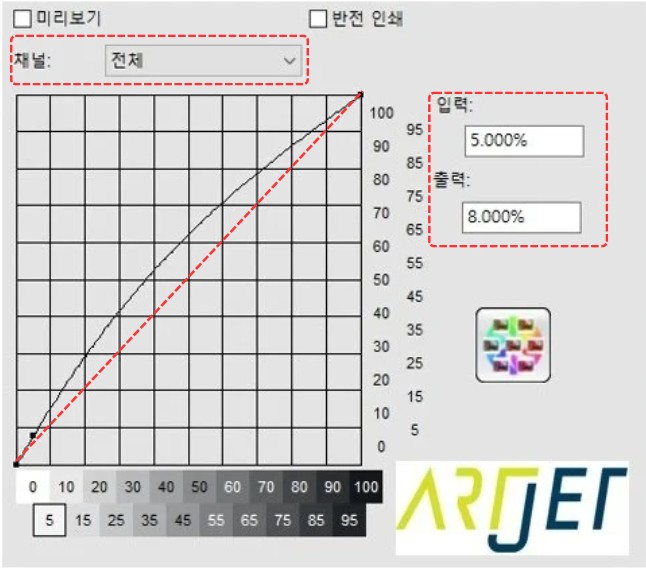
Can a Chinese UV Printer Match the Color Output of a Japanese Machine Using Flexi RIP? - Looking at the red-outlined area on the left side of the image above, you’ll see Channel: All — meaning the adjustment applies to all channels: CMYK, Lc, and Lm.
- Clicking the dropdown arrow next to [All] lets you select individual color channels and adjust each one’s curve separately.
Step 3. Color adjustment example: turning a bluish black into a true black
- Here’s a real example. A customer came to us with the following request.
- “The black isn’t printing right. It looks slightly blue. Is there any way to get a true, pure black?”
- Here’s the curve adjustment I found that solved it.
- Set the [All channels] input value at 95% to output 97%. This produces the pure black the customer was looking for.
- You can push it further, but over-adjusting will shift all other colors as well — keep that in mind.
-

Can a Chinese UV Printer Match the Color Output of a Japanese Machine Using Flexi RIP?
Step 4. Color adjustment example: “How did you boost the purple in that example?”
- The black adjustment used the [All channels] setting — input 95% raised to output 97%. This affects CMYK, Lc, and Lm together.
- But to boost only the purple without affecting everything else, you need to adjust the Cyan channel individually rather than using [All].
- To deepen the purple, click the dropdown arrow next to [All] and select [Cyan].
- A separate Cyan curve graph will appear.
- Adjust the curve so that the 5% input point maps to 8% output — this is the setting that produced the purple in the earlier example.
-

Can a Chinese UV Printer Match the Color Output of a Japanese Machine Using Flexi RIP?
4. How to save your adjusted color curve
Once you’ve dialed in the color using the adjustment tab, you can save that curve as a separate file.
- Operators using our printers typically save a separate color curve for each customer — Customer A gets Curve A, Customer B gets Curve B.
- Each time a job comes in from that customer, they load the saved curve and print with it.
- This is how they manage color consistency on a per-customer basis.
Here’s how to save the adjusted curve.
- Click the [Save As icon] shown in the image below.
-

Can a Chinese UV Printer Match the Color Output of a Japanese Machine Using Flexi RIP? - Select the options to save, then click OK. Since we’re saving the color tab settings only, make sure only the color adjustment tab is checked before clicking OK.
-

Can a Chinese UV Printer Match the Color Output of a Japanese Machine Using Flexi RIP? - After clicking OK, a naming dialog will appear after a moment. Enter a name and click OK.
-

Can a Chinese UV Printer Match the Color Output of a Japanese Machine Using Flexi RIP? - To load a previously saved curve, select it from the list below.
- Once selected, it stays applied even if you reopen the software.
- To return to the original ICC profile values, click the [Reset All] button at the bottom right of the panel.
-

Can a Chinese UV Printer Match the Color Output of a Japanese Machine Using Flexi RIP? - As noted in the red-outlined area on the left: Channel: All means the adjustment applies to all CMYK, Lc, and Lm channels.
- Clicking the dropdown arrow next to [All] lets you select and adjust individual color channels separately.
Important notes on using the color adjustment tab:
- Color output is affected by many variables: UV ink gamut, print resolution (head specs, mechanical precision, offset accuracy), RIP software, and substrate.
- The [Color Adjustment] option can’t make every color identical, but it can get you close.
- That said, it only works properly when all four conditions above are adequately met.
- In our case, we had confidence that our printer’s ink, head, mechanical and offset precision, and RIP were not significantly behind Japanese machines — which is why we attempted the color matching in the first place.
- If those conditions aren’t met, adjusting the color curve alone is unlikely to produce the result you’re looking for.
III. ARTJET UV Printer
