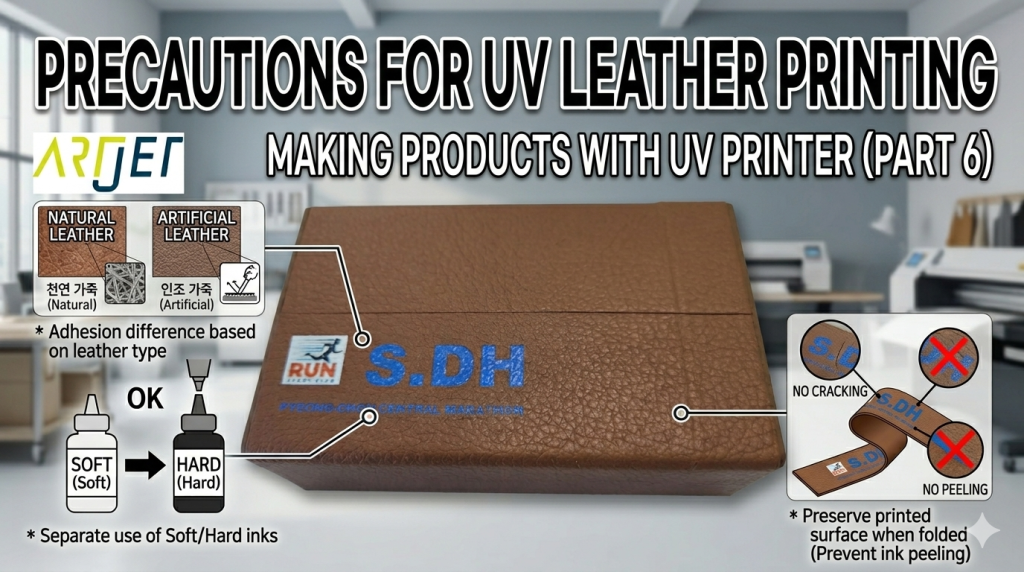
- Anyone attempting UV printing on genuine leather or synthetic leather
- Anyone curious about UV ink adhesion differences between leather types (genuine/synthetic/coated)
- Anyone who wants to know about ink cracking when folding leather after printing (e.g., wallets)
- Anyone curious about the differences between hard, medium, and soft UV inks and how to choose by application
- Anyone who needs to verify durability (adhesion retention period) of UV-printed leather products
- Uncoated genuine leather absorbs ink, resulting in poor color and weak adhesion. The print is likely to peel off when scratched with a fingernail.
- If the leather will be folded after printing to make products like wallets, using hard UV ink will cause the ink to crack or flake off. Medium or soft UV ink must be used.
- Soft ink resists folding well but is weak against surface scratching. Additional post-processing may be required.
- UV ink adhesion varies significantly by leather type — always conduct an adhesion test first before deciding on the product application.
- Synthetic leather generally prints well with strong adhesion. Genuine leather results vary greatly depending on coating.
- Uncoated genuine leather is unsuitable for UV printing due to ink absorption and poor adhesion.
- For products that require folding after printing (wallets, etc.), use medium/soft ink. For non-folding products, hard ink is appropriate.
- Strong adhesion can last over 1 year, but weak adhesion lasts about 6 months — limit use to novelty products in that case.
- Mass leather printing uses Chinese solvent solutions (pre/post-treatment). UV printing is best suited for small-batch customization.
We are covering the various products you can make with a UV printer.
Today, we discuss the conditions and precautions needed when printing on genuine leather and synthetic leather with a UV printer.
I. “Can You Print on Leather?” — Precautions for UV Printing on Leather
1. A Brief Look at the Leather Printing Market
- About 10 years ago, one Louis Vuitton bag model was printed on leather using a UV printer.
- It was an Italian Durst UV printer, and the thought was: “UV printing has finally entered the leather market!”
- However, contrary to expectations, UV printers did not become widely adopted in the leather market.
- China moved quickly and instead of UV printers,
- developed a cost-effective and durable leather printing solution using pre-treatment + conventional solvent ink printing + post-treatment.
- Since then, the majority of leather printing volume has shifted to this Chinese solution.
- With an affordable solution available, expensive UV printers became less relevant in the leather market.
2. Small-Batch, High-Mix Production
- While mass production uses the Chinese solvent solution, some companies still use UV printing for small-batch custom production.
- Operators doing small-quantity or custom printing occasionally ask about leather printing.
- My response is usually somewhat cautious, and I have to ask additional questions:
- “Will you be folding the printed material multiple times to make the final product? Like a wallet?”
- “Are you just UV printing on the finished product as-is?”
- “Is it synthetic leather or genuine leather?”
- “If it’s genuine leather, is it coated? Or are you printing directly on raw leather?”
- “Does the UV print need to last for years? Or is 6 months sufficient?”
In conclusion, UV printing on leather is possible — but whether it’s practical depends entirely on the final product.
II. Precautions for UV Printing on Leather
1. Genuine Leather or Synthetic Leather?
The reason we ask whether it’s genuine or synthetic leather is because of ink adhesion — how well the ink stays on the substrate after UV printing.
Over 20 years of selling UV printers and meeting many customers, we’ve seen significant adhesion differences depending on the leather type.
1_1. Genuine Leather
- Genuine leather has a rough, uneven surface — when UV printed, the ink does not stay on the surface and gets absorbed, resulting in poor color reproduction.
- White must be printed first before Color to achieve proper color, and the White density must be high — otherwise the ink gets absorbed into the leather.
- Another issue is that ink adhesion to the substrate is poor.
- When UV printing on uncoated genuine leather, the print is highly likely to peel off when scratched with a fingernail.
1_2. Coated Genuine Leather
- According to experienced leather professionals:
- “Uncoated leather has a messy surface — most leather is coated to make it clean and presentable.”
- “Coated leather has a smoother surface compared to uncoated, so ink doesn’t get absorbed and color reproduction is better.”
- “However, depending on the type of coating, UV ink adhesion can be either good or poor.”
1_3. Synthetic Leather
- Based on our leather printing test experience, synthetic leather generally prints well and has strong adhesion in most cases.
- Of course, results can vary depending on the specific material composition.
2. How Many Times Will You Fold It?
We’ll exclude uncoated genuine leather from this discussion, as it has poor color reproduction and weak adhesion.
If printing and color reproduction are good, the next critical factor is whether the ink can withstand being folded multiple times without cracking.
2_1. Hard vs. Medium vs. Soft UV Ink
- UV inks are broadly categorized into two types:
- Hard UV ink — rigid but strong against surface scratching.
- Medium or soft UV ink — flexible but weak against surface scratching.
- Most leather substrates are not white — they have an inherent color.
- That color must be covered with White first, then Color is printed on top for proper color reproduction.
- If the White density is insufficient, the leather’s base color bleeds through, and CMYK/Lc/Lm ink colors won’t reproduce accurately.
- This is why when printing on dark-colored leather, White must be applied thickly to shield the dark base color as much as possible.
- This inevitably results in a thick ink layer.
2_2. Post-Processing After Thick Printing on Leather
- Let’s assume you’re making a wallet from leather printed with a thick ink layer.
- Making a wallet requires folding the printed surface two or three times.
- When the printed surface is folded, the cured ink will crack or split.
- When UV printing with the intent to fold the product multiple times afterward, medium or soft UV ink must be used — not hard ink.
- Using hard ink will cause the printed ink to crack or flake off.
- However, if the ink is too soft, it handles folding well but is vulnerable to surface scratching — fingernail marks may be visible.
- For this reason, even when using soft or medium ink, additional post-processing may be applied to protect against surface scratching.
3. How Long Does the Print Need to Last?
- UV ink adhesion varies dramatically depending on the leather type.
- If adhesion to the substrate is strong, the print can last over a year.
- If not, expect approximately 6 months of durability — in which case, it should be applied to novelty/gift items rather than everyday-use products.
- When creating products with UV-printed leather, always verify adhesion first to determine the appropriate product application.
- Leather adhesion testing is conducted as shown in the video below.
- Click here to watch the synthetic/genuine leather adhesion test method and results.
4. An Easy Leather Printing Application
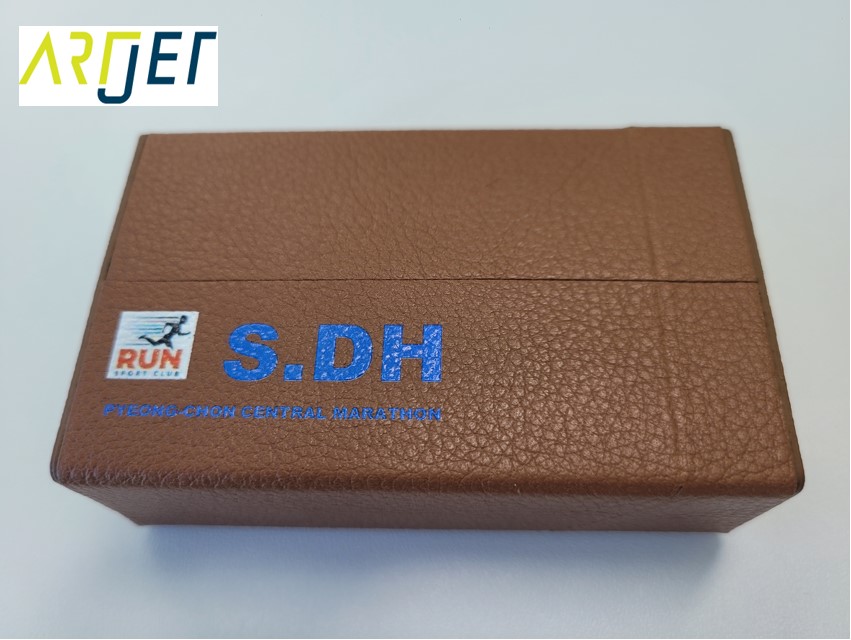
- We made personalized gifts for a club by printing initials on leather cigarette cases.
- The leather in the photo below is synthetic leather — an already-finished product with no folding required.
- Since this product is handled frequently, hard UV ink with strong scratch resistance was used.
- English initials were added for personalization.
III. ARTJET UV Printer
