
Cleaning Problem Summary 1 — Captop Lower Tube _ Ink Supply Problems (Part 1)
✅ Who Should Read This
- Anyone who has experienced alcohol coming out but no ink during cleaning
- Anyone whose inkload (pumping) suddenly stopped working and is looking for the cause
- Anyone whose cleaning problem persisted even after replacing the Captop
- Anyone curious about the types of Captop lower tubes and how to replace them
⚠️ Precautions
- The Captop lower tube requires a dedicated smaller-diameter tube, not a standard flexible ink tube
- Connecting a rigid tube directly to the damper may seem fine at first, but air will eventually seep in over time
- Don’t assume the tube is fine just because it doesn’t pull out easily — always verify it holds firm even when slightly stretched
- Inkload failure has many possible causes — always inspect other connection points in addition to the Captop lower tube
🧭 Key Summary (Field Insight)
- The Captop lower tube must use a dedicated smaller-diameter flexible tube — using a standard flexible tube causes poor sealing and inkload failure
- Inspection method: detach the Captop and pull the lower tube by hand — if it comes off easily, air is entering; replace or cut the end and reconnect
- Alcohol comes out but no ink → check in order: loose damper tube, Captop misalignment, loose Captop lower tube
- Inkload failure has 10+ possible causes — waste ink line blockage, yellow tube shrinkage, Captop failure, head misalignment — check each in sequence
📋 Ink Supply Problems — Full Series List
We are documenting ink supply problems in order. This list is updated with each new part.
01Captop Lower Tube
In our first look at ink supply problems, we cover the Captop lower tube.
We explain why a dedicated smaller-diameter tube must be used instead of a standard flexible tube, and how to inspect it on-site.
I. Background _ Cleaning Problem Summary 1 Captop Lower Tube
1. Industrial Head vs. Epson-Series Head Cleaning Methods

1_1. Industrial Heads (Konica, Ricoh, etc.)
- Air is injected to push ink downward out of the head, and the head is then wiped with a cloth.
1_2. Epson-Series Heads (Small UV Printers)
- The Captop rises up from below the head and seals against it.
- With the seal in place, the motor pump runs and draws ink out.
- Ink flow path: Damper → through the head → Captop → Captop lower tube → motor pump yellow tube → waste ink tank
- After pumping, the wiper automatically cleans the underside of the head to complete the cleaning cycle.
- If ink cannot be drawn out through the motor pump into the waste ink tank, there is no way to clean the head.
2. Captop Location
- The photo below shows the ink flow path from the main ink bottle to the waste ink tank. Every section must be fully sealed for the motor pump to run and move ink into the waste tank.

- When viewed from the front of the printer, the Captop is the part labeled #1 that seals the underside of the head.

II. Captop Lower Tube _ Cleaning Problem Summary 1 Captop Lower Tube
1. Two Types of Ink Tubes
1_1. Rigid Tube
- This tube runs from the main ink bottle, through the cable carrier, and connects to the underside of the head carriage board.
- It is made from a hard material that doesn’t compress when pressed — resistant to friction and wear during X-axis movement.
- Connecting a rigid tube directly to the damper may seem fine at first, but air will seep in over time.
- Since air infiltration causes ink supply problems, rigid tubes should never be connected directly to the damper.
1_2. Flexible Tube
- The final ink tube connecting to the damper must always be flexible.
- Its soft material creates a tight fit when inserted into the damper — once in, it resists being pulled out.
- This tight connection is what prevents air from entering over time.
2. The Dedicated Captop Lower Tube
- In the early days of selling UV printers in 2020, we replaced the Captop lower tube with a standard flexible ink tube.
- But inkload (pumping), which had been working fine, repeatedly failed afterward.
- Tightening with a cable tie would fix it temporarily — only for the problem to return. At the time, we couldn’t identify the cause.
- Much later, while replacing consumables on 8 used machines, we discovered that the Captop lower tube has a smaller diameter than a standard flexible ink tube.
- That’s when we remembered what the Chinese manufacturer had once asked — “Aren’t you going to order the Captop lower tubes?”
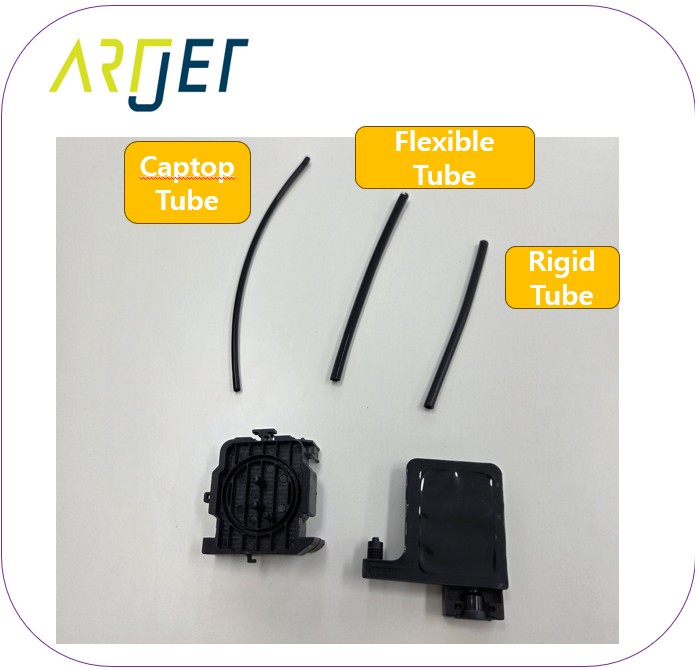
- Click here to watch a video showing how rigid, flexible, and Captop lower tubes feel when connected.
- The Captop lower tube must always use the dedicated smaller-diameter flexible tube.
III. The Tiniest Gap _ Cleaning Problem Summary 1 Captop Lower Tube
1. Alcohol Comes Out but No Ink
- “When I pour alcohol on the Captop and run inkload (pumping), the alcohol comes out — but no ink does.”
- There are usually three causes:
- The tube connected to the damper is loose and pulling in air
- The Captop and print head are slightly misaligned
- The Captop lower tube has loosened and air is entering
- After checking the damper connection and replacing the Captop without success, a loose Captop lower tube is the most likely cause.
1_1. How to Inspect
- Detach the Captop and pull the lower tube by hand — if it separates easily, air is entering.
- The tube should resist being pulled out — that is the normal condition.
- A tube that comes off easily should ideally be replaced, but if the dedicated tube is unavailable, cutting off the end and reconnecting it will also work.
- Don’t assume it’s fine just because it doesn’t pull out with moderate force — always confirm it holds firm even when slightly stretched.
- Overlooking this point often leads to hours of checking other components before the Captop lower tube is finally replaced and the problem is resolved.
2. Multiple Causes of Inkload (Pumping) Failure
- Waste ink line is blocked or kinked
- Peristaltic pump yellow tube has shrunk or torn (the yellow tube is a consumable)
- Captop lower tube is torn or its connection has loosened (covered in this article)
- Captop itself is defective
- The metal frame protecting the print head is damaged, preventing the Captop rubber from sealing against the head
- Head and Captop are misaligned
- Damper connection is faulty (always use flexible tubing, and verify the connection)
- Ink line is pinched somewhere, causing an air leak
- Ink has hardened inside the ink line, blocking supply
IV. UV Printer Basics · Troubleshooting · Product Guides
We have organized our UV Printer content below. Click an item to read the full post.
1) Ink Supply
23 articles on ink supply issues, including cleaning and pumping
2) Print Head Issues
12 articles on head-related problems, from replacement methods to symptoms
For deeper printhead study: Printhead Basics — 10 Articles
3) Electronics / Software Issues
4) Mechanical Issues
5) Sai Flexi RIP Installation, Spot Color, Troubleshooting
6) UV Printable Products — Full Summary
V. ARTJET UV Printer
After selling and maintaining ARTJET UV printers for over 5 years, we have learned one vital lesson.
The most important factor next to product stability is accumulating troubleshooting data.
Problems can occur with any equipment depending on the environment, working conditions, and user skill level. What matters in the field is not “trouble-free equipment,” but:
How fast and how accurately you can find the cause and solve the problem when it occurs.
ARTJET continuously collects and organizes real-world problem data from the field to support faster and more accurate problem resolution.
🎥 View Print Quality Samples
🧾 Full List of UV Printable Products

* Note: Exterior design has been updated.
※ This article is based on actual field cases. Results may vary depending on the environment and equipment configuration.
핑백: Ink that has deteriorated inside the captop - Printer Cleaning Issues Part 9 ARTJET 2026
핑백: Time for ink to fill the damper - Printer Cleaning Issues Part 10 ARTJET 2026
핑백: Ink tube torn - Printer Cleaning Issues Part 11 ARTJET 2026
핑백: How to Replace a Motor Pump Tube - Printer Cleaning Issues Part 12
핑백: Why White Cleaning Doesn't Work Well - Printer Cleaning Issues Part 13 ARTJET 2026
핑백: Head protection plate crumpled _ Printer Cleaning Issues Part 14 ARTJET 2026
핑백: When to replace the damper - Printer Cleaning Issues Part 20 ARTJET 2026
핑백: Problems that occur when ignoring the low ink alarm - Printer Cleaning Issues Part 22 ARTJET 2026
핑백: Printer Cleaning Problems Part 23 Table of Contents ARTJET 2026
핑백: Head protection plate cracked _ Printer Cleaning Issues Part 16 ARTJET 2026
핑백: The color has faded - Printer Cleaning Issues Part 18 ARTJET 2026
핑백: White flies around the image - Printer Cleaning Issues Part 19 ARTJET 2026
핑백: How to Find the Problem Color When the Color is Strange - Printer Cleaning Issues Part 21 ARTJET 2026
핑백: White cleaning methods that might clogged - Printer Cleaning Issues Part 23 ARTJET 2026