
- Anyone whose white nozzles won’t recover despite repeated cleaning and pumping
- Anyone considering a head replacement because nozzle condition stays poor
- Anyone wanting to understand how ink fills the damper and how long it takes
- Anyone looking for the correct White nozzle recovery routine for different scenarios
- Don’t rapidly repeat inkload (pumping) and cleaning when nozzle condition is poor — this never gives the damper enough time to refill, so nozzles rarely recover.
- Running inkload (pumping) for more than 10 seconds empties the damper, and cleaning right after only makes nozzle recovery harder.
- A Test image print is meant to warm up the head and stabilize the damper — not to instantly fix nozzles. Let it run to completion even if white sprays outward.
- White ink is harder to manage than Color — heavy pigment can settle inside the ink tube after just 2–3 days of non-use.
- Cleaning and pumping work but only White won’t recover → suspect insufficient damper fill time, not a broken head
- Epson-series heads use convection feed → the damper needs time to refill after every inkload
- Cleaning before the damper refills → both damper and head stay unstable → endless retry loop
- Heavy White printing the day before → cleaning alone (1–2 times) is usually enough the next day
- After 2–3 days idle → 15-second inkload + cleaning + Test image print restores recovery
I. Background _ Time for Ink to Fill the Damper

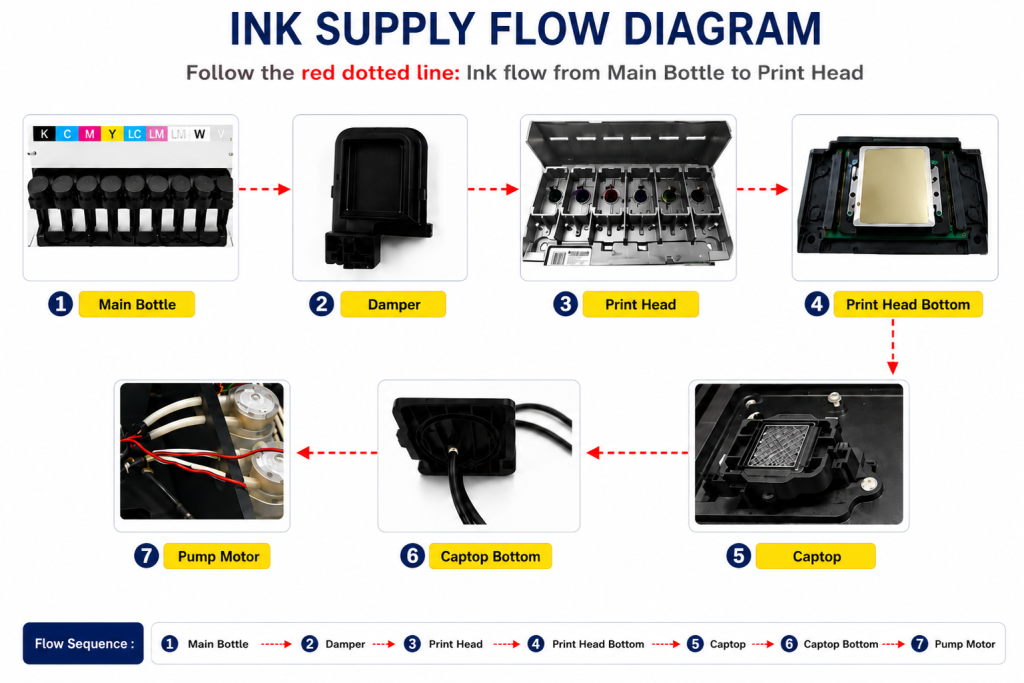
- When ink enters the Damper from the main ink bottle via the ink tube, it passes through the print head, flows to the captop, moves through the motor pump, and finally drains into the waste ink bottle.
- This article covers the Time for Ink to Fill the Damper section of the full ink supply problem series.
- This follows Part 1 Captop Lower Tube, Part 2 How to Replace the Captop, Part 3 Damper, Part 4 Pump Motor and Yellow Tube, Part 5 Captop and Head Position, Part 6 Aligning the Captop and Head Position, Part 7 When the Capping Station Level Is Not Correct, Part 8 Captop Surface Drying, and Part 9 Degraded Ink Inside the Captop.
II. Problem Reporting and Resolution _ Time for Ink to Fill the Damper
This customer was new to ARTJET printers. He had previously used a UV printer from another company and had to return it due to equipment issues — so he was very sensitive to even the smallest details.
“It shouldn’t break like this in such a short period of time…”
“Let’s check the problem together.”
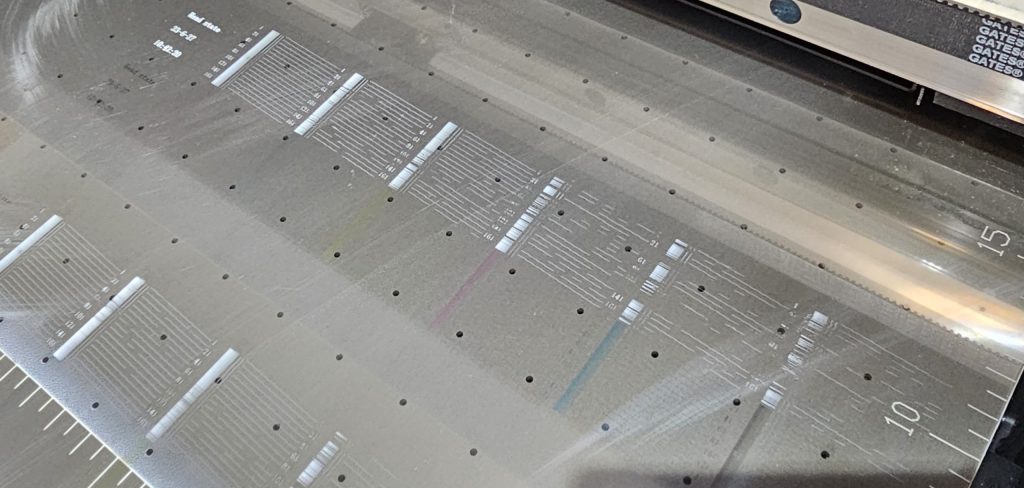
A. Confirm ink flows smoothly without bubbles during pumping
A video confirmed white ink flowing smoothly into the waste ink tank without bubbles during inkload.
“Ink load (pumping) is working fine. Please clean it, print the nozzle pattern, and send me a photo.”
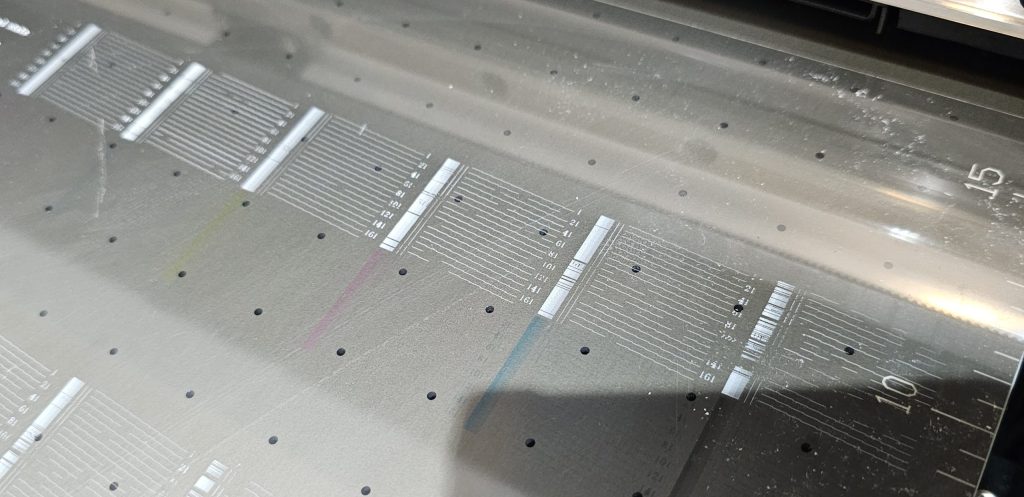
B. Nozzle test after a test print
“It’s fine to waste some ink — just print an ARTJET test image. It’ll take about 10 minutes. When it’s done, don’t clean it. Just print the nozzle pattern and send me a photo.”
- A full-white test print was requested because nozzle condition stabilizes during a large continuous print run
- Test prints sometimes recover some nozzles, and rough-firing nozzles tend to stabilize somewhat
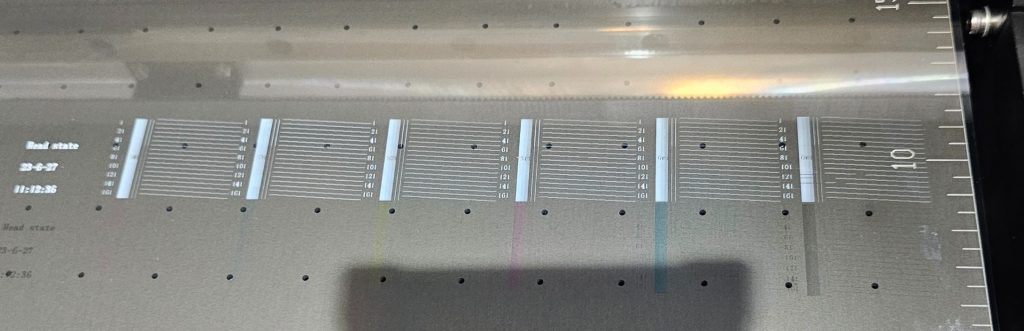
- The photo shows all six channels firing normally on the bar pattern, so this wasn’t a data issue — but it still needed to be confirmed whether any fixed nozzles were clogged
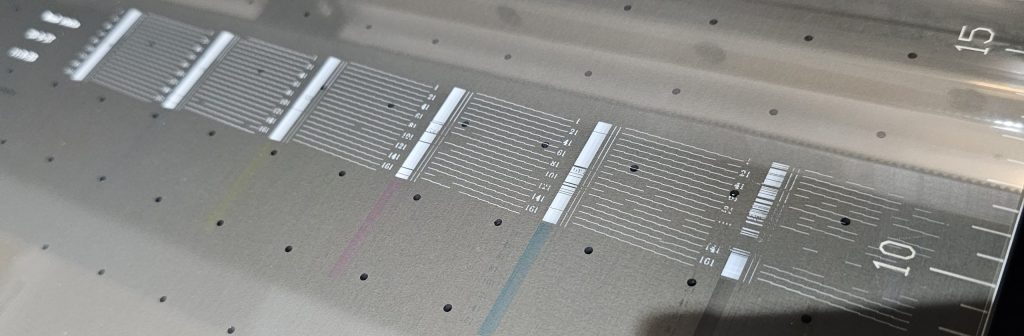
C. Nozzle test after a single cleaning
“Let’s run one cleaning now and take another photo of the nozzle pattern.”

- After one cleaning, only 3 nozzles were missing across all six channels, and all nozzles returned to normal
- A few more cleanings — or simply continued printing — could fully recover the remaining nozzles
- 3 missing nozzles out of 6 channels doesn’t cause visible banding in real prints, so this level of nozzle condition is fine to print at
III. What’s the Problem With This Workflow? _ Time for Ink to Fill the Damper
White ink characteristics
- The main white ink tank has a stirring device to keep ink well mixed, but the ink tube connecting to the damper has none — and ink doesn’t circulate inside it
- White ink uses far more white pigment than color ink for proper shielding, so without agitation, the pigment settles to the bottom
- If the printer goes unused for 2–3 days, the heavier pigment in the white ink tube settles, leaving only lighter white ink sitting on top
- This separated layer of white ink must be cleared out before the printer can reach proper white density
- White ink is simply harder to manage than color ink
Why nozzles don’t recover after inkload (pumping)
- Most compact UV printers have roughly 2.5 meters of ink tubing connecting the main ink tank to the damper
- A 15-second inkload (pumping) cycle drains the ink in the tube into the waste tank, and the tube refills with fresh ink from the main tank
- If pumping runs longer than 10 seconds to clear out separated ink, the white nozzle often won’t recover properly even after subsequent cleaning or another inkload
- Forcibly extracting ink via inkload (pumping) leaves the damper (the intermediate reservoir supplying ink to the head) deflated — it hasn’t been refilled yet
- Cleaning in this state pulls even more ink out of a damper that’s still not full
- Without a stably filled damper, ink supply to the head cannot be stable either
- Running a nozzle test under these conditions results in a scattered, gap-filled nozzle pattern
This never gives the damper enough time to refill, so the nozzle pattern almost never recovers this way.
- Epson heads with a damper rely on convection to move ink from the main bottle to the damper — so the damper fills up slowly
- Inkload (pumping) and cleaning can sometimes restore nozzles immediately, but printing a Test image (around 10 minutes) gives the damper time to refill, warming up the head and restoring nozzle condition at the same time
After heavy white printing the day before — next-day recovery
- Clean 1–2 times without white inkload (pumping) → run a nozzle test → if it looks good, print a test image and finish
- If nozzle condition is poor, run a 5-second inkload, then clean → print a test image immediately → clean 1–2 times → nozzle test, then finish
- Even on a weekday, if white hasn’t been used much, layered separation may exist in the damper or ink line — keep inkload short in that case
- If white was printed heavily the previous day, inkload (pumping) usually isn’t necessary at all — cleaning alone can restore white nozzle condition
Monday after the weekend, or after 2–3 days idle — recovery process
- Run white pumping for 15 seconds starting from when ink first reaches the waste tank, then stop
- Clean 1–2 times — if the white nozzle pattern looks reasonably good, print a test image
- After the test image, clean 1–2 times and print the nozzle pattern — finish if it looks good
- If nozzle condition is still poor, repeat cleaning and nozzle pattern printing
- If white nozzle condition is poor, white ink may spray outward when printing the test image
- Since the goal is nozzle recovery, let the print run to completion even if white sprays out
- Set the test image by selecting Spot 1 as the [Material] option in the RIP software so white prints across the full image size
- For ARTJET software print settings, use [Double Direction] and [G_Mask_Quality] mode for faster printing
- Printing the nozzle pattern right after the test image can recover some previously missing nozzles, but the main purpose is warming up the head and stabilizing ink supply to the damper — not instant nozzle recovery
- Running 1–2 cleanings after the test image typically makes the nozzle pattern noticeably cleaner and far more recovered than before
For Varnish and Color
- Nearly 90% of nozzles print cleanly without any head cleaning
- Only run head cleaning when the nozzle pattern actually looks poor
- Even when cleaning is needed, alternating cleaning → nozzle test → test image print → nozzle test (no cleaning) recovers nozzles faster than repeatedly cleaning and testing back-to-back
Epson-series heads rely on convection feed, so they require time for ink to be supplied to the damper.
- During inkload (pumping), ink in the damper flows out into the waste tank, causing the damper to contract
- Once inkload finishes, the contracted damper slowly refills from the ink tube and returns to its normal shape
- But if cleaning is run before the damper fully refills, ink is pulled out again before it ever gets the chance to fill up
- Running a nozzle pattern in this state means neither the damper nor the head has a stable ink supply, producing a poor nozzle pattern
- From the customer’s perspective, the nozzle stays poor no matter how much cleaning is done — leading to an endless loop of cleaning, nozzle pattern printing, and sometimes even pumping again
- With nozzles never recovering, it’s natural to start wondering, “Should I replace the white head??”
V. ARTJET UV Printer

핑백: How to Replace a Motor Pump Tube - Printer Cleaning Issues Part 12
핑백: Why White Cleaning Doesn't Work Well - Printer Cleaning Issues Part 13 ARTJET 2026
핑백: Head protection plate crumpled _ Printer Cleaning Issues Part 14 ARTJET 2026
핑백: When ink runs out during printing - Printer Cleaning Issues Part 17 ARTJET 2026
핑백: The color has faded - Printer Cleaning Issues Part 18 ARTJET 2026
핑백: White flies around the image - Printer Cleaning Issues Part 19 ARTJET 2026
핑백: When to replace the damper - Printer Cleaning Issues Part 20 ARTJET 2026
핑백: How to Find the Problem Color When the Color is Strange - Printer Cleaning Issues Part 21 ARTJET 2026
핑백: White cleaning methods that might clogged - Printer Cleaning Issues Part 23 ARTJET 2026
핑백: Printer Cleaning Problems Part 23 Table of Contents ARTJET 2026
핑백: Head protection plate cracked _ Printer Cleaning Issues Part 16 ARTJET 2026
핑백: Problems that occur when ignoring the low ink alarm - Printer Cleaning Issues Part 22 ARTJET 2026