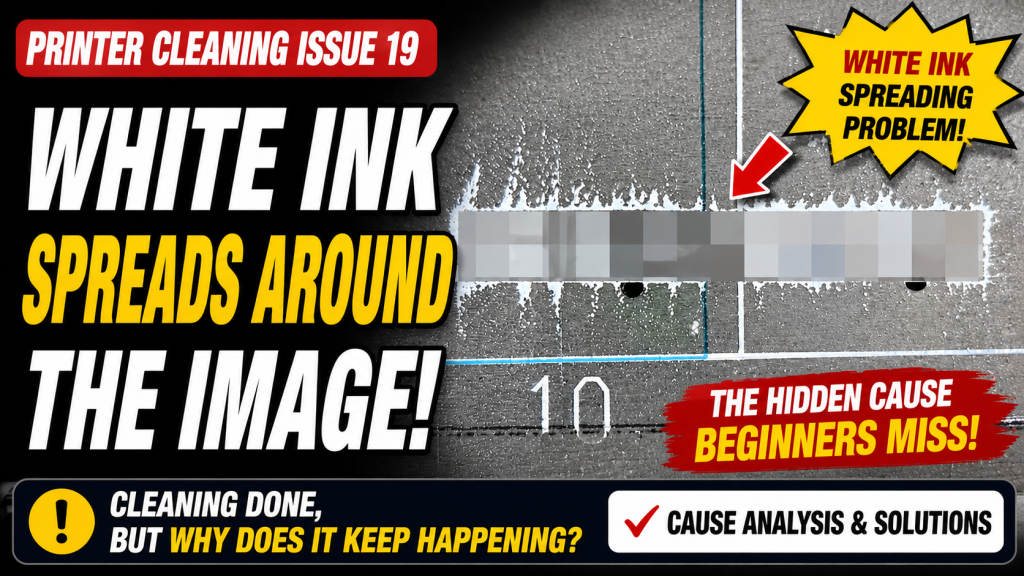
- Anyone whose White ink sprays or scatters faintly around the printed image
- Anyone curious why cold office temperatures in winter can destabilize ink jetting
- Anyone who cleans and prints right away after a holiday or weekend, without running an ink load (pumping) first
- Anyone hearing for the first time that static electricity can affect the direction ink lands
- Ink viscosity changes with room temperature, so keep the office between 18–25°C in cold weather
- Cleaning alone without checking a nozzle test can leave you printing with clogged nozzles
- If the printer sat idle for 2–3 days or more, always run an ink load (pumping) before cleaning
- Highly static-prone materials can clog nozzles or even cause banding
- White scattering around images almost always comes down to one of four causes: ① temperature-related viscosity issues ② incomplete cleaning ③ an empty Damper ④ static electricity
- When ink strays outside its ideal viscosity range, jetting splits into multiple droplets — small ones scatter off at an angle
- After a holiday or weekend: run ink load (pumping) → stop 15 seconds after ink flows out → clean → wait 5 minutes → print a test image
- Keeping the right temperature and cleaning properly resolves about 90% of White scattering issues
I. Background _ White Flies Around the Image
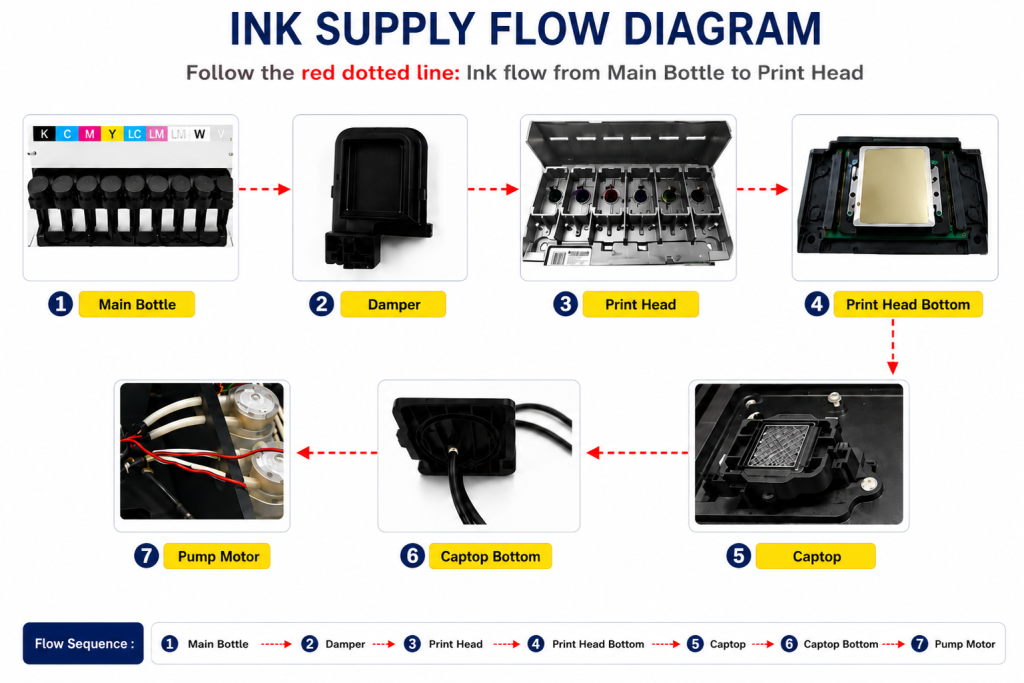
- When ink enters the Damper from the main ink bottle via the ink tube, it passes through the print head, flows to the captop, moves through the motor pump, and finally drains into the waste ink bottle.
- This article covers White Flies Around the Image in the full ink supply problem series.
- This follows Part 1 Captop Lower Tube, Part 2 How to Replace the Captop, Part 3 Damper, Part 4 Pump Motor and Yellow Tube, Part 5 Captop and Head Position, Part 6 Aligning the Captop and Head Position, Part 7 When the Capping Station Level Is Not Correct, Part 8 Captop Surface Drying, Part 9 Degraded Ink Inside the Captop, Part 10 Time for Ink to Fill the Damper, Part 11 Ink Tube Burst, Part 12 How to Replace a Motor Pump Tube, Part 13 Why White Cleaning Doesn’t Work Well, Part 14 Why It’s Important to Replace the Yellow Tube and Captop, Part 15 Head Protection Plate Crumpled, Part 16 Head Protection Plate Cracked, Part 17 When a Specific Color Drops Out During Printing, and Part 18 The Color Has Faded.
II. Problem Symptoms _ White Flies Around the Image
It had been 10 months since we installed this printer at the customer’s site, and they hadn’t used it much.
They’re not a very experienced user, since they only work on the printer on weekends around a day job, leaving little time to learn the equipment.
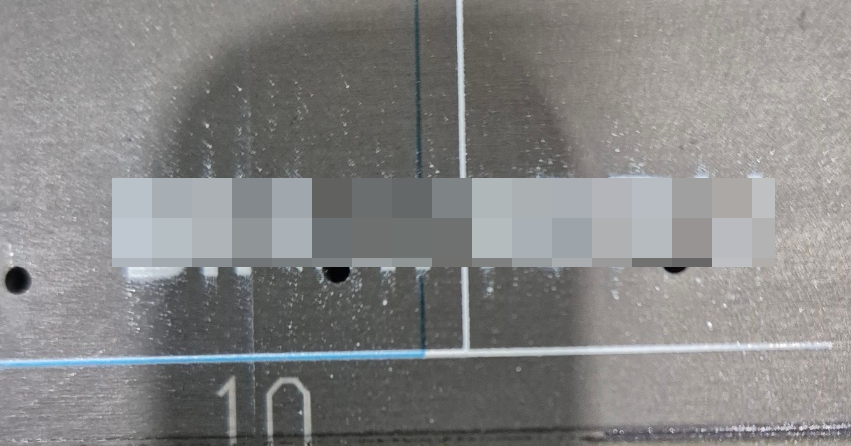
III. Problem Solving _ White Flies Around the Image
Checking the office temperature
When the issue was reported, it was February, and the weather had been quite cold for a while.
Requesting a nozzle test
Since it was right after a holiday, the printer had sat idle for 2–3 days, meaning it needed the same White-clearing step as when reactivating after time off.
IV. Why White Flies Around the Image _ White Flies Around the Image
Take a look at the photos in the link below — they’ll help this make sense.
Printhead Ink Jetting Principle
Briefly, here’s how ink jets from the print head:
- The print head has thousands of tiny holes.
- Each hole holds ink, and the Damper is what keeps that ink from simply flowing down.
- Inside each hole is a thin tube that contracts and relaxes in response to an electronic signal.
- When it contracts inward, that force “pops” the ink out of the hole.
Every print head has a specific ideal viscosity for jetting ink.
- If the ink is above or below that ideal viscosity, when the thin tube “pops” and contracts,
- the ink doesn’t jet out neatly as a single droplet —
- it splits into multiple droplets, with the larger one landing where it should,
- and smaller droplets falling off at an angle, scattering around the image.
- If ink is scattering around the image, keep office temperature — which affects ink viscosity — between 18 and 25°C.

When cleaning wasn’t done properly
- If the print head’s holes lose their round shape, or ink builds up around a nozzle hole and partially blocks it,
- ink that would normally shoot straight out gets deflected and lands off to the side.
- That interference can also break droplets apart, scattering small dots around the image.
- This is why you should always press the TEST button and confirm the nozzle pattern is clean.
When the Damper is empty
- If ink isn’t being supplied to the print head through the Damper,
- meaning the nozzle channel isn’t sufficiently filled with ink,
- the ink breaks apart and misfires when the nozzle channel “pops” and contracts.
- Click here to see what the nozzle pattern looks like when the Damper isn’t filled with ink.
On highly static-prone materials
- Anyone who has used a UV printer for a long time is already familiar with ink scattering caused by static electricity.
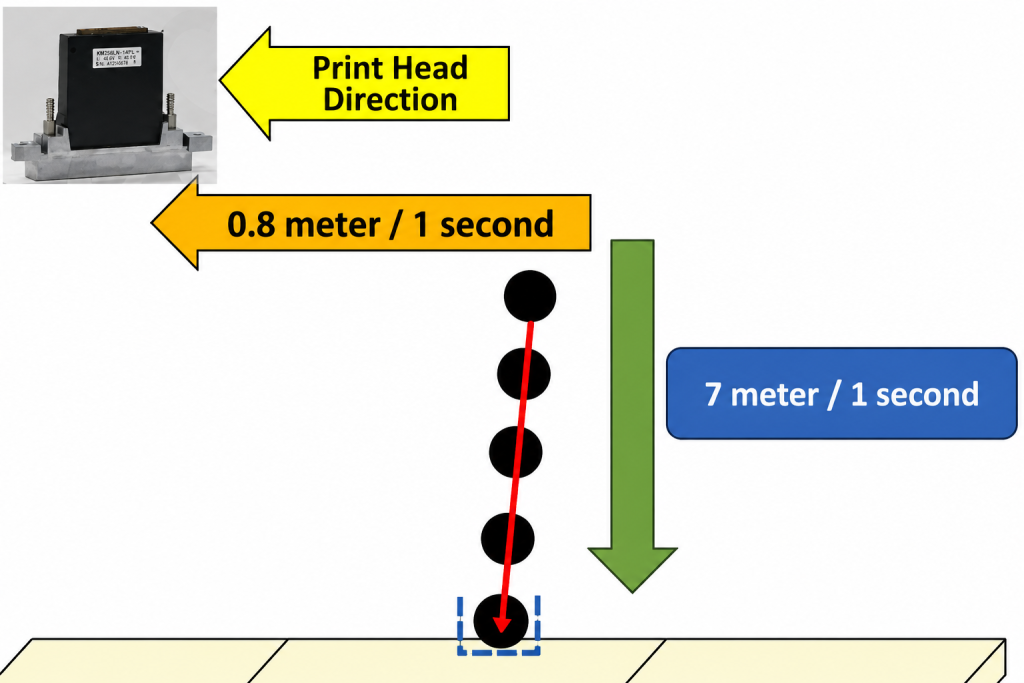
- Across the 1.2mm gap between material and head, ink typically falls at around 7 meters per second.
- The print head carriage’s X-axis travel speed is typically around 0.8 meters per second.
- Because the ink droplet’s falling speed across that 1.2mm gap is so much faster,
- the carriage’s own speed has very little effect on the ink’s jetting direction.
- But static electricity generated in that gap does affect the falling droplet.
- Instead of landing on the material, ink droplets can hover around the head carriage due to static, then suddenly drop onto the material all at once,
- and stray ink drifting around can stick to the print head’s nozzle holes, partially or fully blocking them.
- A partial block behaves the same as poor cleaning,
- and a fully blocked nozzle stops jetting entirely, creating banding.
When White scatters around the image,
- Keep the room/office temperature between 18–25°C
- Confirm the print head’s nozzle pattern comes out clean with no clogged nozzles
- Confirm you gave the Damper time to refill with ink after an ink load (pumping)
- Check whether the material is prone to static electricity
VI. ARTJET UV Printer

핑백: When to replace the damper - Printer Cleaning Issues Part 20 ARTJET 2026
Hola la información esta muy bien de verdad que se agradece este tipo de información pero yo tengo un problema con mi impresora dtf uv que aun no logro resolver, entiendo que la temperatura es un factor lo estoy resolviendo ya que aqui hace mucho calor, pero tras varias limpiezas y remojar el cabezal mas demás métodos de limpieza , al hacer el test donde salen las lineas de todas las tintas, el primer blanco hay un hueco sin rellenar, es decir que no tiene o no saca tinta por mas limpiezas e humectacion que realice, no se si me pueda ayudar . Llevo 4 dias con el problema y al momento de imprimir salen las moscas que describe tanto como barrido y una que otra gota.
¿Por si acaso utiliza dos canales para el cabezal de blanco?
De ser así, intente intercambiar (swap) el canal de blanco que sale bien con el que no sale.
Hacemos esto para verificar si el problema es del suministro de tinta o del propio cabezal.
Si el problema sigue ocurriendo únicamente en el canal que no sale, entonces es un problema de suministro de tinta. Le recomiendo revisar uno por uno los artículos sobre el suministro de tinta en mi sitio web y seguir los pasos. Superar y resolver un problema grande como este le ayudará a mejorar mucho sus habilidades, por lo que vale la pena invertir tiempo en ello.
En el pasado, un cliente tuvo un problema donde la tinta salía y dejaba de salir constantemente en el último canal después de cambiar el cabezal. En ese caso, el problema era que la posición del captop y del cabezal no estaban alineadas. Dado que el blanco suele estar en el último canal, valdría la pena verificar esto también.
Puede ver el índice completo sobre el suministro de tinta en el siguiente enlace:
https://artjetech.com/printer-cleaning-problems-part-23-table-of-contents/
Por otro lado, si la imagen sigue desviándose o saliendo de lado de forma extraña, podría ser un problema del propio cabezal. Puede consultar el índice completo sobre problemas del cabezal aquí:
https://artjetech.com/12-problems-related-to-print-head/