
- Anyone whose White cleaning worked well right after installation but takes longer to recover over time
- Anyone whose cleaning and pumping seem fine, yet specific channels (e.g. White 1, 2) never fully recover
- Anyone who has tried adjusting the capping station level or X-axis position without a lasting fix
- Anyone wondering whether to replace the yellow tube or the Captop first
- If only a humming sound comes from the first ink-extraction step during cleaning but the second step runs fine, it’s easy to mistakenly assume everything is normal
- Changing the X-axis home position or re-adjusting the capping station’s bottom bolts may not address the root cause
- Re-leveling the capping station alone may not restore performance to installation-level condition
- Prioritize replacing consumables (yellow tube + Captop) first — if that still doesn’t help, checking other areas is the fastest path to a fix
- Slow White nozzle recovery ultimately traced back to worn consumables — the yellow tube and Captop
- Replacing only the Captop can bring temporary improvement, but the problem can return within days
- A shrunken yellow tube pulls ink well from only some dampers, leaving specific channels unable to recover
- Conclusion: prioritize consumable replacement first, then check other areas if the problem persists — the fastest path to resolution
I. Background _ Why It’s Important to Replace the Yellow Tube and Captop
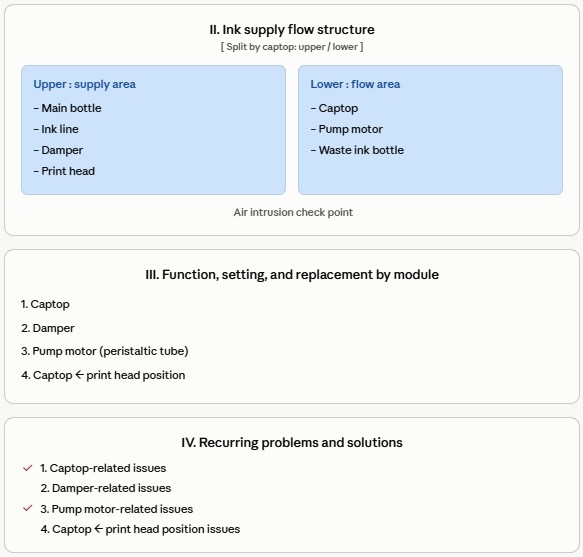
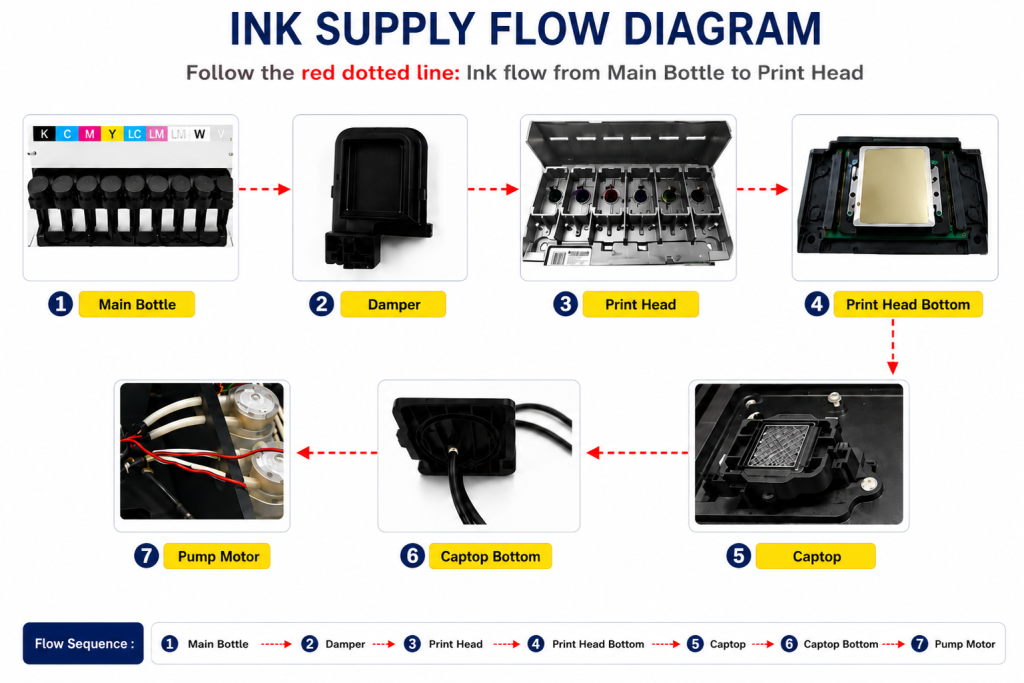
- When ink enters the Damper from the main ink bottle via the ink tube, it passes through the print head, flows to the captop, moves through the motor pump, and finally drains into the waste ink bottle.
- This article covers Why It’s Important to Replace the Yellow Tube and Captop in the full ink supply problem series.
- This follows Part 1 Captop Lower Tube, Part 2 How to Replace the Captop, Part 3 Damper, Part 4 Pump Motor and Yellow Tube, Part 5 Captop and Head Position, Part 6 Aligning the Captop and Head Position, Part 7 When the Capping Station Level Is Not Correct, Part 8 Captop Surface Drying, Part 9 Degraded Ink Inside the Captop, Part 10 Time for Ink to Fill the Damper, Part 11 Ink Tube Burst, Part 12 How to Replace a Motor Pump Tube, and Part 13 Why White Cleaning Doesn’t Work Well.
- In this article, we explain — through a real demo unit case — why replacing consumables should always be the first step when White cleaning isn’t working well.
II. White Cleaning Has Become Difficult _ Why It’s Important to Replace the Yellow Tube and Captop
- The demo unit is now 10 months old.
- For the first 3–4 months, White cleaning worked smoothly and the White nozzle recovered quickly. At some point, though, it started taking much longer to recover.
- Over the past month or two, it has taken more than 30 minutes — sometimes up to an hour — to reach the desired White nozzle condition.
- Beyond the wasted time, the amount of ink consumed by cleaning was also considerable.
- We took the time to investigate.
Since both cleaning and pumping still worked, we started checking other areas without considering the yellow tube or Captop.
- Changed the X-axis home position several times via the software — little improvement, so it was reverted to the original setting
- Loosened the capping station’s bottom bolts and re-set the entire position — seemed to work at first, but the next day White cleaning was just as poor
- Re-leveled the capping station horizontally — significant improvement, but White nozzle recovery still took longer than it did right after installation
- Increased pump motor speed — helped for the first few times, but the same problem returned after a few days
- Adjusted the cleaning time — also showed little improvement
- It looked perfectly fine, so we didn’t initially consider replacing the Captop. After trying every other method with no improvement, we replaced it with a new one.
- After replacing it, the White nozzle recovered much faster.
- We thought that had solved it, but about two days later, White nozzle recovery started taking a long time again.
Being on a demo unit, the yellow tube looked remarkably clean and free of contamination.
- However, pressing the cleaning button produced only a humming sound — it wouldn’t run during the first or second ink-extraction step,
- and only started running from the final step, which drains any remaining ink from the Captop.
- After one cycle like this, the first extraction step would still run poorly on the next attempt,
- but the second step ran fine, so we assumed nothing was wrong.
Yet while some channels recovered quickly, the Channel 1 and 2 nozzles consistently failed to recover.
III. What’s Different from When It Was First Installed? _ Why It’s Important to Replace the Yellow Tube and Captop

Control of the entire ink path — from the main ink tank to the waste ink tank — relies on convection (liquid flowing from high to low), damper technology, and the motor pump. None of it involves the electronics, boards, software, or image data.
We started considering what was different about the ink supply compared to the initial installation.
- A single motor pump draws ink from the main tank, through the ink tube and damper, to the print head — the motor runs smoothly, so it’s not the cause
- The main ink tank and ink tube aren’t consumables, so they’re not the cause either
- The print head simply lets ink flow through, so it’s not the cause
- The UV printer has exactly three consumables: the Damper, the Captop, and the yellow tube.
Here’s what had already been checked:
- Print head and Captop position are correct
- Capping station is properly leveled
- The Captop had already been replaced with a new one (Captop replacement video)
What hadn’t been done yet was replacing the Damper and the yellow tube.
- Since cleaning only produced a humming sound and the pump motor’s rollers weren’t turning properly, we decided to replace the yellow tube first.
- For why the yellow tube takes priority over the motor pump itself, see: How to Replace a Motor Pump Tube
- Only the first extraction step ran poorly, while the second ran fine and ink still came out well — so replacing the yellow tube too felt like it might be overkill. Still, since it’s a consumable, we replaced it anyway. (Yellow tube replacement video)
We tried several other methods and saw some improvement, but nothing works better than simply replacing the basic consumables.
Captop comparison
- In the photo below, the left side is the old, used Captop, and the right side is the new one.
- The rubber blade on the used Captop was significantly worn,
- which likely prevented a proper seal and made cleaning less effective.

Yellow tube comparison
- In the photo below, the top is the new yellow tube and the bottom is the used one.
- The used tube had shrunk, so it couldn’t fully draw liquid in a single suction,
- meaning ink was only being pulled reliably from whichever of the six White dampers happened to draw well,
- which appears to explain why White channels 1 and 2 never recovered properly.

If pumping and White cleaning both run properly but the White nozzle still isn’t recovering,
- First, replace the Captop and yellow tube.
- Prioritize consumable replacement above everything else,
- and only check other areas if the problem still isn’t resolved — that’s the fastest path to a fix.
VI. ARTJET UV Printer

핑백: Head protection plate crumpled _ Printer Cleaning Issues Part 15 ARTJET 2026
핑백: Head protection plate cracked _ Printer Cleaning Issues Part 16 ARTJET 2026
핑백: When ink runs out during printing - Printer Cleaning Issues Part 17 ARTJET 2026
핑백: The color has faded - Printer Cleaning Issues Part 18 ARTJET 2026
핑백: White flies around the image - Printer Cleaning Issues Part 19 ARTJET 2026
핑백: Printer Cleaning Problems Part 23 Table of Contents ARTJET 2026
핑백: When to replace the damper - Printer Cleaning Issues Part 20 ARTJET 2026