- Anyone whose printer worked fine yesterday but suddenly won’t pump or clean today
- Anyone whose pumping brings out ink mixed with bubbles
- Anyone who has already replaced the Captop, yellow tube, and ink tube without finding the cause
- Anyone wondering how to handle a head protection plate that’s slightly opened at the seam
- Adjusting the Captop position is delicate work — even a slight misalignment can stop pumping altogether
- Don’t assume the head and Captop position are fine too quickly — rule out every other cause before re-checking them
- Cross-connecting the Color and Varnish channels is an easy way to test whether the head-to-Captop seal is the real problem
- If the head has had a prior collision, suspect a gap in the protection plate first
- A gap in the head protection plate can let air in, preventing ink from being drawn up during pumping
- If everything below the Captop (Captop, ink tube, yellow tube, motor pump) and above it (ink tube–damper, damper–head connections) checks out fine, suspect a head-to-Captop seal issue
- Fix 1: reposition the Captop dead-center on the print head underside so the rubber clears the gap
- Fix 2: remove the head protection plate entirely (more reliable if the head has a history of collisions)
I. Background _ Head Protection Plate Cracked
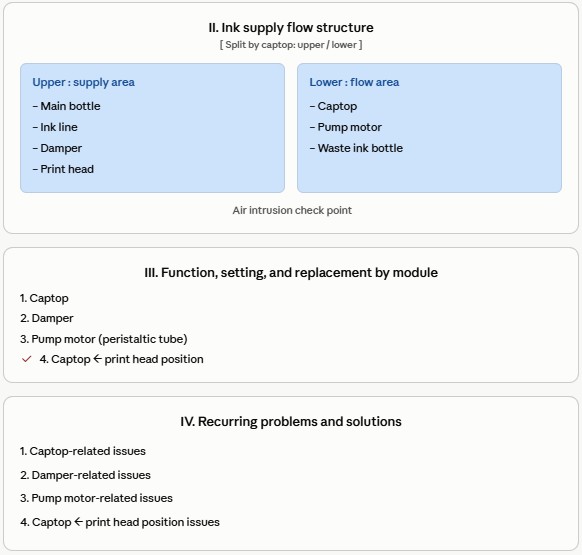
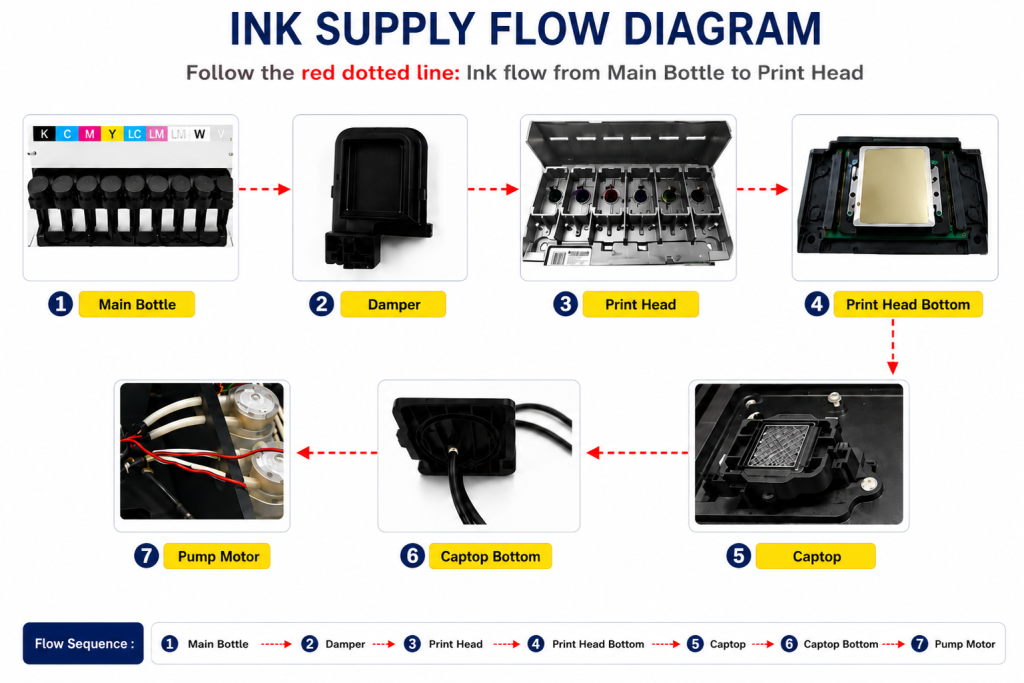
- When ink enters the Damper from the main ink bottle via the ink tube, it passes through the print head, flows to the captop, moves through the motor pump, and finally drains into the waste ink bottle.
- This article covers Head Protection Plate Cracked in the full ink supply problem series.
- This follows Part 1 Captop Lower Tube, Part 2 How to Replace the Captop, Part 3 Damper, Part 4 Pump Motor and Yellow Tube, Part 5 Captop and Head Position, Part 6 Aligning the Captop and Head Position, Part 7 When the Capping Station Level Is Not Correct, Part 8 Captop Surface Drying, Part 9 Degraded Ink Inside the Captop, Part 10 Time for Ink to Fill the Damper, Part 11 Ink Tube Burst, Part 12 How to Replace a Motor Pump Tube, Part 13 Why White Cleaning Doesn’t Work Well, Part 14 Why It’s Important to Replace the Yellow Tube and Captop, and Part 15 Head Protection Plate Crumpled.
- In this article, we assume the head and Captop position are unchanged, and walk through how the investigation eventually pointed to a gap in the protection plate.
II. Problem Symptoms _ Head Protection Plate Cracked
This is a problem that has come up twice in five years of printer maintenance. The symptoms can show up in a few different ways.
- It was working fine until yesterday, but today, ink suddenly won’t reach the waste ink tank no matter how much you pump or clean.
- Pumping does send ink to the waste ink tank, but bubbles come out along with it.
III. Problem-Solving Process _ Head Protection Plate Cracked
The head and Captop position are fine.
- Ink loading (pumping) had been fine up to yesterday — or bubbles came out along with the ink, but ink still reached the waste tank —
- so we assumed the mechanical setup, including the print head and Captop position, was unchanged.
We then started checking other areas.
Everything below the Captop means:
- ① The Captop itself
- ② The ink tube connected below the Captop
- ③ The motor pump tube (yellow tube) connected to the ink tube
- ④ Whether the motor pump inside the cap is working
We replaced ① the Captop and, at the same time, replaced ② the ink tube below it with a new one — but pumping still failed.
We then replaced ③ the yellow tube, and ④ the motor pump inside the cap ran fine, yet pumping still wasn’t working properly.
Everything above the Captop means:
- ① The ink tube–damper connection
- ② The damper–head connection
We started from the assumption that the Captop and head positions hadn’t changed, and since everything below the Captop checked out, we began inspecting above it.
After removing the Damper for each color channel from the print head and drawing ink with a syringe, no air bubbles came through, so ① the ink tube–damper connection is normal.
The Damper was also pressed firmly into the head, so ② the damper–head connection is normal as well.

As shown above, the head and Captop position were fine.
- Ink loading (pumping) had been fine up to yesterday — or bubbles came out along with the ink, but ink still reached the waste tank —
- so we assumed the mechanical setup, including the print head and Captop position, was unchanged.
But since everything above and below the Captop checked out fine, we went back and re-examined the head and Captop position after all.
Here’s how to check for a head-and-Captop position issue.
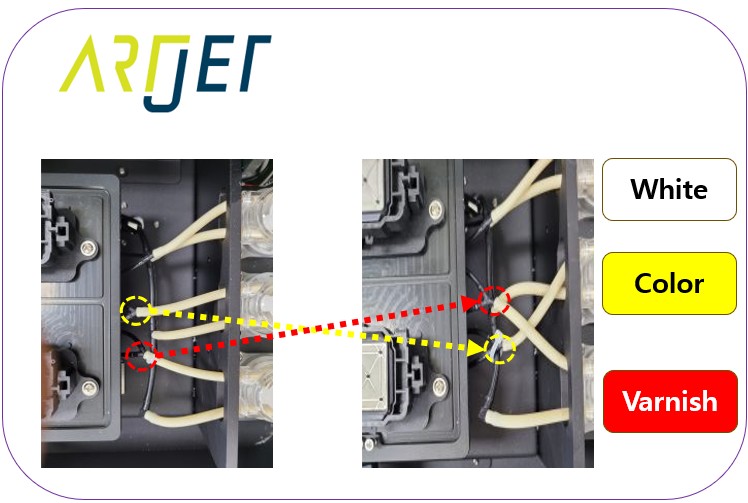
- Varnish pumps normally, but Color doesn’t.
- Connect the Color Captop’s lower tube to the Varnish yellow tube, and the Varnish Captop’s lower tube to the Color yellow tube.
- If, when pumping both Color and Varnish, only Varnish still comes out and Color doesn’t,
- it points to the Color head and Captop not being correctly positioned — or, for whatever reason, not forming a proper seal.
Since pumping had worked up until yesterday, and ink still came out little by little even with bubbles,
- rather than a head-and-Captop position problem,
- we started to suspect the head and Captop simply weren’t sealing properly for some reason.
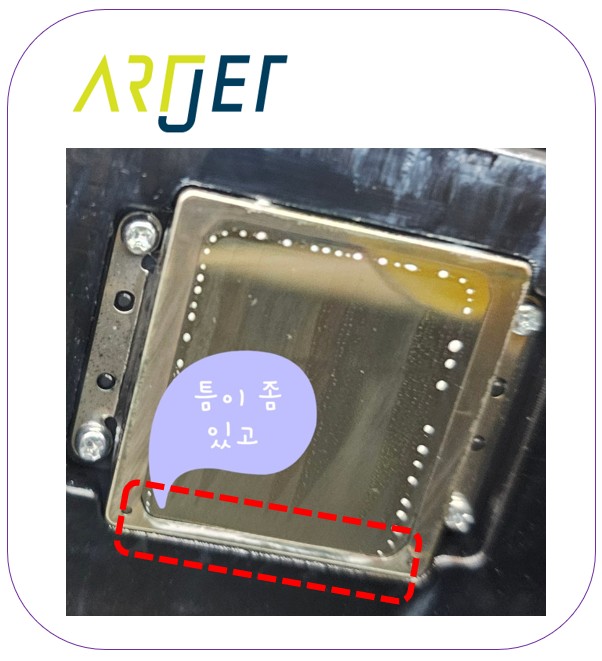
While pumping, we noticed a lot of bubbles forming behind the Captop, so we raised the head and checked the condition of the protection plate.
As shown below, the protection plate on the back was slightly open.
There are two solutions.
First solution
- The Captop’s edge wasn’t centered on the head.
- Make a fine adjustment — either the lower section or the whole Captop — so it’s centered on the head.
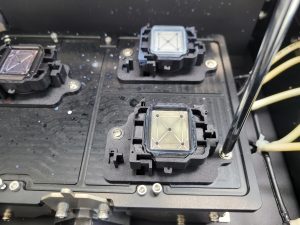
Second solution
- Remove the head protection plate entirely.
- After checking with the CEO, it turned out there had been a previous head collision, which appears to have caused the protection plate to open slightly.
- Adjusting the Captop position is trickier than it looks — even a small misalignment can stop pumping.
- For that reason, on this job we simply removed the head protection plate.
- See the link below for how to remove the head protection plate: The problem and solution that couldn’t be solved even after using all our knowledge
IV. Summary _ Head Protection Plate Cracked
If ink loading (pumping) suddenly stops working, it’s best to check the easiest things first, one at a time.
- Press firmly on the Damper to make sure it’s seated tightly in the head.
- Check whether the Captop’s lower tube is loose — remove the Captop and pull on the ink tube by hand. If it slips out easily, that’s the problem; if it stays firmly in place, it’s fine.
- If that doesn’t help, replace the Captop.
- If replacing the Captop doesn’t help, replace the motor pump tube (yellow tube).
- Check the damper-to-ink-tube connection — pull the ink tube out of the damper by hand and check for tightness, and confirm no bubbles come through when drawing ink with a syringe.
- Confirm the print head and Captop position are correct.
- Check whether the print head’s protection plate is dented.
- Check whether the print head’s protection plate has opened up at any particular spot.
The cause behind today’s problem:
A gap in the print head’s protection plate let air in through that gap, preventing ink from being drawn up during ink loading (pumping).
The fix:
- During capping, position the Captop dead-center on the print head underside so its rubber clears the gap, or
- remove the head protection plate.
VI. ARTJET UV Printer

핑백: When to replace the damper - Printer Cleaning Issues Part 20 ARTJET 2026
핑백: How to Find the Problem Color When the Color is Strange - Printer Cleaning Issues Part 21 ARTJET 2026
핑백: Problems that occur when ignoring the low ink alarm - Printer Cleaning Issues Part 22 ARTJET 2026