
White cleaning methods that might clogged — Ink Supply Problems (Part 23)
✅ Who Should Read This
- Anyone struggling to restore White nozzles after 2–3 days or a long weekend of inactivity
- Anyone wondering why White ink looks pale or printed colors look faded after startup
- Anyone curious about the correct office and ink storage temperatures required for stable Epson head jetting
- Anyone wanting to safely unclog White nozzles using 99% IPA without damaging Epson print heads
⚠️ Precautions
- Do NOT inject IPA directly into Epson heads — doing so can permanently damage less durable head structures
- Never leave IPA on the captop for more than 10 minutes, or the ink and IPA reaction may cause severe clogging
- When pumping with IPA, limit total pumping time to 30 seconds ~ 1 minute to avoid head damage
- Keep winter overnight office temperatures above 18°C (65°F) so cold liquid ink doesn’t disrupt morning jetting
🧭 Key Summary (Field Insight)
- White pigments separate rapidly in tubes/dampers; run the stirrer for 10–20 mins and pump for at least 15 extra seconds once ink flows
- Always wipe the head wiper blade after pumping/cleaning, and print a test image to help stabilize White nozzles
- For stubborn White clogs after weeks of non-use, pour 99% IPA on the captop (not in head/damper) and let sit capped for max 10 minutes
- If nozzles remain unresponsive after 2–3 IPA captop cycles, lock out bad White channels in software and boost density on good channels
📋 Ink Supply Problems — Full Series List
We are documenting ink supply problems in order. This list is updated with each new part. You can view full summaries via 24 articles on ink supply issues.
03Damper
23White Cleaning Methods That Might Clogged
In our twenty-third look at ink supply problems, we cover how to properly clean and recover White nozzles after a long weekend or extended inactivity.
We break down environmental prerequisites, step-by-step cleaning protocols, and safe 99% IPA captop recovery methods.
I. Background Information _ White Cleaning Methods That Might Clogged
1. Ink Supply Flow Diagram
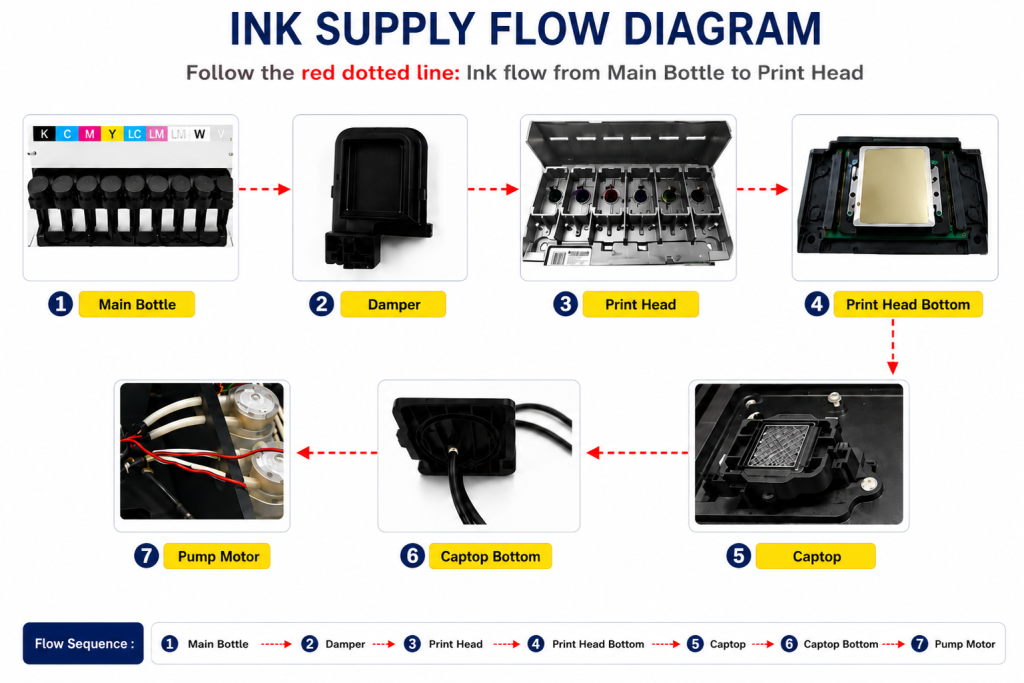
- When ink flows from the main ink bottle through the ink tube to the damper, it passes through the print head to the captop, moves through the motor pump, and drains into the waste ink tank.
- This article covers White Cleaning Methods That Might Clogged in the full ink supply problem series.
- You can view the full series index via 24 articles on ink supply issues.
II. Conditions to Be Met Before Cleaning _ White Cleaning Methods That Might Clogged
1. Office Temperature Between 18 and 25 Degrees
Ink Storage Temperature:
- The optimal storage temperature for Epson UV inks is between 5 and 25 degrees Celsius.
- Failure to maintain this temperature can result in ink deterioration, color shifts during printing, or functional changes.
- Always check the ink bottle or confirm with your distributor for exact storage specifications.
Office Temperature Requirements for Epson Heads:
- Epson heads lack an internal heater and rely on room temperature to maintain proper jetting viscosity.
- Epson heads require an office temperature between 18 and 25°C for stable ink jetting.
- If the temperature is inappropriate, ink viscosity changes, preventing stable jetting.
“Even though I raised the office temperature, the white nozzle doesn’t recover properly, and ink blows around the image during printing.”
- Turning on the heater in the morning warms the air quickly, but liquid ink in the main tanks stays cold much longer.
- Liquid ink cooled overnight may not reach 18°C until the end of the workday.
- Recommendation: Keep the office heater set to 18°C (65°F) overnight during winter.
2. Other Smooth Cleaning Operations
To restore White nozzles, all cleaning-related hardware must function perfectly:
- Captop and Print Head Position: Must be correctly aligned. See Aligning Captop & Head Position and Capping Station Leveling.
- Peristaltic Pump Tube (Yellow Tube): Old yellow tubes degrade pumping suction. Replace the White pump yellow tube once every 3 months. See How to Replace Pump Tube.
- Captop Condition: If the White captop is contaminated or worn, replace it immediately. See How to Replace Captop.
- Damper Replacement: If pumping works but White ink in a specific channel won’t flow, replace the damper. See When to Replace Damper.
III. White Cleaning After 2–3 Days of Non-Use _ White Cleaning Methods That Might Clogged
1. White Stirring Device Operation
- Turn on the printer and connect to ARTJET software. The stirring device begins spinning automatically.
- Let it stir for 10 to 20 minutes to thoroughly mix heavy White ink pigments that settled at the bottom of the main tank.
2. White Pumping (Inkload)
While main tank stirrers mix tank ink, ink inside tubes and dampers remains uncirculated, causing heavy pigments to settle.
- Cleaning without pumping leaves unmixed, pale White ink in the lines, causing low density and faded overall colors.
- For more context on faded colors, see The Color Has Faded.
- Maintain inkload/pumping for at least 15 seconds after White ink appears in the waste bottle to completely purge separated ink.

3. Cleaning, Nozzle Pattern, and Test Image Printing
“The colors were strange at first, but as printing progressed, they gradually became more accurate.”
This happens when users print directly after pumping without executing a head cleaning cycle! Always run a head cleaning and thoroughly wipe the black wiper blade with a lint-free cloth before printing.
Printing a Test Image:
- If White nozzles aren’t severely damaged after 1–2 cleanings, proceed directly to printing a test image rather than continuous cleaning.
- Set print mode to bi-directional Quality mode. In RIP software, assign Spot 1 as Material and Spot 2 as Spot color.
- White nozzle jetting naturally stabilizes during active printing. Run a nozzle test after the test print to confirm full nozzle recovery.
- Check out the video demonstration: Shorts Video Link
IV. Severe Clogging Protocols & 99% IPA Usage _ White Cleaning Methods That Might Clogged
1. Leaving Printer Inactive Over a Month
- Never leave the printer unused for over a month; severe White head clogging can become irreversible.
- Avoid directly injecting head-clearing liquids or alcohol into Epson heads. In test trials on 18 degraded heads, direct syringe flushing damaged the internal structures without restoring nozzles.
2. Safe 99% IPA Captop Soaking Method
When left unattended for 2–3 weeks, ink dries out on the White captop. Use 99% Isopropyl Alcohol (IPA) only on the captop:
Step 1: Dissolve Dried Ink on Captop
- Fill the captop with 99% IPA using a spray bottle (shield linear encoder scale with your hand).
- Pump immediately until IPA drains into waste bottle, dissolving dried captop ink.
⚠️ Step 2: Captop Soaking (Strict 10-Minute Limit)
- Pour enough IPA onto captop to slosh, then park head in capped position for exactly 10 minutes.
- Do NOT exceed 10 minutes — prolonged IPA exposure reacts with ink and ruins head nozzles.
- After 10 minutes, pump for 30 seconds to maximum 1 minute. Continuous long pumping can damage the head.
Step 3: Repeat & Channel Locking Backup Plan
- Clean and print test pattern. Repeat IPA captop soaking 2–3 times.
- If White nozzles fail to recover after 2–3 attempts, abandon further flushing. Lock bad White channels in software and increase density on working channels.
- See setup details: Head Offset Precision Tuning ARTJET
V. UV Printer Basics · Troubleshooting · Product Guides
We have organized our UV Printer content below. Click an item to read the full post.
1) Ink Supply
23 articles on ink supply issues, including cleaning and pumping
2) Print Head Issues
12 articles on head-related problems, from replacement methods to symptoms
For deeper printhead study: Printhead Basics — 10 Articles
3) Electronics / Software Issues
4) Mechanical Issues
5) Sai Flexi RIP Installation, Spot Color, Troubleshooting
6) UV Printable Products — Full Summary
VI. ARTJET UV Printer
After selling and maintaining ARTJET UV printers for over 5 years, we have learned one vital lesson.
The most important factor next to product stability is accumulating troubleshooting data.
Problems can occur with any equipment depending on the environment, working conditions, and user skill level. What matters in the field is not “trouble-free equipment,” but:
How fast and how accurately you can find the cause and solve the problem when it occurs.
ARTJET continuously collects and organizes real-world problem data from the field to support faster and more accurate problem resolution.
🎥 View Print Quality Samples
🧾 Full List of UV Printable Products

* Note: Exterior design has been updated.
※ This article is based on actual field cases. Results may vary depending on the environment and equipment configuration.
핑백: Printer Cleaning Problems Part 23 Table of Contents ARTJET 2026
핑백: Recovering a UV White Print Head After 1 Month Idle (Real Field Case, XP600)