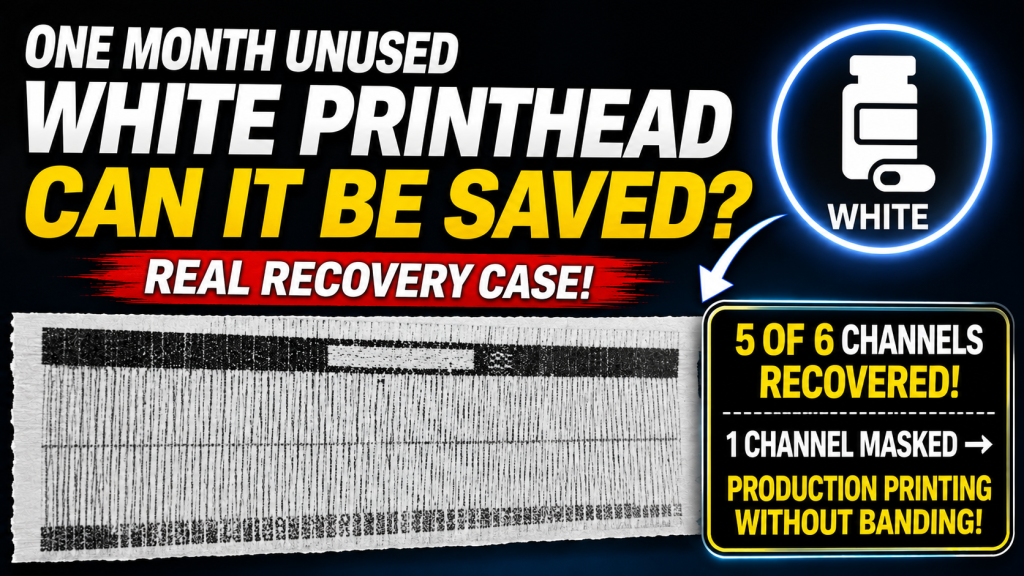
- UV printer operators experiencing White ink output failure after extended downtime
- Field technicians troubleshooting White channel recovery or replacement decisions
- Production operators needing realistic recovery expectations before replacing a print head
- This procedure may damage the print head if performed incorrectly — attempt recovery at your own risk
- The IPA 99% captop soak must not exceed 10 minutes — longer exposure can cause a chemical reaction that hardens ink and fully blocks the nozzle
- Pumping (ink load) must not exceed 1 minute — excessive pumping can damage the extremely fine nozzles
- Result: 6 White channels → 5 channels recovered, 1 channel permanently blocked
- The unrecoverable channel was disabled via software channel masking → banding-free production printing became possible
- The XP600 head dedicates all 6 channels to White, so disabling 1 channel still leaves ~500% density — more than enough
- If nozzle recovery stays around only 5% despite repeated cleaning/pumping, banding-free quality is unlikely — head replacement is the answer
- Prevention: run pumping, cleaning, and a test print at least once a week (every two weeks at most) to keep White nozzles healthy
- Printing errors caused by ink supply (including cleaning and pumping issues) have been recently updated.
- For printers using dampers, troubleshooting can be done through the link below.
- This is a table of contents, with 23 articles, complete with photos and explanations.
- Printer Cleaning Problems Part 23 Table of Contents ARTJET 2026
- In the first session, the symptoms and solutions that occur when a DATA cable becomes contaminated with ink.
- In the second session, the 17 used heads we had in storage, how many were usable after cleaning them with alcohol, and what errors occurred.
- In the third hour, we discussed the issue of certain colors being printed strangely during printing.
- In the fourth hour, we explained how to deal with light-reflective materials when printing, and what’s actually more dangerous than light reflection and can block the head nozzle.
I. Failure Symptoms — Recovering a UV White Print Head After 1 Month Idle
Due to health-related reasons, the customer did not operate the printer for approximately one month.
After restarting the machine, Color and Varnish channels recovered after several pumping and cleaning cycles.
However, the White channel did not recover, even after repeated pumping and cleaning procedures.
During pumping, ink was discharged into the waste ink tank normally. However, nozzle tests showed poor or missing output, and test image printing showed no meaningful improvement.
Ink Drying and Hardening on the Print Head Surface
- In damper-based ink systems, the print head is parked against a captop, which seals the nozzle area using a rubber sealing surface to reduce air exposure.
- However, during extended idle periods, the sealing performance of the rubber captop can degrade over time.
When sealing weakens:
- The captop surface may begin to dry
- The print head surface may also begin to dry
As the head surface dries, residual White ink inside the nozzle openings can dry and harden, preventing proper ink jetting.
Compared to White ink, Color and Varnish inks typically contain:
- Smaller pigment particles
- Lower concentrations of photoinitiators related to curing
As a result, they are generally less prone to clogging. White ink typically contains:
- Larger pigment particles
- Higher photoinitiator content
This increases the likelihood of curing and hardening, particularly during extended idle conditions.

II. White Nozzle Recovery Procedure — Recovering a UV White Print Head After 1 Month Idle
Full recovery is not always possible. However, recovery can be attempted by filling the captop with IPA 99% and performing controlled pumping.
Procedure:
- Move the head carriage to the left position.
- Fill the square captop on the right side with IPA 99% alcohol. Avoid overfilling (minor overflow is generally acceptable). When filling alcohol, take care not to contaminate the X-axis linear scale.
- After filling the captop, press the Reset button in the ARTJET software to move the print head into the capping position.
- When capped, the White print head surface will contact the IPA 99% alcohol inside the captop.
- To sufficiently soak dried White ink residue at the nozzle tips: standard condition ~5 minutes; this case (1 month idle) 10 minutes.
- Important: UV ink begins dissolving when exposed to IPA 99%. However, exposure longer than 10 minutes may cause a chemical interaction between ink and alcohol, potentially hardening ink residue and fully blocking the nozzle.
- Do not exceed 10 minutes.
- After soaking, perform ink load (pumping) to remove White ink from the damper. Residual alcohol inside the captop will also be removed during pumping.
- Once White ink flow begins, pump for approximately 30–50 seconds — do not exceed 1 minute.
- Excessive pumping can force ink through the extremely fine nozzles and may damage the print head.
- After pumping, perform head cleaning, then perform a nozzle pattern test.
Results — First Recovery Attempt
- At this stage, recovery success was uncertain, and print head replacement was already under consideration, so recovery was performed aggressively.
- Procedure used: 10-minute IPA captop soak, 1-minute pumping, cleaning.
- Since nozzle pattern improvement was unlikely, a full White test image was printed first.
- Results: White output was restored (previously nearly zero), but significant banding remained.
- Nozzle pattern results (6 White channels): 3 channels near normal, 2 channels partial output, 1 channel no output.
Results — Second Recovery Attempt
- The same recovery method was repeated.
- Since head replacement was already being considered, pumping duration was extended from 1 minute to 2 minutes. (⚠ Pumping beyond 1 minute may damage the print head.)
- Results: 5 of 6 channels achieved near-complete recovery.
- 1 channel showed partial output but was determined unrecoverable.
The final unrecoverable channel was disabled using the ARTJET software channel lock function.
- If channel lock is not applied, unstable nozzle output can cause White banding during printing.
- When a channel is locked, the software generates a new print mask using the remaining functional channels, reducing banding.
- Typical Japanese UV printer configurations limit White density to approximately 200% relative to Color.
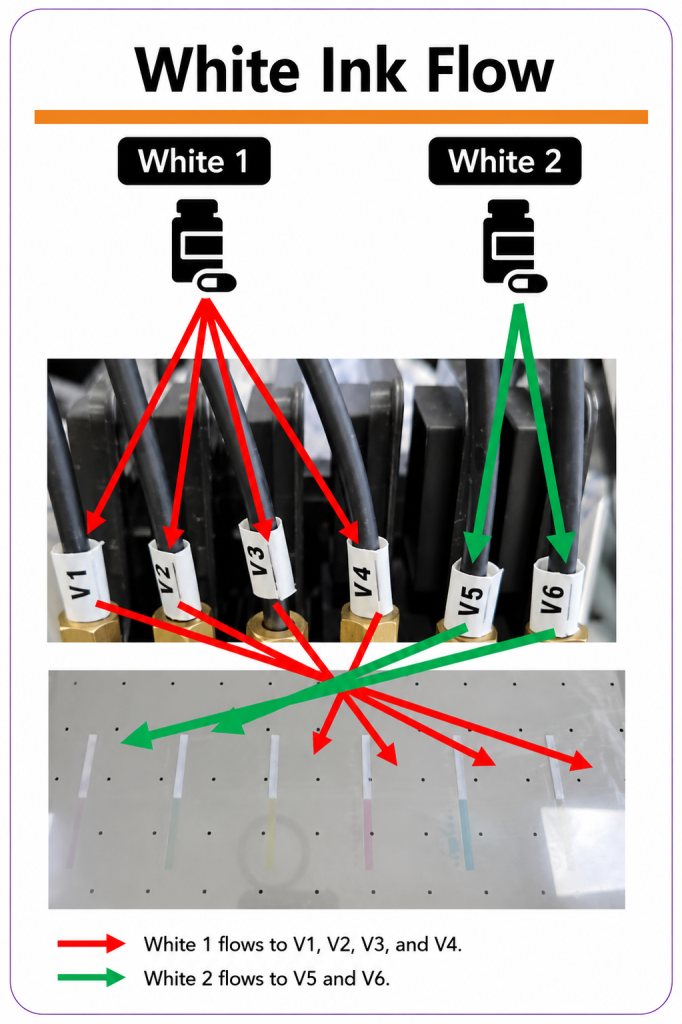
- In this XP600-based configuration, one full head is dedicated to White (6 White channels total).
- This allows White output up to approximately 600% relative to Color.
- Even with one channel disabled, White output remains approximately 500% — typically sufficient for production.
- The remaining 5 channels showed stable nozzle condition and minimal White banding during test image printing.
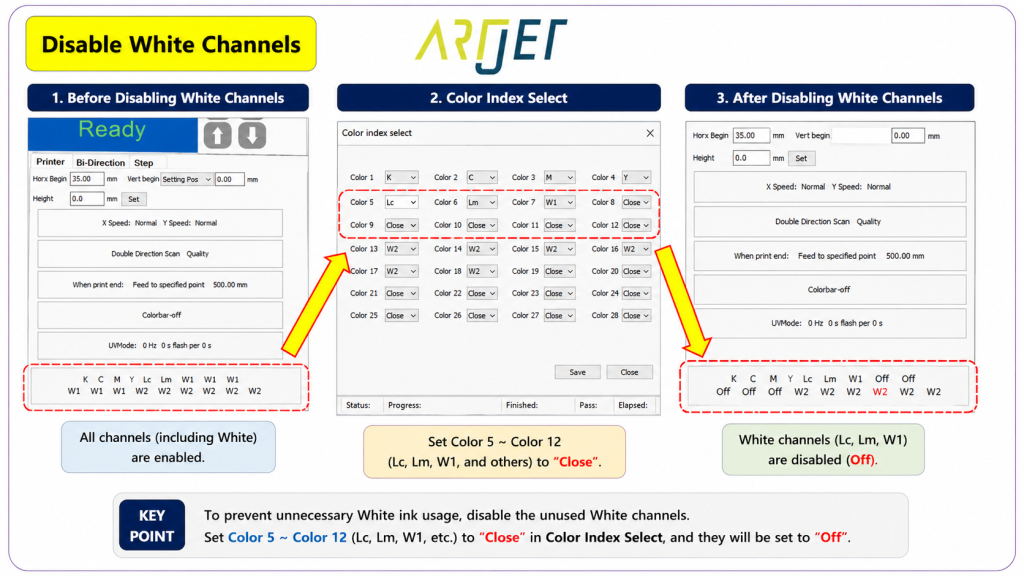
White Channel Lock Setting
- Channel locking can be configured in the software control panel.
- Select the red box on the left to open the channel control screen.
- Channels 7–12 correspond to White channels.
- Identify the faulty channel using nozzle pattern results — for example, White under Black = Channel 7, White under Light Magenta = Channel 12.
- Select the affected channel → press the down arrow → select [Close].
- This disables ink jetting for that channel during printing. Nozzle pattern testing will still show the channel’s pattern.
- After applying the setting, confirm the status on the main screen.
If nozzle condition recovers, stable operation is typically possible after 1–2 weeks of normal usage.
However, if after one month of idle time, recovery remains around ~5% nozzle recovery despite repeated cleaning and pumping,
- the head may remain unstable even after recovery.
- A common risk is diagonal jetting instead of straight jetting, leading to persistent White banding.
- In similar recovery cases, if nozzle condition remains unstable, banding-free White printing is unlikely.
- Preventive maintenance recommendation: run pumping, cleaning, and test image printing at minimum once a week, at most once every two weeks, to maintain White nozzle condition.
If White nozzles don’t recover with this method, or if White prints but with severe banding, head replacement is necessary.
IV. ARTJET UV Printer

핑백: Print Head End-of-Life Symptoms _Head Issue 6 _ ARTJET 2026