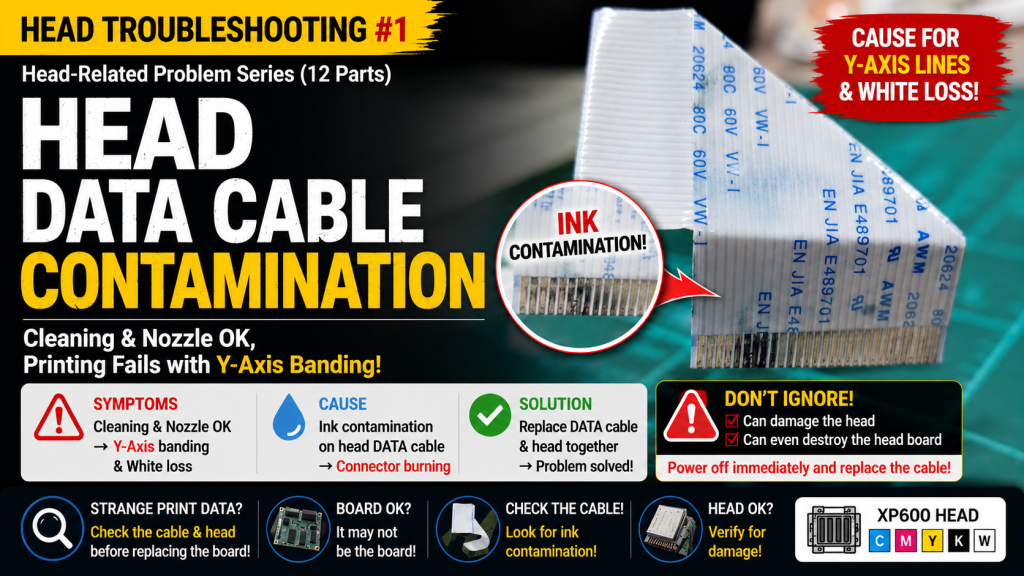
Head DATA Cable Contamination – Print Head Issues Part 1
✅ Who Should Read This
- Anyone whose cleaning and nozzle pattern look normal, but Y-axis banding appears only during printing
- Anyone whose White gradually disappears mid-print even after raising White density
- Anyone who replaced the head board but still hasn’t fixed the problem
- Anyone who doesn’t realize DATA cable contamination can damage the head itself
- Anyone trying to reuse a DATA cable by wiping it with alcohol only
⚠️ Precautions
- Once ink gets on the DATA cable, alcohol cleaning alone may not fix the issue
- Continuing to use a contaminated cable can damage the head, or even the head board
- If print DATA looks abnormal, check the DATA cable and head before the board
🧭 Key Summary
- Symptom: Cleaning/nozzle normal → Y-axis banding while printing → White fades further as density is raised
- Cause: Ink contamination on the head DATA cable → burning at the head connection point
- Solution: Replace both the DATA cable and head together → problem resolved
- Lesson: The moment you find a contaminated cable, cut power immediately and replace the cable
📋 Print Head Issues — Full Series List
We are documenting print head issues in order. This list is updated with each new part.
01Head DATA Cable Contamination
If cleaning, pumping, or printing is not working properly, there are two approaches you can take.
Problems related to image data, such as ink supply or electronic boards, head, or DATA cables.
Printing errors caused by cleaning, pumping, or ink supply issues have been recently updated.
- If you have a printer that uses a damper, you can resolve ink supply issues by following the steps below.
- There are 23 articles in total, with photos and explanations, available at the link below.
- Printer Cleaning Problems Part 23 Table of Contents ARTJET 2026
Today, we’ll discuss problems related to image data, such as electronic boards, heads, and DATA cables — starting with what happens when the head or DATA cable becomes contaminated.
I. Problem Symptoms _ Head DATA Cable Contamination
1. When Printing at 70% White Density
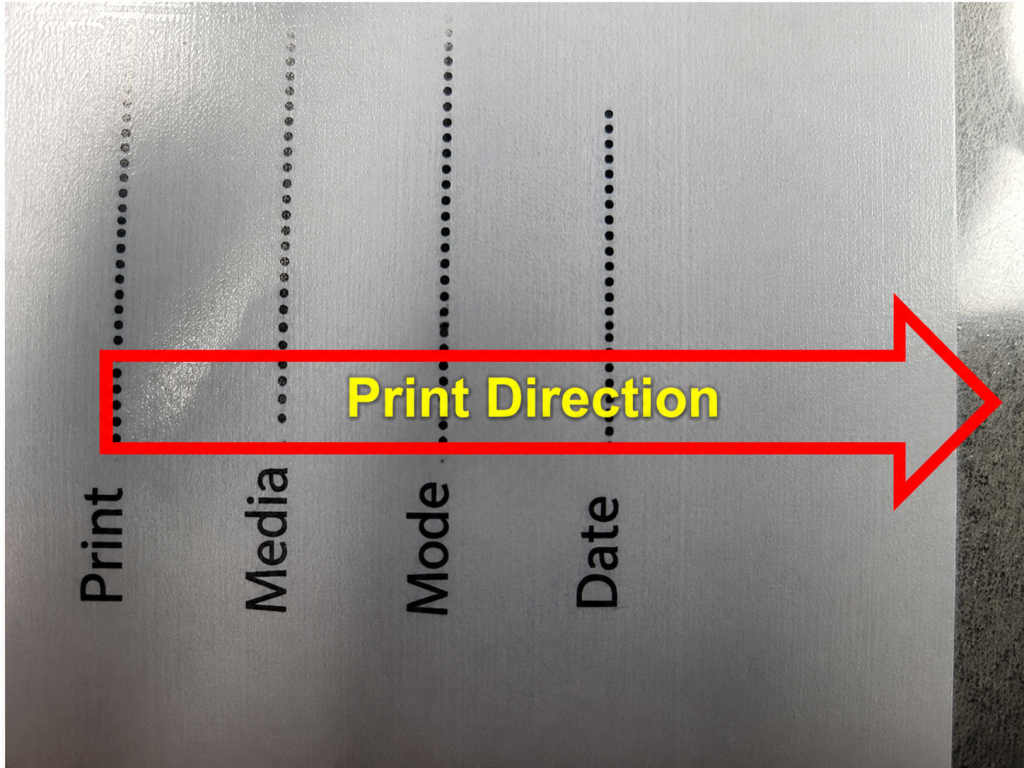
- Below is a photo of White printed using the XP600 head.
- Cleaning is fine, and the nozzle pattern is fine,
- but when printing, grain-like patterns appear along the Y-axis, not the X-axis.
2. Symptoms When White Density Is 100%
- I wondered if the Y-axis grain was due to insufficient White density, so I raised the density to 100% and printed.
- At first it looked normal, but after 4cm of printing, White gradually disappeared.
- After 8cm, it disappeared completely.
- Looking closely at the first section, the Y-axis grain-like pattern was actually present throughout.

II. Solution _ Head DATA Cable Contamination
Pumping and cleaning were working well, and the nozzle test looked good, so I approached this as a DATA-related issue rather than an ink supply issue.
1. Contaminated DATA Cable
Carriage Board Replacement
- I suspected the problem was caused by one of three factors: the head board, the head, or the DATA cable connecting the head and the head board.
- Since printing was still working, I suspected the board was the issue rather than the head or DATA cable.
- With this in mind, I replaced the electronic board first, but the problem remained.
DATA Cable Check
- Next, it had to be either the head or the DATA cable.
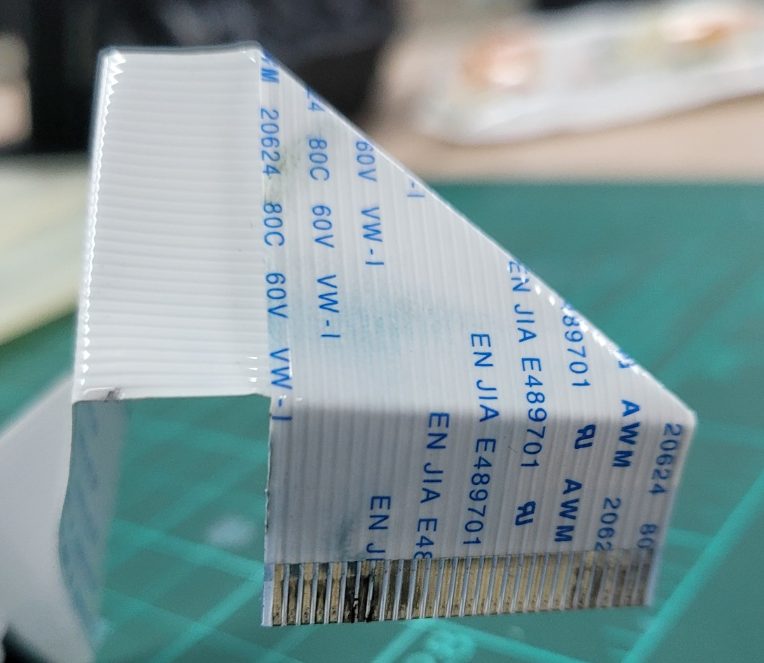
- When I removed the DATA cable to replace it, I found it contaminated with ink, as shown in the photo below.
- After cleaning the DATA cable with alcohol and reconnecting it to the head, I test-printed again — this time, even the nozzle pattern didn’t appear.
- Instead of alcohol cleaning, I replaced it with a brand-new DATA cable, but still no DATA output at all.
2. The Dangers of Contaminated DATA Cables
The problem was resolved by replacing both the head and DATA cable at once.
If the DATA cable is contaminated with ink or liquid,
- Once ink gets into the DATA cable connected to the head, simply replacing the cable won’t solve the problem.
- After disconnecting the DATA cable and closely examining the head connection point, I noticed partial burning.
- If ink enters the head-DATA cable connection point,
- it can damage not only the DATA cable, but the head itself as well.
- In unlucky cases, reverse current can flow from the head, damaging the head board too.
⚠️ Act Immediately If You Find DATA Cable Contamination
- Wipe it off right away, or
- if it’s too late and ink has already spread to the connection point, turn off all power to the printer immediately and replace the head cable.
- Leaving it unattended can damage the head or even the head board.
Also, if DATA looks abnormal during printing, replacing the DATA cable or head before the board will resolve the issue faster.

III. UV Printer Basics · Troubleshooting · Product Guides
We have organized our UV Printer content below. Click an item to read the full post.
1) Ink Supply & Cleaning Issues
2) Electronics / Software Issues
3) Mechanical Issues
4) Sai Flexi RIP Installation, Spot Color, Troubleshooting
5) UV Printable Products — Full Summary
IV. ARTJET UV Printer
After selling and maintaining ARTJET UV printers for over 5 years, we have learned one vital lesson.
The most important factor next to product stability is accumulating troubleshooting data.
Problems can occur with any equipment depending on the environment, working conditions, and user skill level. What matters in the field is not “trouble-free equipment,” but:
How fast and how accurately you can find the cause and solve the problem when it occurs.
ARTJET continuously collects and organizes real-world problem data from the field to support faster and more accurate problem resolution.
🎥 View Print Quality Samples
🧾 Full List of UV Printable Products

* Note: Exterior design has been updated.
※ This article is based on actual field cases. Results may vary depending on the environment and equipment configuration.
핑백: Results after cleaning 17 heads with alcohol _Head related issues 2 _ARTJET 2026
핑백: Certain colors are printed strangely _Head related issues 3 _ ARTJET 2026
핑백: Can I print on reflective material _Head related issues 4 _ ARTJET 2026
핑백: Symptoms of a Cracked Ink Channel Inside Print Head _ Head related issues 10 _ ARTJET 2026
핑백: How to Connect a Printhead DATA Cable _ Head related Issues #12 _ ARTJET 2026
핑백: 12 Problems Related to print head
핑백: Recovering a UV White Print Head After 1 Month Idle (Real Field Case, XP600) _Head related problem 5 _ARTJET 2026