Symptoms of a Cracked Ink Channel Inside Print Head _ Head related issues 10 _ ARTJET 2026
Head Issue #10 · ARTJET 2026
- Operators/technicians who run and maintain UV printers
- Anyone whose cleaning/pumping looks normal, but a specific color drops out during printing
- Those who need a clear decision 기준 before replacing a head (ink supply vs. internal head issue)
- This post is based on a real field case. Similar symptoms can have different causes.
- Excessive cleaning or aggressive syringe suction can worsen print head damage.
- Results can vary by temperature/humidity, ink condition, and operating habits.
But during real production, a specific color drops out and then recovers as the print continues.In this pattern, there is a high chance of a cracked ink channel inside the print head → in most cases, head replacement is required.
If your printer uses dampers, the following index can help you solve common ink supply problems:
- Part 1: Symptoms & Fix When a DATA Cable Is Contaminated by Ink
- Part 2: 17 Stored Used Heads: How Many Worked After Alcohol Cleaning & What Errors Appeared
- Part 3: A Specific Color Prints Abnormally During Printing
- Part 4: How to Print on Reflective Materials + More Dangerous Causes That Can Clog Nozzles
- Part 5: Real Case: Reviving a White Head Not Used for One Month
[Click here for the “clogged white head” recovery method] - Part 6: Symptoms when a printhead reaches end-of-life and how to swap heads
- Part 7: Why banding appears only on certain solid colors + tips to reduce it
- Part 8: A case where a color still didn’t print even after replacing the head
- Part 9: Print Motion but No Ink Output
I. Symptoms _Symptoms of a Cracked Ink Channel Inside Print Head

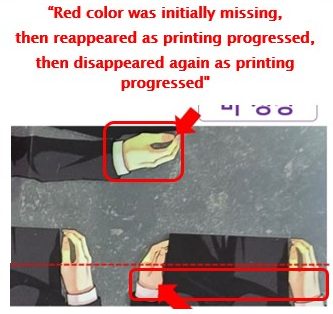
As printing continues, the tone gradually returns and looks normal with a reddish tint.
Magenta does not fire at the beginning,
then Magenta recovers and prints normally as the job continues.
However, this case was not identical, so it did not solve the issue.
“Manager, if you have time, could you visit tomorrow? We replaced the cap top but it didn’t solve it, and the issue is irregular.”
“Okay.”
“Also, when I raise the print head and look underneath, I can see red ink around the protective metal area.”
“Then it might be a burst Magenta ink channel inside the head. I’ll check it on-site.”
II. Inspection & Diagnosis _Symptoms of a Cracked Ink Channel Inside Print Head
1) ARTJET Test Image Printed Normally
- After cap top replacement: cleaning & pumping confirmed normal
- Because the issue involved red tones, we removed the Magenta / Light Magenta dampers and pulled ink with a syringe → ink flowed normally with no bubbles
The test image printed cleanly without ink loss.
Jobs with heavy red/magenta areas can still show the original dropout symptom.
2) Print Head Replacement
At that moment, red ink appeared and pooled from the tilted area.
so the head could not hold the ink and it simply leaked out.
- If ink beads appear across all nozzles of a specific channel (out of 6 channels) → suspect damper lifespan, replace dampers first
- If a single ink color spreads across the entire head surface → possible cracked internal ink channel
III. ARTJET UV Printer
Based on over five years of sales and maintenance experience with ARTJET UV printers, one key lesson stands out:
After product stability, the next most critical factor is troubleshooting data.
Every product can encounter issues — whether caused by equipment conditions or user operation.
In real production environments, product reliability depends on how quickly and efficiently those issues can be identified and resolved.
ARTJET continuously collects and organizes real field troubleshooting data to support faster and more accurate problem resolution.
You can view print quality samples here:
[Print quality sample by video]
You can view ARTJET pricing and sales conditions here:
(Note: Exterior design has been updated)
You can also review a complete list of products that can be produced using UV printers here:
[UV Printable Product Guide]
