White nozzle recover after leaving it for one month
I’m summarizing UV printer problems and solutions.
The link below is a compilation of all the problems and causes and solutions that occurred over the past 5 years, totaling 24 episodes. If you have a printer that uses the damper method, you can solve most problems by just clicking the link below.
Ink supply issue and solution summary
Now, I’m organizing the problems and symptoms related to UV Printer heads.
Before dealing with the actual problems and solutions, there are many misconceptions about heads, so I’ll explain the basic knowledge first.
If you understand only the sessions explained here, you will be able to see that you know more about inkjet heads than inkjet manufacturer salespeople or equipment distributor engineers.
Last time, I explained why the following problem occurred.
1. Banding appears on the Y axis instead of the X axis. Click here for more details.

2.”Can I clean the XP600 head, which is an Epson series head, with alcohol?”


4. “It was printing fine until yesterday, but suddenly a certain color is flying away.”

5. “Won’t the nozzle get clogged when printing on highly reflective materials such as mirrors?”

Today I will explain how to restore the white nozzle when the UV Printer has not been used for one month.
I. Printer that has not been used for a month _White nozzle recover after leaving it for one month
1. Problem Symptoms _White nozzle recover after leaving it for one month
The representative who uses it didn’t use the printer for a month due to health reasons.
I pumped and cleaned it, but the result of the Nozzle Pattern Test showed some white lines, but only about 5% of the total.
Fortunately, the nozzles of Color and Varnish were restored by repeating the ink load (pumping) and cleaning.
2. Why White Nozzle Repair is Hard _White nozzle recover after leaving it for one month

When most Epson heads are not printing,
the print head is parked with the air blocked by the CAPTOP, which is a square rubber border.
However, even if the air is blocked by the captop, if the period continues, the seal is broken because the captop surface is made of rubber.
As the seal is broken, the captop surface dries, and the print head surface also dries.
As the print head surface dries, the white ink remaining in the print head nozzle hole dries and hardens, so the ink may not be sprayed.
Color and Varnish have small pigments that produce the color of the ink and small content of the photo-initiator that hardens the ink, so they are relatively less clogged,
White has large color pigments and a large content of the photo-initiator that hardens the ink, so it tends to harden more easily.
II. How to recover white nozzle _White nozzle recover after leaving it for one month
1. Even if the nozzle condition is restored _White nozzle recover after leaving it for one month
If the nozzle condition is restored in about 1~2 weeks, I think there will be no major problems in using it.
However, if it has been left for a month and only about 5% of the nozzle pattern is displayed even after repeating ink loading and cleaning, the possibility of print head recovery is slim.
Even if it is restored, it is not easy to obtain white quality without banding because there are more diagonal nozzles than straight nozzles when jetting ink.
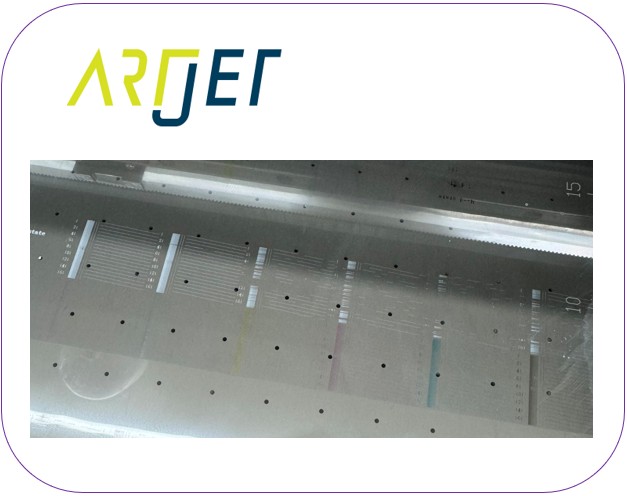
The photo below is not the same head, but a print head nozzle pattern test photo that was restored in a similar way,
and you cannot expect white printing without banding with this nozzle condition.

2. How to Recover a Head Clogged with Ink _White nozzle recover after leaving it for one month
It is not easy to completely recover, but you can try to recover the nozzle by pouring IPA 99% alcohol on the captop. The method is as follows.
- After moving the head carriage to the left, fill the square captop on the right with alcohol (IPA 99%) without overflowing (it doesn’t matter if it overflows).When filling the alcohol, be careful not to contaminate the X-axis liner scale.
- After filling the captop with alcohol, press the Reset button on the ARTJET SW to make the print head carriage capping.
- When capping, the white head surface touches the IPA 99% alcohol on the captop.
- Wait for about 5 minutes in this state to sufficiently wet the dried white ink on the tip of the print head nozzle with alcohol.
- Since this equipment had not been used for a month, I waited for 10 minutes instead of 5 minutes in this state.
- One thing to note is that UV ink starts to dissolve after coming into contact with IPA 99% (alcohol), but if it exceeds 10 minutes, the ink and alcohol chemical reaction will harden the ink and completely block the nozzle.
- It should not exceed 10 minutes.
- After 5 minutes, sufficiently remove the white ink in the damper through ink load (pumping). At this time, the alcohol remaining on the captop will also be removed.
- When the white ink starts to come out, remove the ink for 30 to 50 seconds. It should not exceed 1 minute.If you forcefully remove the ink through ink load (pumping) for more than 1 minute, that is, for a long time, it may not be good for the nozzle because it is forcibly removing the ink through a very fine print head nozzle. It should not exceed 1 minute.
- After the ink load (pumping) is finished, clean the print head through cleaning and perform the nozzle pattern test.
3. First step using the above method _White nozzle recover after leaving it for one month
I was not sure if the White head would come back to life or not, and I was thinking about replacing it, so I went ahead and did a somewhat bold nozzle recovery operation.
After waiting for 10 minutes in the alcohol-filled Captop and performing 1 minute of inkload (pumping), I immediately proceeded with white full-face printing with the ARTJET QC image white material option.
- White was printed, but there was a lot of banding.
- After printing the test image, I printed the Nozzle pattern, and
- Out of the 6 White channels, 3 channels almost came out, 2 channels were missing here and there, and 1 channel did not come out at all.
4. Second step using the above method _White nozzle recover after leaving it for one month
The same method was used, but the ink load (pumping) was performed for 1 to 2 minutes (if it is performed for more than 1 minute, the print head may be damaged, so be careful).
After printing the ARTJET QC image, the nozzle pattern was printed.
Five of the six channels were printed almost perfectly with the nozzle pattern.
The remaining one channel was sparse, but it was judged to be unrecoverable.
5. Final Steps _White nozzle recover after leaving it for one month
The last white channel that is not recoverable was locked using the ARTJET Software program.
You can lock channels or swap channels in the Software program as follows:

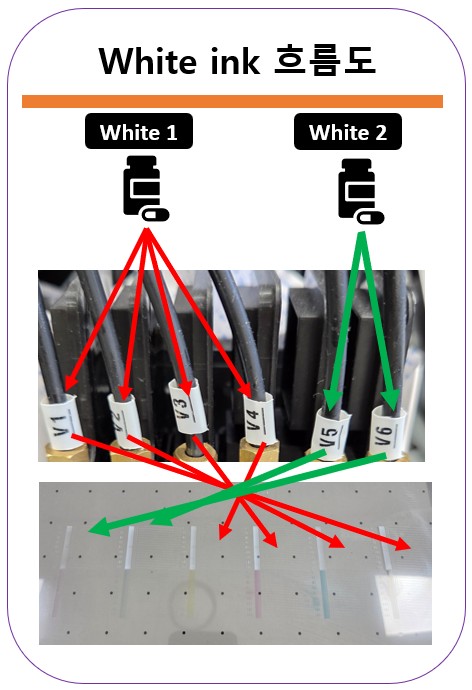
Japanese UV Printers have a maximum white of 200% compared to color, but
ARTJET uses one head entirely as white, as shown in the figure below, so all 6 channels are white.
That is, white compared to color is up to 600%.
Even if one white channel is not used, it is 500%, so the white density is sufficient and there is no problem.
The remaining 5 channels that survived had good nozzle conditions, so white banding hardly occurred when printing test images.
III. How to manage white heads _White nozzle recover after leaving it for one month
1. When not used for 2~3 days _White nozzle recover after leaving it for one month
If it has not been used for 2~3 days, only cleaning is done and when printing the nozzle test pattern, white is printed lightly.
In this state, if you print white and color on transparent paper, the background white comes out lightly and the whiteness drops, so the entire color is expressed lightly.
At this time, be sure to perform ink load and ink fill (pumping). It should be performed for at least 15 seconds from the time when white ink starts to come out of the waste ink tank.
The white ink tank has a stirring device, so white layer separation does not occur.
However, the 2.5 meter ink tube is connected from the White main ink tank to the Damper,
- In the ink line and damper, the heavy pigments settle, and the light white remains on top.
- Through cleaning, only the light white remaining on top comes out,
- So when printing, the white comes out lightly and the color is expressed weakly.
- The separated white in the ink line and damper must be extracted by inkload (pumping) to start to produce proper white.
- For this reason, when not used for 2~3 days, perform ink load and ink fill (pumping) for at least 15 seconds from the time when the white ink starts to come out of the waste ink tank.
If you have done White printing work for at least 1 hour the day before,
- After 1~2 white cleanings, proceed with ARTJET QC image printing
- After that, if you do 1~2 white cleanings,
- you can almost always restore the white nozzle condition without inkload (pumping).
2. What to do when ink load (pumping) does not work _White nozzle recover after leaving it for one month
When performing white cleaning, you should check if white ink comes out of the waste ink bottle, and if not, you should take out the white through ink load.
If ink does not flow out of the waste ink bottle even after ink load (pumping), it may be because the top of the captop is dry.
If you pour alcohol on the captop and try lnk load (pumping) again, the ink will almost always flow out of the waste ink bottle.
Sometimes, only alcohol comes out of the waste ink bottle and no ink comes out.
In this case, wait 20~30 seconds in the ink load (pumping) state, and if the ink still does not flow out of the waste ink bottle, pour alcohol on the captop and perform the same operation 2~3 times.
If the ink still does not flow out of the waste ink bottle, you should check the entire ink load (pumping) function from the beginning.
The related content is not simple, and you should study the contents of the site below to solve it.
Ink supply issue and solution summary
IV. This is how ARTJET supports our customers.
One thing I feel while selling and maintaining ARTJET UV Printers for 5 years is that the next most important thing after product stability is Troubleshooting DATA.
All products have problems, whether they are actual equipment problems or consumer errors, and product stability is how easily and quickly you solve those problems.
We are organizing all the troubleshooting DATA as follows.
You can see the product print quality by clicking here.

1. Complete Guide to Printhead Problems and Solutions
ARTJET UV Printer Problems and Solution _Printhead Problems Summary
Additional issue and solution
The red color does not appear at first, then appears during printing, and then does not appear again
Printhead replacement video and precautions
2. Complete Guide to Ink Supply Problems and Solutions
Previously sorted, ink supply problem summary
Updated ink supply problem summary
3. Mechanical problem and Solutions
1. How to align the print head in a straight line
2. There is a clicking noise from the X-axis
3. Banding problem in specific section
4. The Importance of Head Height in Bidirectional Printing
5. Problems that occur when the wiper height is high
6. When the cleaning belt screw is loose
7. When the capping fixing plate does not fit
8. How do I prepare the ARTJET electricity?
9.When Anti-crash becomes a jam in captop
10. Print head Anti crash system
4. Electron board and Software problem is hereunder.
1. The printer works but printing does not work
2. Resetting to default settings
3. Touch panel does not turn on
4. The printer is printing, but nothing is printed
5. Software closes when I just press the print button
6. Printing in the wrong place
7. Positioning misalignment in X-axis direction
8. How to make the Offset fine tune
9. Vertical offset is not correct only for the right section of white
10. Software turn off when click print button
5. Sai Flexi Rip software
1. How to make the Spot Color & several mistakes
2. Color is strange after applying Spot color
3. White is sticking out
4. Installation and Dongle Key Recognition Failure Measures
5. Dongle Key Recognition Failure
6. White lines appear when printing only color
7. Color Adjustment through Graph
8. Print size compensation
9. Ink Consumption Calculation
10. What is ICC profile & menu board UV Printing
11. Dongle Key recognition Failure from USB port
6. Problems and solutions from actual consumer sites
1. Paper that absorbs ink
2. A line-like thing appears at the end of the white print surface
3.Can varnish banding be reduced?
4. Are there many problems with China’s UV Printer?
7. UV Printer Application
we are explaining not only UV printer problems and solutions, but also what products are produced with UV printers.
1. Braille printing
2. Flip the material and align it
3. 2.5D UV print
4. ARTJET UV Printer Application 6 _아크릴 본딩 장비
5. I phone 14 print limitation
6. Mask printing not recommend
7. Leather Cigarette Case UV Printing
8. Round soccer strategy board UV printing
9. Primer performance & limitation
10. UV Print & Laser crop mark cutting
11. Mobil case UV print profit
12. Screen vs Digital Comparison and UV Printing on Hand Sanitizer Cases
13. Bottle zig & print
14. Canvas UV Printing
15. Applying epoxy effect with varnish
16. Making a light frame with UV Printer & Laser cutter
17. UV Printer & Laser Cutting Equipment Button Name Tag Making
18. UV Printer & Laser Cutting Making a Cell Phone GripTok
19. Making an Acrylic Keychain with UV Printer & Laser Cutter
20. UV Print with Zig
21. How to make RD WORKS CCD camera cutting Video manual
22. Acrylic bonding equipment
23. All the steps to create UVDTF
24. UVDTF TEST Result on various material
25. ARTJET CW+C Print time & Ink Cost
26. Create a white shield with different images on the front and back of the keyring
27. Keyring Business Required Equipment and Investment Costs
29. Acrylic Lighting Goods
30. Ballpoint pen jig printing
31. Staining occurs when printing on coated leather
8. Bonus
1. ARTJET UV Printer Old Model Refurbished
2. UV Printer Laser Cutter Bonding Machine Which equipment should I buy first?
3. Considerations when choosing a UV printer
4. DTF Printer Price and Specification Survey
5. Acrylic Bonding Equipment Don’t Put It Off Anymore
6. China inkjet level now
7. Thoughts on KOSIGN 2024
8. ARTJET Delivery Preparation
9. ARTJET Setting Sequence
10. UV Printer History and Future Prediction 1
11. UV Printer History and Future Prediction 2
12. UV Printer History and Future Prediction 3
13. UV Printer History and Future Prediction 4
14. UV Printer History and Future Prediction 5
15. Are there many problems with China’s UV Printer?
16. UV Printer Small Text Meaning
17. Is the XP600 head okay
18. Roland UV Printer Summary
19. Mimaki UV Printer Summary
20. UV Printer Alibaba Direct Purchase Considerations
21. Things to consider when buying a used UV Printer
22. Bi Uni Print Quality Differences
23. RDworks download install and laser head position by SW
That’s it for today.