ARTJET UV Printer Application 23 _ UV Printer+Laser cutting Making an Acrylic Keychain
ARTJET UV Printer has been sold in Korea for 4 years, and we are organizing the printer problems we have encountered so far, their causes, and their solutions.
We have compiled 10 different print head problems and 17 ink supply problems, and you can find detailed information at the site below.
ARTJET UV Printer troubleshooting sum up
From last time, we are explaining not only UV printer problems and solutions, but also what products are produced with UV printers.
In the first session, ARTJET UV Printer Application 1 braille printing
In the second session, ARTJET UV Printer Application 2 Flip the material and align it
In the third session, ARTJET UV Printer Application 3 2.5D UV print
In the fourth session, Sai rip [Color Adjustment] tab. ARTJET UV Printer Application 4 Sai rip color graph
In the fifth session, ARTJET UV Printer Application 5 Sai rip print size compensation
In the sixth session, we talked about the acrylic bonding equipment that those who have UV printers and laser cutting equipment are looking for.
Hereuner is only Korean since only Korea is hot on this machine. ARTJET UV Printer Application 6 _아크릴 본딩 장비
In the seventh session ARTJET UV Printer Application 7 _ Ink Consumption Calculation
In the Eighth session, ARTJET UV Printer Application 8 _ I phone 14 print limitation
About K print, Korea Signage Label & special printing exhibition, ARTJET UV Printer Market research 1 _ K Print 2024 Korea printing exhibition
In the ninth session, ARTJET UV Printer Application 9 _ Mask printing not recommend
In the tenth session, ARTJET UV Printer Application 10 _ Leather Cigarette Case UV Printing
In the eleventh session, ARTJET UV Printer Application 11 _ Round soccer strategy board UV printing
In the twelve session, ARTJET UV Printer Application 12 _ What is ICC profile & menu board UV Printing
In the thirteen session, ARTJET UV Printer Application 13 _ Primer performance & limitation
In the fourteen session, ARTJET UV Printer Application 14 _ UV Print & Laser crop mark cutting
In the fifteen session, ARTJET UV Printer Application 15 _ Mobil case UV print profit
In the sixteen session, ARTJET UV Printer Application 16 _ Screen vs Digital Comparison and UV Printing on Hand Sanitizer Cases
In the seventeen session, ARTJET UV Printer Application 17 _ bottle print
In the eighteen session, ARTJET UV Printer Application 18 _ Canvas UV Printing
In the nineteen session, ARTJET UV Printer Application 19 _ Applying epoxy effect with varnish
In the twenty session, ARTJET UV Printer Application 20 _ Making a light frame with a printer+laser cutter
In the twenty one session, ARTJET UV Printer Application 21 _ UV Printer+Laser Cutting Equipment Button Name Tag Making
In the twenty two session, ARTJET UV Printer Application 21 _ UV Printer+Laser Cutting Making a Cell Phone Grip Tok
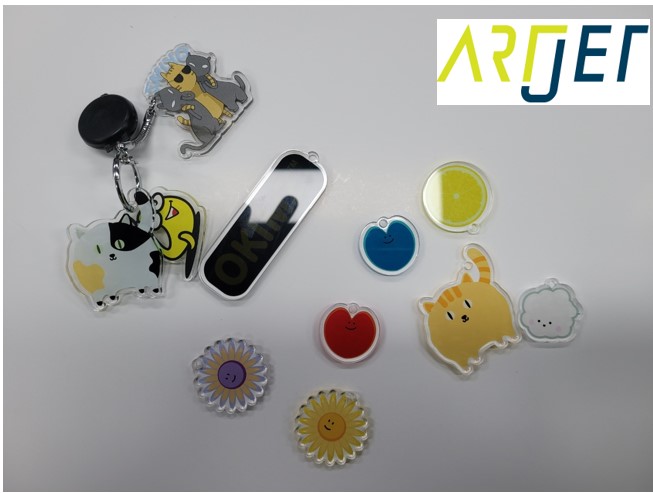
Today I will show you how to make an acrylic keychain using a UV Printer and laser cutting machine.
I. Crop Mark
1. Ai file
Ai file must have a total of 4 layers: Crop mark layer, Cut line layer, Color image layer, and White spot layer.
UV printing uses a total of 3 layers: Crop mark layer, Color image layer, and White spot layer.
Laser cutting uses two layers: Crop mark layer and Cut line layer.
After UV Printer printing, refer to the following for the method of linking Laser crop mark cutting using a camera.
ARTJET UV Printer Application 14 _ UV Print & Laser crop mark cutting
2. Crop mark
While delivering ARTJET UV Printer, I got to see various types of Laser cutting equipment on the customer site.
Crop mark display format
Most of the time, a large white circle is drawn and a small black circle is drawn inside it.
We only displayed it in white, but sometimes the camera confused the white circle with surrounding objects and failed to recognize the crop mark.
The camera recognition rate improves when a small black circle is displayed in a large white circle.

Black Crop Mark Circle Diameter Size
If you look at American or German products, the crop mark circle diameter size is not small.
In the case of Chinese laser cutting equipment using the RD works program, the crop mark circle diameter size must be at least 5mm to be recognized well.
So the minimum circle diameter size must be at least 5mm, and there was no problem when testing up to 10mm, and it seems to be okay from 5mm to 10mm.
Crop mark 갯수
Even if you only use two crop marks, the camera recognizes and proceeds with cutting.
However, for some reason, the cutting line feels inaccurate.
Since the location is recognized and the entire cutting is performed with only two crop marks, errors are bound to occur.
To minimize this error range, at least four crop marks are required,
and those who actually work use five crop marks as a basic.
Also, the larger the entire image to be cut, the more likely an error will occur,
and for this reason, some people use up to eight crop marks.
If the crop mark is too close to the image
If the crop mark is too close to the image, the camera will recognize the image around the image as a crop mark, such as a circle.
In this case, a message will appear saying, ‘The crop mark is not in the image file location, so recognition failed.
In this case, there are several methods.
* Cover the circle on the acrylic print with white tape.
* Leave a gap between the crop mark and the image from the beginning, and exclude the image that appears as the circle from the range that the camera can recognize.
* The last and most standard method is to reduce the camera recognition range in the RD works camera program.
II. Manufacturing process and Laser Crop mark cutting
1. Same process as the mobile phone griptok
It is the same process as the mobile phone griptok production explained previously. Please refer to the details below.
ARTJET UV Printer Application 21 _ UV Printer+Laser Cutting Making a Cell Phone Grip Tok
Here are some more details:
Most of the keychains are made of 2mm thick acrylic with C W C Mirror printing, then 1mm acrylic bonding.
Or, 3mm thick acrylic with CWC mirror printing and then finishing.
However, since the ink is exposed, you need to check the acrylic adhesion and use hard ink that won’t scratch even if you scratch it with your fingernail.
“We use soft or medium ink, so there are scratches. What should I do?”
Wouldn’t it be okay to cover this part with Varnish? I tested it, but the bigger the image, the more it is impossible to prevent ticks. Also, if the varnish you use is soft or medium-hard, not hard, the same nail scratches will occur.
2. The fear of being first!!
After selling UV printers for over 15 years, when I first brought in laser cutting equipment,
* The manual was not well-written
* The twists and turns I experienced while installing the SW program
* The twists and turns I experienced while installing the additional camera and crop mark cutting program in the middle.
In the end, I gave up learning about laser cutting equipment for a while and just asked an engineer to do the cutting whenever I needed to.
I was frustrated with the time I had to ask and wait, so I made up my mind and learned it once, and it didn’t even take an hour.
If you think the same as me, please refer to the video below.
ARTJET UV Printer Application 23 _ UV Printer+Laser cutting acrylic keychain
Most Chinese laser cutting equipment uses the RD works program.
If you follow the laser crop mark cutting video in the latter half of the video, you can perform crop mark cutting.
3. Does it catch fire when cutting? Is the cutting surface not smooth?
“American and German products do not catch fire when cutting acrylic, but Chinese laser cutting equipment catches fire when cutting.”
Opinions may vary from user to user, but I have seen cases where German equipment caught fire.
This part is related to the laser cutting power and speed settings, and the wind speed used during cutting.
Of course, there are differences depending on the type of acrylic used.
“American and German products have right-angled cutting surfaces, but Chinese laser cutting equipment does not.”
Whether the cutting surface is right angled or not is determined by whether the laser cutting machine is set up mechanically correctly.
This part is determined by the level of the engineer who sets up the equipment.
In the case of high-priced equipment sellers, since the QC standards are high, this is unlikely to happen often,
and if Chinese equipment is imported and sold without sufficient study, this situation may occur.
“American and German products have shiny and clean cutting surfaces, but Chinese laser cutting equipment does not.”
This part is the laser cutting power and speed settings, and the acrylic itself.
In particular, there is a huge difference depending on the acrylic material.
Some acrylics are shiny, but they tend to light up and go out when cut,
and some acrylics don’t light up well, but after cutting, the grain is more visible for some reason,,
You need to find the right material after testing various acrylics.
“A few things to acknowledge”
The laser source is CO2, so there are times when the laser power jumps.
For this reason, it is difficult to make elaborate assemblies using the laser, but it is not a big problem to use it for cutting purposes such as key rings.
In fact, I have seen people using Japanese equipment for UV printers, but Chinese equipment for cutting.
Also, it is better to use dedicated engraving equipment rather than cutting equipment for engraving.
That’s all for today.