ARTJET UV Printer Application 34 _ ARTJET CW+C Print time & ink cost
ARTJET UV Printer has been sold in Korea for 4 years, and we are organizing the printer problems we have encountered so far, their causes, and their solutions.
We have compiled 10 different print head problems and 17 ink supply problems, and you can find detailed information at the site below.
ARTJET UV Printer troubleshooting sum up
From last time, we are explaining not only UV printer problems and solutions, but also what products are produced with UV printers.
In the first session, ARTJET UV Printer Application 1 braille printing
In the second session, ARTJET UV Printer Application 2 Flip the material and align it
In the third session, ARTJET UV Printer Application 3 2.5D UV print
In the fourth session, Sai rip [Color Adjustment] tab. ARTJET UV Printer Application 4 Sai rip color graph
In the fifth session, ARTJET UV Printer Application 5 Sai rip print size compensation
In the sixth session, we talked about the acrylic bonding equipment that those who have UV printers and laser cutting equipment are looking for.
Hereuner is only Korean since only Korea is hot on this machine. ARTJET UV Printer Application 6 _아크릴 본딩 장비
In the seventh session ARTJET UV Printer Application 7 _ Ink Consumption Calculation
In the Eighth session, ARTJET UV Printer Application 8 _ I phone 14 print limitation
About K print, Korea Signage Label & special printing exhibition, ARTJET UV Printer Market research 1 _ K Print 2024 Korea printing exhibition
In the ninth session, ARTJET UV Printer Application 9 _ Mask printing not recommend
In the tenth session, ARTJET UV Printer Application 10 _ Leather Cigarette Case UV Printing
In the eleventh session, ARTJET UV Printer Application 11 _ Round soccer strategy board UV printing
In the twelve session, ARTJET UV Printer Application 12 _ What is ICC profile & menu board UV Printing
In the thirteen session, ARTJET UV Printer Application 13 _ Primer performance & limitation
In the fourteen session, ARTJET UV Printer Application 14 _ UV Print & Laser crop mark cutting
In the fifteen session, ARTJET UV Printer Application 15 _ Mobil case UV print profit
In the sixteen session, ARTJET UV Printer Application 16 _ Screen vs Digital Comparison and UV Printing on Hand Sanitizer Cases
In the seventeen session, ARTJET UV Printer Application 17 _ bottle print
In the eighteen session, ARTJET UV Printer Application 18 _ Canvas UV Printing
In the nineteen session, ARTJET UV Printer Application 19 _ Applying epoxy effect with varnish
In the twenty session, ARTJET UV Printer Application 20 _ Making a light frame with a printer+laser cutter
In the twenty one session, ARTJET UV Printer Application 21 _ UV Printer+Laser Cutting Equipment Button Name Tag Making
In the twenty two session, ARTJET UV Printer Application 21 _ UV Printer+Laser Cutting Making a Cell Phone Grip Tok
In the twenty three session, ARTJET UV Printer Application 23 _ UV Printer+Laser cutting Making an Acrylic Keychain
In the twenty four session, ARTJET UV Printer Application 24 _ UV Print with Zig
In the twenty five session, ARTJET UV Printer Application 25 _ How to make RD WORKS CCD camera cutting Video manual
In the twenty six session, ARTJET UV Printer Application 26 _ Acrylic bonding equipment
In the twenty seven session ARTJET UV Printer Application 27 _ All the steps to create UVDTF
In the twenty eight session ARTJET UV Printer Application 28 _ Simple troubleshooting & Captop replacement time
In the twenty nine session ARTJET UV Printer Application 29 _ UVDTF TEST Result
In the thirty session ARTJET UV Printer Application 30 _ Print head Anti crash system
In the thirty one session ARTJET UV Printer Application 31 _ Offset fine tune
In the thirty two session ARTJET UV Printer Application 32 _ ARTJET Delivery Preparation
In the thirty three session ARTJET UV Printer Application 33 _ ARTJET Setting Sequence
Today, I will explain the time and ink cost for double-sided printing, that is, Color printing after Color+White printing.
I. “Can’t ARTJET print CWC at once?”
1. CWC printing and CW+C printing methods
Sometimes people ask, “Can’t ARTJET print CWC at once?”
When I tell them that CWC doesn’t work, they think, ‘ARTJET has poor functionality.’
I’ll tell you about the advantages of Color printing after CW printing over CWC printing.
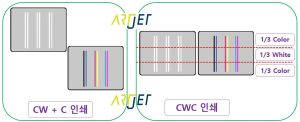
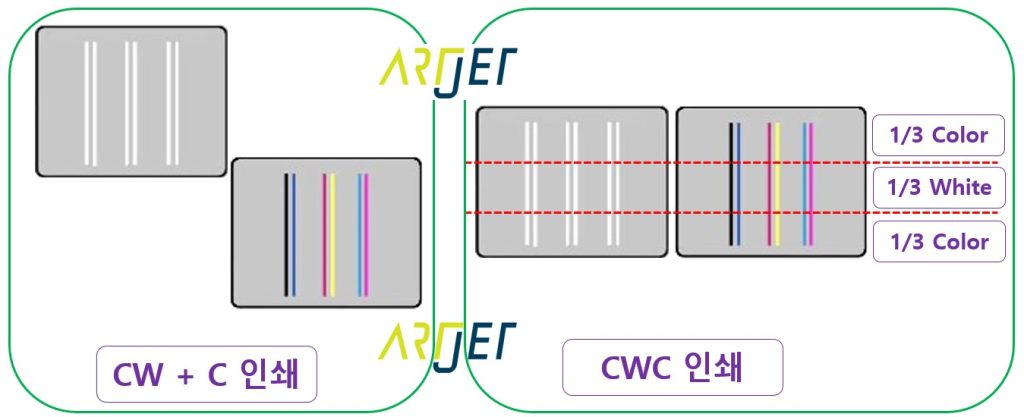
First, let me explain the CWC printing method on the right.
* The front of the Color Print head 1/3 prints only color,
* The White Print head prints only the 2/3 part in white,
* The remaining colors print only the 3/3 part.
That is, instead of using all the nozzles of the Print head, it uses 1/3 each to print Color white color at once.
Since it uses 1/3 of the Print head each, the printing speed is reduced to the same ratio of 1/3.
Next, let me explain the C printing method after CW printing.
* When the Print head is used up and CW printing is finished,
* Only Color is printed again.
That is, the printing speed is not much different between the CWC printing speed and the color printing method after CW printing.
However, there is the inconvenience of having to come in person to select the image and press the color printing button when printing the next color.
However, if the next color image starts automatically, that inconvenience will also disappear.
And the CWC printing risk factor is that
since only 1/3 of the nozzle is used, the remaining 2/3 of the nozzle that is not used is continuously exposed to the LED lamp during printing, so the nozzle condition may deteriorate during long-term operation.
And, if the print head is used narrowly by 1/3, the printing banding is more likely to occur.
2. If you only need to print CW
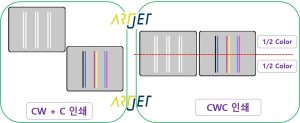
You can see this just by looking at the picture.
The left side uses the entire print head, while the right side uses only half of the print head, so the printing speed is twice as slow.
II. ARTJET CW+C print time
1. Image file size
Print image size: 596 x 287mm
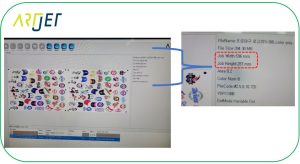
2. Ripping Info
720 x 1080 dpi
First Ripping: Color + White spot Ripping
Second Ripping: Reload the same image file from Rip, set Spot 1 None, Spot 2 None, and then RIP Color only
3. Printing method and time
Bi direction Print
ARTJET SW automatically records the print jobs and the time taken for one day.
First Ripping (Color + white) printing time: 10 minutes 28 seconds
Second Ripping (Color) image printing time: 09 minutes 37 seconds
If you add 1 minute to the start time of the second image after the first image printing is finished,
The total time taken is approximately 21 to 22 minutes for bidirectional printing.
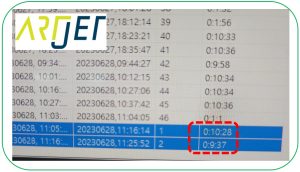
The second image is printed automatically.
After the Color +white printing is finished, the next image, Color, is automatically printed.
Reduces the hassle of having to print the second image separately. For related videos, please refer to the link below.
III. ARTJET CW+C print ink cost
1. Ink consumption calculation options
Most UV printers consume a lot of ink for maintenance, but
sometimes when making an estimate, some people are curious about the actual ink consumption of the printed image.
You can check the estimated ink consumption of the image printed today through the function in Rip software.
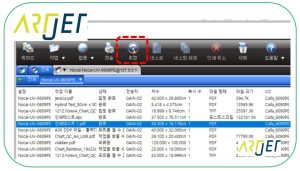
There is an option called “estimate” in the RIP software, and you can check the images that have been ripped (sometimes you may hear that the estimation is not activated when you load a new image and do not rip it) by clicking the “estimate” option.
Our ink is sold for 160,000 won including VAT for 1 kg, not 1 liter.
For color and varnish, the specific gravity is not high, so 1 kg is considered 1 liter and is priced at 160,000 won,
For white, the specific gravity is high, so 1 kg is specified as 950 ml and is priced at 160,000 won.
Please refer to the following for how to use the ink estimation option.
ARTJET UV Printer Application 7 _ Ink Consumption Calculation
2. Ink Consumption and Cost
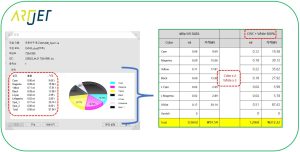
The DATA of Rip SW on the left is based on 1 print of Color White.
The printed image was printed 1 more time after simultaneous printing of Color white, so Color was printed 2 times in total.
White was printed once, but 3 times more was added.
You can set the white ink concentration in ARTJET SW, and all 6 channels of White are set to 50% (50% x 6ch White =300%) and printed 300%.
That is, the DATA calculated 2 times for color and 3 times for white is the Excel sheet on the right.
The total ink used for separate printing of color after CW printing of the keyring image above is 1.29ml, and the ink cost is 212.22 won.
IV. To summarize
The image size of 596 x 287mm shown in the figure below
When printing in CW and then in Color through bi direction print methods.
The total time taken is 21~22 minutes
The total ink cost is 212.22 won.
That’s it for today.