
ARTJET UV Printer Application 30 _ Print head Anti crash system
ARTJET UV Printer has been sold in Korea for 4 years, and we are organizing the printer problems we have encountered so far, their causes, and their solutions.
We have compiled 10 different print head problems and 17 ink supply problems, and you can find detailed information at the site below.
ARTJET UV Printer troubleshooting sum up
From last time, we are explaining not only UV printer problems and solutions, but also what products are produced with UV printers.
In the first session, ARTJET UV Printer Application 1 braille printing
In the second session, ARTJET UV Printer Application 2 Flip the material and align it
In the third session, ARTJET UV Printer Application 3 2.5D UV print
In the fourth session, Sai rip [Color Adjustment] tab. ARTJET UV Printer Application 4 Sai rip color graph
In the fifth session, ARTJET UV Printer Application 5 Sai rip print size compensation
In the sixth session, we talked about the acrylic bonding equipment that those who have UV printers and laser cutting equipment are looking for.
Hereuner is only Korean since only Korea is hot on this machine. ARTJET UV Printer Application 6 _아크릴 본딩 장비
In the seventh session ARTJET UV Printer Application 7 _ Ink Consumption Calculation
In the Eighth session, ARTJET UV Printer Application 8 _ I phone 14 print limitation
About K print, Korea Signage Label & special printing exhibition, ARTJET UV Printer Market research 1 _ K Print 2024 Korea printing exhibition
In the ninth session, ARTJET UV Printer Application 9 _ Mask printing not recommend
In the tenth session, ARTJET UV Printer Application 10 _ Leather Cigarette Case UV Printing
In the eleventh session, ARTJET UV Printer Application 11 _ Round soccer strategy board UV printing
In the twelve session, ARTJET UV Printer Application 12 _ What is ICC profile & menu board UV Printing
In the thirteen session, ARTJET UV Printer Application 13 _ Primer performance & limitation
In the fourteen session, ARTJET UV Printer Application 14 _ UV Print & Laser crop mark cutting
In the fifteen session, ARTJET UV Printer Application 15 _ Mobil case UV print profit
In the sixteen session, ARTJET UV Printer Application 16 _ Screen vs Digital Comparison and UV Printing on Hand Sanitizer Cases
In the seventeen session, ARTJET UV Printer Application 17 _ bottle print
In the eighteen session, ARTJET UV Printer Application 18 _ Canvas UV Printing
In the nineteen session, ARTJET UV Printer Application 19 _ Applying epoxy effect with varnish
In the twenty session, ARTJET UV Printer Application 20 _ Making a light frame with a printer+laser cutter
In the twenty one session, ARTJET UV Printer Application 21 _ UV Printer+Laser Cutting Equipment Button Name Tag Making
In the twenty two session, ARTJET UV Printer Application 21 _ UV Printer+Laser Cutting Making a Cell Phone Grip Tok
In the twenty three session, ARTJET UV Printer Application 23 _ UV Printer+Laser cutting Making an Acrylic Keychain
In the twenty four session, ARTJET UV Printer Application 24 _ UV Print with Zig
In the twenty five session, ARTJET UV Printer Application 25 _ How to make RD WORKS CCD camera cutting Video manual
In the twenty six session, ARTJET UV Printer Application 26 _ Acrylic bonding equipment
In the twenty seven session ARTJET UV Printer Application 27 _ All the steps to create UVDTF
In the twenty eight session ARTJET UV Printer Application 28 _ Simple troubleshooting & Captop replacement time
In the twenty nine session ARTJET UV Printer Application 29 _ UVDTF TEST Result
Today, I will explain about the ARTJET UV Printer head anti-crash device.
I. Inkjet Printer Print head Anti crash system
1. What is the Print head Anti crash system?
This is a device that immediately stops the X-axis movement for the purpose of protecting the print head before the material and print head collide during printing or when moving the head carriage to the flatbed.
2. It’s just an auxiliary device
The print head collision prevention device is not a panacea.
The print head collision prevention device is lowered slightly below the bottom of the print head to stop the movement before the print head collision,
and if the print head carriage is too low, it cannot prevent the print head carriage itself from colliding.
Also, the height difference between the print head and the anti-crash may not be caught by the head collision prevention device.
Still, it is much better than nothing, and it is a device that actually plays a big role in protecting the head.
II. ARTJET UV Printer’s print head anti crash system
1. Description of ARTJET UV Printer Print Head Collision Prevention Device
One in each silver box on either side of the print head carriage,
When moving from right to left,
When moving from left to right,
That is, when moving in both directions, if something catches it, it stops.

At the bottom of the silver box, there is a bar hanging down,
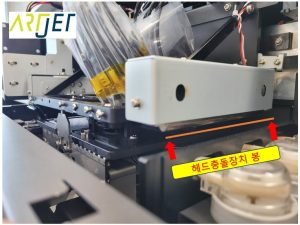
When this bar goes up, the head carriage moving along the X-axis stops immediately, and a message like the one below appears. The print head collision device has been activated, and you should check the material being printed and take action.

Please refer to the video below to get a feel for the bar going up.
2. What to do when the head collision prevention device does not release
Sometimes, the head collision prevention device is not released while it is up.
In other words, the head collision prevention system is still operating, and the SW is not initialized.
In this case, raise and lower the head collision prevention bar by hand as shown below and start again.
For more information, please refer to the following YouTube video.
ARTJET UV Printer Application 30 _ Print head Anti crash system
That’s it for today.