
ARTJET UV Printer Consumer Issues Reception and Resolution 4 _ Sai Flexi Lip Installation and Dongle Key Recognition Failure Measures
ARTJET UV Printer has been sold in Korea for 4 years, and we are organizing the printer problems we have encountered so far, their causes, and their solutions.
We have compiled 10 different print head problems and 17 ink supply problems, and you can find detailed information at the site below.
ARTJET UV Printer troubleshooting sum up
From last time, we are explaining not only UV printer problems and solutions, but also what products are produced with UV printers.
In the first session, ARTJET UV Printer Application 1 braille printing
In the second session, ARTJET UV Printer Application 2 Flip the material and align it
In the third session, ARTJET UV Printer Application 3 2.5D UV print
In the fourth session, Sai rip [Color Adjustment] tab. ARTJET UV Printer Application 4 Sai rip color graph
In the fifth session, ARTJET UV Printer Application 5 Sai rip print size compensation
In the sixth session, we talked about the acrylic bonding equipment that those who have UV printers and laser cutting equipment are looking for.
Hereuner is only Korean since only Korea is hot on this machine. ARTJET UV Printer Application 6 _아크릴 본딩 장비
In the seventh session ARTJET UV Printer Application 7 _ Ink Consumption Calculation
In the Eighth session, ARTJET UV Printer Application 8 _ I phone 14 print limitation
About K print, Korea Signage Label & special printing exhibition, ARTJET UV Printer Market research 1 _ K Print 2024 Korea printing exhibition
In the ninth session, ARTJET UV Printer Application 9 _ Mask printing not recommend
In the tenth session, ARTJET UV Printer Application 10 _ Leather Cigarette Case UV Printing
In the eleventh session, ARTJET UV Printer Application 11 _ Round soccer strategy board UV printing
In the twelve session, ARTJET UV Printer Application 12 _ What is ICC profile & menu board UV Printing
In the thirteen session, ARTJET UV Printer Application 13 _ Primer performance & limitation
In the fourteen session, ARTJET UV Printer Application 14 _ UV Print & Laser crop mark cutting
In the fifteen session, ARTJET UV Printer Application 15 _ Mobil case UV print profit
In the sixteen session, ARTJET UV Printer Application 16 _ Screen vs Digital Comparison and UV Printing on Hand Sanitizer Cases
In the seventeen session, ARTJET UV Printer Application 17 _ bottle print
In the eighteen session, ARTJET UV Printer Application 18 _ Canvas UV Printing
In the nineteen session, ARTJET UV Printer Application 19 _ Applying epoxy effect with varnish
In the twenty session, ARTJET UV Printer Application 20 _ Making a light frame with a printer+laser cutter
In the twenty one session, ARTJET UV Printer Application 21 _ UV Printer+Laser Cutting Equipment Button Name Tag Making
In the twenty two session, ARTJET UV Printer Application 21 _ UV Printer+Laser Cutting Making a Cell Phone Grip Tok
In the twenty three session, ARTJET UV Printer Application 23 _ UV Printer+Laser cutting Making an Acrylic Keychain
In the twenty four session, ARTJET UV Printer Application 24 _ UV Print with Zig
In the twenty five session, ARTJET UV Printer Application 25 _ How to make RD WORKS CCD camera cutting Video manual
In the twenty six session, ARTJET UV Printer Application 26 _ Acrylic bonding equipment
In the twenty seven session ARTJET UV Printer Application 27 _ All the steps to create UVDTF
In the twenty eight session ARTJET UV Printer Application 28 _ Simple troubleshooting & Captop replacement time
In the twenty nine session ARTJET UV Printer Application 29 _ UVDTF TEST Result
In the thirty session ARTJET UV Printer Application 30 _ Print head Anti crash system
In the thirty one session ARTJET UV Printer Application 31 _ Offset fine tune
In the thirty two session ARTJET UV Printer Application 32 _ ARTJET Delivery Preparation
In the thirty three session ARTJET UV Printer Application 33 _ ARTJET Setting Sequence
In the thirty four session ARTJET UV Printer Application 34 _ ARTJET CW+C Print time & ink cost
In the thirty five session ARTJET UV Printer Application 35 _ Create a white shield with different images on the front and back of the keyring
In the thirty Six session ARTJET UV Printer Application 36 _ Vertical offset is not correct only for the right section of white
In the thirty Seven session ARTJET UV Printer Application 37 _Keyring Business Required Equipment and Investment Costs
Problems and solutions from actual consumer sites
In the first section ARTJET UV Printer Consumer Issues and Solutions 1 _ White does not come out at all.
In the second section ARTJET UV Printer Consumer Issues and Resolution 2 _ The nozzle test is fine, but it seems that a certain color is not coming out during printing
In the third section ARTJET UV Printer Consumer Issues and Resolution 3 _ The red color does not appear at first, then appears during printing, and then does not appear again
Today, I will explain about “ARTJET UV Printer Consumer Issues Reception and Resolution 4 _ Sai Flexi Lip Installation and Dongle Key Recognition Failure Measures”.
I. Sai Flexi Rip Installation
1.Sai Flexi Rip Installation Dongle USB Version and Preparation
Until a year ago, the UV Printer and Rip Box were provided together as shown below.

A customer moved and had the lock key, but lost the box with the activation code, so he ended up buying a new Rip at a high price.
You must have the lock key and activation code in the picture below.

Also, when installing a program or deleting a program, you must register on the Internet to use it or delete it.
The Internet is also absolutely necessary.
2. Sai Flexi Rip program installation
Lock Key should never be plugged into the computer during installation.
For Rip installation, only 3 things are needed: internet connection, installation USB, and activation code.
Plug in the installation USB and follow the instructions in the picture below.
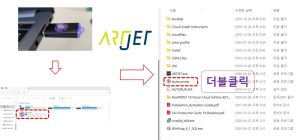


Even after the icon appears, the program is still being installed, so you need to wait patiently until the installation wizard ends as shown in the image below.
When the PM icon appears, now is the first time to plug in the dongle USB (Lock key) to the computer and run PM.
This is how the Sai rip program is installed.

II. After installing Sai Rip, connect the Printer Driver and set up Rip basic settings.
1. Sai Flexi Rip, make the Printer Driver, Apply ICC profile.
Please follow up the hereunder picture.

When you create a Printer Driver, a folder with the model name is created.
I hope you don’t get confused because you didn’t create a Printer Driver like me and the folder doesn’t exist.
When I installed the Printer, I created an ARTJET folder on the desktop and put all the installation-related files there. There is also an ICC profile file in that folder.
Copy the ICC profile from the ARTJET folder and paste it into that folder.
2. Setting up Rip Basics
Change the cm unit to mm and set the Rip default settings as shown in the figure below.
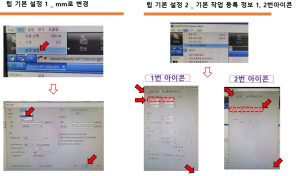

You can also check the contents explained so far through the video below.
After installing Sai Rip and using it well, after Windows update, I deleted and reinstalled it for 4 hours due to a problem with not recognizing the dongle USB (Lock key),,,
I will explain the solution to this problem next time.
That’s it for today.