
Tips for Reducing Varnish Banding
So far, UV printer-related issues, We’ve compiled
24 articles on ink supply issues,
9 articles on head basics,
12 articles on actual head issues and their solutions,
10 actual mechanical Machine Problems and Solutions.
Related information can be found via the links.
Following the ink supply, head, and mechanism issues, we are now explaining the problems that occurred with the board or software.
1.”The print function works, but nothing comes out.”

2. “I think I messed up the SW. Can I restore it to its default settings?

3. “The SW connection is not working because the touch panel is not powered on.”

4. “Start printing from the flatbed starting point”

5. “The software closes when I just press the print button.”

6. “Sometimes it’s fine on the X-axis, and sometimes it’s double-printed.”

7. “Why is the white color printed only on the right side of the Y-axis?”

8. “How do I set the offset precision?”

9. “The print start position keeps moving sideways while printing.”

10. “There’s a white line at the end of the print.”

Today, I’m going to share some tips to help you reduce varnish banding.
I. Minimum requirements for glossiness and banding _Tips for Reducing Varnish Banding
1. Whether it is a lamp specifically for varnish _Tips for Reducing Varnish Banding
Before Chinese UV lamps became widespread, UV lamps were only produced in the US and UK.
Because of their high cost, a separate lamp specifically for curing varnish was not available, limiting the ability to achieve a glossy varnish.
Since the varnish was cured by the lamp immediately after it fell off, the matte finish was achieved, but the glossy effect, which only appeared after the varnish had spread, was not achieved.
To achieve a glossy effect, software was used to turn the lamp on once after every four cycles of the head carriage, allowing the varnish to spread on the material. This allowed for a glossy effect.
However, because the lamp only cured once every four cycles, a band-like line appeared at each interval, which also presented limitations.
However,
With the widespread adoption of Chinese LED lamps, lamp prices have decreased, leading to the adoption of separate varnish lamps in UV printers.
The previous four-print, one-cure software technique is no longer necessary, and banding can be minimized by adjusting the position of the varnish lamp.
2. Glossy Varnish Banding Minimum Requirements _Tips for Reducing Varnish Banding
UV printers with separate varnish lamps can minimize varnish banding under the following conditions:
Test results show that varnish banding was minimized when the lamp was in position 1 and the varnish concentration was 40%.

However, due to the change in lamp orientation (the lamp becomes larger as it is angled 10 degrees outwards), if used this way, the left cover must be removed due to lamp interference.
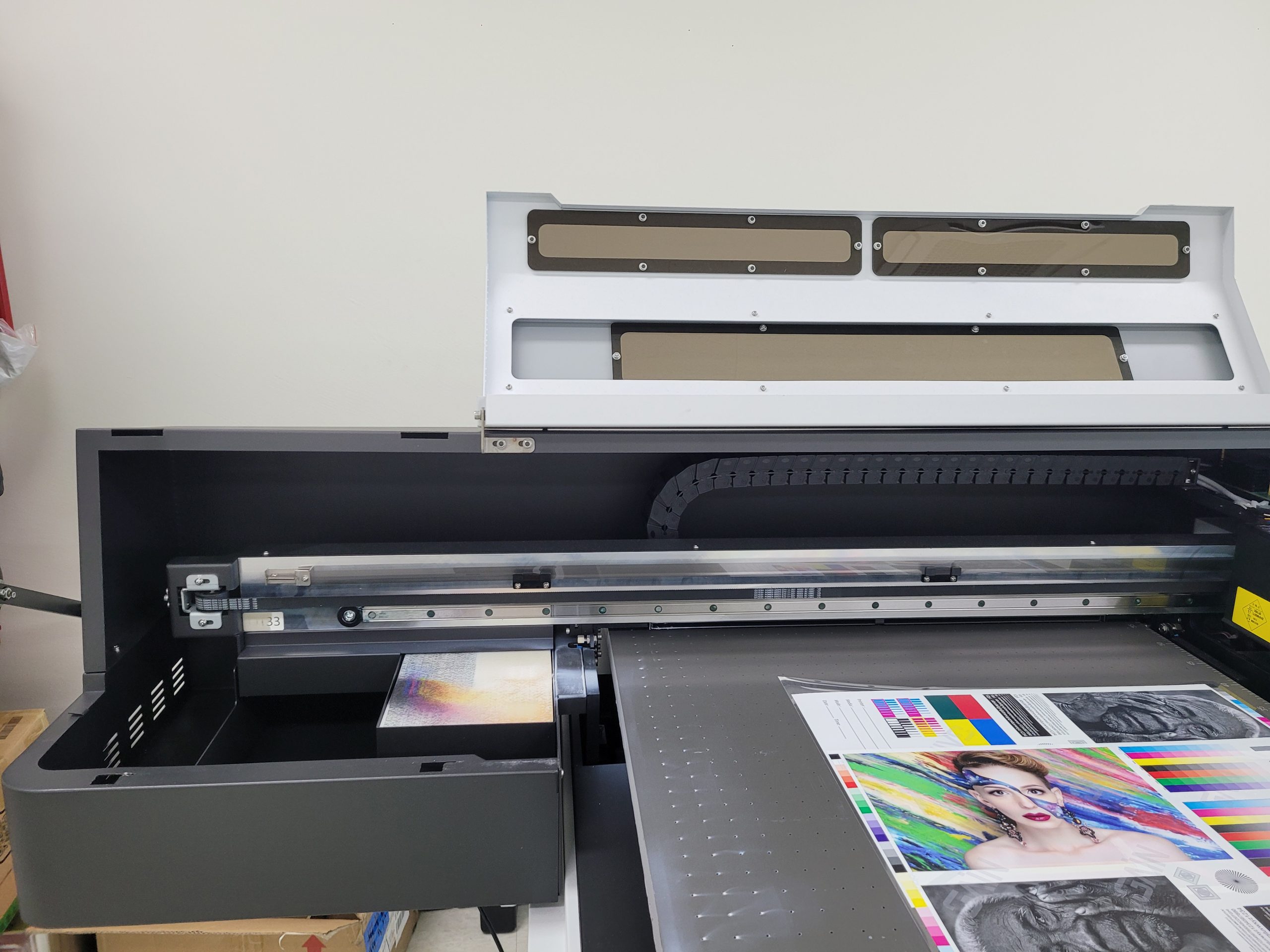
II. Test process _Tips for Reducing Varnish Banding
To minimize varnish banding, we tested two variables:
- Checking for banding based on lamp position
- Checking for banding based on varnish density
1. Banding degree depending on lamp position _Tips for Reducing Varnish Banding
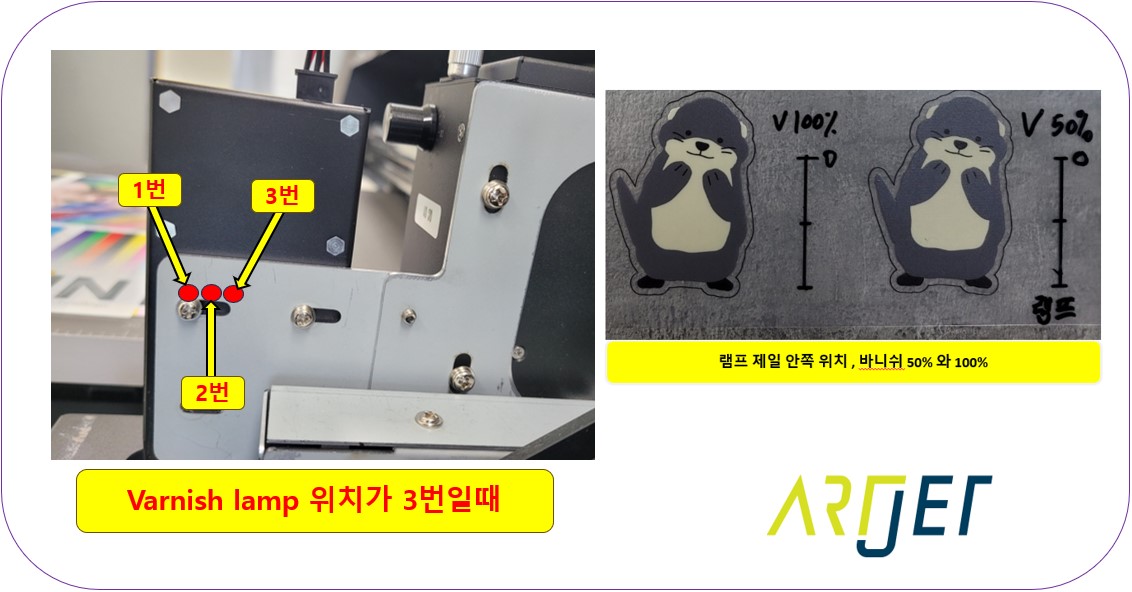
When the lamp is in position 3,
the time it takes for the varnish to spread after it’s applied is minimized, resulting in a matte, less glossy varnish compared to positions 1 and 2.
When held up to light, banding is minimized due to the matte finish, but the glossy finish is significantly reduced.
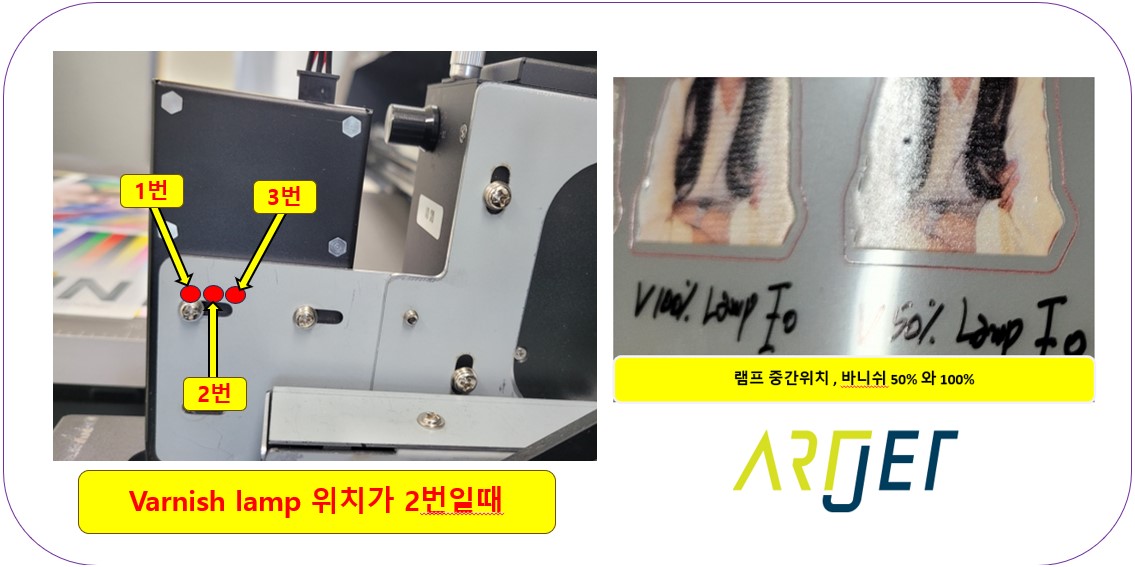
When the lamp is in position 2,
the varnish is allowed time to spread after application, creating a glossy finish.
However, testing results show that both 50% and 100% varnishes exhibit significant banding.
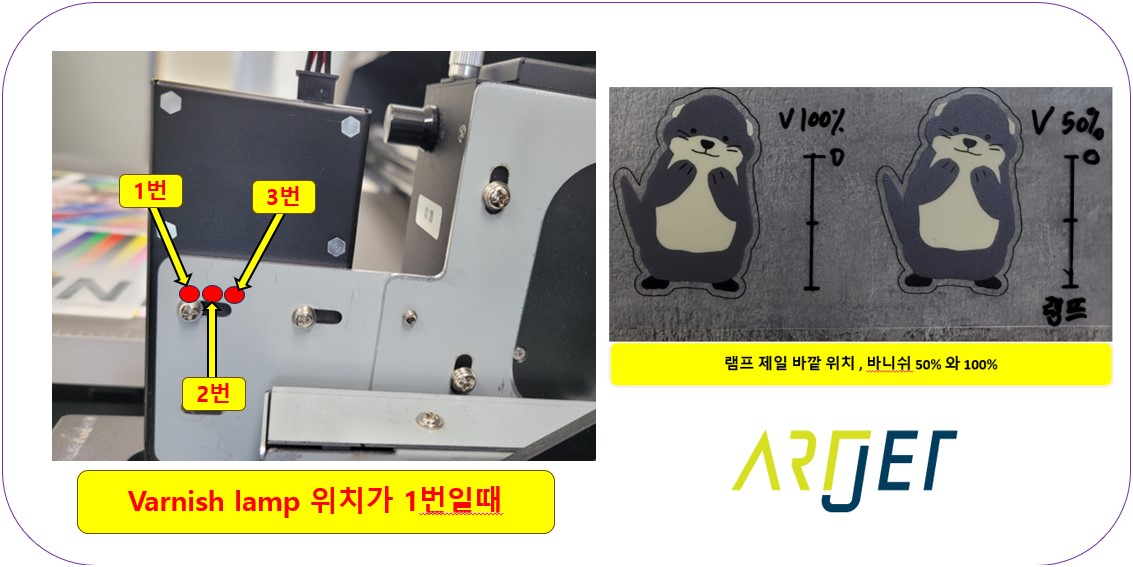
When the lamp was in position 1,
banding was significantly reduced and the greasy effect was optimal.
The point where varnish banding was minimized was position 1, so the lamp was fixed at position 1.
2. Varnish density test at lamp position 1 _Tips for Reducing Varnish Banding
I adjusted the varnish density from 10% to 100%, in 10% increments.
Banding was minimized at 30, 40, 50, and 60%.
The varnish banding became more visible when exposed to light.
The optimal value found through this approach was a varnish density of 40%.
You can also watch the video showing the process of finding this density at the link below.

III. This is how ARTJET supports our customers.
One thing I feel while selling and maintaining ARTJET UV Printers for 5 years is that the next most important thing after product stability is Troubleshooting DATA.
All products have problems, whether they are actual equipment problems or consumer errors, and product stability is how easily and quickly you solve those problems.
We are organizing all the troubleshooting DATA as follows.
You can see the product print quality by clicking here.

1. Complete Guide to Printhead Problems and Solutions
1st Summary
ARTJET UV Printer Problems and Solution _Printhead Problems Summary
Additional issue and solution
The red color does not appear at first, then appears during printing, and then does not appear again
Printhead replacement video and precautions
2nd Summary
I have summarized the basic knowledge about the head and the head problems that have occurred as follows.
Complete summary of actual head problems ARTJET 2025
2. Complete Guide to Ink Supply Problems and Solutions
Previously sorted, ink supply problem summary
2nd Summary
This is a summary of all the issues that have occurred over the past 5 years. If you have a printer that uses the Damper method, you can solve most problems by just looking at the link below.
If you go to the link, there are a total of 24 problems and solutions.
Complete summary of actual head problems ARTJET 2025
Addition
“no clogged nozzles, but banding in the red ARTJET 2025”
“When I print it, the whole thing has a yellow tint to it”
3. Mechanical problem and Solutions
You can refer to the information summarized above.
4. Electron board and Software problem is hereunder.
1. The printer works but printing does not work
2. Resetting to default settings
3. Touch panel does not turn on
4. The printer is printing, but nothing is printed
5. Software closes when I just press the print button
6. Printing in the wrong place
7. Positioning misalignment in X-axis direction
8. How to make the Offset fine tune
9. Vertical offset is not correct only for the right section of white
10. Software turn off when click print button
5. Sai Flexi Rip software
1. How to make the Spot Color & several mistakes
2. Color is strange after applying Spot color
3. White is sticking out
4. Installation and Dongle Key Recognition Failure Measures
5. Dongle Key Recognition Failure
6. White lines appear when printing only color
7. Color Adjustment through Graph
8. Print size compensation
9. Ink Consumption Calculation
10. What is ICC profile & menu board UV Printing
11. Dongle Key recognition Failure from USB port
6. Problems and solutions from actual consumer sites
1. Paper that absorbs ink
2. A line-like thing appears at the end of the white print surface
3.Can varnish banding be reduced?
4. Are there many problems with China’s UV Printer?
7. UV Printer Application
we are explaining not only UV printer problems and solutions, but also what products are produced with UV printers.
1. Braille printing
2. Flip the material and align it
3. 2.5D UV print
4. ARTJET UV Printer Application 6 _아크릴 본딩 장비
5. I phone 14 print limitation
6. Mask printing not recommend
7. Leather Cigarette Case UV Printing
8. Round soccer strategy board UV printing
9. Primer performance & limitation
10. UV Print & Laser crop mark cutting
11. Mobil case UV print profit
12. Screen vs Digital Comparison and UV Printing on Hand Sanitizer Cases
13. Bottle zig & print
14. Canvas UV Printing
15. Applying epoxy effect with varnish
16. Making a light frame with UV Printer & Laser cutter
17. UV Printer & Laser Cutting Equipment Button Name Tag Making
18. UV Printer & Laser Cutting Making a Cell Phone GripTok
19. Making an Acrylic Keychain with UV Printer & Laser Cutter
20. UV Print with Zig
21. How to make RD WORKS CCD camera cutting Video manual
22. Acrylic bonding equipment
23. All the steps to create UVDTF
24. UVDTF TEST Result on various material
25. ARTJET CW+C Print time & Ink Cost
26. Create a white shield with different images on the front and back of the keyring
27. Keyring Business Required Equipment and Investment Costs
29. Acrylic Lighting Goods
30. Ballpoint pen jig printing
31. Staining occurs when printing on coated leather
8. Bonus
1. ARTJET UV Printer Old Model Refurbished
2. UV Printer Laser Cutter Bonding Machine Which equipment should I buy first?
3. Considerations when choosing a UV printer
4. DTF Printer Price and Specification Survey
5. Acrylic Bonding Equipment Don’t Put It Off Anymore
6. China inkjet level now
7. Thoughts on KOSIGN 2024
8. ARTJET Delivery Preparation
9. ARTJET Setting Sequence
10. UV Printer History and Future Prediction 1
11. UV Printer History and Future Prediction 2
12. UV Printer History and Future Prediction 3
13. UV Printer History and Future Prediction 4
14. UV Printer History and Future Prediction 5
15. Are there many problems with China’s UV Printer?
16. UV Printer Small Text Meaning
17. Is the XP600 head okay
18. Roland UV Printer Summary
19. Mimaki UV Printer Summary
20. UV Printer Alibaba Direct Purchase Considerations
21. Things to consider when buying a used UV Printer
22. Bi Uni Print Quality Differences
23. RDworks download install and laser head position by SW
That’s it for today.