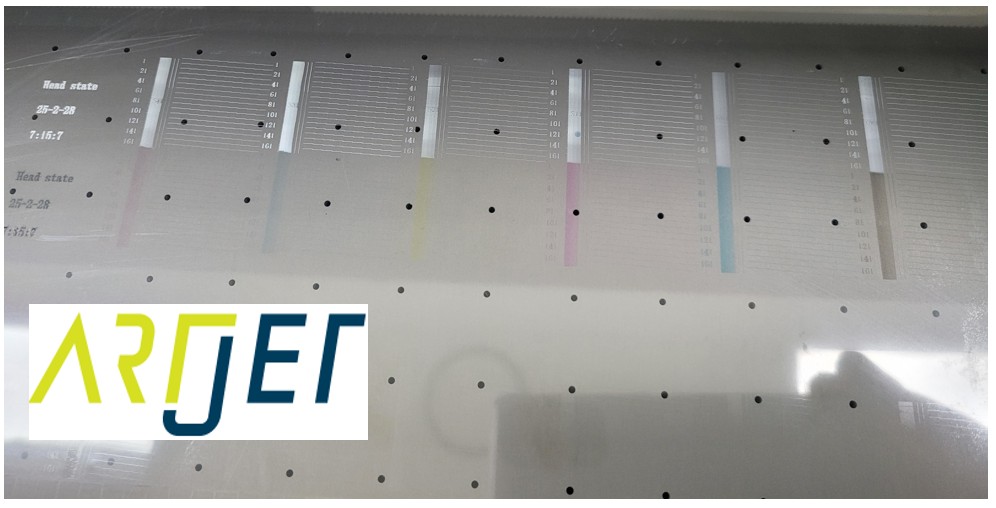
Printer is printing, but nothing is printed
I. Problem _Printer is printing, but nothing is printed
This Tuesday, when I arrived at the office after installing the equipment, the manager in charge called me.
“Team Leader, after you left, when I tried to print, it worked, but nothing came out.”
“Would you like to try printing the file I tested again, not the newly ripped file?”
After a while,
“Team Leader, nothing came out of the ARTJET TEST image either.”
“Would you like to try a nozzle test?”
“Wait a minute. Nothing came out.”
Nozzle pattern should be like hereunder. but nothing came out.

“Did you do anything else after I left?”
“I just turned off the PC and the equipment and reconnected them because I was moving for a bit.”
II. Solution _Printer is printing, but nothing is printed
1. “turned off the PC and the equipment and reconnected them” _Printer is printing, but nothing is printed
“Manager. Turn off the software, press the power button, and turn off the main power switch. Let’s do it together.”
“Okay, I understand.”
“Please proceed in order.”
“Should I turn it on now?”
“Yes, turn on the main power switch, press the power button on the front. And wait for 7 seconds before connecting the software.”
“OK, 7 seconds is passed, I click the software” for a while “Initializing is complete.”
“Please press the Test button.”
“Oh, the ink is coming out now.”
“Just in case, please print the ARTJET TEST image. Please don’t hang up.”
“I’m holding the phone with my shoulder while I’m working, so if it doesn’t work, I’ll call you back. I’ll hang up^^”
ARTJET Test image, for your reference

2. Print head power supply _Printer is printing, but nothing is printed
This is something I briefly explained during the call.
“Manager, when you press the power button, power is supplied to the headboard, and when you look at it from the front, two red lights in the middle of the board come on and off.”
“Where is it?”
“It should be gone now, I think that’s the stage where power is supplied to the print head.”
“Ah, I think I know what you mean.”
“Before the red light goes off, if you connect the software, power will not be supplied to the print head, so the nozzle cannot work, and of course, the ink will not be jetted.”
Please refer to the video below for pressing the Power button and seeing the red light turn off.
After clicking the Power button, please wait for about 7 seconds and then connect the Software.
ARTJET UV Printer Troubleshooting Electron & SW 4 _ The printer is printing, but nothing is printed
III. This is how Artjet supports our customers.
ARTJET UV Printer has been sold in Korea for 5 years, and we are organizing the printer problems we have encountered so far, their causes, and their solutions.
1. Printhead Problems and Solutions Total 10
ARTJET UV Printer Problems and Solution_Printhead Problems Summary
Additional issue and solution
The red color does not appear at first, then appears during printing, and then does not appear again
2. Ink Supply Problems and Solutions Total 17
ARTJET UV Printer Problems and Solutions_Ink Supply Problems Summary
Comprehensive application
Damper replacement time
The nozzle test is fine, but it seems that a certain color is not coming out during printing
Capping station block positioning to match the print head and captop
Can I ignore the ink alarm and use it?
UV Printer Monday Morning Routine
3. Mechanical problem and Solutions
1. How to align the print head in a straight line
2. There is a clicking noise from the X-axis
3. Banding problem in specific section
4. The Importance of Head Height in Bidirectional Printing
5. Problems that occur when the wiper height is high
6. When the cleaning belt screw is loose
7. When the capping fixing plate does not fit
8. How do I prepare the ARTJET electricity?
9.When Anti-crash becomes a jam in captop
10. Print head Anti crash system
4. Electron board and Software problem is hereunder.
1. The printer works but printing does not work
2. Resetting to default settings
3. Touch panel does not turn on
4. The printer is printing, but nothing is printed
5. Software closes when I just press the print button
6. Printing in the wrong place
7. Positioning misalignment in X-axis direction
8. How to make the Offset fine tune
9. Vertical offset is not correct only for the right section of white
5. Sai Flexi Rip software
1. Sai Flexi Rip _ How to make the Spot Color & several mistakes
2. Sai Flexi Rip _ Color is strange after applying Spot color
3. Sai Flexi Rip _ White is sticking out
4. Sai Flexi Rip _ Installation and Dongle Key Recognition Failure Measures
5. Sai Flexi Rip _ Dongle Key Recognition Failure
6. Sai Flexi Rip _ White lines appear when printing only color
7. Sai Flexi Rip _ Color Adjustment through Graph
8. Sai Flexi Rip _ Print size compensation
9. Sai Flexi Rip _ Ink Consumption Calculation
10. What is ICC profile & menu board UV Printing
11. Sai Flexi Rip _ Dongle Key recognition Failure from USB port
6. Problems and solutions from actual consumer sites
1. Paper that absorbs ink
2. White Motor Pump Does Not Turn
3. A line-like thing appears at the end of the white print surface
4.Can varnish banding be reduced?
5. Are there many problems with China’s UV Printer?
7. UV Printer Application
we are explaining not only UV printer problems and solutions, but also what products are produced with UV printers.
1. Braille printing
2. Flip the material and align it
3. 2.5D UV print
4. ARTJET UV Printer Application 6 _아크릴 본딩 장비
5. I phone 14 print limitation
6. Mask printing not recommend
7. Leather Cigarette Case UV Printing
8. Round soccer strategy board UV printing
9. Primer performance & limitation
10. UV Print & Laser crop mark cutting
11. Mobil case UV print profit
12. Screen vs Digital Comparison and UV Printing on Hand Sanitizer Cases
13. Bottle zig & print
14. Canvas UV Printing
15. Applying epoxy effect with varnish
16. Making a light frame with UV Printer & Laser cutter
17. UV Printer & Laser Cutting Equipment Button Name Tag Making
18. UV Printer & Laser Cutting Making a Cell Phone GripTok
19. Making an Acrylic Keychain with UV Printer & Laser Cutter
20. UV Print with Zig
21. How to make RD WORKS CCD camera cutting Video manual
22. Acrylic bonding equipment
23. All the steps to create UVDTF
24. UVDTF TEST Result on various material
25. ARTJET CW+C Print time & Ink Cost
26. Create a white shield with different images on the front and back of the keyring
27. Keyring Business Required Equipment and Investment Costs
29. Acrylic Lighting Goods
30. Ballpoint pen jig printing
31. Staining occurs when printing on coated leather
8. Bonus
1. ARTJET UV Printer Old Model Refurbished
2. UV Printer Laser Cutter Bonding Machine Which equipment should I buy first?
3. Considerations when choosing a UV printer
4. DTF Printer Price and Specification Survey
5. Acrylic Bonding Equipment Don’t Put It Off Anymore
6. China inkjet level now
7. Thoughts on KOSIGN 2024
8. ARTJET Delivery Preparation
9. ARTJET Setting Sequence
10. UV Printer History and Future Prediction 1
11. UV Printer History and Future Prediction 2
12. UV Printer History and Future Prediction 3
13. UV Printer History and Future Prediction 4
14. UV Printer History and Future Prediction 5
15. Are there many problems with China’s UV Printer?
16. UV Printer Small Text Meaning
That’s it for today.