
Is the XP600 head okay
I. “Is the XP600 head okay ?”
1. The knowledge I have _Is the XP600 head okay
Since it would be unreliable for someone who doesn’t really know about inkjet to talk like this, I’m adding here some articles that summarize the knowledge I’ve gained while working at a UV Printer development manufacturer since 2003.
- This will give you an idea of how ink is ejected through the head. How does print head jet ink
- 인You can get a precise idea of chain resolution. Printhead Print Resolution Concept
- “What dpi level is the head used for? Other places express it as Npi. What does that mean?” Print head Y axis resolution concept
- Here’s a glossary of print head specifications and terms that inkjet practitioners need to know. Xaar1201(Gen5i) specifications description
- Here are some frequently asked questions and answers about heads in inkjet practice. 프린트헤드 스펙 용어 설명
- You can see how Multi drop and Gray scale work. Printhead Gray scale, Multi drop
- This is a summary of Ricoh heads so you can see them at a glance. 프린트헤드 Ricoh 리코 헤드 설명
- This is a summary of Konica heads so you can see them at a glance. Konica Inkjet print head summary
- Here is a comparison of the Gen5i head specs, which is the same head as the now discontinued Xaar1201. Ricoh Gen5i vs Xaar1201 print head
- This article is about head life and warranty. print head compensation availability
2. Head mainly used in large format UV printers _Is the XP600 head okay
인쇄 size가 큰 Large format UV Printer는 주로 고가 헤드를 사용합니다.
One color per head, White has weak whiteness, so 2 heads
For 4-color equipment, use 6 print heads of C, M, Y, K, W, W, or for 6-color equipment, use 8 print heads of C, M, Y, K, Lc, Lm, W, W.
If Varnish or Primer is added, replace one White print head with the corresponding functional ink, or add 1 more to use 9 print heads.
Although they cost up to 3 or 4 million won per head, industrial print heads are also consumables and are not covered by a warranty.
The head lifespan
Assuming that it is well managed, it can be used for about 2~3 years, but that well-managed lifespan is not as easy as you think.
If a nozzle with diagonal spray occurs among the numerous nozzles, or 1~2 are clogged, when printing solid colors of the clogged head color series, lines or grains will be visible.
White also uses up to 2 heads, and if 2~3 of the white print head nozzles are clogged, grains or grains will also be visible on the white background.
As shown in the photo below, if the nozzle is diagonally sprayed or clogged,
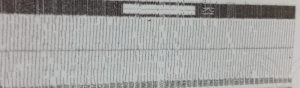
Since the head is expensive,
there are various head-piercing liquids commercialized on the market. Sometimes this solves the problem, sometimes it doesn’t,
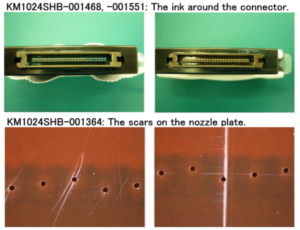
As you can see in the picture below, this head is a consumable that must be replaced if it rubs against the material or gets worn out by something, eventually.
3. Head mainly used in small UV printers _Is the XP600 head okay
A print head that can operate with 4 or 6 colors in one print head can be called a low-cost head.
Compared to industrial print heads, it seems to be low-cost because the Piezo (thin plate that vibrates) is made weaker.
The price range varies depending on the head, but for a 4-channel or 6-channel head, it seems to be around 1 million won or slightly more.
II. Criteria for Choosing a Small UV Printer _Is the XP600 head okay
1. Print quality is a priority over productivity _Is the XP600 head okay
Large UV printers are mainly used for large-sized prints, and after printing, they are hung on the wall or installed somewhere.
At least the visibility is about 1 meter, so even if the halftone dots are not fine, it is not a big problem.
However, in the case of small printers, since the prints are small, they are installed in places where people can see them, that is, they are often printed on goods that are short-sighted or can be touched by hand.
Since the visibility is short, you have to look at the prints in more detail, and if they are slightly rough or have lines, it becomes a problem.
As such, if the print quality of small equipment is not good, it is not easy to sell, so print quality is always the first priority.
2. Expensive industrial heads vs. low-cost series heads _Is the XP600 head okay
From our perspective of developing, manufacturing, and selling printers, we believe that installing an expensive industrial head on a small UV printer is a wrong concept.
If the print quality is better or the same, you should definitely choose a low-cost print head regardless of the print speed.
‘If one or two nozzles for a color are diagonally sprayed or clogged, you will see lines when printing the solid color,’
‘Since white also uses only one or two expensive heads, if several nozzles are clogged, you will see marks on the white background.’
‘The print head can be damaged by being hit or damaged by some accident,’
At last year’s K Print exhibition, there was a company that introduced a UV printer equipped with a Ricoh Gen6 print head on a small device.
“How much does the device cost?”
“It’s about 30 million won.”
“How much does one head cost?”
“It’s between 3 million and 4 million won.”
The official name of the Ricoh Gen6 print head is MH5320, which can operate up to two colors, and MH5340, which can operate up to four colors.
Even if the MH5340 operates four colors, if a nozzle gets clogged, the replacement cost is 30-4 million won.
If you use a head that operates MH5320 two colors, you need to use two heads for CMYK configuration, so it costs 60-8 million won.
If the equipment price is 30 million won and the cost of replacing one head is 30-4 million won, it always creates an ambiguous relationship with the customer, so expensive heads are not used, especially for small equipment.
3. Common opinions of experienced people _Is the XP600 head okay
Many of my friends who were doing AS at the development manufacturer run a lot of printing shops, and their opinions are as follows.
“If even a few nozzles are blocked in a small UV printer, solid color or white background is shown,,, how can I replace the expensive head every time?”
“For a small UV printer, just use a cheap head, and when one or two nozzles are blocked, replace it every time and use it as if it was the first time it was installed, so I feel more comfortable.”
III. Why I Like the XP600 Head as a Seller _Is the XP600 head okay
1. Prices that won’t make customers blush _Is the XP600 head okay
Those who have purchased ARTJET UV Printers now probably don’t know how fortunate it is to have purchased a low-cost head device,,,
Back in the days when JETRIX UV Printers were being sold, one head cost 3.5 to 4 million won,
Every time a JETRIX UV Printer customer replaced a head,, that feeling,, and how many difficult words were exchanged because the cause was unclear,,,
2. i1600 4 color comparison, 6 color on similar halftone _Is the XP600 head okay
Don’t think that the XP600 head is cheap and therefore has poor print quality.
Similar to the i1600, but with the addition of Light cyan and Light magenta, it operates in 6 colors,
In reality, when delivering printed materials, how much of a difference is there between rich and poor colors,,,
This is an evaluation by someone who printed a file that was actually produced in 4 colors with Mimaki and then printed it with ARTJET.
Team leader, will the Mimaki colors come out?
3. Meaning that White uses 6 channels _Is the XP600 head okay
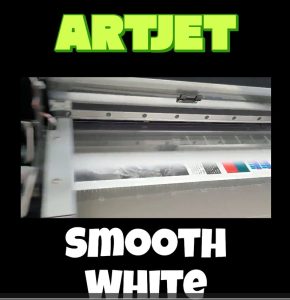
Because the head price is expensive, in the case of large UV printers, one or two white heads are used.
If a few nozzles are clogged in one or two of those heads, a line-like pattern will be visible when printing white.
Also, in the case of Roland equipment that uses two white channels, there are often complaints that “the white is not enough.”
However, one XP600 head used in the ARTJET UV Printer uses only white.
In other words, it uses 6 channels for white, and instead of the usual 100% per channel, it uses 50% (6ch x 50%) to print a total of 300% white.
Even if one or two channels have a problem, you can lock that channel and increase the output from 50% to 70% or 80%,
so you are much freer from problems such as white nozzle clogging or diagonal spraying.
Today’s white print video is a video printed using 50% 6 channels Please see the video.
4. ARTJET SW with channel swapping _Is the XP600 head okay
ARTJET UV Printer software is software developed by an inkjet development manufacturer.
The software of large equipment is modified and applied to ARTJET UV Printer, and has various functions.
In particular, as in the link below, you can operate the color by changing the software after swapping the damper,
and in the case of White, you can simply lock the channel where the nozzle condition is not good.
ARTJET SW with channel swapping
IV. This is how Artjet supports our customers.
ARTJET UV Printer has been sold in Korea for 5 years, and we are organizing the printer problems we have encountered so far, their causes, and their solutions.
1. Printhead Problems and Solutions Total 10
ARTJET UV Printer Problems and Solution_Printhead Problems Summary
Additional issue and solution
The red color does not appear at first, then appears during printing, and then does not appear again
2. Ink Supply Problems and Solutions Total 17
ARTJET UV Printer Problems and Solutions_Ink Supply Problems Summary
Comprehensive application
Damper replacement time
The nozzle test is fine, but it seems that a certain color is not coming out during printing
Capping station block positioning to match the print head and captop
Can I ignore the ink alarm and use it?
UV Printer Monday Morning Routine
3. Mechanical problem and Solutions
1. How to align the print head in a straight line
2. There is a clicking noise from the X-axis
3. Banding problem in specific section
4. The Importance of Head Height in Bidirectional Printing
5. Problems that occur when the wiper height is high
6. When the cleaning belt screw is loose
7. When the capping fixing plate does not fit
8. How do I prepare the ARTJET electricity?
9.When Anti-crash becomes a jam in captop
10. Print head Anti crash system
4. Electron board and Software problem is hereunder.
1. The printer works but printing does not work
2. Resetting to default settings
3. Touch panel does not turn on
4. The printer is printing, but nothing is printed
5. Software closes when I just press the print button
6. Printing in the wrong place
7. Positioning misalignment in X-axis direction
8. How to make the Offset fine tune
9. Vertical offset is not correct only for the right section of white
5. Sai Flexi Rip software
1. Sai Flexi Rip _ How to make the Spot Color & several mistakes
2. Sai Flexi Rip _ Color is strange after applying Spot color
3. Sai Flexi Rip _ White is sticking out
4. Sai Flexi Rip _ Installation and Dongle Key Recognition Failure Measures
5. Sai Flexi Rip _ Dongle Key Recognition Failure
6. Sai Flexi Rip _ White lines appear when printing only color
7. Sai Flexi Rip _ Color Adjustment through Graph
8. Sai Flexi Rip _ Print size compensation
9. Sai Flexi Rip _ Ink Consumption Calculation
10. What is ICC profile & menu board UV Printing
11. Sai Flexi Rip _ Dongle Key recognition Failure from USB port
6. Problems and solutions from actual consumer sites
1. Paper that absorbs ink
2. White Motor Pump Does Not Turn
3. A line-like thing appears at the end of the white print surface
4.Can varnish banding be reduced?
5. Are there many problems with China’s UV Printer?
7. UV Printer Application
we are explaining not only UV printer problems and solutions, but also what products are produced with UV printers.
1. Braille printing
2. Flip the material and align it
3. 2.5D UV print
4. ARTJET UV Printer Application 6 _아크릴 본딩 장비
5. I phone 14 print limitation
6. Mask printing not recommend
7. Leather Cigarette Case UV Printing
8. Round soccer strategy board UV printing
9. Primer performance & limitation
10. UV Print & Laser crop mark cutting
11. Mobil case UV print profit
12. Screen vs Digital Comparison and UV Printing on Hand Sanitizer Cases
13. Bottle zig & print
14. Canvas UV Printing
15. Applying epoxy effect with varnish
16. Making a light frame with UV Printer & Laser cutter
17. UV Printer & Laser Cutting Equipment Button Name Tag Making
18. UV Printer & Laser Cutting Making a Cell Phone GripTok
19. Making an Acrylic Keychain with UV Printer & Laser Cutter
20. UV Print with Zig
21. How to make RD WORKS CCD camera cutting Video manual
22. Acrylic bonding equipment
23. All the steps to create UVDTF
24. UVDTF TEST Result on various material
25. ARTJET CW+C Print time & Ink Cost
26. Create a white shield with different images on the front and back of the keyring
27. Keyring Business Required Equipment and Investment Costs
29. Acrylic Lighting Goods
30. Ballpoint pen jig printing
31. Staining occurs when printing on coated leather
8. Bonus
1. ARTJET UV Printer Old Model Refurbished
2. UV Printer Laser Cutter Bonding Machine Which equipment should I buy first?
3. Considerations when choosing a UV printer
4. DTF Printer Price and Specification Survey
5. Acrylic Bonding Equipment Don’t Put It Off Anymore
6. China inkjet level now
7. Thoughts on KOSIGN 2024
8. ARTJET Delivery Preparation
9. ARTJET Setting Sequence
10. UV Printer History and Future Prediction 1
11. UV Printer History and Future Prediction 2
12. UV Printer History and Future Prediction 3
13. UV Printer History and Future Prediction 4
14. UV Printer History and Future Prediction 5
15. Are there many problems with China’s UV Printer?
16. UV Printer Small Text Meaning
That’s it for today.