ARTJET UV Printer Troubleshooting Mechanical 5 _ Problems that occur when the wiper height is high
Once you know it, it’s nothing, but before you know it, it’s confusing, so I’m sharing it.
For your information, the silicone wiper has been replaced with a rubber wiper for a long time due to the hassle of adjusting the height.
Those who are currently using ARTJET won’t have the same problem, but I’m sharing it just in case.
I. Problem
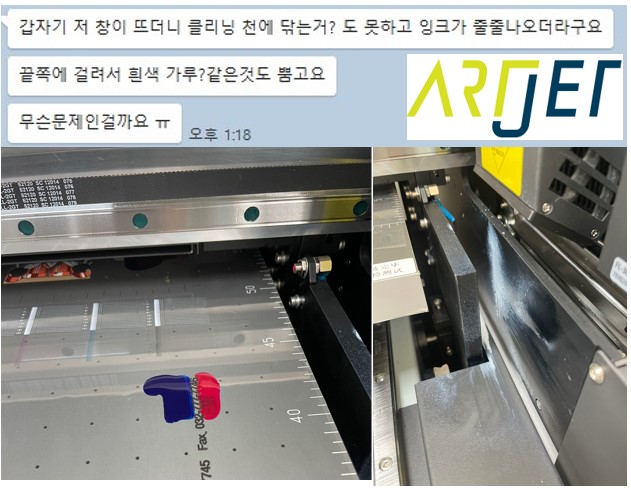
1. KakaoTalk content and photos
2. Software message
Other operations are fine, but the same problem occurs only during the Cleaning operation, and the following message window pops up.

“The collision switch has been triggered. Please check the print platform for troubleshooting and then click OK to reset!”
To put it more simply,
- The head collision prevention switch has been activated.
- To resolve the issue, check if the material on the flatbed surface is pressing the head collision prevention switch.
- Remove the material, check if the head collision prevention switch is back down (making it inactive), and
- If there is no problem, press the [Confirm] button to reset the device.
II. Troubleshooting
1. Head cleaning operation principle
* For the head cleaning button, refer to page 18 of the ARTJET user manual.
- When you press the Clean button,
- The Captop goes up and seals the print head,
- And the peristaltic pump motor rotates (once briefly, once longer, the motor operates twice) to forcefully extract ink from the print head.
- The ink that was forcibly extracted remains in the Captop, and as the Captop comes down, the print head seal is released, and the peristaltic pump motor rotates again to send the ink on the Captop to the waste ink tank.
- Since the ink was forcibly extracted from the print head, the surface of the print head is dirty with ink, and the wiper operates to wipe the dirty ink.
- When the head carriage moves back and forth and stops for a moment at the wiper position for each head, the wiper moves forward and backward to wipe the corresponding print head.
- When the wiper operation is completed, the print head carriage moves to the left end of the X-axis and performs spit (only spraying ink from the nozzle to improve the jetting condition).
- When this operation is completed, the head carriage moves to the origin position, and the Captop goes up to seal the print head.

Older versions had hard silicone wipers, which caused problems, but the wipers on sale now are soft, so the likelihood of the same problem occurring is very low.
2. Cause of problem symptoms
The wiper is hard and its position is raised high,
When the print head stops at the wiper position, the wiper moves forward to wipe the print head and then moves back to its original position.
In this process, if the wiper height is high, when the wiper moves, it strongly scratches the entire bottom of the print head carriage, causing a load.
The wiper cannot return to its original position due to the load and stops at an unexpected position.
In this state, the print head carriage moves sideways for the next operation,
At this time, the high wiper position stops the printer by pressing the head collision prevention switch below.

Then, the print head carriage was performing a cleaning operation, and suddenly the head crash switch was activated, causing the operation to stop at this position.

After the head carriage has moved all the way to the left end section, it should perform a spit operation (only spraying ink from the nozzle to improve the jetting condition).
The X-axis move command is applied immediately, and stops at this location, and the spit (only spraying ink from the nozzle to improve the jetting condition) command has already been sent, so it performs a spit operation at this location.
Then, as below, the color was on the flatbed, and the white was spitting at a location slightly off the flatbed, so the symptom appeared as the consumer said.
3. Solution
For the old version of the wiper, remove the wiper as shown below, cut it to the appropriate height, and then reattach it.

The black new version has never had the same problem for a year, but if you still have similar symptoms, you can solve them similarly.
As a side note, sometimes the release does not work properly when the head collision prevention switch is activated.
In this case, you can release the head collision prevention switch through the video below.
ARTJET UV Printer Troubleshooting Mechanical 5 _ Problems that occur when the wiper height is high
III.This is how Artjet supports its customers.
ARTJET UV Printer has been sold in Korea for 4 years, and we are organizing the printer problems we have encountered so far, their causes, and their solutions.
We have compiled 10 different print head problems and 17 ink supply problems, and you can find detailed information at the site below.
ARTJET UV Printer troubleshooting sum up
The Mechanical problem is hereunder.
In the first session, ARTJET UV Printer Troubleshooting Mechanical 1 _ How to align the print head in a straight line
In the second section, ARTJET UV Printer Troubleshooting Mechanical 2 _There is a clicking noise from the X-axis
In the third section, ARTJET UV Printer Troubleshooting Mechanical 3 _ Banding problem in specific section
In the fourth section, ARTJET UV Printer Troubleshooting Mechanical 4 _ The Importance of Head Height in Bidirectional Printing
From last time, we are explaining not only UV printer problems and solutions, but also what products are produced with UV printers.
In the first session, ARTJET UV Printer Application 1 braille printing
In the second session, ARTJET UV Printer Application 2 Flip the material and align it
In the third session, ARTJET UV Printer Application 3 2.5D UV print
In the fourth session, Sai rip [Color Adjustment] tab. ARTJET UV Printer Application 4 Sai rip color graph
In the fifth session, ARTJET UV Printer Application 5 Sai rip print size compensation
In the sixth session, we talked about the acrylic bonding equipment that those who have UV printers and laser cutting equipment are looking for.
Hereunder is only Korean since only Korea is hot on this machine. ARTJET UV Printer Application 6 _아크릴 본딩 장비
In the seventh session ARTJET UV Printer Application 7 _ Ink Consumption Calculation
In the Eighth session, ARTJET UV Printer Application 8 _ I phone 14 print limitation
About K print, Korea Signage Label & special printing exhibition, ARTJET UV Printer Market research 1 _ K Print 2024 Korea printing exhibition
In the ninth session, ARTJET UV Printer Application 9 _ Mask printing not recommend
In the tenth session, ARTJET UV Printer Application 10 _ Leather Cigarette Case UV Printing
In the eleventh session, ARTJET UV Printer Application 11 _ Round soccer strategy board UV printing
In the twelve session, ARTJET UV Printer Application 12 _ What is ICC profile & menu board UV Printing
In the thirteen session, ARTJET UV Printer Application 13 _ Primer performance & limitation
In the fourteen session, ARTJET UV Printer Application 14 _ UV Print & Laser crop mark cutting
In the fifteen session, ARTJET UV Printer Application 15 _ Mobil case UV print profit
In the sixteen session, ARTJET UV Printer Application 16 _ Screen vs Digital Comparison and UV Printing on Hand Sanitizer Cases
In the seventeen session, ARTJET UV Printer Application 17 _ bottle print
In the eighteen session, ARTJET UV Printer Application 18 _ Canvas UV Printing
In the nineteen session, ARTJET UV Printer Application 19 _ Applying epoxy effect with varnish
In the twenty session, ARTJET UV Printer Application 20 _ Making a light frame with a printer+laser cutter
In the twenty one session, ARTJET UV Printer Application 21 _ UV Printer+Laser Cutting Equipment Button Name Tag Making
In the twenty two session, ARTJET UV Printer Application 21 _ UV Printer+Laser Cutting Making a Cell Phone Grip Tok
In the twenty three session, ARTJET UV Printer Application 23 _ UV Printer+Laser cutting Making an Acrylic Keychain
In the twenty four session, ARTJET UV Printer Application 24 _ UV Print with Zig
In the twenty five session, ARTJET UV Printer Application 25 _ How to make RD WORKS CCD camera cutting Video manual
In the twenty six session, ARTJET UV Printer Application 26 _ Acrylic bonding equipment
In the twenty seven session ARTJET UV Printer Application 27 _ All the steps to create UVDTF
In the twenty eight session ARTJET UV Printer Application 28 _ Simple troubleshooting & Captop replacement time
In the twenty nine session ARTJET UV Printer Application 29 _ UVDTF TEST Result
In the thirty session ARTJET UV Printer Application 30 _ Print head Anti crash system
In the thirty one session ARTJET UV Printer Application 31 _ Offset fine tune
In the thirty two session ARTJET UV Printer Application 32 _ ARTJET Delivery Preparation
In the thirty three session ARTJET UV Printer Application 33 _ ARTJET Setting Sequence
In the thirty four session ARTJET UV Printer Application 34 _ ARTJET CW+C Print time & ink cost
In the thirty five session ARTJET UV Printer Application 35 _ Create a white shield with different images on the front and back of the keyring
In the thirty Six session ARTJET UV Printer Application 36 _ Vertical offset is not correct only for the right section of white
In the thirty Seven session ARTJET UV Printer Application 37 _Keyring Business Required Equipment and Investment Costs
Problems and solutions from actual consumer sites
In the first section ARTJET UV Printer Consumer Issues and Solutions 1 _ White does not come out at all.
In the second section ARTJET UV Printer Consumer Issues and Resolution 2 _ The nozzle test is fine, but it seems that a certain color is not coming out during printing
In the third section ARTJET UV Printer Consumer Issues and Resolution 3 _ The red color does not appear at first, then appears during printing, and then does not appear again
In the fourth section ARTJET UV Printer Consumer Issues Reception and Resolution 4 _ Sai Flexi Lip Installation and Dongle Key Recognition Failure Measures
In the fifth section ARTJET UV Printer Consumer Issues and Resolution 5 _ Sai Flexi Lip Dongle Key Recognition Failure
In the sixth section ARTJET UV Printer Consumer Issues and Solutions 6 – Paper that absorbs ink
In the seventh section ARTJET UV Printer Consumer Problems and Solutions 6 – White Motor Pump Does Not Turn
Bonus
In the first section ARTJET UV Printer Old Model Refurbished
In the second section ARTJET UV Printer-UV Printer Laser Cutter Bonding Machine Which equipment should I buy first?
In the third section ARTJET UV Printer-Considerations when choosing a UV printer
In the fourth section ARTJET UV Printer-DTF Printer Price and Specification Survey
In the fifth section ARTJET UV Printer-Acrylic Bonding Equipment Don’t Put It Off Anymore
In the sixth section ARTJET UV Printer – China inkjet level now
In the Seventh section ARTJET UV Printer – Thoughts on KOSIGN 2024
That’s it for today.