
- Anyone wondering whether it’s okay to ignore the main ink tank alarm and keep printing
- Anyone wanting an exact figure for how much you can actually print after the alarm goes off
- Anyone who’s had ink drip onto the platform mid-print after running low on ink
- Anyone curious why air getting into the line can’t be fixed with regular cleaning or a short pump
- Even though the tank is technically half full when the alarm sounds, the actual usable ink is only about 100ml, not half
- The ink outlet sits higher than the tank’s floor (20mm) — once the level drops below that, ink and air get pulled into the tube together
- Once air gets into the tube, regular cleaning or a short pump won’t fully clear it out
- To fully purge the air, you need to keep pumping for roughly 30 extra seconds after ink starts flowing out
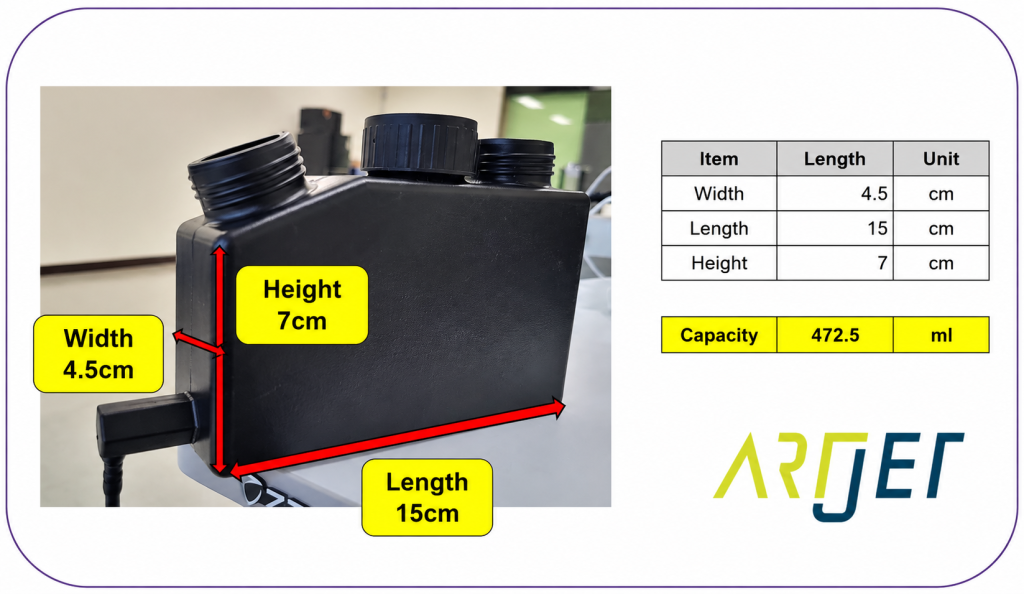
- The main ink tank holds about 400ml, and the float sensor triggers the alarm at a 35mm ink level (out of a 70mm-tall tank)
- Since the outlet’s highest point sits at 20mm, the ink actually usable between the alarm point and the outlet limit is only around 100ml
- Going past that 100ml lets air enter the tube along with ink, causing ink to drip mid-print
- Fix: don’t rely on a quick clean or short pump — pump long enough to fully replace the ink and air in the entire tube with fresh ink (about 30 extra seconds after ink appears)
I. Background _ Problems That Occur When Ignoring the Low Ink Alarm
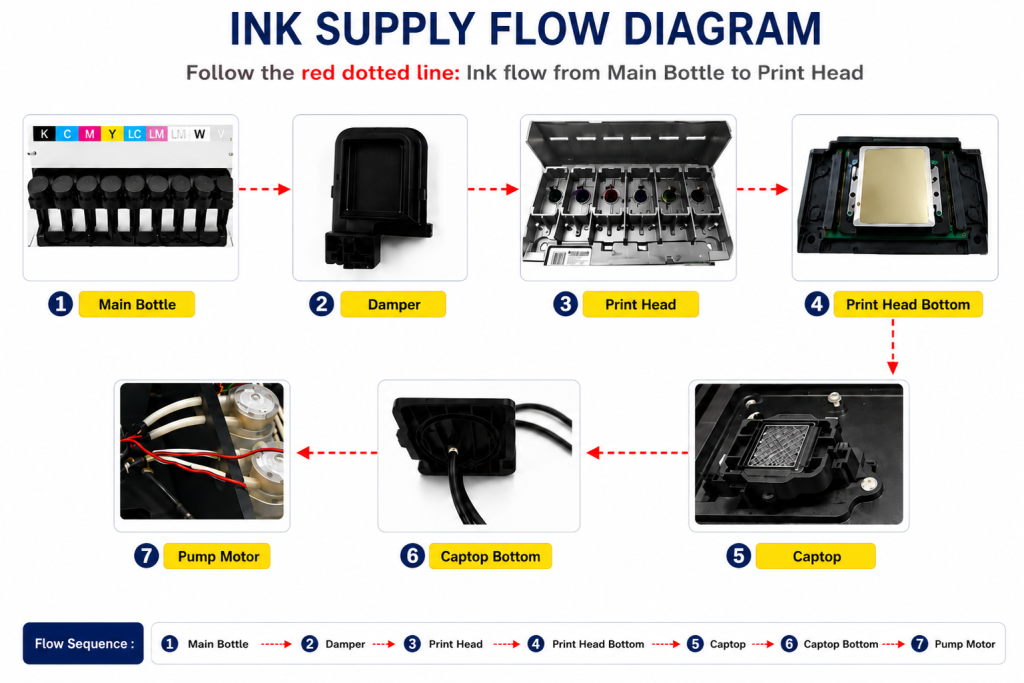
- When ink enters the Damper from the main ink bottle via the ink tube, it passes through the print head, flows to the captop, moves through the motor pump, and finally drains into the waste ink bottle.
- This article covers Problems That Occur When Ignoring the Low Ink Alarm in the full ink supply problem series.
- This follows Part 1 Captop Lower Tube, Part 2 How to Replace the Captop, Part 3 Damper, Part 4 Pump Motor and Yellow Tube, Part 5 Captop and Head Position, Part 6 Aligning the Captop and Head Position, Part 7 When the Capping Station Level Is Not Correct, Part 8 Captop Surface Drying, Part 9 Degraded Ink Inside the Captop, Part 10 Time for Ink to Fill the Damper, Part 11 Ink Tube Burst, Part 12 How to Replace a Motor Pump Tube, Part 13 Why White Cleaning Doesn’t Work Well, Part 14 Why It’s Important to Replace the Yellow Tube and Captop, Part 15 Head Protection Plate Crumpled, Part 16 Head Protection Plate Cracked, Part 17 When a Specific Color Drops Out During Printing, Part 18 The Color Has Faded, Part 19 White Flies Around the Image, Part 20 When to Replace the Damper, and Part 21 How to Find the Problem Color When the Color Is Strange.
II. Can I Ignore the Ink Alarm? _ Problems That Occur When Ignoring the Low Ink Alarm
Here’s a quick explanation:
- Most small inkjet printers made in China use the same style of ink bottle.
- Color inks connect one channel per bottle.
- For example, if you’re running CMYK, Lc, and Lm (six colors total), the main bottles are also one CMYK, one Lc, one Lm — each connected 1:1.
- White has two main bottles: the first covers four channels, and the second covers two.
- Varnish has one main bottle feeding all six channels.
- Inside each main bottle is a sensor that flags when the ink level runs low.
- When that sensor activates, an alarm sounds and a light on the back of the printer shows which main bottle is running low.
- Once you refill the ink, the sensor stops triggering, the alarm goes quiet, and the blinking light stops.
III. Ink Remaining After the Alarm _ Problems That Occur When Ignoring the Low Ink Alarm
As shown in the photo below, the outer measurement comes out to 427.5ml, and the internal capacity is estimated at roughly 400ml.
Most inkjet printers use a float sensor attached to the main ink bottle.
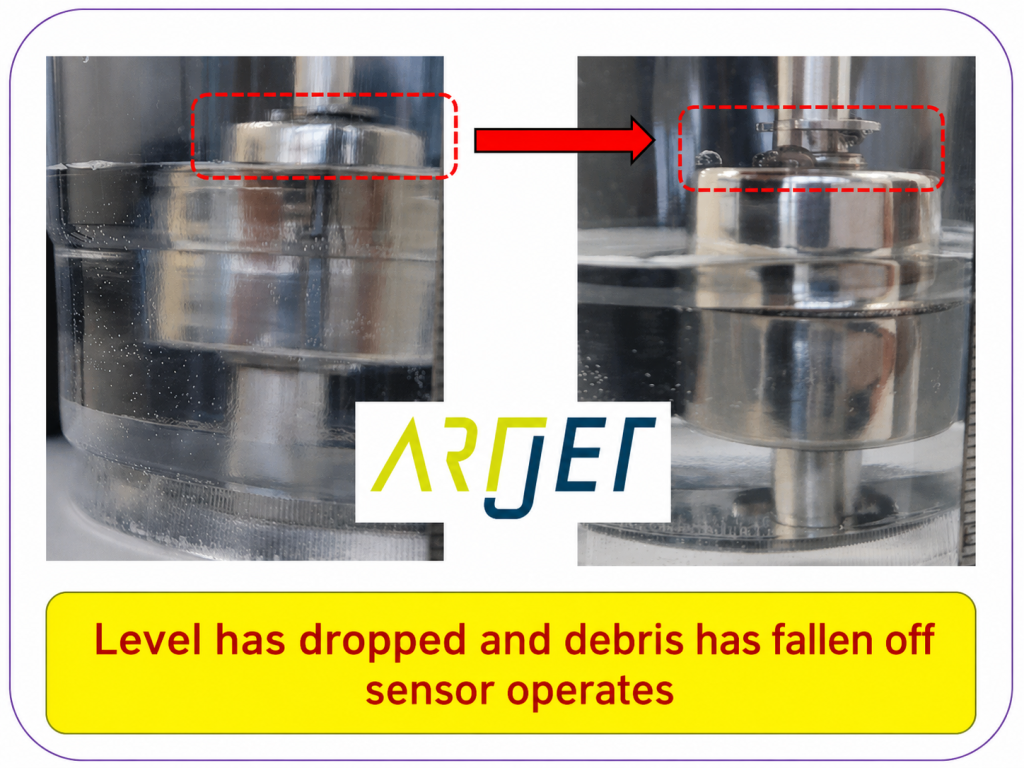
- When the ink level is high, the float stays attached to the sensor and the alarm doesn’t sound.
- When the ink level drops, the float detaches from the sensor, and that’s the moment the alarm triggers.
- Each bottle has its own float sensor, and the alarm sound plus a blinking light together tell you which bottle is running low.
- As the ink level drops, the float that had been sitting on the hook detaches from it, triggering the low-ink alarm.
- Refilling the ink lets the float settle back onto the hook, which stops the alarm.
- In the photo below, the left side shows enough ink to keep the alarm quiet, and the right side shows a low-ink state.
Let’s calculate how much ink is left in the main bottle at the moment the float sensor activates.
The float sensor’s activation height matters, but so does the height at which ink actually exits the bottle.
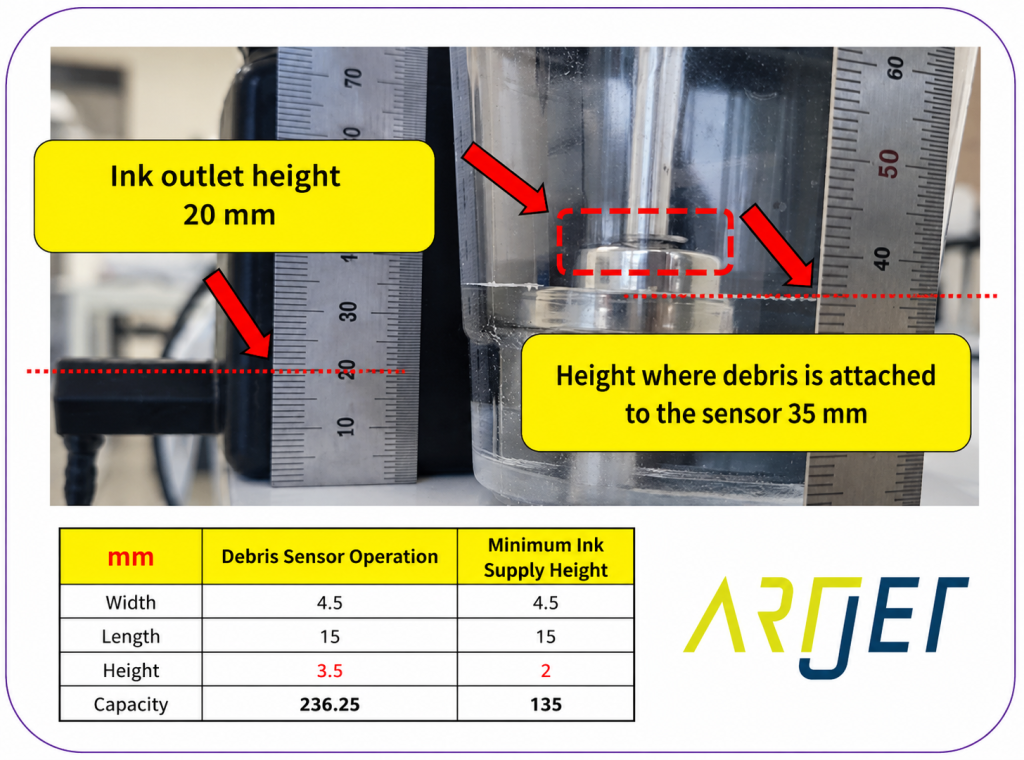
1. The float sensor activates at a height of 35mm.
- The main ink bottle’s total height is 70mm.
- As shown above, the float sensor starts triggering once the ink level drops below 35mm.
- That’s the point where the alarm begins sounding.
- “If the bottle is 70mm tall and the alarm goes off at 35mm — exactly half — doesn’t that mean half the ink is left?”
- Yes, that’s correct. Half the ink is technically still there.
- But the usable ink isn’t the same story.
2. The ink outlet sits at a height of 20mm.
- The point where ink exits the bottle isn’t located at the very bottom of the main tank.
- Looking at the left side of the photo above, the outlet sits above the floor of the tank, with its highest point at 20mm.
- That means once the ink level drops below 20mm, ink and air get pulled into the ink tube together.
- When ink is supplied along with air, the tube isn’t fully filled with ink, and that causes printing problems.
⚠️ 3. After the low ink alarm sounds, the usable ink is about 100ml — not half the tank.
- Ink remaining at the 35mm float-trigger point: 236.25ml
- Ink remaining at the 20mm minimum outlet height: 135ml
- Usable ink between 35mm and 20mm: 101.25ml (236.25ml − 135ml)
- After the low ink alarm sounds, roughly 100ml of usable ink remains.
IV. Problems That Occur When Ignoring the Low Ink Alarm
Most small UV printers rely on convection and Dampers rather than pneumatics to supply ink.
Convection systems in particular need the ink line to stay fully filled — from the main ink tank, through the ink tube, all the way to the Damper — for the head to jet ink stably.
If you ignore the ink alarm and keep printing past the 100ml usable limit,
- the ink level drops below the 20mm outlet height, letting air enter the ink tube along with ink.
- The tube is no longer fully filled with ink — it develops air pockets here and there —
- and once that air reaches the Damper, the Damper can no longer hold ink at the proper level,
- causing ink to drip onto the platform mid-print, as shown in the photo below.
- Once ink drips out like that, that color stops jetting properly afterward, so the color no longer prints correctly.
- The photo below shows this happening with Varnish, not Color.
- If it’s a Color main bottle running low instead, the exact same problem shows up in that color.
We assumed the same thing and went ahead without much thought, and were genuinely stumped when it didn’t fix anything.
- After cleaning, the nozzle test looked fine, and printing seemed okay at first — then the same problem showed up again.
- This time we ran a short pump, cleaned, confirmed the nozzle test, and printed again — same problem, again.
- “Why on earth is this happening?”
The reason the problem wouldn’t go away:
- Once air gets into the ink tube, cleaning alone can’t fully clear it out.
- Since air pockets are scattered throughout the tube, cleaning only clears part of it,
- and whatever air doesn’t get pushed out simply moves back and forms new pockets further along the tube.
- A short pump won’t fully expel the air trapped in the ink line either.
- That’s why neither cleaning nor a short pump solves the problem.
To get every bit of air out of the ink tube,
- pump for a good, long stretch — long enough to fully replace all the ink and air throughout the entire tube with fresh ink. That’s the only way to clear all the air out.
- Don’t stop the pump the moment ink starts properly flowing into the waste tank — keep going for about 30 more seconds, giving ink time to travel all the way from the bottle to the head, then stop.
- If you keep using the printer without fully clearing that air out, the same problem can come right back.
VI. ARTJET UV Printer

핑백: White cleaning methods that might clogged - Printer Cleaning Issues Part 23 ARTJET 2026