Creating an Epoxy Effect with Varnish
So far, UV printer-related issues, We’ve compiled
24 articles on ink supply issues,
9 articles on head basics,
12 articles on actual head issues and their solutions,
10 actual mechanical Machine Problems and Solutions.
12 Problems and Solutions of Electronic Boards and SW Actually Issued
11 Problems and Solutions: Sai Rip Installation and Basic Settings, Spot Color Creation, and More
For related information, click on the article to go to the link.
Now, I’m explaining about the products that can be made with a UV Printer


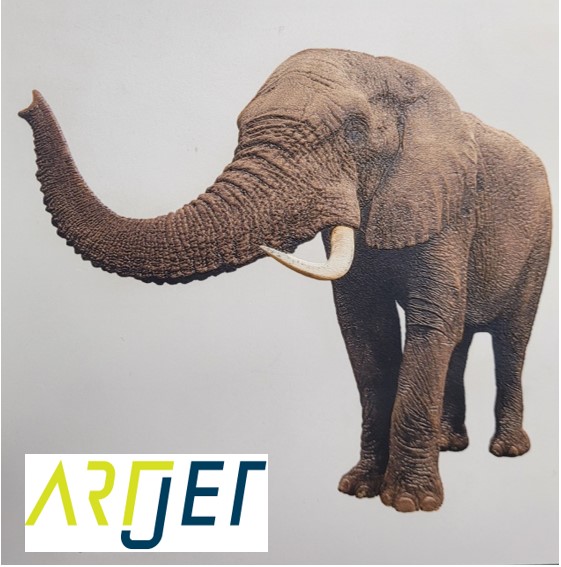
Expressing gradients and three-dimensionality with white
4. “It is not easy to print a phone case because of the height of the iPhone 14 camera.”

5. “Do not print masks with a UV printer.”
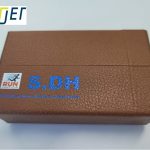
7. I will explain how to print on the round name tags used on the soccer strategy board.

8. Description of Primer functionality and limitations

10. “How much will I earn if I sell my UV-printed phone case?”

11. Explain the difference between screen printing and inkjet printing.

11. Practicality of the Circular Bottle Print Jig

12. Precautions for Canvas Printing

Today I’m going to show you how to create an epoxy effect by simply applying varnish to a regular print.
Those who only work with UV printer-specific items, such as goods, signs, and advertisements, may not be particularly interested in this matter,
but those who own existing printing equipment such as Ricoh may be curious about epoxy, gold leaf, and silver leaf for small-scale production, so I’m organizing this information.
I. Varnish-specific equipment _Creating an Epoxy Effect with Varnish
1. Traditional printing industry _Creating an Epoxy Effect with Varnish
UV printers offer a transparent ink option called Varnish.
While not commonly used, this allows you to apply transparent ink to specific areas to create a design effect.
This effect can also be achieved in traditional printing, typically using epoxy.
The glossy finishes on book covers and titles are all examples of epoxy effects.
After printing, we send the product to a post-processing company to create this epoxy effect.
However, since this process isn’t inkjet printing,
- unit costs are high for small quantities,
- and post-processing companies are reluctant to accept small orders.
- Profitability is only guaranteed when large quantities are processed.
2. Single-pass inkjet equipment capable of printing epoxy, gold, and silver foil _Creating an Epoxy Effect with Varnish
Even in the traditional printing industry, the need for small-volume printing and the demand for variable data with different numbers for each print led to the introduction of inkjet printing, and the label industry saw the fastest adoption and expansion.
As printing itself was replaced by inkjet, epoxy, gold, and silver foil finishing equipment was also being replaced by inkjet.
The Israeli-made “Scodix” equipment was the first to be introduced as a finishing equipment in the traditional printing industry.
In Korea, it was primarily supplied to large companies due to its high price (KRW 500-700 million).
Later, Konica Minolta released its MGI varnish equipment, priced at KRW 200-300 million. Currently, I understand that MGI equipment sales exceed those of Scodix equipment.
Both devices work on the principle of creating epoxy or gold/silver foil effects:
- Printed paper is placed on the paper tray,
- and when the device is started, it automatically loads it one by one.
- As the paper flows, a camera mounted on the device detects the printing location.
- The device program’s transparent ink file prints transparent ink at the designated location,
- and cures the transparent ink using UV light to complete the epoxy effect.
- Alternatively, if gold or silver foil is applied through a file over an area with an epoxy effect,
- the gold or silver foil attached to the film is transferred to the transparent ink, creating a gold or silver effect.
While productivity is slower than traditional post-processing equipment, this technology allows for smaller orders and more detailed effects, leading to increased sales.
3. Multi-pass varnish post-processing equipment _Creating an Epoxy Effect with Varnish
As you can see in the YouTube video below, it is a method of reading the crop mark of paper printed in a traditional way and printing varnish only on specific areas.
https://www.youtube.com/watch?v=t-HRdxabQDI
Compared to single-pass equipment like Scodix and MGI, productivity is significantly lower,
but its low price suggests some demand in the printing industry.
However, separate equipment is required for gold and silver foiling.
The price is approximately 80 to 90 million won.
II. Creating an epoxy effect using a UV printer _Creating an Epoxy Effect with Varnish
1. Epoxy effect _Creating an Epoxy Effect with Varnish
This photo was printed on a Ricoh printer, then applied with varnish to create an epoxy effect.
Because the varnish reacts with the printing ink, the printing paper must be coated to achieve a clean epoxy effect.

Uncoated paper will not look clean as the Ricoh ink and varnish ink will react as shown below.

While it’s possible to create an epoxy effect using varnish, one problem is that without a camera, the placement must be manually adjusted.
- By creating four or more borders outside the paper print surface,
- and then printing identical borders outside the flatbed using a UV printer,
- and then aligning the print to those positions,
- you can print only the varnish on a specific print surface, although not perfectly.
Of course, if you print using a UV printer and also use a UV printer for the varnish, the varnish will be printed in one step.
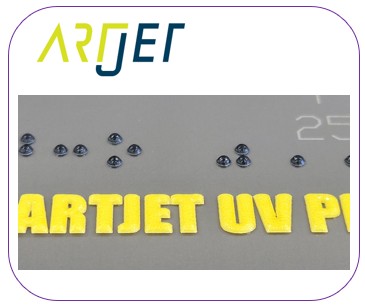
UV printing allows for layering of varnish, which can be used to create Braille, as shown below.
2. Gold and silver foil _Creating an Epoxy Effect with Varnish
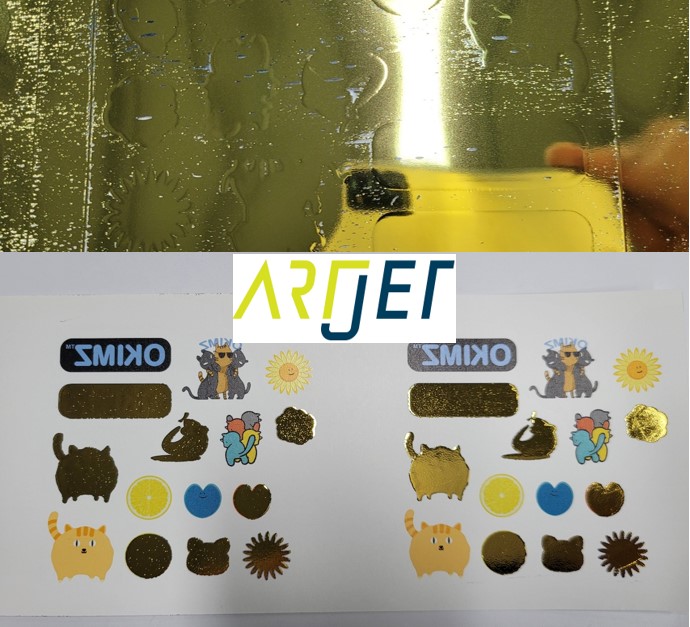
I’ve tested gold and silver foiling using varnish ink.
Because varnish isn’t specifically designed for gold and silver foiling, there were limitations to achieving gold and silver foiling with varnish.
If you look closely at the photo below, you’ll see that the edges aren’t rendered cleanly.
3. Chinese partner _Creating an Epoxy Effect with Varnish
According to our Chinese partner selling the multi-pass inkjet varnish equipment described above,
- For gold and silver foil applications, the varnish ink itself must be developed separately,
- and the lamp cure method must also be tested.
- The gold and silver foil papers must also be set up to match the developed varnish.
- The coating temperature must also be tested during the gold and silver foiling process.
III. This is how ARTJET supports our customers.
One thing I feel while selling and maintaining ARTJET UV Printers for 5 years is that the next most important thing after product stability is Troubleshooting DATA.
All products have problems, whether they are actual equipment problems or consumer errors, and product stability is how easily and quickly you solve those problems.
We are organizing all the troubleshooting DATA as follows.
You can see the product print quality by clicking here.

1. Additional information on printhead problems
Please refer to the information summarized above, and there is no additional information summarized yet.
2. Additional information on ink supply issues
Please refer to the information summarized above, and the additional information summarized below is as follows.
Addition
“no clogged nozzles, but banding in the red ARTJET 2025”
“When I print it, the whole thing has a yellow tint to it”
3. Additional information on Mechanical issues
Please refer to the information summarized above, and there is no additional information summarized yet.
4. Additional information on Electron board and Software issues
Please refer to the information summarized above, and there is no additional information summarized yet.
5. Additional information on Sai Flexi Rip software
Please refer to the information summarized above, and there is no additional information summarized yet.
6. Problems and solutions from actual consumer sites
1. Paper that absorbs ink
2. A line-like thing appears at the end of the white print surface
3.Can varnish banding be reduced?
4. Are there many problems with China’s UV Printer?
7. UV Printer Application
we are explaining not only UV printer problems and solutions, but also what products are produced with UV printers.
1. Braille printing
2. Flip the material and align it
3. 2.5D UV print
4. ARTJET UV Printer Application 6 _아크릴 본딩 장비
5. I phone 14 print limitation
6. Mask printing not recommend
7. Leather Cigarette Case UV Printing
8. Round soccer strategy board UV printing
9. Primer performance & limitation
10. UV Print & Laser crop mark cutting
11. Mobil case UV print profit
12. Screen vs Digital Comparison and UV Printing on Hand Sanitizer Cases
13. Bottle zig & print
14. Canvas UV Printing
15. Applying epoxy effect with varnish
16. Making a light frame with UV Printer & Laser cutter
17. UV Printer & Laser Cutting Equipment Button Name Tag Making
18. UV Printer & Laser Cutting Making a Cell Phone GripTok
19. Making an Acrylic Keychain with UV Printer & Laser Cutter
20. UV Print with Zig
21. How to make RD WORKS CCD camera cutting Video manual
22. Acrylic bonding equipment
23. All the steps to create UVDTF
24. UVDTF TEST Result on various material
25. ARTJET CW+C Print time & Ink Cost
26. Create a white shield with different images on the front and back of the keyring
27. Keyring Business Required Equipment and Investment Costs
29. Acrylic Lighting Goods
30. Ballpoint pen jig printing
31. Staining occurs when printing on coated leather
8. Bonus
1. ARTJET UV Printer Old Model Refurbished
2. UV Printer Laser Cutter Bonding Machine Which equipment should I buy first?
3. Considerations when choosing a UV printer
4. DTF Printer Price and Specification Survey
5. Acrylic Bonding Equipment Don’t Put It Off Anymore
6. China inkjet level now
7. Thoughts on KOSIGN 2024
8. ARTJET Delivery Preparation
9. ARTJET Setting Sequence
10. UV Printer History and Future Prediction 1
11. UV Printer History and Future Prediction 2
12. UV Printer History and Future Prediction 3
13. UV Printer History and Future Prediction 4
14. UV Printer History and Future Prediction 5
15. Are there many problems with China’s UV Printer?
16. UV Printer Small Text Meaning
17. Is the XP600 head okay
18. Roland UV Printer Summary
19. Mimaki UV Printer Summary
20. UV Printer Alibaba Direct Purchase Considerations
21. Things to consider when buying a used UV Printer
22. Bi Uni Print Quality Differences
23. RDworks download install and laser head position by SW
That’s it for today.