Things to Check Before Buying a Used UV Printer
So far, I have summarized the information related to UV Printers below. If you click on the article, you will be taken to the link for related information.
24 articles on ink supply issues,
9 articles on head basics,
12 articles on actual head issues and their solutions,
10 actual mechanical Machine Problems and Solutions.
12 Problems and Solutions of Electronic Boards and SW Actually Issued
11 Problems and Solutions: Sai Rip Installation and Basic Settings, Spot Color Creation, and More
We’ve compiled a list of products that can be made with a UV printer.
I. “I want to try learning it.” _Things to Check Before Buying a Used UV Printer
1. limited budget _Things to Check Before Buying a Used UV Printer
If you need a UV printer but your budget is tight, you might decide to purchase one through Alibaba in China.
Or, you might decide to buy a used UV printer from Korea.
In this situation, you have no choice but to search for equipment based on price on secondhand sites or forums.
If the exterior looks neat, you might visit the store, see how it prints, and after some discussion, decide to purchase.
2. 알면 알 수록 _Things to Check Before Buying a Used UV Printer
At first, I thought everything would be fine as long as it printed, but after a few iterations and actual print orders were produced,
“The colors are weird?”
“After printing, I see some kind of line!”
“Why is the image so grainy?”
“Why is the ink peeling off this material?”
“After printing, it feels kind of sticky.”
The more I work with the UV printer, the more I notice various issues.
3. If any problem occurs _Things to Check Before Buying a Used UV Printer
While you can get answers to some minor issues from the place you purchased your used equipment, if you encounter any issues, it can be incredibly frustrating.
Without answers from the place you purchased it, you’re left searching the internet for solutions to similar problems.
Thus, your top priority becomes solving the problem, and you find yourself struggling to find solutions one by one.
If it’s resolved, that’s great, but if it’s not, you start to seriously consider, “Should I just throw the equipment away?”
II. Things to Check Before Buying a Used UV Printer
1. Check original purchase location _Things to Check Before Buying a Used UV Printer
No matter how pristine the equipment is, if it’s imported directly from China, rather than purchased through a Korean dealer, the risks are significant.
- If a problem arises, there’s no one to turn to but the place of purchase,
- and since the person purchasing the equipment isn’t an engineer, you can’t expect a solution.
- Even if you’re able to secure a contact point in China through the place of purchase, it’s difficult to expect smooth after-sales service in China because the equipment wasn’t purchased directly.
- Even if you purchase ink from a Chinese distributor, sales volume is low, making it difficult to expect proactive after-sales service.
- The biggest problem is that if the Chinese distributor discontinues a model, it can be difficult to obtain the board if a problem arises.
- If you’re purchasing used equipment directly, always verify that it was purchased through a Korean dealer.
It’s also best to avoid purchasing equipment that’s too old.
- The head you’re using may be discontinued, driving up prices and ultimately eliminating supply.
- The electronic board may also no longer be available.
2. Print quality _Things to Check Before Buying a Used UV Printer
It’s highly recommended that you check the print head condition and print quality with the seller using a test image.
A. First, you should look at the nozzle test photo and then examine the entire print as it was printed.
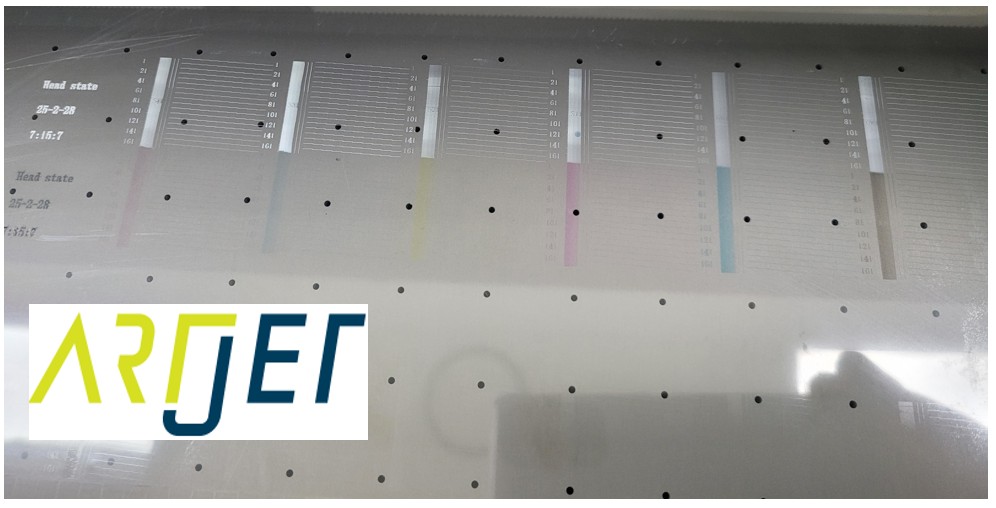
B. Are there any visible lines on a solid color or white background?
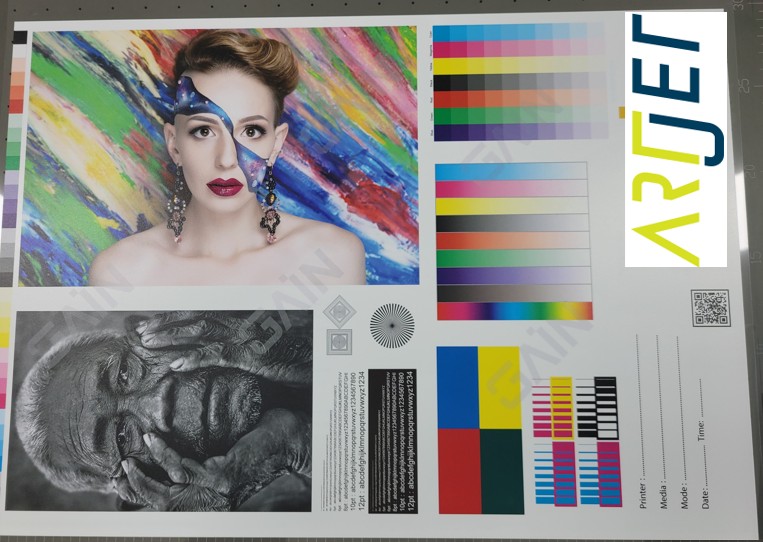
C. To what extent are small prints displayed?
See below for what small print means in terms of print quality.
UV Printer Small Text Meaning _updated

Rather than checking for good print quality, you should check that the images printed on used equipment are of sufficient print quality for the work you need to do.
3. Rip software _Things to Check Before Buying a Used UV Printer
Once you’ve achieved the desired print quality, the next step is to determine the printable file and color.
- You must check whether the printable file is only Photoshop or AI files.
- Some people, unfamiliar with the concept of ICC profiles, blindly adjust the colors in the Photoshop file to achieve the desired color.
- It’s also a good idea to check whether the RIP software has applied the ICC profile and whether it has a color graph adjustment function.
- Once you place an actual print order, customers will likely request color changes.
- If changing the original file colors is difficult, you’ll have no choice but to adjust the color graph in RIP software to achieve the desired color.
- While you can change colors using Photoshop or AI files, it’s not easy if you don’t have the printer’s default color values.
4. Consumables and spare parts _Things to Check Before Buying a Used UV Printer
There are three scenarios:
Equipment sold in Korea with a certain number of units sold.
- Electronic boards, spare parts, and consumables can be obtained through that seller.
- In some cases, after-sales service may be available for a fee.
Equipment sold in Korea is limited in the number of units sold for that model.
- You should inquire whether the electronic board for that equipment is still available.
- Sometimes, the model may be discontinued and the electronic board for that model may no longer be available.
If you are importing used equipment purchased through Alibaba,
- It’s recommended to take a photo of the equipment’s nameplate and contact the Chinese seller to inquire about the availability of the electronic board.
- You should also check the availability of spare parts.
5. “Can I buy ink from Alibaba?” _Things to Check Before Buying a Used UV Printer
Purchasing ink through Alibaba means
- it ignores the ICC profile currently assigned to the ink, which can result in incorrect colors.
- Matching incorrect colors with standard colors is not easy.
Even if you’re willing to sacrifice color accuracy, if you want to change ink, you should purchase ink that specifically identifies the head.
Ink not specifically designated for the head can cause various problems.
- Even if ink loads and pumps, it may not jet at all.
- Even if it jets, ink may fly off during printing and scatter around the printer.
- If the flyoff is severe, the nozzle may clog during printing, creating streaks.
Do you have after-sales service? You should also check whether parts, including the board, are available.
III. This is how ARTJET supports our customers.
One thing I feel while selling and maintaining ARTJET UV Printers for 5 years is that the next most important thing after product stability is Troubleshooting DATA.
All products have problems, whether they are actual equipment problems or consumer errors, and product stability is how easily and quickly you solve those problems.
We are organizing all the troubleshooting DATA as follows.
You can see the product print quality by clicking here.

1. Additional information on printhead problems
Please refer to the information summarized above, and the additional information summarized below is as follows.
Addition
“After connecting the DATA Cable, one channel is not fired”
2. Additional information on ink supply issues
Please refer to the information summarized above, and the additional information summarized below is as follows.
Addition
“no clogged nozzles, but banding in the red ARTJET 2025”
“When I print it, the whole thing has a yellow tint to it”
3. Additional problems due to equipment problems or management negligence
Please refer to the information summarized above, and the additional information summarized below is as follows.
“I see a white line after 600mm on the Y-axis.”
4. Additional information on Electron board and Software issues
Please refer to the information summarized above, and there is no additional information summarized yet.
5. Additional information on Sai Flexi Rip software
Please refer to the information summarized above, and there is no additional information summarized yet.
6. Problems and solutions from actual consumer sites
1. Paper that absorbs ink
2. A line-like thing appears at the end of the white print surface
3.Can varnish banding be reduced?
4. Are there many problems with China’s UV Printer?
7. UV Printer Application
Please refer to the information summarized above, and there is no additional information summarized yet.
8. Bonus
1. UV Printer Old Model Refurbished _updated
2. UV Printer Laser Cutter Bonding Machine Which equipment should I buy first? _updated
3. Considerations when choosing a UV printer _updated
4. DTF Printer Price and Specification Survey_updated
5. Acrylic Bonding Equipment Don’t Put It Off Anymore
6. China inkjet level now_updated
7. Thoughts on KOSIGN 2024_updated
8. ARTJET Delivery Preparation
9. ARTJET Setting Sequence
10. UV Printer History and Future Prediction 1_updated
11. UV Printer History and Future Prediction 2_updated
12. UV Printer History and Future Prediction 3_updated
13. UV Printer History and Future Prediction 4 _updated
14. UV Printer History and Future Prediction 5_updated
15. Are there many problems with China’s UV Printer? _updated
16. UV Printer Small Text Meaning _updated
17. Is the XP600 head okay _updated
18. Roland UV Printer Summary _updated
19. Mimaki UV Printer Summary _updated
20. UV Printer Alibaba Direct Purchase Considerations
21. Things to consider when buying a used UV Printer
22. Bi Uni Print Quality Differences
23. RDworks download install and laser head position by SW
That’s it for today.