
- Anyone who wants to read a head brochure but isn’t sure where to start
- Anyone curious about why print speed, resolution, and image quality differ between machines
- Anyone who wants to assess printer performance directly from a head spec sheet
- This article uses the Xaar1201 (Gen5i) brochure as its reference — figures will differ depending on the head model
- Stand-off distance, pass count, and gradient mask figures are theoretical — actual results vary by operating environment
- 900 dpi on the Y-axis is theoretically possible but difficult to achieve in the field due to feed precision limitations
- The total nozzle jetting span (print swathe) lets you estimate approximate print speed
- Nozzle pitch lets you calculate the maximum achievable Y-axis resolution
- 1.33 mm is the optimal stand-off — exceeding it leads to landing errors, satellite drops, and nozzle contamination
Why You Need to Understand Print Head Spec Values
I. Why Print Head Spec Values Matter — Why You Should Know What Print Head Specifications Mean
- Print head spec sheets are easy to find online.
- Inkjet equipment manufacturers receive more detailed documentation from head manufacturers beyond what is publicly available in catalogs.
- While the full head manual contains the most detail, even a head brochure contains a surprising amount of useful information.
- Distributors and end users may find printhead specs difficult to parse — but there is genuinely important information packed into those brochures.
- From a head brochure alone, you can get a rough sense of the following:
- “Why is our printer slow — or fast?”
- “Why does our machine produce finer dots than a competitor’s — or coarser ones?”
- “Why is the print resolution high — or low?”
- “What gap does the head manufacturer actually recommend between the head and the substrate — not just what the distributor says?”
- We will walk through these points using the Xaar1201 brochure — which shares the same specs as the Ricoh Gen5i print head.
-

Why You Should Know What Print Head Specifications Mean Why You Need to Understand Print Head Spec Values
II. What You Can Learn from a Head Spec Sheet — Why You Should Know What Print Head Specifications Mean
1. Maximum Printable Width in a Single Pass
- This corresponds to item 1 in the diagram above.
-

Why You Should Know What Print Head Specifications Mean Why You Need to Understand Print Head Spec Values - Before developing a printer, inkjet manufacturers estimate print speed based on the nozzle jetting span — i.e., the print width.
- The “Print swathe: 27 mm” in the table above refers to the distance from the first nozzle to the last nozzle in the array.
1_1. Printing uses a concept called “passes.” A brief explanation:
- Printing from the first nozzle to the last in a single sweep is called 1 pass. Just like a nozzle test pattern, it jets ink across the full 27 mm head width in one go.
- 1-pass is used only in single-pass machines. Scanning printers do not use 1-pass for actual print jobs — only for nozzle testing.
- 2-pass splits the print into two sweeps: 27 ÷ 2 = 13.5 mm. The Y-axis advances only 13.5 mm instead of 27 mm per sweep, cutting the printable area in half — and doubling the print time.
- 4-pass: 27 ÷ 4 = 6.75 mm per advance. Print time is 4× longer than 1-pass.
- 6-pass: 27 ÷ 6 = 4.5 mm per advance. Print time is 6× longer.
- The Xaar1201 (Gen5i) head typically requires 6 passes to achieve adequate resolution, with E-closion (feathering mask or gradient mask) applied on top to reduce visible banding.
1_2. A brief explanation of E-closion (feathering mask / gradient mask):
- Assume you are printing at 900 × 1200 dpi with 6 passes.
- Adding gradient mask level 1 keeps the resolution the same (900 × 1200 dpi) but adds 2 more passes — bringing the total to 8 passes.
- Speed decreases by the added 2 passes, but the boundary between passes becomes softer, making banding less visible.
- Gradient mask is a software masking technique that blurs the boundary between passes to reduce banding.
- Level 1 (adding 2 passes) is usually not enough to hide the boundary. Level 3 (adding 6 passes) is typically required to eliminate visible banding in solid-color areas.
1_3. You can estimate print speed from the head’s nozzle jetting span.
- While this varies by head, applying 6-pass as the base resolution and gradient mask level 3 results in 12 passes total.
- At 12 passes, the Y-axis advances 27 ÷ 12 = 2.25 mm per sweep.
- The carriage can travel stably at approximately 800 mm/second.
- By calculating how many back-and-forth sweeps are needed to cover a full flatbed at 2.25 mm per advance at 800 mm/second, you can estimate the approximate print speed before the machine is even built.
- In other words, simply checking the total nozzle jetting span in the spec sheet gives you a rough estimate of what print speed the machine will deliver.
2. Nozzle Pitch
- This corresponds to item 2 in the diagram above.
-

Why You Should Know What Print Head Specifications Mean Why You Need to Understand Print Head Spec Values
2_1. Using one color per nozzle row:
- In this configuration, the nozzle pitch is A = 0.0847 mm.
- Dividing 25.4 mm (1 inch) by 0.0847 mm gives 299.88 — meaning approximately 300 ink drops land within 1 inch, resulting in 300 dpi.
- If rows A, B, C, and D each carry a different ink color, each color can print at 300 dpi in a single pass.
- In 2-pass printing, jetting into the gaps between the 0.0847 mm nozzle positions gives 600 dpi. Dividing those gaps into thirds and adding another drop gives 900 dpi — but in practice, 900 dpi on the Y-axis is theoretical, as the feed precision required may not be achievable reliably.
2_2. Using one color across two nozzle rows:
- Looking closely at the nozzle layout, the Cyan nozzles sit precisely between the Black nozzles.
- When the same color is loaded into both rows, the effective nozzle pitch becomes 0.0423 mm.
- That gives 25.4 mm (1 inch) ÷ 0.0423 mm = 600.4 — approximately 600 dpi.
- Loading Black ink into both the Black and Cyan rows (i.e., the same color across two rows) allows Black to be printed at 600 dpi rather than 300 dpi.
2_3. Can you mount more heads, assign the same color to two rows on each, and achieve 600 dpi across all colors?
- Theoretically, yes.
- However, while nozzles within a single head are precisely offset from the factory, aligning two separate heads to the same sub-millimeter offset by hand is nearly impossible.
- Achieving micron-level mechanical alignment requires a high-precision camera system and a jig capable of fine control.
- Rather than adding more heads to chase higher resolution, it is better to select a print head that is inherently capable of higher resolution.
- In this way, nozzle pitch also gives you a reliable way to estimate achievable print resolution.
3. “How Many Picoliters Is This Head?”
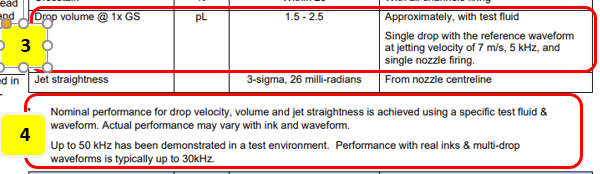
- This corresponds to items 3 and 4 in the diagram above.
-
Why You Should Know What Print Head Specifications Mean Why You Need to Understand Print Head Spec Values
3_1. Ink Volume
- The spec lists 1.5–2.5 pl — an extremely small volume. Note that this is not a size unit; picoliter is a volume unit.
- One important caveat: each head manufacturer optimizes their heads using a specific test fluid tailored to that head’s design.
- The 1.5–2.5 pl figure is based on that test fluid. Actual drop volume will differ depending on whether water-based, oil-based, or UV ink is used.
- Waveform varies by ink type, and picoliter values shift accordingly with the waveform.
- For UV inks, drop volume is typically larger than the spec suggests — for the Xaar1201 (Gen5i), actual volume is estimated at around 3–3.5 pl.
- Knowing the ink volume lets you estimate maximum achievable resolution — just as nozzle pitch does — and gives you a sense of how smooth the printed image will look.
3_2. Jetting Speed and Max Hz
- The speed at which ink exits the nozzle and lands on the substrate — and the head’s maximum operating frequency (Hz) — are both important.
- If the ink jetting speed is low but the carriage moves too fast, ink cannot land at the correct position.
- The carriage speed and X-axis resolution must be operated within the head’s maximum kHz rating — making max kHz a critical spec.
- Together, jetting speed and max kHz help you estimate the carriage’s transport speed — another key input for predicting overall print speed.
- For reference, the figure here shows 7 m/s — meaning 7 meters per second. The ink travels at 7 meters per second as it exits the nozzle.
4. Optimal Gap Between Print Head and Substrate
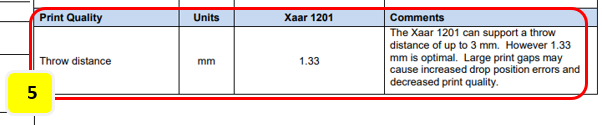
- This corresponds to item 5 in the diagram above.
-
Why You Should Know What Print Head Specifications Mean Why You Need to Understand Print Head Spec Values
4_1. What 1.33 mm means
- The gap between the substrate and the print head is called the “stand-off” in inkjet terminology.
- 1.33 mm is the spec recommended by the print head manufacturer.
- The accompanying text in the brochure states: “Up to 3 mm is possible, but 1.33 mm is optimal. Beyond that, dot landing errors increase and image quality degrades.”
4_2. Problems caused by excessive stand-off
- “The jetting speed we just looked at — 7 meters per second — how long does the ink maintain that velocity after leaving the nozzle?”
- For a 3.5 pl ink drop — tiny and nearly weightless — how far it can maintain speed after being jetted can be inferred from the brochure’s own answer.
- “Up to 3 mm is possible…” — meaning beyond 3 mm from the nozzle, velocity begins to drop off progressively.
- When the stand-off exceeds 1.33 mm:
- The low-mass ink drop loses velocity, and is also affected by air turbulence generated by the moving head carriage.
- As speed drops, the drop can also break apart — producing satellites: smaller secondary drops that separate from the main drop.
- Both the main drop and the satellite drops are displaced by air turbulence and may not land at the correct position. The satellite drops in particular can drift through the air and adhere to the nozzle face.
- If these tiny adhered drops are not cleaned off and printing continues, the UV lamp in a UV printer will continuously expose them — and over time, those tiny drops cure and harden, collapsing the nozzle aperture and producing the messy nozzle pattern shown in the photo below.
-

Why You Need to Understand Print Head Spec Values
5. In Summary
- Just from the key specs in a head brochure, you can estimate maximum print speed, maximum achievable resolution, expected image smoothness, and the maximum printable substrate height.
- Printer manufacturers use the head brochure as their first filter when evaluating a new head. If it aligns with their development concept, they contact the head manufacturer to arrange a more detailed technical meeting.
III. ARTJET UV Printer

핑백: Printhead inkjet principle ARTJET 2025
핑백: Print head multi drop Gray scale ARTJET 2025
핑백: Ricoh Printhead Description ARTJET 2025
핑백: Ricoh Gen5i and Xaar1201 same head ARTJET 2025
핑백: Konica print head model name meaning ARTJET 2025
핑백: Head problem Y-axis banding ARTJET 2025