
ARTJET UV Printer Application 35 _ Create a white shield with different images on the front and back of the keyring
ARTJET UV Printer has been sold in Korea for 4 years, and we are organizing the printer problems we have encountered so far, their causes, and their solutions.
We have compiled 10 different print head problems and 17 ink supply problems, and you can find detailed information at the site below.
ARTJET UV Printer troubleshooting sum up
From last time, we are explaining not only UV printer problems and solutions, but also what products are produced with UV printers.
In the first session, ARTJET UV Printer Application 1 braille printing
In the second session, ARTJET UV Printer Application 2 Flip the material and align it
In the third session, ARTJET UV Printer Application 3 2.5D UV print
In the fourth session, Sai rip [Color Adjustment] tab. ARTJET UV Printer Application 4 Sai rip color graph
In the fifth session, ARTJET UV Printer Application 5 Sai rip print size compensation
In the sixth session, we talked about the acrylic bonding equipment that those who have UV printers and laser cutting equipment are looking for.
Hereuner is only Korean since only Korea is hot on this machine. ARTJET UV Printer Application 6 _아크릴 본딩 장비
In the seventh session ARTJET UV Printer Application 7 _ Ink Consumption Calculation
In the Eighth session, ARTJET UV Printer Application 8 _ I phone 14 print limitation
About K print, Korea Signage Label & special printing exhibition, ARTJET UV Printer Market research 1 _ K Print 2024 Korea printing exhibition
In the ninth session, ARTJET UV Printer Application 9 _ Mask printing not recommend
In the tenth session, ARTJET UV Printer Application 10 _ Leather Cigarette Case UV Printing
In the eleventh session, ARTJET UV Printer Application 11 _ Round soccer strategy board UV printing
In the twelve session, ARTJET UV Printer Application 12 _ What is ICC profile & menu board UV Printing
In the thirteen session, ARTJET UV Printer Application 13 _ Primer performance & limitation
In the fourteen session, ARTJET UV Printer Application 14 _ UV Print & Laser crop mark cutting
In the fifteen session, ARTJET UV Printer Application 15 _ Mobil case UV print profit
In the sixteen session, ARTJET UV Printer Application 16 _ Screen vs Digital Comparison and UV Printing on Hand Sanitizer Cases
In the seventeen session, ARTJET UV Printer Application 17 _ bottle print
In the eighteen session, ARTJET UV Printer Application 18 _ Canvas UV Printing
In the nineteen session, ARTJET UV Printer Application 19 _ Applying epoxy effect with varnish
In the twenty session, ARTJET UV Printer Application 20 _ Making a light frame with a printer+laser cutter
In the twenty one session, ARTJET UV Printer Application 21 _ UV Printer+Laser Cutting Equipment Button Name Tag Making
In the twenty two session, ARTJET UV Printer Application 21 _ UV Printer+Laser Cutting Making a Cell Phone Grip Tok
In the twenty three session, ARTJET UV Printer Application 23 _ UV Printer+Laser cutting Making an Acrylic Keychain
In the twenty four session, ARTJET UV Printer Application 24 _ UV Print with Zig
In the twenty five session, ARTJET UV Printer Application 25 _ How to make RD WORKS CCD camera cutting Video manual
In the twenty six session, ARTJET UV Printer Application 26 _ Acrylic bonding equipment
In the twenty seven session ARTJET UV Printer Application 27 _ All the steps to create UVDTF
In the twenty eight session ARTJET UV Printer Application 28 _ Simple troubleshooting & Captop replacement time
In the twenty nine session ARTJET UV Printer Application 29 _ UVDTF TEST Result
In the thirty session ARTJET UV Printer Application 30 _ Print head Anti crash system
In the thirty one session ARTJET UV Printer Application 31 _ Offset fine tune
In the thirty two session ARTJET UV Printer Application 32 _ ARTJET Delivery Preparation
In the thirty three session ARTJET UV Printer Application 33 _ ARTJET Setting Sequence
In the thirty four session ARTJET UV Printer Application 34 _ ARTJET CW+C Print time & ink cost
Today, I will explain how to create a white shield with different images on the front and back when making a keychain.
I. Request
“Team leader, this keyring has different images on the front and back and shouldn’t be reflected. Is that possible?”
“No matter how much I increase the white, if the background color is dark, it will be reflected. If you look at the promotional video for a large UV printer of a former competitor, when printing the front and back images, it was okay to print in 7 layers like color 1 => white => gray => black => gray => white => Color 2.”
“If I do that, the ink thickness will increase too much and it won’t work well when bonding the acrylic after printing.”
“Of course, I’ll test it with white first.”
Just like when you paint, you have to apply white several times on a black background wall to make it white, so inkjet is the same and it’s even more difficult because you have to cover it with ink dots.
After several TEST processes, we made a keyring with different images on the front and back and delivered it to the customer.
I will explain the conditions applied to the tested assumptions and the final delivered sample.
II. White Concentration Control TEST
1. White 300%
White concentration can be adjusted by moving the cursor within the red dotted line in the figure below.
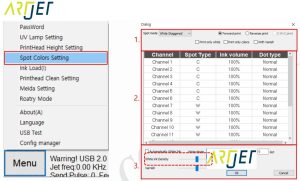
Color 1 => White 300% => Color 2
First, I printed in the default mode, White 300%. 6channel x 50% = 300%
When I looked at it from the floor, not the fluorescent light direction, the Color 2 image was slightly reflected on Color 1.
2. White 600%
Color 1 => White 600% => Color 2
6 channel x 100% = 600%
The print speed is the same because only the White density was increased from 50% to 100%.
It is a bit better than White 300%, but when looking towards the bottom, the Color 2 image is reflected on Color 1.
III. Add grey layer
1. Layer configuration and file saving
Printing proceeded as follows.
color 1 => white => gray => white => Color 2
The Ai file has 5 layers: Color 1, Color 2, White spot, Gray, and crop mark.
The file was saved in 3 parts.
No.1 file: White spot, Color 1, Crop Mark
No.2 file: Gray, White spot
No.3 file: Color 2, Crop mark
2. Printing and Results
Using the auto print function, I printed files 1, 2, and 3 in that order.
When printing at White 300%, there was definitely an improvement, but I felt a bit disappointed.
When printing at White 420%, it was definitely better than before, but it wasn’t perfect.
The BEST should be color 1 => white => gray => black => gray => white => Color 2, but it didn’t work out because it was too time-consuming to do in practice.
The sample was submitted at White 420% and passed.
3. Acrylic bonding and comment
If the ink layer is too thick, there may be defects when bonding the acrylic, so instead of white 600%, I used 420%, and
Since white 420% was added to the front and back of the gray, the total was 840%.
The acrylic bonding went well,
However, even though white 840% is used, the front and back images are slightly visible, so it seems that white alone is not completely shielded.
Second,
The darker the front and back images are, the more severe the problem of being visible, and it is less visible for light images.
If the front and back images are dark and the customer wants perfect shielding, I think you should proceed as follows.
Instead, I think you should estimate the price higher.
color 1 => white => gray => black => gray => white => Color 2
That’s it for today.