
- Anyone experiencing white nozzle dropout where cleaning and pumping work fine but nozzles keep failing
- Anyone who has replaced the head, damper, and ink but the problem still isn’t resolved
- Anyone whose white nozzle dropout shifts to different channels every time — not the same nozzle each time
- Anyone using a printer in a low-temperature environment or with low usage frequency
- Just because cleaning and pumping work fine does not mean the captop is problem-free — degraded ink can remain inside the captop without affecting pumping performance
- Extreme temperatures (too low or too high) can change ink viscosity and cause degradation — degraded ink left in the captop can keep triggering the same problem
- Damper, pump tube, and captop are all consumables — when an unknown problem occurs, replace all three first, then diagnose
- Low usage frequency means ink in the captop is not refreshed and can degrade faster than ink stored in a sealed bottle or damper
- Cleaning and pumping normal / nozzle dropout changes channels each time → suspect degraded ink inside the captop
- Pause mid-print + clean → white prints normally / end print + clean → white drops out → head contacts captop only at end-of-print
- Root cause: degraded ink on captop surface briefly touches nozzle face during capping → disrupts ink jetting
- Fix: replace captop → resolved immediately (8 hours of work done in 10 minutes)
- Risk factors: extreme temperature, low usage frequency, overdue captop replacement
I. Background _ UV Printer inkload cleaning works well, but white doesn’t appear
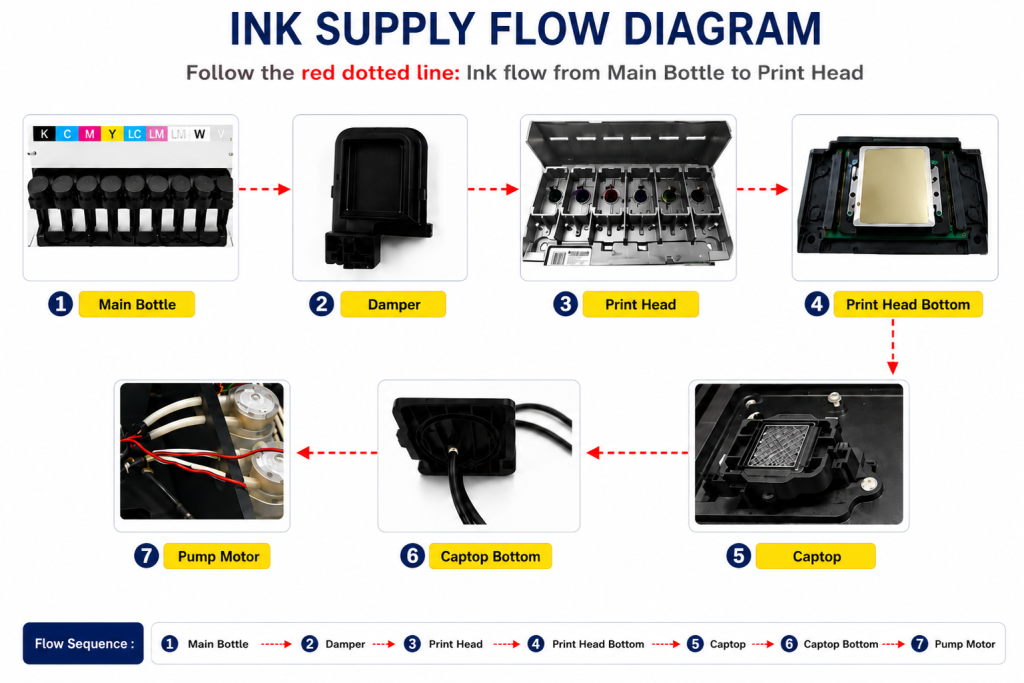
- When ink enters the Damper from the main ink bottle via the ink tube, it passes through the print head, flows to the captop, moves through the motor pump, and finally drains into the waste ink bottle.
- This article covers the Degraded Ink Inside the Captop section of the full ink supply problem series.
- This follows Part 1 Captop Lower Tube, Part 2 How to Replace the Captop, Part 3 Damper, Part 4 Pump Motor and Yellow Tube, Part 5 Captop and Head Position, Part 6 Aligning the Captop and Head Position, Part 7 When the Capping Station Level Is Not Correct, and Part 8 Captop Surface Drying.

- This case took over 8 hours to resolve. The first time it occurred, it was fixed by accident. The second time, all parts and even the ink were replaced before the root cause was finally identified.
- The same problem later appeared at two other customer sites — and because it was such an unsuspected variable, it was only resolved after exhausting every other check.
- Sharing what we learned from 8 hours of hard work.
II. Problem Symptoms _ UV Printer inkload cleaning works well, but white doesn’t appear
A problem that made no sense at all.
- Cleaning works fine
- Inkload (pumping) works fine
- But when printing the nozzle pattern, the white pattern fails to print properly
- A test print was attempted — but the white nozzle still wouldn’t recover
- The head is not clogged — it’s not the same nozzle every time; the failing area changes from print to print
- This took 8 hours to resolve

III. Testing Process _ UV Printer inkload cleaning works well, but white doesn’t appear
Since cleaning and pumping were both working, the white head was replaced on the assumption it would solve the problem. But the white nozzle still didn’t recover.
The electronic board was briefly suspected, but since ink was coming from all channels — even if not cleanly — it was concluded this was not a data-related issue.

Since inkload and cleaning were both functioning, the approach shifted to: “Could there be some kind of deterioration in the white ink itself?”
A. Damper Replacement
- The equipment had been installed for two years — decided to replace the damper
- No improvement after damper replacement

B. Refilling with New White Ink
- Filled the white ink tank with new ink, pumped until fresh ink was flowing through
- No improvement
C. Full tank cleaning and fresh ink refill
- Removed the white ink tank entirely, poured out all ink, cleaned the bottom with 99% IPA, wiped clean, and refilled with fresh white ink
- Printed the nozzle pattern — still no improvement
D. Second Damper Replacement
- Replaced the damper again with a new one just in case degraded ink remained
- Still not resolved
IV. Root Cause and Resolution _ UV Printer inkload cleaning works well, but white doesn’t appear
After 7 hours of testing:
- Continued printing despite the poor white nozzle condition just to see what would happen
- White ink wouldn’t print at all, so Pause was pressed mid-print, the head was cleaned, and printing resumed
- The white ink printed normally from that point — all the way to the end of the print job
- But after the print ended, running cleaning and then the nozzle pattern showed the same white dropout again
The repeating pattern:
- Test image → Pause → Cleaning → Resume printing → White prints normally
- Print ends → Cleaning → Nozzle pattern → White dropout
- The same pattern repeated every time without exception
- Cleaning after print ends: head bottom sits on the captop before stopping → nozzle pattern shows dropout
- Cleaning mid-print via Pause: head bottom does not touch the captop, printing resumes immediately → white prints correctly
- When the head touched the captop → nozzle pattern was poor. When it did not → printing was normal.
- Since inkload and cleaning worked fine, replacing the captop had never been considered
- After so many inkload cycles, it was assumed any residue on the captop had been diluted by fresh ink flowing through
- It never occurred to anyone that degraded ink remaining in the captop could briefly touch the nozzle face during capping and disrupt jetting
Replacing the captop resolved the problem immediately.
V. What the Four Affected Customers Had in Common _ UV Printer inkload cleaning works well, but white doesn’t appear
A total of four customers experienced this problem — two on White, two on Color. Based on their environments, here are the common contributing factors.
A. Extremely Low Temperature
- Office temperature dropped to 2°C in winter — even with heating, it wouldn’t rise above 15°C
- Temperatures too low or too high can change ink viscosity, cause ink degradation, and leave degraded ink behind in the captop
- Replacing the captop resolved the issue immediately in this case too
B. Low Usage Frequency
- Ink in the captop is not refreshed when the printer is used infrequently
- Ink sitting in the captop may degrade faster than ink stored in a sealed, light-blocked bottle or damper
C. Overdue Captop Replacement
- All affected customers had not replaced their captops for a very long time
- Damper → even if it looks fine, old dampers can cause nozzle dropout during printing or cleaning failures
- Pump tube → nozzle recovery can slow significantly, or pumping may stop working even though it appears intact
- Captop → cleaning or inkload may suddenly fail, or the degraded-ink problem described here can occur
- If an unknown problem occurs, replace all three consumables first, then begin diagnosis
VII. ARTJET UV Printer

핑백: UV Printer printing is fine at first, suddenly color is changed
핑백: When and how to replace the yellow tube ARTJET 2025
핑백: UV Printer When to Replace the Damper ARTJET 2025
핑백: UV Printer Monday Head Cleaning ARTJET 2025
핑백: UV Printer Capping Station Level and Gap ARTJET 2025