- Those who want to create epoxy effects using varnish on existing printed materials
- Those who want to process epoxy, gold foil, and silver foil in small quantities
- Those who are curious about the difference between single-pass finishing equipment such as Scodix, MGI and multi-pass equipment
- Those who want to know whether gold and silver foil expressions are possible with UV printer varnish
- Those who are using existing printing equipment such as Ricoh together with UV printers
- Since varnish reacts with printing ink, coated paper must be used to achieve a clean epoxy effect
- Since UV printers do not have a camera, the varnish printing position must be manually aligned
- With current UV printer varnish, there are limitations in expressing gold and silver foil
- For gold and silver foil, separately developed varnish, dedicated film, and coating temperature settings are required
- Epoxy effects can be implemented with UV printer varnish. However, coated paper must be used
- Since there is no camera, positioning must be aligned manually, but if printing and varnish are done with UV, they can be processed at once
- Single-pass finishing equipment (Scodix 500k~700k USD, MGI 200k~300k USD) has high productivity, and multi-pass equipment (80k~90k USD) is a low-cost alternative
- Gold and silver foil have limitations with current UV varnish because edges are not clean. Separate varnish + dedicated film are required
- Rather than companies focused on goods or signage, it is more valuable for companies that own existing printing equipment such as Ricoh for small-quantity epoxy work
We are explaining products that can be made with a UV Printer.
Today, we will explain how to create an epoxy effect by applying only varnish on general printed materials.
I. Varnish Dedicated Equipment — Creating Epoxy Effects with Varnish
1. Printing Industry
- In UV printers, varnish is a transparent ink option.
- Although it is not used frequently, design effects can be created by applying transparent ink to specific areas.
- In traditional printing fields, this effect is usually called “epoxy.”
- When only the title part of a book cover is glossy, that is also an epoxy effect.
- After printing is completed, this epoxy effect is created by sending it to a post-processing company.
1-1. However, since this process is not inkjet printing,
- When done in small quantities, the unit cost is high,
- Post-processing companies are reluctant to handle small orders,
- And because there is a minimum order quantity, even if only a small quantity is needed, the order must proceed at a bulk price.
2. Single-pass Inkjet Equipment Capable of Epoxy, Gold Foil, and Silver Foil
2-1. Inkjet in the Traditional Printing Industry
- The need for small-quantity printing has also arisen in the traditional printing industry.
- Inkjet was introduced due to the demand for variable data where numbers differ for each print,
- And the area where it spread the fastest is the label industry.
- As printing itself is being replaced by inkjet, post-processing equipment such as epoxy, gold foil, and silver foil is also being replaced by inkjet.
- The first widely adopted post-processing equipment in the traditional printing field was the “Scodix” machine made in Israel.
- In Korea, due to its high price (500,000–700,000 USD), it was mainly supplied to large-scale companies.
- After that, Konica Minolta released MGI varnish equipment at a level of 200,000–300,000 USD, and currently, it is known that more MGI equipment is sold than Scodix equipment.
2-2. The principle of both machines for creating epoxy or gold/silver foil effects is as follows:
- Paper printed by traditional printing equipment is placed in the paper tray, and when the machine is operated, the printed sheets are automatically loaded one by one,
- While passing through, the camera installed in the equipment accurately recognizes the print position on the paper,
- The transparent ink prints only the varnish data according to the image file while recognizing the paper position,
- Then, the transparent ink is cured by UV to complete the epoxy effect,
- Or, when gold or silver foil roll film passes over the completed epoxy area, the foil attached to the film is transferred onto the transparent ink, creating gold and silver expressions.
- The single-pass inkjet post-processing equipment described above is not faster in productivity compared to traditional post-processing equipment used in the printing field, but since it allows small orders and can create more detailed effects, the sales of inkjet post-processing equipment are increasing.
3. Multi-pass Varnish Post-processing Equipment
- If you watch the YouTube video below, it shows a method where crop marks from traditionally printed paper are read, and varnish is printed only on specific areas.
- https://www.youtube.com/watch?v=t-HRdxabQDI
- Compared to single-pass equipment such as Scodix and MGI, productivity is significantly lower, but due to its lower price, it is said to have some demand in the printing industry.
- However, separate equipment is required for gold and silver foil expression.
- The price is approximately 80,000–90,000 USD.
II. Actual Canvas Printing — Creating Epoxy Effects with Varnish
1. Epoxy Effect
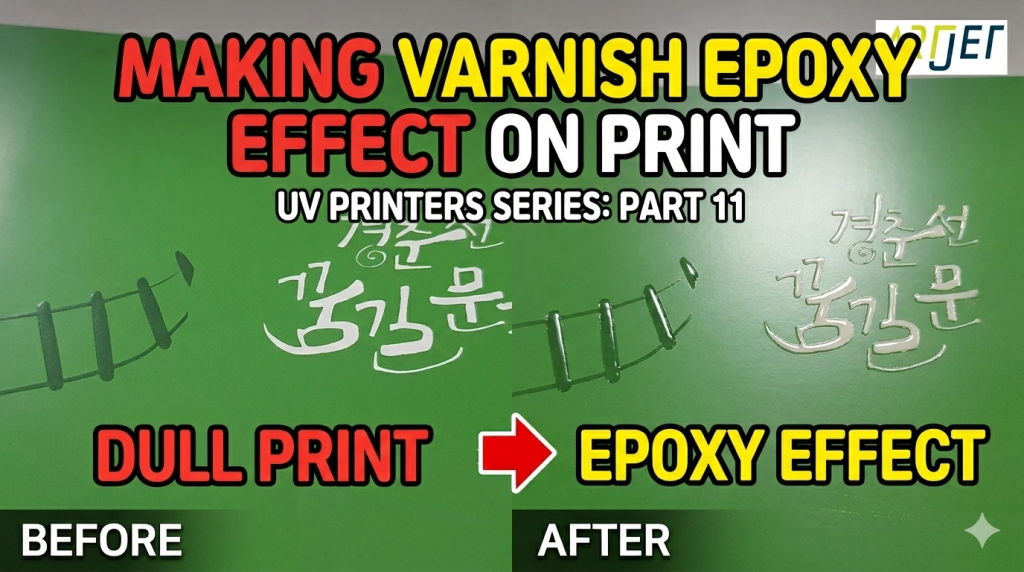
- This is an image where epoxy effect was created by printing with a Ricoh printer and applying only varnish.
- Since varnish reacts with printing ink, coated paper must be used to achieve a clean epoxy effect.
-

Creating Epoxy Effects with Varnish - It is possible to create epoxy effects using varnish, but one issue is that since there is no camera, the position must be manually aligned.
- Create four or more borders outside the printed area of the paper, and after printing the same borders outside the flatbed using a UV printer,
- If printing is aligned to that position, it is not perfectly accurate, but varnish can be printed only on a specific printed area.
- Of course, if both printing and varnish are done using a UV printer, varnish can be applied in a single process.
2. Gold and Silver Foil
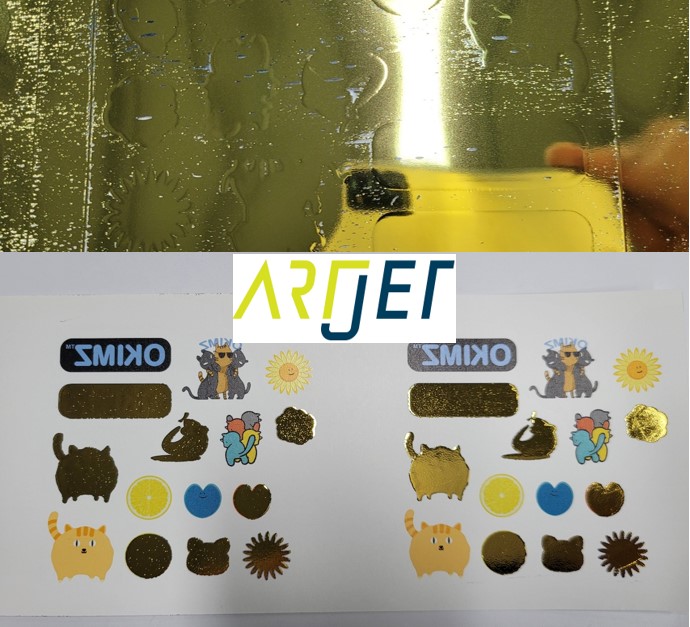
- We have tested gold and silver foil using varnish ink.
- Since varnish was not a liquid specialized for gold and silver foil, there were limitations in expressing gold and silver with the current varnish.
- If you look closely at the image below, the edges were not expressed cleanly.
-
Creating Epoxy Effects with Varnish
3. Chinese Market Situation
- According to a Chinese partner selling the multi-pass inkjet varnish equipment mentioned above,
- For gold and silver foil expression, varnish ink has been separately developed, and testing is also required for the lamp curing method.
- It is necessary to set up gold and silver foil materials suitable for the developed varnish, and when processing gold and silver foil, coating temperature must also be tested.
- Those who focus only on UV printer-specific items such as goods, signage, and advertising may not be very interested in this,
But for those who have existing printing equipment such as Ricoh, there is curiosity about epoxy, gold foil, and silver foil for small-quantity work, so this has been summarized.
III. ARTJET UV Printer
