
Damper _ Ink Supply Problems (Part 3)
✅ Who Should Read This
- Anyone wondering what a damper does and where it sits in the ink flow path
- Anyone experiencing missing nozzles on a specific channel or ink dropout during printing
- Anyone who doesn’t know that White and Varnish channel inspection works differently from Color
- Anyone who wants to know when to replace the damper and how to use a syringe for ink supply checks
⚠️ Precautions
- The tube connecting to the damper must always be flexible tubing — using rigid tubing causes air infiltration and inkload failure
- Damper inlet diameters vary by manufacturer — always use parts from the printer’s original manufacturer
- When performing syringe work on White or Varnish channels, always block all other shared channels first — otherwise healthy channels will also be affected
- Replace dampers on a 6-month schedule even if no obvious problem is present
🧭 Key Summary (Field Insight)
- Damper functions: ink storage and supply, maintaining ink at the nozzle surface, filtering air bubbles and contaminants
- Color channels are 1:1 and can be checked independently / White and Varnish share a main ink bottle — always block other channels before syringe work
- Ink drops out mid-print then recovers after cleaning, repeating → check head surface for ink pooling → damper replacement is the first action
- Replace dampers every 6 months — the cheapest and fastest way to eliminate a major variable
📋 Ink Supply Problems — Full Series List
We are documenting ink supply problems in order. This list is updated with each new part.
In our third look at ink supply problems, we cover the damper.
We explain the damper’s location and role, the ink supply structure, and real-world problems and solutions from the field.
I. Background _ Cleaning Problem Summary 3 Damper
1. Ink Supply Flow Diagram

- This article covers the Damper section highlighted in the full ink supply problem index.
II. Damper Location and Role _ Cleaning Problem Summary 3 Damper
1. What the Damper Does
- The damper is the first component connected to the ink tube coming from the main ink bottle.
- It plugs into the print head and supplies ink to it.
The damper serves three roles:
- It stores ink that flows by convection from the main ink bottle and delivers it to the head.
- It prevents ink from dripping through the head, keeping ink at the nozzle surface so it can be jetted properly during printing.
- It acts as a filter, catching air bubbles and contaminants in the ink.

III. Ink Supply Structure _ Cleaning Problem Summary 3 Damper
1. Overall Structure
Typical structure of a UV printer using three XP600 heads:
- Three heads total — Color head, White head, Varnish head
- Color head: C, M, Y, K, Lc, Lm — each channel connected 1:1 to its own main ink bottle
- White head: first White bottle supplies W1–W4 (4 channels); second White bottle supplies W5–W6 (2 channels)
- Varnish head: one main bottle splits into two lines — V1–V4 on one line, V5–V6 on the other

- For Color, each channel connects 1:1 to its own damper and main bottle — if a specific color is missing, only that channel needs to be checked.
- White and Varnish work differently. Multiple channels share a single main ink bottle, so working on one channel with a syringe affects all others on the same line.
- When inspecting White or Varnish, you must know which channels share the same main ink bottle.

2. How to Check When Pumping Problems Occur
2_1. Color Example — Lc Not Printing
- Remove the Lc damper from the head and press a syringe against the damper’s head-connection port, then pull to draw ink.
- Initially, ink comes out with bubbles — then, at a certain point, ink flows cleanly with no bubbles.
- If ink flows cleanly without bubbles, ink supply from the main bottle to the damper is normal.
- If bubbles keep coming, air is leaking in somewhere and must be resolved. Left unresolved, this causes cleaning failure, inkload failure, and ink dropout during printing.

2_2. White / Varnish Example — W3 Not Printing
- Unlike Color, simply pulling the W3 damper and using a syringe on it alone is meaningless.
- Ink will initially flow — but it is coming from W1, W2, and W4 dampers on the same shared line, not from the main bottle.
- Once those dampers are drained, the head nozzles are open to air, and only air enters no matter how hard you pull.
- The correct method: remove W1, W2, and W4 dampers from the head, fold and clamp their tubes with cable ties to block air entry, then perform syringe work on W3 only. This is the only way to accurately verify whether ink is reaching W3 from the main bottle.
IV. Real-World Problems from the Field _ Cleaning Problem Summary 3 Damper
1. Using a Rigid Tube on the Damper
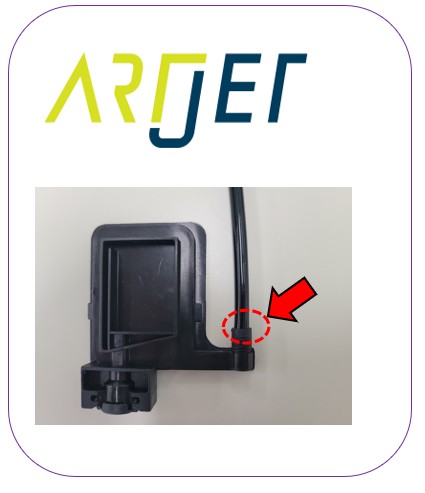
- Nearly the entire ink line from the main bottle to the damper uses rigid tubing. However, the final connection into the damper itself must always use flexible tubing.
- In our early days, we only stocked rigid tubing and used it when replacing dampers. Inkload, which had been partially working before, stopped entirely after the replacement.
- We suspected the rubber ring seal and re-tightened the gold bolt as hard as we could — but the problem persisted.
- Switching to flexible tubing on the damper resolved the issue.
- Flexible tubing must fit tightly into the damper — once inserted, it should resist being pulled out by hand.
- If the tube does not fit snugly, the rubber ring and bolt alone cannot prevent air from entering.

2. Damper Inlet Diameter
- After learning about the importance of flexible tubing and the limitations of rubber rings, we started testing each new damper before use — inserting flexible tubing into the inlet and discarding any that didn’t fit snugly.
- Dampers that look identical can have different inlet diameters depending on the manufacturer. Buying random dampers from Alibaba can cause problems later.
- Ink tube inner and outer diameters also vary by manufacturer. Buying random ink tubing from Alibaba can cause problems later.
- We discarded all parts purchased from third-party suppliers once we learned this. Since then, we only import parts sourced directly from the printer’s original manufacturer — even at a higher cost.
3. White and Varnish Syringe Work
- Damper ink supply checks for White and Varnish are different from Color.
- All channels not being tested must be blocked before starting — without this, you cannot accurately assess the channel in question, and previously healthy channels may be damaged in the process.
- Cleaning Problem Summary 3 — Related Short Video
- Cleaning Problem Summary 3 Damper — Full Video: Syringe Work to Nozzle Test
4. When to Replace the Damper
- Dampers rarely cause obvious problems on their own, so they tend to get overlooked as a consumable — often used without ever being replaced.
- But this leads to mysterious symptoms that resist all troubleshooting. After exhausting every other possibility, someone finally says, “Let’s try replacing the damper — it probably isn’t related, but…” — and it turns out that was the fix.
- To prevent this, replace dampers on a 6-month schedule regardless of whether a problem is visible.
If you see these symptoms, replace the damper first:
- A specific color prints fine then suddenly drops out mid-print → cleaning restores it → it drops out again mid-print → cleaning restores it again — repeating cycle
- Raising the head and inspecting the underside reveals ink pooling on the head surface
- Leaving the head stationary for 30 minutes shows ink beading up on the surface
- In these cases, replace the affected color’s damper first. A worn-out damper that can no longer hold ink properly is the most likely cause.
- Since damper replacement is the cheapest and simplest fix, eliminating the damper as a variable before checking anything else is always the right call.
V. UV Printer Basics · Troubleshooting · Product Guides
We have organized our UV Printer content below. Click an item to read the full post.
1) Ink Supply
23 articles on ink supply issues, including cleaning and pumping
2) Print Head Issues
12 articles on head-related problems, from replacement methods to symptoms
For deeper printhead study: Printhead Basics — 10 Articles
3) Electronics / Software Issues
4) Mechanical Issues
5) Sai Flexi RIP Installation, Spot Color, Troubleshooting
6) UV Printable Products — Full Summary
VI. ARTJET UV Printer
After selling and maintaining ARTJET UV printers for over 5 years, we have learned one vital lesson.
The most important factor next to product stability is accumulating troubleshooting data.
Problems can occur with any equipment depending on the environment, working conditions, and user skill level. What matters in the field is not “trouble-free equipment,” but:
How fast and how accurately you can find the cause and solve the problem when it occurs.
ARTJET continuously collects and organizes real-world problem data from the field to support faster and more accurate problem resolution.
🎥 View Print Quality Samples
🧾 Full List of UV Printable Products

* Note: Exterior design has been updated.
※ This article is based on actual field cases. Results may vary depending on the environment and equipment configuration.
핑백: Captop and head position _ Printer Cleaning Issues Part 5 ARTJET 2026
핑백: Aligning the Captop and Head Position - Printer Cleaning Issues Part 6 ARTJET 2026
핑백: Ink that has deteriorated inside the captop - Printer Cleaning Issues Part 9 ARTJET 2026
핑백: How to Replace a Motor Pump Tube - Printer Cleaning Issues Part 12
핑백: Why it's important to replace the yellow tube and captop
핑백: Head protection plate crumpled _ Printer Cleaning Issues Part 14 ARTJET 2026
핑백: Head protection plate cracked _ Printer Cleaning Issues Part 16 ARTJET 2026
핑백: When ink runs out during printing - Printer Cleaning Issues Part 17 ARTJET 2026
핑백: White flies around the image - Printer Cleaning Issues Part 19 ARTJET 2026
핑백: How to Find the Problem Color When the Color is Strange - Printer Cleaning Issues Part 21 ARTJET 2026
핑백: Problems that occur when ignoring the low ink alarm - Printer Cleaning Issues Part 22 ARTJET 2026
핑백: Printer Cleaning Problems Part 23 Table of Contents ARTJET 2026
핑백: Why White Cleaning Doesn't Work Well - Printer Cleaning Issues Part 13 ARTJET 2026