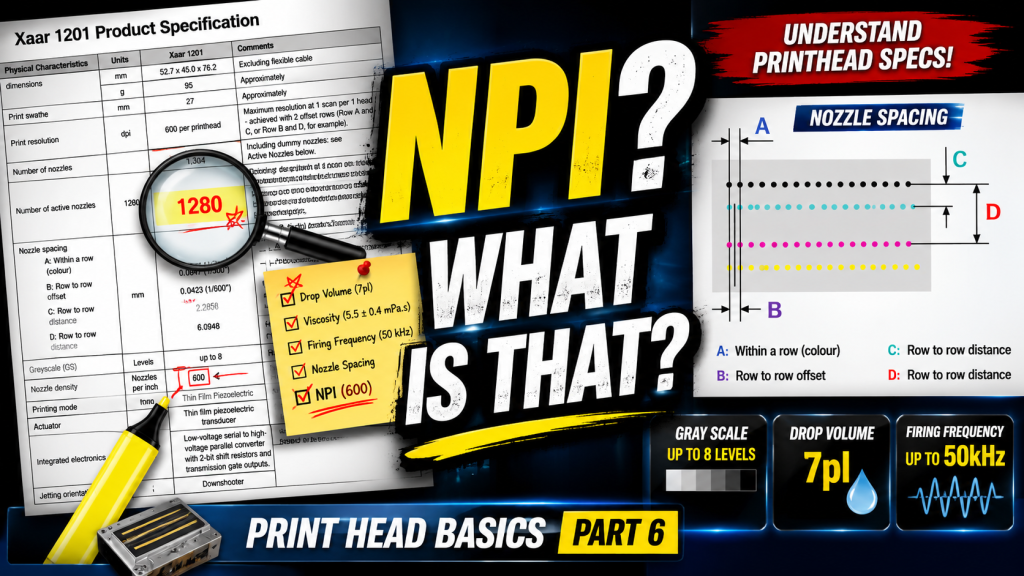
- Anyone new to print head spec sheets who finds the terminology unfamiliar
- Anyone who wants to understand the precise meaning of terms like NPI, gray scale, and ink viscosity
- Anyone preparing for a meeting with a head manufacturer or distributor
- The drop volume listed in spec sheets is based on the manufacturer’s test fluid — actual values may differ when using real ink
- Even heads with a built-in heater may not maintain perfectly uniform temperature across all nozzles
- If ink viscosity falls outside the head’s specified range, jetting instability or nozzle clogging may occur
- Head and nozzle are different things — “the head is clogged” is imprecise; “a nozzle is clogged” is the correct term
- NPI (Nozzle Per Inch) is the unit for Y-axis head resolution — often used interchangeably with DPI, but technically distinct
- Gray scale / Multi drop does not mean different drop sizes come out of the nozzle — small drops merge within the short stand-off distance to form a larger drop
Printhead Spec Terminology Explained
I. Terms You Must Know — Printhead Specification Terminology Explained
1. Are “Head” and “Nozzle” the Same Thing? Why Do People Use Both Terms?

- The assemblies shown on the left side of the diagram above are called print heads.
- Looking at the underside of a print head, you can see thin lines. Zooming in on those lines reveals that they are made up of tiny holes — as shown on the far right. These holes are called nozzles.
- When colors look off during printing, or banding appears on the output, people often say “the head seems clogged” — but the precise term is “a nozzle seems clogged.”
- A single print head contains anywhere from dozens to thousands of nozzles.
- The more nozzles there are, the more ink can be jetted at once — which means faster print speeds.
- However, more nozzles also means a higher head price.
- Some head manufacturers price their heads according to nozzle count.
2. What Is the Head’s Resolution? What DPI Class Is It? And What Is NPI?
- “Does the print head itself have a fixed resolution? What does that mean?” It may sound like a strange concept at first, but it is something anyone working in inkjet printing must understand.
2_1. X-Axis Resolution of the Print Head
- When print resolution is expressed as 720 x 1080 dpi, the first number — 720 — refers to the X-axis resolution, and the second — 1080 — refers to the Y-axis resolution.
- Resolution is determined by how many ink drops land within 1 inch (25.4 mm) along the X-axis (scan direction) and the Y-axis (feed direction).
- At 720 x 1080 dpi, 720 ink drops land within 1 inch horizontally (X-axis), and 1080 ink drops are packed within 1 inch vertically (Y-axis).
- For the X-axis — the head’s scan direction — as long as the ink drop volume allows, you can increase X-axis resolution by reducing the head’s travel speed.
2_2. Y-Axis Resolution of the Print Head
- Y-axis resolution — in the feed direction — is determined by the physical specifications of the print head itself.
- For example, looking at the underside of a Ricoh Gen4 print head, you can see two black lines.
- To the naked eye they look like solid black lines, but zooming in reveals that each line is made up of countless tiny holes — nozzles.
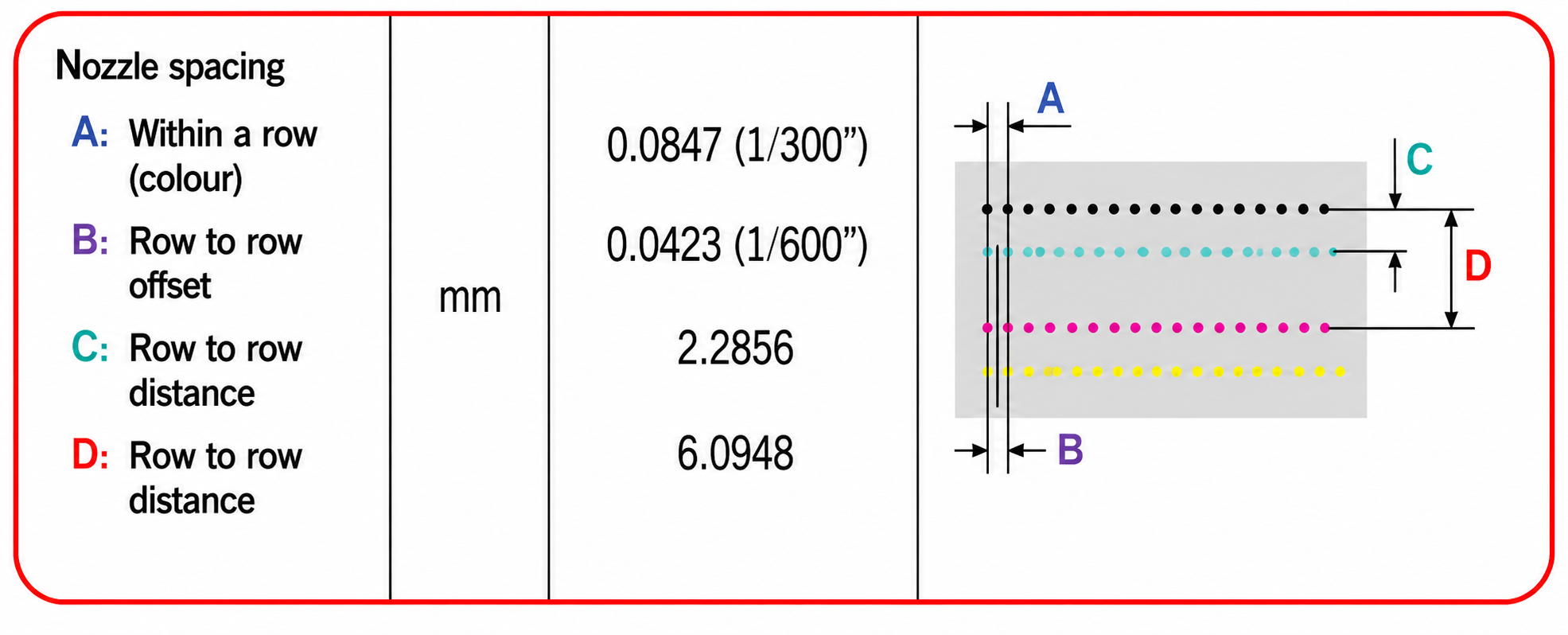
- The diagram below shows the distances between those holes. The concepts of Distance A and Distance B are important.
- A: Distance between nozzles within a single row: 0.1693 mm
- B: Distance between nozzles when both rows are combined: 0.0846 mm
-
Printhead Specification Terminology Explained Printhead Spec Terminology Explained ARTJET 2025 - When a different color is assigned to each row:
- If Black ink is loaded into the holes of one row and Magenta into the other — i.e., each row carries a different color — the resolution calculated from the Y-axis drop spacing is 150 dpi [25.4 mm (1 inch) ÷ 0.1693 mm = 150.029].
- Within 1 inch, 150 Black ink drops and 150 Magenta ink drops can each land.
- Since 150 ink drops land within 1 inch along the Y-axis, the resolution is 150 dpi.
- However, when referring to the head itself, the term 150 NPI is used instead of 150 DPI.
- Nozzle Per 1 Inch. When the nozzle pitch is 0.1693 mm, the head is called a 150 NPI-class head.
- Now suppose the same color is loaded into both nozzle rows — both the first and second rows carry the same ink:
- Each row is offset by half of 0.1693 mm, so the effective nozzle pitch becomes 25.4 mm (1 inch) ÷ 0.0846 mm = 300.236… — meaning 300 dpi can be achieved.
- Using one color per nozzle row gives 150 dpi; using one color across both rows gives 300 dpi.
- In inkjet practice, when the combined result of the two offset rows works out to 300, the head is referred to as “a 300 dpi-class head.”
- When discussing a head’s own resolution, NPI (Nozzle Per 1 Inch) is more precise than DPI (Dot Per Inch).
- For a more technical explanation of Y-axis resolution and DPI, refer to the link below.
- The Exact Concept of Inkjet Print Resolution
3. How Many Picoliters Is This Head?
3_1. “This Head Is 7 Pico”
- Most people hear “7 pico” and assume it refers to the size of the ink drop. It does not.
- The unit omitted after “pico” is not a size unit — it is liter. It refers to the volume of ink jetted in a single drop.
- The ink drop volume listed in a print head spec sheet is not based on the ink actually used in the printer — it is based on a test fluid used by the head manufacturer.
- The drop volume specified using that test fluid may differ from the actual drop volume when real ink is used.
- Drop volume varies depending on ink type — water-based, solvent, UV — as well as jetting conditions such as waveform, temperature, viscosity, and air pressure.
- In other words, while the head manufacturer’s spec may say 5pl, the actual drop volume when the head is installed in a real printer may fall anywhere from 4pl to 7pl.
3_2. How Picoliter Affects Print Grain
- The photo below makes it clear why ink dot size matters — and why choosing a smaller picoliter head is important.
- The Samba appears to be the only head currently capable of stably jetting UV ink at 2 picoliters.
-

Printhead Specification Terminology Explained
4. Gray Scale, Multi Drop
- Before I studied this myself, I also assumed that big drops and small drops came out of the nozzle separately.
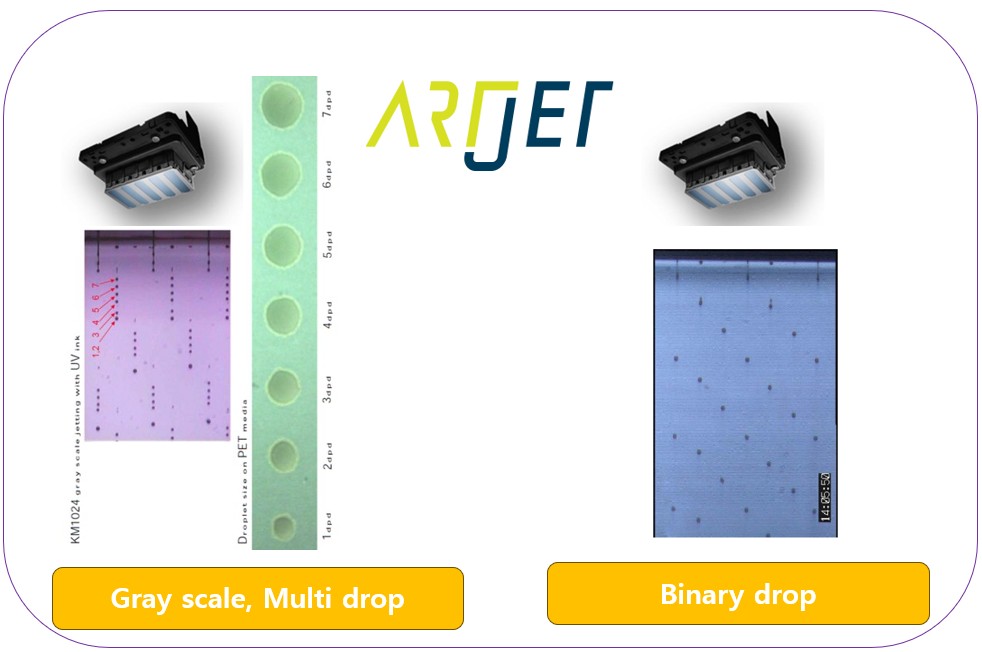
- Gray scale and multi drop do not mean different drop sizes exit independently. Instead, small drops merge within the short 1.2–1.5 mm stand-off distance to form a larger drop — and that is what is called gray scale or multi drop.
- In the photo below, the small ink drops numbered 1 through 7 in the left diagram merge within the 1.2 mm stand-off distance, and the combined ink volume lands on the substrate.
- The right side shows drops that do not merge — each one jets at the same speed and lands individually. This method of jetting only identical ink volumes is called binary drop.
-
Printhead Specification Terminology Explained Printhead Spec Terminology Explained ARTJET 2025 - For a more detailed explanation of multi drop and gray scale, refer to the link below.
- Variable Dot Technology Explained
- You can also see the drop merging process in action in the video below, starting at around the 2-minute 4-second mark.
- Gray scale multi drop video
II. Additional Terms — Printhead Specification Terminology Explained

1. Active Nozzle Count
- Not all nozzles in a row are used. There are a number of dummy nozzles at both ends of each row that are not used in actual printing.
2. Heater
- Some print head models have a built-in heater; others do not.
- When a heater is present, it maintains a consistent ink viscosity so that ink jets stably.
- Heads with heaters are naturally priced higher than those without.
- While a heated print head is preferable, heating typically occurs at only one or two points — so it cannot be guaranteed that exactly the same temperature is maintained across the entire nozzle span.
- For example, the ink sitting at nozzle 1 may be at 45°C, while the ink at nozzle 500 may be at 44°C.
- When temperature varies like this, ink viscosity differs between nozzles — and differences in viscosity can lead to variations in drop volume, jetting speed, and straightness from nozzle to nozzle.
- When evaluating a head with a heater, it is essential to confirm with the head manufacturer whether uniform temperature is maintained across all nozzles.
3. Ink Type
- Print head spec sheets list the compatible ink types — water-based, solvent, UV, and so on.
- Some heads are compatible with all ink types; others are not. Always check this carefully.
4. Recommended Ink Viscosity
- The viscosity range of ink that the print head can jet is also listed in the spec sheet.
- Most high-end industrial print heads operate at around 10 cp; Epson-based heads typically fall in the 5–7 cp range.
- If viscosity is outside the specified range, the head may fail to jet ink at all — or if it does jet, straightness may be compromised.
- Certain nozzles may also stop firing during printing.
- The viscosity range specified in the head spec must be maintained at all times for stable ink jetting.
5. Jetting Speed, Jetting Angle
- Jetting speed refers to the velocity of the ink as it exits the nozzle. Within the typical 1.2 mm stand-off distance, ink travels at approximately 6 meters per second — extremely fast. Beyond that 1.2 mm, however, velocity drops off rapidly.
- Jetting angle refers to the straightness of the ink drop as it exits the nozzle, and is usually expressed as a tolerance range. In practice, this can vary significantly depending on ink characteristics and waveform tuning.
6. Print Head Lifespan
- Industrial print heads are more often replaced due to physical crashes or insufficient maintenance than from reaching their rated lifespan. Proper care matters that much — which is also why lifespan data has disappeared from modern head manuals.
- For more on print head lifespan, refer to the link below.
- Print Head Lifespan and Warranty
Today we covered the key concepts you need to know from a print head spec sheet. Having at least this level of knowledge is the minimum required for meaningful communication when meeting with a head manufacturer.
III. ARTJET UV Printer
