
Variable Dot Technology Explained — Printhead Basics (Part 3)
✅ Who Should Read This
- Anyone curious about why print quality differs between UV printer models
- Those encountering variable dot technology (Gray Scale / Multi Drop) for the first time
- Anyone who wants to understand waveform tuning when switching inks or replacing a print head
⚠️ Precautions
- Variable dot quality depends not only on the head’s hardware specs, but also on waveform settings
- When switching inks, always verify whether the new ink’s waveform can be applied to your printer
🧭 Key Summary (Field Insight)
- Variable dot (Multi Drop) is a technology that merges multiple small droplets in mid-air to form a larger dot
- Even a 4-color printer with variable dot can produce gradients as smooth as a 6-color system
- Before switching inks, always confirm whether the waveform can be applied and whether ICC profile re-creation is possible
UV Printer Basics · Troubleshooting · Product Guides
We have organized our UV Printer content below. Click an item to read the full post.
1) Ink Supply
23 articles on ink supply issues, including cleaning and pumping
2) Print Head Issues
12 articles on head-related problems, from replacement methods to symptoms
For deeper printhead study: Printhead Basics — 9 Articles
3) Electronics / Software Issues
4) Mechanical Issues
5) Sai Flexi RIP Installation, Spot Color, Troubleshooting
6) UV Printable Products — Full Summary
📋 Printhead Basics — Full Series List
We are documenting printhead fundamentals in order. This list is updated with each new part.
03
Variable Dot Technology Explained
Variable Dot Technology Explained
Many printer users — and even service engineers — hold misconceptions about print heads, so we would like to explain the fundamentals of printhead knowledge.
Today, we explain variable dot technology — also known in the field as Gray Scale or Multi Drop.
I. Print Quality Comparison: Variable Dot vs. Fixed Dot — Variable Dot Technology Explained
1. Print Quality: Variable Dot vs. Fixed Dot
- This story goes back to early 2005, when we were selling UV printers as a manufacturer.
- At the time, the best print quality came from UV printers using a Spectra print head at 25pl.
- We developed a UV printer using the KM512 14pl print head, and at launch it offered the best print output quality in the world.
- Two years later, however, OCE released a new model called the Arizona, and our sales dropped sharply.
- Our machine used 14pl with 6 colors (CMYK + Lc + Lm), while OCE used only 4 colors (CMYK) — but with a smaller 7pl ink drop.
- OCE’s advantage was not just the smaller picoliter; they also incorporated variable dot (gray scale / variable dot) technology, which made their image quality dramatically superior.
- The diagram below shows how ink drops land differently across these approaches.
- We will walk through 14pl 4-color, 14pl 6-color, and 7pl variable dot in order.
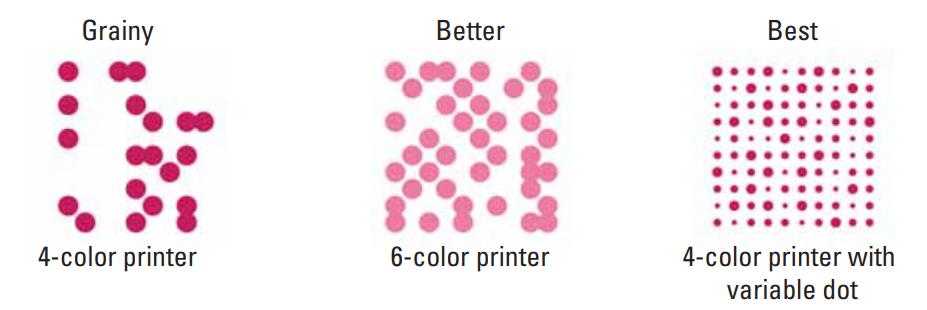
2. 14 Picoliter 4-Color System
- When reproducing human skin tones with a 14pl head using only 4 colors, Magenta alone cannot cover the darker areas of the skin.
- As a result, Black dots are scattered into areas where Magenta falls short.
- The problem is that when 14pl Black dots land on light skin tones, those scattered Black dots become visible to the human eye, making the skin tone look rough and coarse.
- In 2005, there were no print heads capable of jetting smaller picoliters, so this was accepted as a fundamental limitation of UV printers.
- For this reason, UV printers were not used for close-up POP displays. Instead, water-based ink was printed on standard adhesive sheets, which were then mounted on foam-X or foam board to produce POP advertising.
3. 14 Picoliter 6-Color System
- By adding Light Magenta and Light Cyan as supplementary colors, the lighter areas can be handled by Lc and Lm instead of Black dots, significantly reducing the number of Black dots that land in those regions.
- Compared to a CMYK 4-color setup, adding Lc and Lm produces a much smoother rendering of light skin tones.
- This is why many manufacturers moved from 4-color to 6-color systems.
- The difference in print quality between a 4-color CMYK and a 6-color CMYK+Lc+Lm system on a 14pl head was significant.
4. 7 Picoliter 4-Color System with Multi Drop
- With only 4 colors (CMYK), dot size is adjusted — as shown on the far right of the diagram below — so that larger dots land in darker areas and smaller dots land in lighter areas.
- Using variable dots this way produces a smoother, more gradual image.
-
Variable Dot Technology Explained - Viewed from a distance, the larger dots read as Magenta, while the smallest dots appear as light as Light Magenta.
- And since there are mid-sized dots as well, colors between Magenta and Light Magenta are also reproduced.
- Because Multi Drop technology can jet both large and small picoliter dots from a single color channel, the tonal range expressible with one ink is greatly expanded.
- Without relying heavily on Black dots for light skin tones, the skin tone can still be reproduced — resulting in images that appear fine and smooth, as shown in the photo below.
-

Variable Dot Technology Explained
II. How Multi Drop Technology Works — Variable Dot Technology Explained
1. How Multi Drop and Fixed Dot Jet Ink
1_1. Looking at the diagram below
- Voltage is applied to the upper plate holding the ink, delivering a physical force to it.
- The plate flexes once, pushing the ink, and that force jets the ink out of the nozzle.
- As shown in the first diagram, one push jets one drop of ink. The second and third pushes each jet one drop as well.
- In this way, the print head simply jets ink drops of identical volume each time.
1_2. So how does a larger drop form?
- The gap between the print head and the substrate is typically 1.2 mm or 1.5 mm. In inkjet printing, this gap is called the stand-off.
- Multi Drop and Gray Scale do not jet different ink volumes — such as 7pl, 14pl, or 21pl — from the same nozzle. Instead, the same volume of ink is jetted each time, and the drops merge within that short 1.2 or 1.5 mm stand-off distance to form a larger dot.
- This method of merging drops within a short distance to mix large and small drops and reproduce an image is called Multi Drop or Gray Scale.
-

Variable Dot Technology Explained
2. How Do Drops Merge Within 1.2 mm?
- As mentioned above, one voltage pulse jets one ink drop.
2_1. Adjustable Variables That Control the Ink Drop
- When applying voltage, several conditions can be adjusted:
- 1. The voltage level itself
- 2. Whether the voltage rises gradually or sharply
- 3. The duration the voltage is applied
- 4. How long to wait after the first voltage pulse before applying the next — i.e., the delay between pulses
2_2. The Principle Behind Drop Merging
- Looking at the diagram below, the first and second pulses apply voltage for the same duration, while only the third pulse has a duration that is multiplied.
- When this is done, the first and second drops merge with the third to form a larger volume ink drop — all within the 1.2 mm stand-off distance.
- Click here to see this in action on video.
- Two short pushes jet two small drops, and then one long push jets a third drop at higher velocity — that faster third drop catches up to and merges with the first two.

Printhead Gray Scale, Multi Drop — Waveform Explanation - The process of controlling jetting conditions through the head and finding the optimal values is called waveform tuning.
- Head manufacturers and ink manufacturers work together to create the waveform, and may supply the resulting waveform data to printer manufacturers. Alternatively, ink manufacturers purchase a dropwatcher — a device for tuning waveforms — and tune the waveform independently without the head manufacturer’s involvement, then supply it together with the ink.
- All printers in use today ship with a waveform already built into their default settings.
3. In the Field
- Waveform must be re-established every time the head or ink is changed.
- In the early days, the default waveform supplied by the head manufacturer was used as-is. As printer manufacturers grew, they began building their own dropwatcher equipment and creating waveforms directly in collaboration with ink manufacturers.
- Following Japanese, American, and European printer manufacturers, Korean manufacturers also began producing waveforms via dropwatcher — and today this is standard practice among Chinese UV printer manufacturers and companies specializing in board and software development.
- Ink manufacturers as well now purchase dropwatchers and tune waveforms as part of their ink development process.
- When customers ask “Can I switch to a different ink?”, the answer is yes — provided the new ink comes with a waveform, and that waveform can be applied to the printer currently in use.
- However, if the printer does not support waveform updates, or if the user does not know how to apply them, or if the ink manufacturer has no concept of waveform at all, then switching inks carries a real risk of running the machine with a suboptimal jetting condition.
- When purchasing ink from Alibaba, two factors must be considered before deciding: whether waveform application is available, and whether ICC profile recreation is possible on your setup.
III. ARTJET UV Printer
After selling and maintaining ARTJET UV printers for over 5 years, we have learned one vital lesson.
The most important factor next to product stability is accumulating troubleshooting data.
Problems can occur with any equipment depending on the environment, working conditions, and user skill level. What matters in the field is not “trouble-free equipment,” but:
How fast and how accurately you can find the cause and solve the problem when it occurs.
ARTJET continuously collects and organizes real-world problem data from the field to support faster and more accurate problem resolution.
🎥 View Print Quality Samples
🧾 Full List of UV Printable Products

* Note: Exterior design has been updated.
※ This article is based on actual field cases. Results may vary depending on the environment and equipment configuration.