Why Printing on iPhone 14 Cases Is Difficult — UV Printer Products (Part 4)
✅ Who should read this?
- Anyone attempting UV printing on cases with tall camera bumps like the iPhone 14
- Anyone who wants to understand how the gap between the head and substrate (stand-off) affects print quality
- Anyone curious about why ink spreads sideways or shows banding when the stand-off is too high
- Anyone who wants to know why prolonged printing at high stand-off can cause nozzle clogging
- Anyone considering or currently running a phone case printing business
⚠️ Cautions
- The optimal stand-off is 1.2 mm, with an acceptable range up to 1.5 mm. Beyond that, ink fails to land accurately and print quality drops significantly.
- At high stand-off, White ink spreads especially badly due to its heavier pigment and higher deposition volume.
- Prolonged printing at high stand-off causes airborne ink mist to accumulate and cure on the nozzle surface, potentially causing permanent damage that cleaning cannot fix.
- When printing iPhone 14 cases, printing multiple units on a jig at once can cause air turbulence to shift the starting points — printing one at a time is recommended.
🧭 Key Summary (Field Checklist)
- The iPhone 14’s protruding camera bump forces the stand-off to be set higher than optimal, degrading print quality.
- Ink jetting speed is 7 m/s at the nozzle, but drops with distance — causing droplets to fragment and become susceptible to air turbulence.
- Fragmented ink mist adheres to nozzle surfaces → causes angled jetting → banding → and eventually permanent nozzle blockage.
- Avoid high stand-off substrates like iPhone 14 cases when possible, or use cases with detachable camera modules.
- Depending on the print head type, some printing is possible — but defect rates are high and head lifespan is negatively affected.
UV Printer — Knowledge Base · Troubleshooting · Printable Products
We have organized UV Printer related content as listed below. Click any item to navigate to the corresponding guide.
1) Ink Supply
23 articles covering ink supply issues including cleaning and pumping errors
2) Print Head Issues
12 articles covering everything from head replacement to head-related problems
For a deeper understanding of print heads: Printhead Basics — 9 Articles
3) Electronics / Software Issues
4) Mechanical Issues
5) Sai Flexi RIP Installation, Spot Color, and Troubleshooting
📋 UV Printer Products Series — Full Article List
We are documenting UV printer product manufacturing methods in order. This list will be updated as new articles are added.
04Why Printing on iPhone 14 Cases Is Difficult
We are covering the various products you can make with a UV printer.
Today, we explain why printing becomes problematic when the gap between the substrate and the print head is too large.
I. The Bottom Line First — Why Printing on iPhone 14 Cases Is Difficult
1. The Gap Between Head and Substrate — Stand-Off
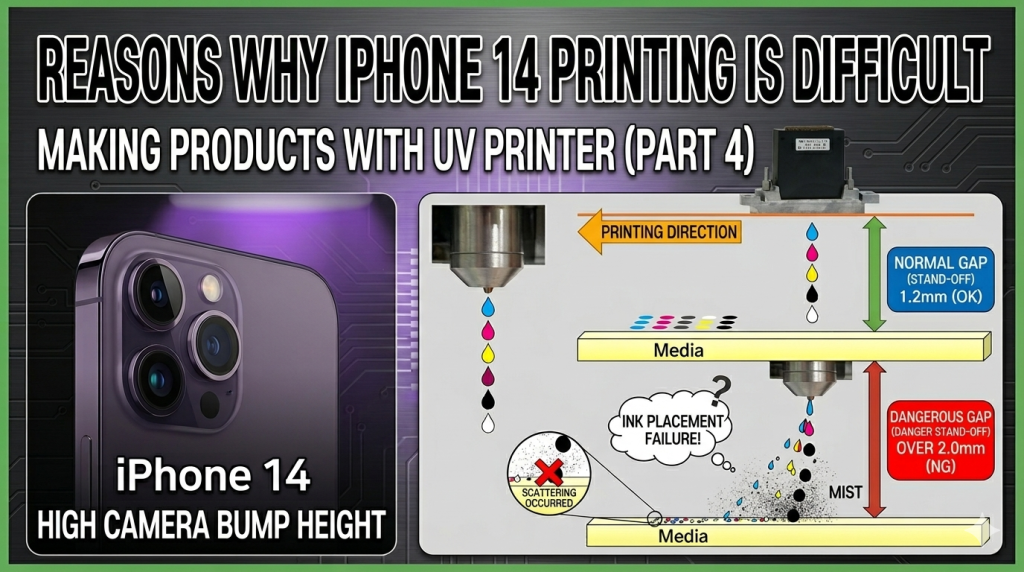
- The distance between the substrate and the print head is called the “stand-off,” and its optimal value is 1.2 mm.
- Up to 1.5 mm, there is minimal change — but as the stand-off increases, ink increasingly fails to land in the intended position.
- Due to the iPhone 14’s protruding camera bump height, the stand-off must be set much higher to print with a UV printer.
2. However, When the Stand-Off Is Too High:
- Ink begins to spread sideways — especially White ink, which has heavier pigment and higher deposition volume, scatters more severely.
- Since neither White nor Color lands in the correct position, White may show visible lines, and Color images appear rough.
- When the stand-off exceeds the print head’s maximum tolerance, air turbulence causes ink droplets to land in completely unintended locations.
- Prolonged printing at high stand-off can cause partial clogging of print head nozzles.
- Depending on the print head being used, some level of production may still be possible,
- but print quality drops noticeably and the defect rate increases significantly.
- Repeated identical jobs over long periods can partially block print head nozzles.
-
Why Printing on iPhone 14 Cases Is Difficult
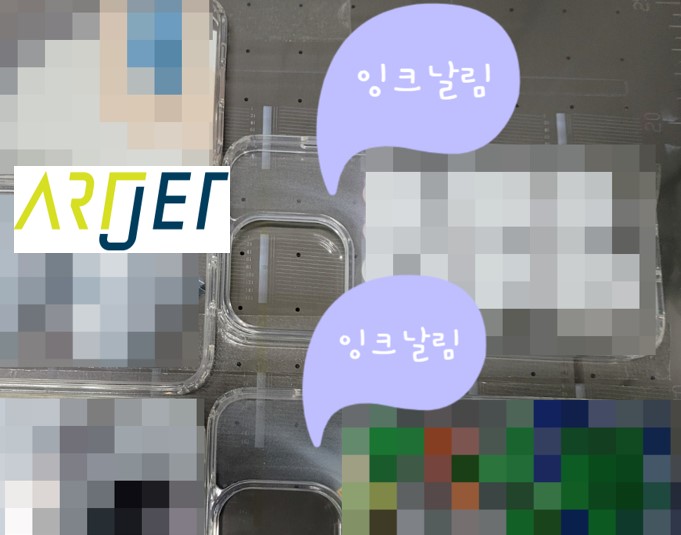
II. Problems When Ink Fails to Land Accurately — Why Printing on iPhone 14 Cases Is Difficult
1. When the Stand-Off Is Too High
1_1. Why Ink Fails to Land in the Correct Position
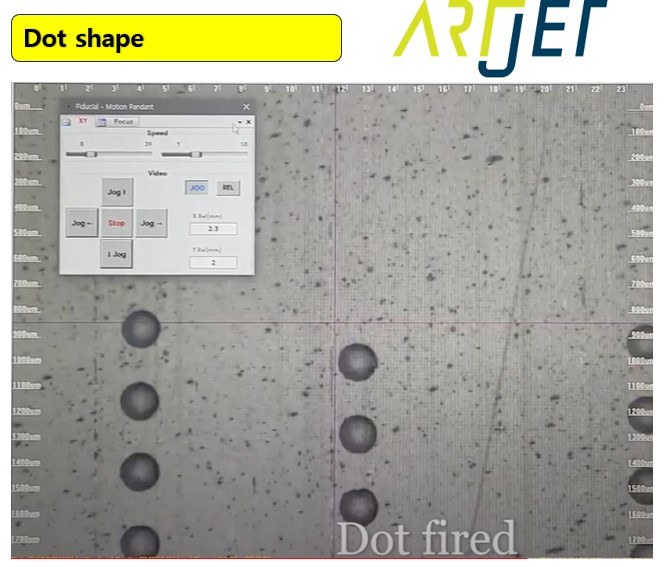
- The photo below shows the optimal jetting conditions found using a dropwatcher.
- When the droplet maintains a round shape, its straightness is also good.
- However, no matter how optimal the jetting conditions are, the greater the stand-off, the more ink fails to land accurately.
-
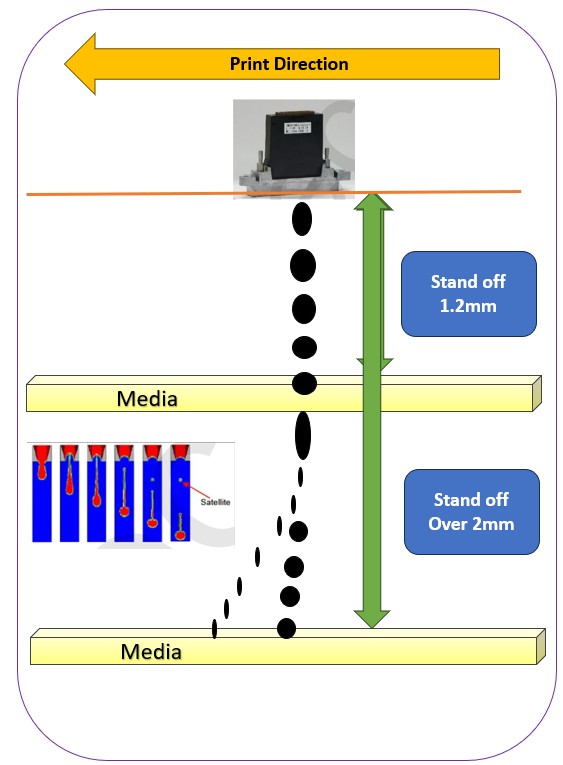
Why Printing on iPhone 14 Cases Is Difficult - The ink jetting speed is typically 7 m/s — meaning the ink travels 7 meters per second. It jets extremely fast.
- However, 7 m/s is the speed at the moment the ink is fired (jetted) through the nozzle.
- The low-mass ink droplet’s speed decreases from the initial 7 m/s as the distance increases,
- and the offset alignment calibrated for each color and White — based on the ink drop speed of 7 m/s and the print head carriage travel speed of 0.8 m/s — also becomes misaligned.
- Ultimately, ink droplets miss their intended landing positions, making the print rough and causing colors to deviate from the intended output.
-
Why Printing on iPhone 14 Cases Is Difficult
1_2. And When the Drop Distance Increases Even Further:
- The ink jetting speed of 7 m/s drops sharply, and the ink that was falling as a single unified droplet breaks apart into smaller satellite droplets.
- With reduced speed and fragmented low-mass droplets, the ink becomes susceptible to air turbulence generated by the print head carriage speed (0.8 m/s).
- In particular, these small fragmented droplets ride the air turbulence and drift along with the head carriage — eventually landing together in completely unintended locations.
- Click the video below to understand this explanation more easily.
- Why Ink Lands in Different Positions Depending on Head Height
2. The Danger of Airborne Ink Mist
- The tiny airborne ink droplets don’t just fall on the substrate surface — they also adhere to the print head nozzle surface.
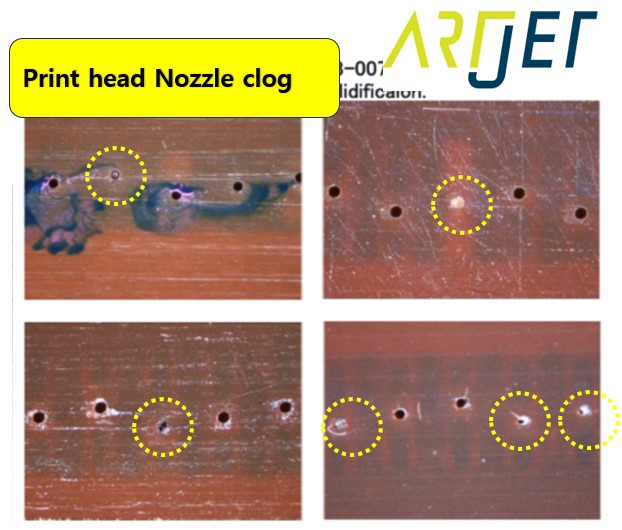
- Small ink droplets gradually accumulate on the nozzle surface, growing into larger droplets that partially block nozzle openings — preventing ink from jetting straight.
- Ink from partially blocked nozzles jets at an angle instead of straight, causing visible banding (lines) in the actual print output.
- The bigger problem is: if this ink accumulated on the nozzle surface is not properly wiped clean,
- the ink around the nozzles will be cured by the UV lamp, making it impossible to recover even with cleaning.
- Initially, angled jetting affects print quality — but if more ink accumulates and cures in this state, it eventually blocks the nozzle completely.
- Refer to the photos below for partial and complete nozzle blockage.
-
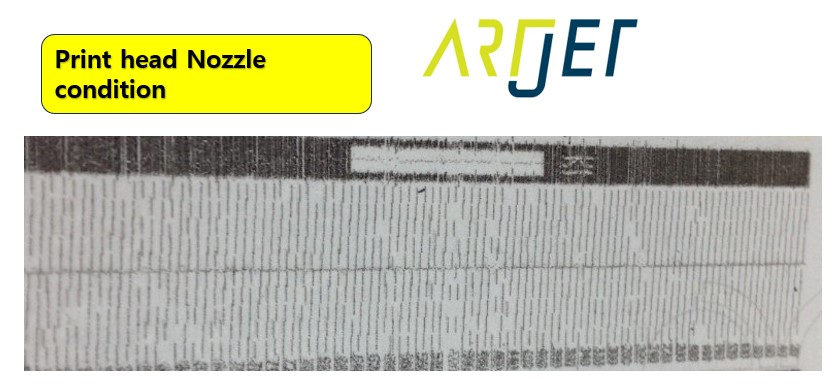
Why Printing on iPhone 14 Cases Is Difficult - If you print a nozzle check pattern in this state, the result will look like the messy output shown below.
-
Why Printing on iPhone 14 Cases Is Difficult
3. Users Who Actually Print on iPhone 14 Cases
- Despite these risks, some customers do occasionally print iPhone 14 cases using our printer.
- Initially, they used jigs to print multiple cases at once, but air turbulence caused the starting point on each case to shift slightly — so they now print one at a time.
- Whenever we speak with this customer, we always advise: “If possible, please look for other items instead of iPhone 14 cases.”
- We’ve also heard of one business owner who purchases cases with detachable camera modules — removing the camera bump section before printing and reassembling afterward.
- From conversations with various shop owners, we’ve heard that Mimaki printers can handle iPhone 14 printing to some extent — though print quality still suffers.
III. ARTJET UV Printer
Having sold and serviced ARTJET UV printers for over five years, the most important lesson we’ve learned is this:
After product reliability, the most critical factor is accumulating troubleshooting data.
Any machine can develop problems depending on the environment, workload, and operator experience. What matters most in a real production setting is not “a machine that never breaks down,” but rather:
How quickly and accurately you can identify the cause and resolve the issue when something goes wrong.
ARTJET continuously collects and organizes real-world field data to support faster and more accurate problem resolution.
🎥 Print Quality Sample
💰 ARTJET Pricing & Sales Conditions
(Note: Exterior design has been updated)
🧾 Complete List of UV Printable Products

* Note: Exterior design has been updated.
※ This article is based on real field cases. Results may vary depending on your environment and machine configuration.
핑백: Creating Epoxy Effects with Varnish