
White Ink Gradient and Texture Printing — UV Printer Products Part 3
✅ Who should read this?
- Anyone who wants to create gradients (variable density) with White ink
- Anyone attempting textured, three-dimensional printing with a UV printer
- Anyone curious about how to create a White Spot Color using Photoshop’s alpha channel and Levels adjustment
- Anyone who believes “White can only be printed as a Spot Color (0% or 100%)”
- Print shop operators looking to develop high-value product lines (texture effects, embossed printing)
⚠️ Caution (Protecting High-Cost Components)
- White gradients cannot be created in Illustrator (AI files). You must use Photoshop’s alpha channel + Levels adjustment.
- To express texture with White layering, 100–800% repeat print settings are required, and print time increases proportionally.
- Printers with only 1–2 White heads require 3× or more print time compared to ARTJET (6 channels) for the same texture effect.
- Texture printing requires head height adjustment and uni-directional printing. Review the braille printing setup first.
🧭 Key Summary (Field Checklist)
- White gradients are created using Photoshop: alpha channel → Levels adjustment → Spot Color assignment.
- White prints at varying heights based on the level values, producing actual physical texture (contours).
- The printer program’s White layering settings (100–800%) follow the same method as braille printing.
- ARTJET uses 6 White channels (600%), enabling 3–6× faster texture printing compared to 1–2 channel printers.
- Texture printing is a high-value product category that can be expanded into various applications alongside braille and embossed printing.
📋 UV Printer Products Series — Full Article List
We are documenting UV printer product manufacturing methods in order. This list will be updated as new articles are added.
03White Ink Gradient and Texture Printing
We are covering the various products you can make with a UV printer.
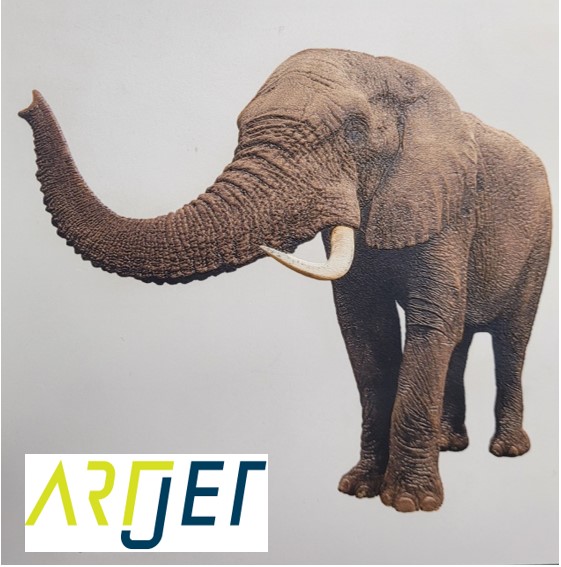
Today, we explain how to create gradients with White ink, and furthermore, how to print with realistic three-dimensional texture as shown in the thumbnail photo.
I. Image File Preparation — White Ink Gradient and Texture Printing
1. About the Photo Below
- Looking at the photo below, the contours around the elephant’s trunk are not just an effect of good photography.
- The texture — the contours and surface detail — was actually printed with real physical dimension.
- The reason you can feel the texture is that White ink was layered higher in raised areas and lower in recessed areas.
- Even when viewing the actual printed image, you can see the three-dimensional effect, and when you touch it, you can feel the height variation — the texture.
-
 White Ink Gradient and Texture Printing
2. A Method That Even Experienced UV Printer Users Don’t Know
- Long-time UV printer users typically say things like:
- “White can only do Spot Color — you can’t create gradients from 0 to 100% the way you want.”
- “The RIP has a similar feature, but it’s not easy to control White exactly the way you want.”
3. However, There Is One Method.
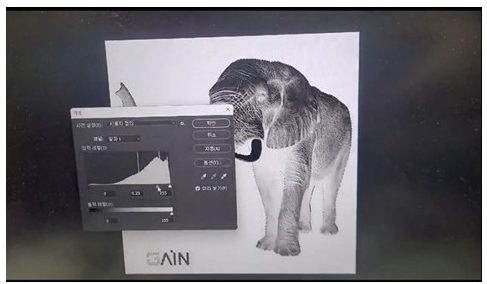
- It cannot be done with Illustrator (AI files), but using Photoshop, you can create both gradients and texture with White ink.
- After creating an alpha channel, you can adjust the alpha channel’s Level through [Image → Adjustments → Levels].
- After adjusting the Levels, create a Spot Color assignment — and White will be printed according to those level values rather than as a flat layer.
-
 White Ink Gradient and Texture Printing
 - Click the link below to watch a video tutorial on how to create the file.
- Click here to watch the file creation tutorial.
II. Printer Program Option Settings — White Ink Gradient and Texture Printing
1. To express three-dimensional texture with White, the White layer needs sufficient thickness.
- After creating the image in Photoshop, the printing method is similar to the braille printing method explained previously.
- Adjust from 100–800% to achieve the desired height, print White first, then finish with Color to render the image.
- For the White print settings needed to express texture, refer to the link below.
- Braille Printing (Printer Program Options for White Texture Settings)
2. Is This Practical?
2_1. Braille
- When we first showed braille printing as a UV printer application, almost everyone said:
- “Building up that thickness takes way too long… it’s not practical!!”
- 95% of customers we met said this, while 5% showed genuine curiosity.
- Two companies using our printers order noticeably more White and Varnish — both are printing images that include braille, creating high-value products.
2_2. A Business Owner Who Keeps Developing New Products
- Whenever we visited this business owner’s office, they would show us new products we hadn’t seen before.
- The products seemed solid, but the business wasn’t doing well.
- On later visits, there were always new items — and after pushing hard for so long, the owner seemed worn out.
- “Do you know anyone who wants to buy a used UV DTF roll laminator? I barely use the laminator anymore either.”
- For a year, business was quiet — but two months ago, they signed a 2-year contract with a major client. Now they’re working weekends.
- When we visited last week, the owner said:
- “The client saw all the different products we’d made and loved them. Every product in the order requires lamination. I thought I’d never use the laminator again…”
- And recently, they applied UV DTF to “mugs as a sample. I think I’ll be using that machine going forward.”
- Among the various items being developed, White texture printing also seems like a valuable product category.
2_3. Texture Effects That Are Difficult with Japanese Equipment
- Rather than thinking “Japanese equipment is expensive but better,” it’s more important to understand the strengths and weaknesses of each machine.
- UV printers using expensive print heads typically have 1 Color print head and a maximum of 2 White heads — meaning White output is at most 200% of Color.
- White is printed as a base layer for CMYK Color on transparent or colored substrates, but sometimes 200% White density is insufficient.
- Especially when printing White on a black substrate, the black may not be fully covered — requiring White to be printed twice.
- In the same context, to create braille or texture effects with 200% White, you would need to print 3× more passes compared to our printer with 600% White.
- Braille follows the same logic — multiple repeated prints are needed to achieve the required dot height.
- The elephant image texture also takes significantly more time on equipment with only one or two White print heads.
2_4. As a Product Category
- When talking to colleagues who run print shops with UV printers, some mention that clients occasionally ask: “Cost doesn’t matter — can you achieve this kind of effect?”
- By building a portfolio of texture-printed applications, it can help secure contracts like the business owner who signed a 2-year deal, and provide immediate solutions for artists or clients who want something special.
III. UV Printer Basics · Troubleshooting · Printable Products
All UV Printer content has been organized below. Click any item to go directly to that article.
1) Ink Supply
23 articles on print errors caused by ink supply issues including cleaning and pumping
2) Print Head Issues
12 articles covering everything from head replacement to head-related problems
Want to study print heads in depth: Print Head Basics — 9 Articles
3) Electronics / Software Issues
4) Mechanical Issues
5) Sai Rip Installation, Spot Color, and Troubleshooting
IV. ARTJET UV Printer
Having sold and serviced ARTJET UV printers for over five years, the most important lesson we’ve learned is this:
After product reliability, the most critical factor is accumulating troubleshooting data.
Any machine can develop problems depending on the environment, workload, and operator experience. What matters most in a real production setting is not “a machine that never breaks down,” but rather:
How quickly and accurately you can identify the cause and resolve the issue when something goes wrong.
ARTJET continuously collects and organizes real-world field data to support faster and more accurate problem resolution.
🎥 Print Quality Sample
💰 ARTJET Pricing & Sales Conditions
(Note: Exterior design has been updated)
🧾 Complete List of UV Printable Products

* Note: Exterior design has been updated.
※ This article is based on real field cases. Results may vary depending on your environment and machine configuration.
핑백: Do Not Print on Masks — UV Printer Products (Part 5) ARTJET 2026