
- Anyone deciding which print resolution to use with an XP600 head
- Anyone curious how E-closion (feathering / gradient mask) affects pass count and speed
- Anyone wondering about the real quality difference between 720dpi vs. 360dpi, or unidirectional vs. bidirectional printing
- Anyone skeptical of a competitor’s claim that “faster carriage speed means double the productivity”
- This article reflects the author’s own testing and personal opinion — results can vary depending on the board manufacturer and equipment setup
- If head height (stand-off) is set higher than the material, image quality suffers significantly regardless of resolution
- Pushing carriage speed too high can cause serious ink misting/spatter
- If a competitor claims “twice the speed” on the same head, the first thing to suspect is a reduced pass count
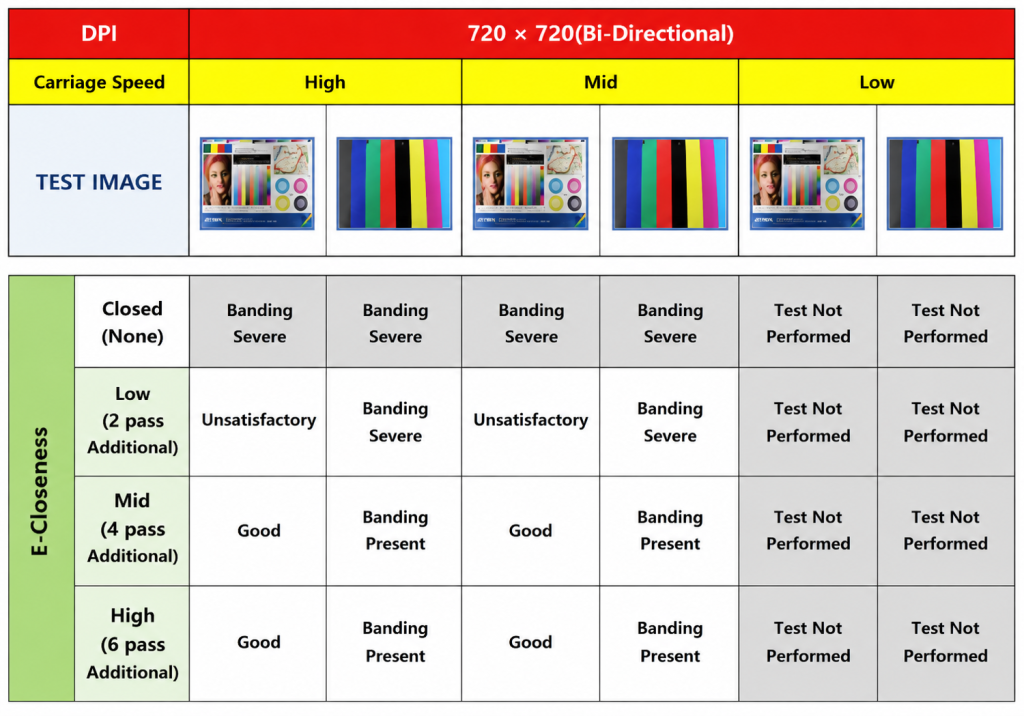
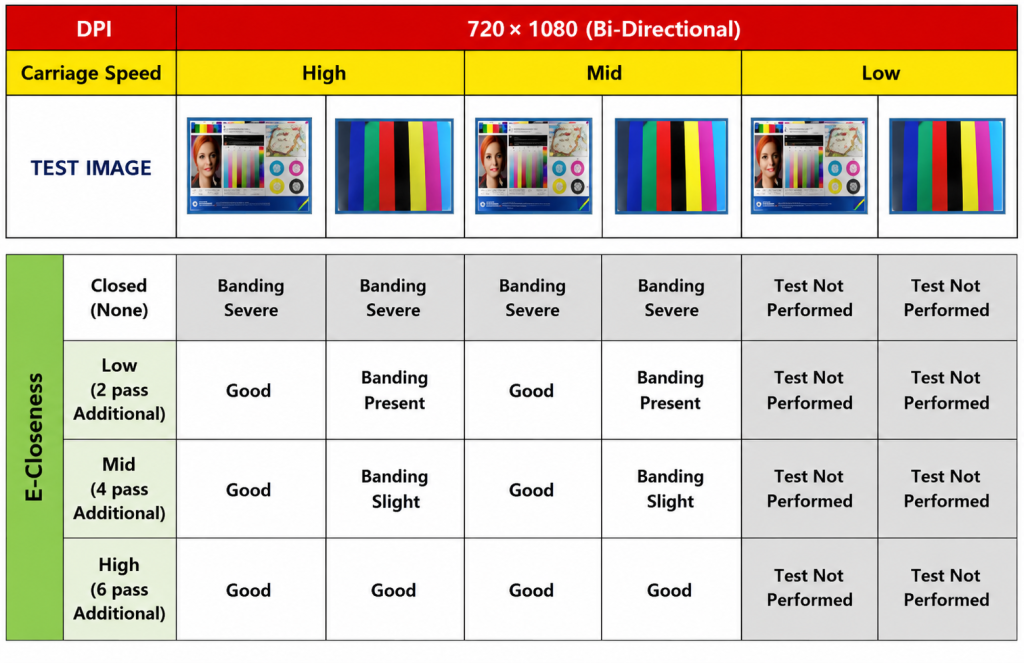
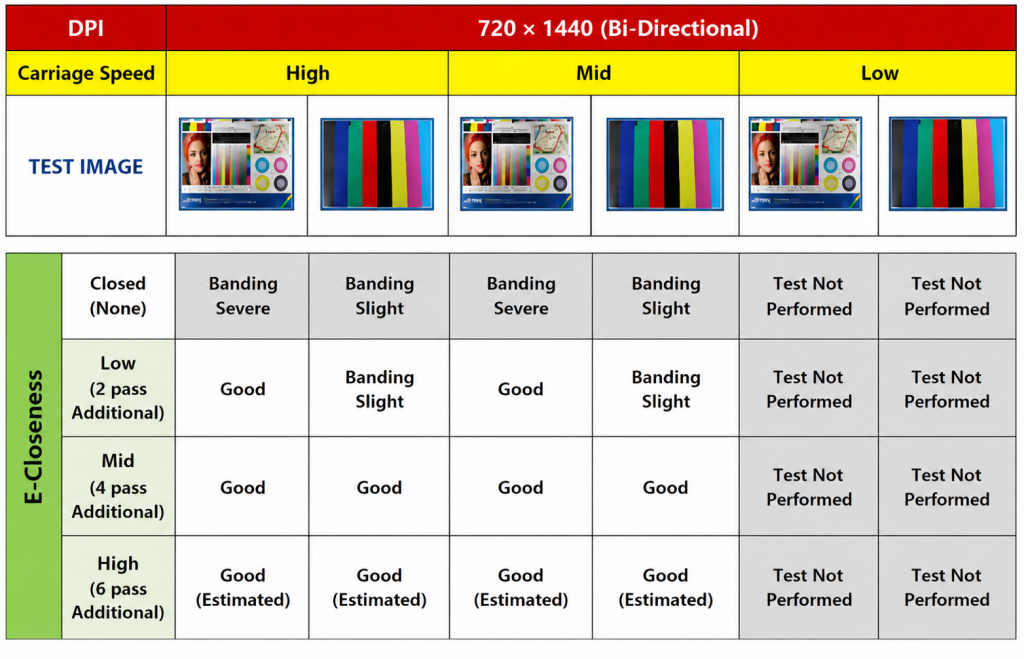
- Each E-closion level (Low/Mid/High) adds 2 passes — banding decreases, but speed drops proportionally
- Most 360dpi modes lacked sufficient density and color to be practical; only 360×720 at 2 passes was kept, and only for line-only work
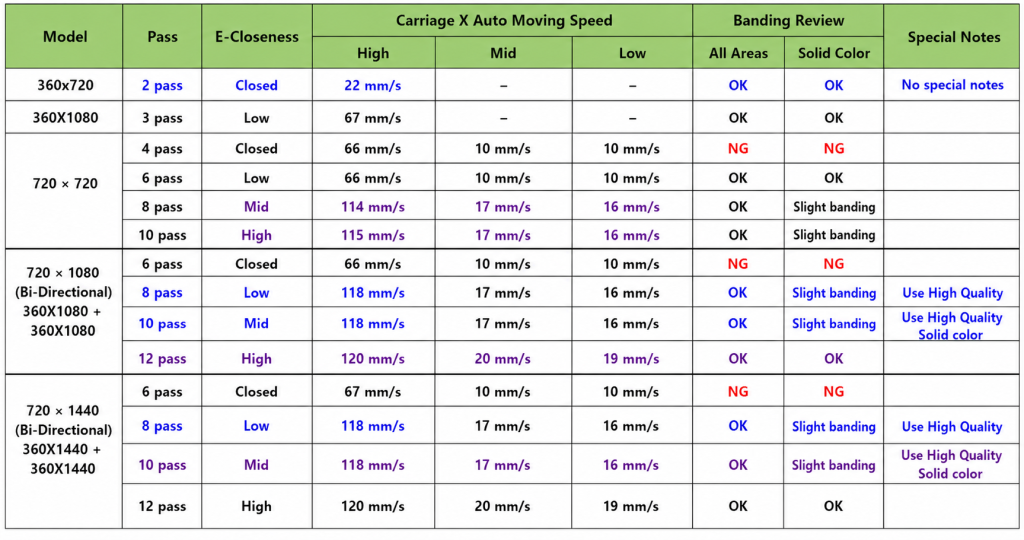
- Among the 720dpi modes, 720×1080 at 6 passes — even with E-closion High added — gave the best balance of quality and speed
- Conclusion: aside from the dedicated 2-pass line mode, 720×1080 with E-closion adjusted as needed is the optimal setup
Back in September 2019(?), during our first XP600 head installation, I was coming from a background of developing, manufacturing, and selling only industrial head equipment — this was my first real exposure to Epson heads, through a piece of Chinese-made equipment. After the installation wrapped up, I asked, “What print resolution should we set the XP600 head to?” My Chinese contact replied, “720 x 1080 is all you need!”
Privately, I thought, “That doesn’t sound right — I should test the resolutions myself and find the right one.”
I. E-closion (Feathering, Gradient Mask) — XP600 Head Ink Density and Speed Tests Across Resolutions
At first, I didn’t realize how much E-closion slowed things down — but while testing resolutions at different pass counts, I noticed the timing lined up, and realized each E-closion level adds 2 passes.
- 720 x 1080 resolution is normally 6 passes. But printing with E-closion Low adds 2 passes, bringing it to 8.
- It’s a technique that scatters ink where passes meet, so the seam (pass banding) becomes harder to see.
- Depending on image complexity and how well the material’s surface tension lets ink spread, you can choose Low, Mid, or High — each adding 2 more passes, softening the seams and reducing banding, but at a proportional cost in speed.
| E-closion | Description |
|---|---|
| Close | Prints at the native resolution — 720 x 1080 is 6 passes, and stays 6 passes at Close |
| Low | Adds 2 passes over Close — speed drops accordingly |
| Mid | Adds 4 passes over Close — speed drops accordingly |
| High | Adds 6 passes over Close — speed drops accordingly |
II. X-Axis 360dpi Print Mode Tests — XP600 Head Ink Density and Speed Tests Across Resolutions
The X-axis is the print direction, and the Y-axis is the feed direction. Let’s start by looking at an X-axis resolution of 360.
1. 360 x 360 dpi, 1 pass
- When printing an absolute density target to build a profile, the density itself came up short.
- Because of that density shortfall, this mode couldn’t even hold an ICC profile → not usable.
2. 360 x 720 dpi, 2 passes (after ICC work)
- Printing a normal image showed overall low density, and Red and Blue in particular looked noticeably off.
- Since it’s fast, we decided to reserve this mode for line-only output.
3. 360 x 1080 dpi, 3 passes (after ICC work)
- This 3-pass mode was oddly interesting. A normal image looked passable with E-closion Low, but it was hard to use for solid colors.
- Even getting the normal image to print without banding required 5 passes [3 passes + 2 passes (E-closion Low)].
- Not meaningful in practice.
4. 360 x 1440 dpi, 4 passes (after ICC work)
- Normal images weren’t a big problem, but solid-color banding was severe — even with E-closion High (4+6=10 passes), solid-color banding was worse here than in other modes.
- Not meaningful in practice.
5. 360 x 1440 dpi (asymmetric X/Y case)
- Whenever X and Y resolution are asymmetric, color values tend to shift significantly. For that reason, we didn’t run this test.
- Not meaningful in practice.
💬 In the end,
- For X-axis 360dpi, we decided to keep only the 360 x 720, 2-pass mode as a general line mode.
- This mode is currently used with a two-head color configuration (Color in place of White) at companies printing text on COVID test kits and outline printing on picture-cafe products.
III. X-Axis 720dpi Print Mode Tests — XP600 Head Ink Density and Speed Tests Across Resolutions
1. 720 x 720, 4 passes
- Normal images printed without major issues, but solid colors showed banding problems.
- (720x720dpi, bidirectional printing, tested at High and Mid carriage speeds)
XP600 Head Ink Density and Speed Tests Across Resolutions
2. 720 x 1080, 6 passes
- Normal images had no issues, and with E-closion High (adding 6 passes), solid colors were reasonably acceptable.
- (720x1080dpi, bidirectional printing, tested at High and Mid carriage speeds)
XP600 Head Ink Density and Speed Tests Across Resolutions
3. 720 x 1440, 8 passes
- I expected higher dpi to improve things further, but solid colors were no better than at 720×1080 — if anything, they looked slightly worse.
- (720x1440dpi, bidirectional printing, tested at High and Mid carriage speeds)
XP600 Head Ink Density and Speed Tests Across Resolutions
4. Things I noticed while testing
- Comparing unidirectional and bidirectional printing, plain solid colors showed little difference. But for sharp, detailed images or skin-tone portraits, bidirectional printing looked noticeably rougher. In the end, unidirectional mode is the one I’d recommend.
- More than the unidirectional/bidirectional difference, image quality drops sharply if the head height sits higher than the material. Setting the correct print height is essential every time.
- On carriage speed: once stand-off is properly optimized, High and Mid printing quality showed almost no difference — though that assumes the ink is well-matched to the head. Low speed brought a slight improvement but no dramatic quality difference, and it’s simply too slow to be worth using except in special cases (e.g. when material warping forces you to print at a greater height).
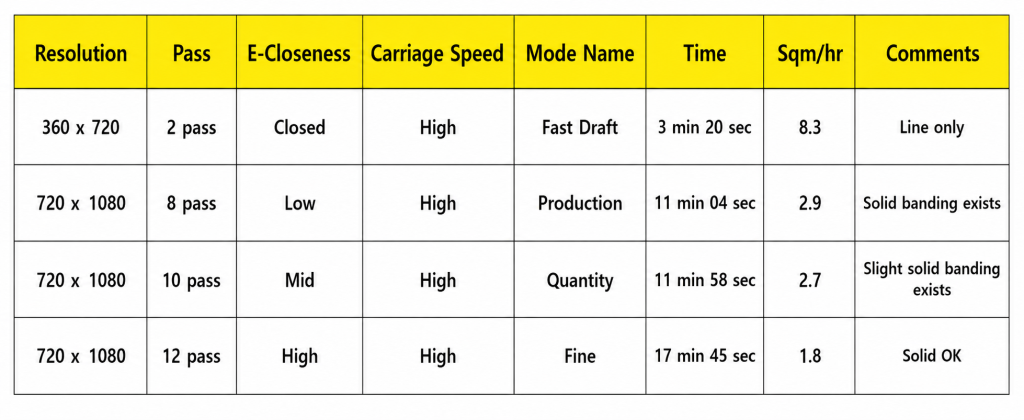
IV. Print Time and Image Quality Summary by Resolution – XP600 Head Ink Density and Speed Tests Across Resolutions
Print conditions: bidirectional printing, 600 x 900mm output size.
After printing every test image, timing each output across the whole unit, and running this over three days, here’s the final conclusion.
V. Losing a Two-Unit Order (About $400K)…_ XP600 Head Ink Density and Speed Tests Across Resolutions
This is a story from my previous job.
A steel company had asked for a UV printer with custom specs, and we’d delivered a customized unit that they were using happily. About two years later, they visited a competitor and a Chinese manufacturer to purchase two more units. Our company had told them upfront that the price wasn’t negotiable, and they said they’d think it over — this was through their business division head.
Two weeks passed after the meeting with no word, so I called. It turned out they’d already signed with a competitor for two units. Looking back, I wondered if I’d been too complacent as a salesperson…
As the conversation got more technical, it seemed like he’d stopped really listening.
And that’s how I left it.
VII. ARTJET UV Printer
