
Banding Only in Certain Zones — Mechanical Issues Part 2
Symptom → Hypothesis → Inspection → Solution
✅ Who Should Read This
- Anyone experiencing banding or color inconsistency only in specific zones — not across the entire flatbed
- Anyone printing multiple substrates simultaneously using a jig
- Anyone who swaps substrates mid-print to speed up production
- Anyone seeing pronounced color inconsistency specifically in solid color prints
- Anyone dealing with banding that appears inconsistently — sometimes present, sometimes not
⚠️ Caution (Protecting Print Quality)
- Never touch substrates while a solid color print is in progress. Removing the front substrate physically affects Y-axis feed and causes color banding.
- Removing a substrate mid-print causes a momentary drop in suction pressure, which can lift the substrate slightly — creating a gap between it and the head that leads to color inconsistency.
- Print quality comes before speed. For solid color jobs, always wait for the full print cycle to complete before swapping substrates.
- Small-text or multi-color images are less sensitive to this, but solid colors are extremely sensitive to any change in conditions.
🧭 Quick Summary (Field Decision)
- Banding in specific zones + no consistent pattern → Check your workflow first. It may not be a machine issue at all.
- The cause was swapping substrates mid-print — the physical force subtly disrupted Y-axis feed values.
- The fix is simple: wait until the print cycle is fully complete before swapping substrates and the banding disappears.
- Solid color is the most condition-sensitive image type. It requires far stricter working conditions than small text or multi-color prints.
📋 Mechanical Issues — Full Series
Real mechanical issues encountered in the field, documented in order. This list will be updated as new articles are added.
02
Banding only in certain zones — the effect of swapping substrates mid-print
Banding only in certain zones — the effect of swapping substrates mid-print
Today we cover Part 2 of the Mechanical Issues series — banding that appears only in specific zones of the flatbed during printing.
I. Symptom — Banding Only in Certain Zones
A high-volume order using a jig
- Every time a new smartphone model launched, we needed to print and deliver official cases on a tight deadline.
- The printer ran 24 hours a day, and we built a custom jig to streamline the workflow.
- We were using the full flatbed area for printing — but strangely, banding with a color inconsistency kept appearing in one specific zone.
Where the banding occurred
- We were printing on transparent PC sheets, each measuring 350×250mm.
- With a flatbed size of 600×900mm, we loaded 4 PC sheets per print cycle.
- Looking at the printed output, the color inconsistency appeared in the second zone — around the Y-axis 550mm mark on the flatbed.
-
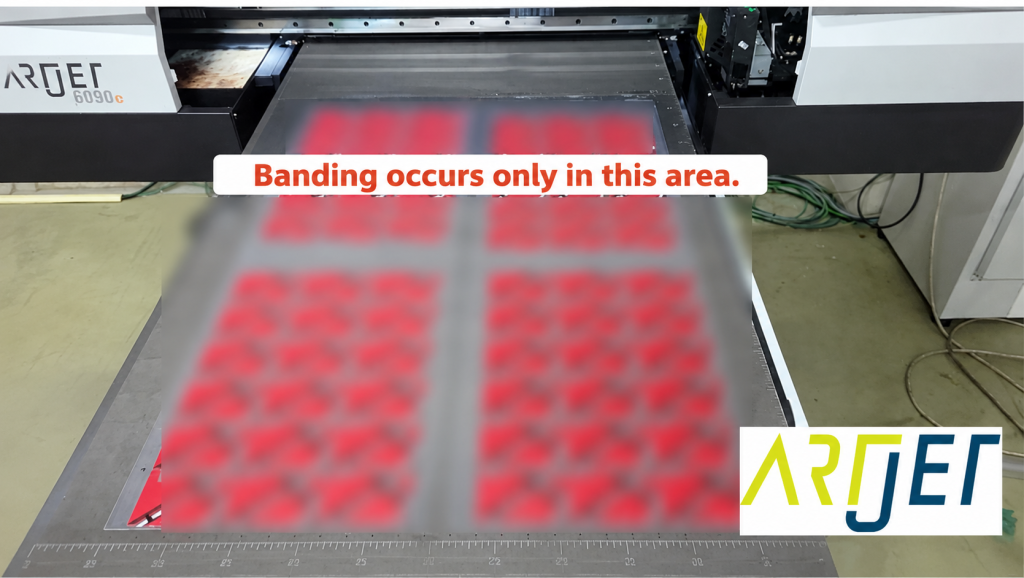
Banding only in certain zones
- It was barely visible head-on, but when viewed at an angle, the color inconsistency became clearly visible in the light.
-

Banding only in certain zones
II. Cause and Resolution — Banding Only in Certain Zones
1. Various Theories — and a Problem That Suddenly Disappeared
Initial theories
- The Y-axis is belt-driven, so the first thought was: “Is this just a limitation of belt-driven movement?”
- Another theory: “Is it more sensitive because we’re using bidirectional printing rather than unidirectional?”
- With no time to investigate further, we raised the G mask by one level to reduce the visible banding and kept the job running.
The next morning, all overnight prints were banding-free.
- We had no explanation. “Why is it gone?”
- During the day, our own staff had been operating the machine. Overnight, contract workers had run it.
- We started looking at the differences between how each group worked.
What the night shift did differently
- The contract workers had never used a UV printer before, so we gave them the safest, most careful set of instructions.
- Before printing: place all 4 PC sheets on the flatbed, confirm positioning, then start the print.
- After the print cycle finishes: remove all printed sheets, reload 4 new sheets, and start again.
- We specifically told them not to touch any substrates while printing was in progress — only handle materials after the cycle was fully complete.
- Even with the G mask raised, our daytime prints still showed faint banding — but the overnight output had none. In fact, when the G mask was restored to its original setting, the overnight prints were still banding-free.
2. Root Cause
The cause was in the workflow itself.
A colleague noticed several anomalies while working.
- “Sometimes the banding shows up in zone 4, sometimes zone 5, and sometimes not at all. I tried waiting until all 4 sheets were done before removing anything — and the banding was gone.”
- “Is it because removing the substrate weakens the fan suction? Or does touching the flatbed physically shift the Y-axis feed value slightly?”
- Our best assessment: removing the front substrate causes a brief drop in suction, momentarily lifting the sheet — or the physical force of swapping substrates affects Y-axis feed. The bidirectional printing mode may also have made the system more sensitive.
- To save time, we had been swapping the front 2 PC sheets while the printer was still printing the rear 2 sheets.
- That physical disturbance during the swap was the cause of the color banding.
Why solid color is so hard to get right
- One of the most demanding image types for a UV printer is not fine text — it’s solid color: a single, uniform tone such as a solid blue or red.
- With solid color, even the slightest change in conditions becomes immediately visible to the human eye.
- By contrast, fine text or images with multiple mixed colors are comparatively forgiving.
- This is why swapping substrates mid-print causes no visible issue when printing ballpoint pen designs or other fine-text images.
If you swap substrates mid-print to speed up production, we strongly recommend avoiding this practice during solid color jobs. For fine-text or small-image prints such as ballpoint pen designs, it is generally not a problem.
III. UV Printer Basics · Troubleshooting · Printable Products
All UV Printer content has been organized below. Click any item to go directly to that article.
1) Ink Supply
23 articles on print errors caused by ink supply issues including cleaning and pumping
2) Print Head Issues
12 articles covering everything from head replacement to head-related problems
Want to study print heads in depth: Print Head Basics — 9 Articles
3) Electronics / Software Issues
4) RIP Software
5) Products You Can Make with a UV Printer
IV. ARTJET UV Printer
After more than five years of selling and servicing ARTJET UV printers, one thing stands out above all else.
Next to product reliability, the most critical factor is accumulated troubleshooting data.
Any machine can develop problems depending on the environment, work conditions, and operator experience. What truly matters in a production setting is not “a machine that never fails” — it’s:
How quickly and how accurately you can identify and resolve the issue when it occurs.
ARTJET continuously collects and organizes real-world problem data from the field to support faster and more precise troubleshooting.
🎥 Print Quality Sample
💰 ARTJET Pricing & Sales Conditions
(Note: Exterior design has been updated)
🧾 Full List of UV Printable Products

* Note: Exterior design has been updated.
※ This article is based on real field cases. Results may vary depending on your environment and machine configuration.
핑백: The Cleaning Wiper Won't Move — Mechanical Issues (EP.6) ARTJET 2026