ARTJET UV Printer Troubleshoot Ink Supply 14_Practice 9
ARTJET is a UV printer that uses three XP600 (FA1080-a1) print heads. Each print head color is as follows.
Print head 1 : CMYK Lc Lm 6 color,
Print head 2 : White 6 channel
Print head 3 : White 6 channel
This article covers inspection points for each part when the ARTJET UV Printer’s ink is not supplied, as well as ink supply problems and solutions that occur in actual consumer equipment.
The articles I write are:
Because we are dealing with the experience gained through ARTJET UV Printer TEST and QC for 4 years, and the problems and solutions that occurred at actual consumer sites,
Not only is it helpful to consumers who directly use the equipment, but it is especially optimal data for after-sales service staff at equipment sales companies.
For the list and links created so far, please refer to Title I.
Today, for the 14th time, I will tell you about the cause and solution to the problem of ink not coming out even when you pull the damper responsible for black ink with a syringe.
I. List of articles written so far
1. Episodes 1 to 5
When ink supply problems occur and ink load (pumping) does not work, check points for each part.
In part 1, Captop ARTJET UV Printer Troubleshoot Ink Supply 1
In part 2, Damper ARTJET UV Printer Troubleshoot Ink Supply 2
In parts 3, Peristaltic pump ARTJET UV Printer Troubleshoot Ink Supply 3
In Part 4, Captop and Print head locations ARTJET UV Printer Troubleshoot Ink Supply 4
In Part 5, we explained Captop replacement. ARTJET UV Printer Troubleshoot Ink Supply 5
2. From episode 6 onwards
It covers problems encountered during actual use of the equipment and their solutions.
In part 6, white density problem artjet-uv-printer-troubleshoot-ink-supply-6-practice-1/
In part 7, white print head inkload (pumping) did not work and how to solve it. artjet-uv-printer-troubleshoot-ink-supply-7_practice-2
In Part 8, we explained the difficulties experienced during white cleaning and how to restore the print head nozzle condition. artjet-uv-printer-troubleshoot-ink-supply-8_practice-3-2
In Part 9, Causes and solutions for why ink load (pumping) does not work even though the peristaltic pump motor runs well. artjet-uv-printer-troubleshoot-ink-supply-8_practice-4-2
In Part 10, I explained the cause and solution to the problem of pumping not working even after changing the captop and yellow tube and checking the location several times. artjet-uv-printer-troubleshoot-ink-supply-8_practice-5-2
In Part 11, I explained the cause and solution for why ink load (pumping) suddenly stopped working even though I used it without a problem yesterday. artjet-uv-printer-troubleshoot-ink-supply-11_practice-6-2
In Part 12, I explained the problem where white does not jetted in place in the image, but is blown around the image and falls. ARTJET UV Printer Troubleshoot Ink Supply 12_Practice 7
In Part 13, we explained the problem of white and ink load (pumping) working well and print head cleaning working well, but the nozzle pattern was not maintained and printing was not done properly even during printing. ARTJET UV Printer Troubleshoot Ink Supply 13_Practice 8
II. Problem
1. Problem Symptoms
The correct color does not come out during printing, so when printing the nozzle pattern after printing is finished, the black ink nozzle pattern does not come out.
When ink loading (pumping), ink flows well into the waste ink container, and no particular problem symptoms can be identified during print head cleaning.
However, black ink does not appear when printing the nozzle pattern.
Photo of the nozzle pattern sent by the company. In place of the black channel, only a few nozzle patterns are visible.
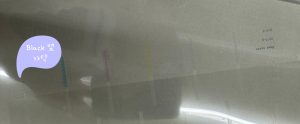
“Director, I saw a few patterns in the black space, so I think it’s not a print head problem, but an ink supply problem.”
“Team leader, inkload (pumping) is working well, and I’ve cleaned it several times, but the black nozzle pattern doesn’t come out properly.”
“In the case of color, the ink lines are connected 1:1 to each ink tank, so inkload (pumping) can be done with other inks even if black does not come out. First, let’s check the ink supply one by one. ”
If you are curious about the ink line structure, please refer to the article below.
ARTJET UV Printer Troubleshoot Ink Supply 2
III. Problem solving process
1. Some assumptions
Since several nozzle patterns appear in the black channel, the possibility of a print head problem is low.
Ink load (pumping) works well, so it is not a problem related to ink load (pumping).
Since black ink, that is, only one channel’s ink supply problem, is suspected and approached as one of the following issues.
* Damper connection status on top of print head
* Damper itself (sometimes, there was a torn part in the damper)
* Tightness of the ink tube inserted into the damper
* Leakage that may occur from the ink tube connected from the top of the damper to the main ink tank
2. Print head and damper connection status
I pressed the damper firmly to check if it was properly inserted into the print head, but the same problem occurred when printing the nozzle pattern.
The ink tube connected to the damper was also removed and checked to see if it was tightly connected, but there was no problem.
3. 1st syringe operation
To check the supply of black ink from the main ink container to the damper, I pulled out the damper and pulled it with a syringe, and the ink is coming.
In this state, after print head cleaning, a much better nozzle pattern is obtained as shown below.
I thought this solved the problem, but black ink did not come out the same way during printing, and when printing the nozzle pattern, black ink did not come out properly again.
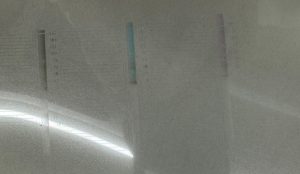
ARTJET UV Printer Troubleshoot Ink Supply 14_2
4. Ink line inspection in reverse order from 2nd syringe operation
I took out the black ink damper again and pulled it with a syringe, but this time, no ink came out, no pressure was felt at all, and only air came out.
The ink tube and various fittings of the ink line shown in the photo below were inspected, but no problems were found.
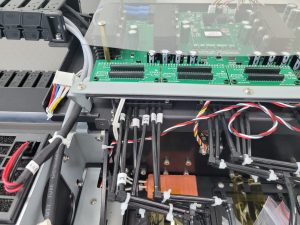
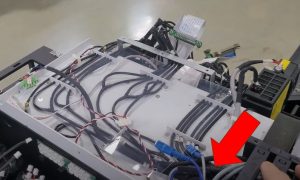
Remove the electronic board as shown below, disconnect the main ink line coming from the bottom of the electronic board,
When I inserted the ink line into the syringe from the cut part (the part with the arrow) and pulled it, only air came out.
In other words, there is a problem somewhere on the main ink line coming from the main ink bottle via the cable carrier.
5. Problem Causes and Solutions
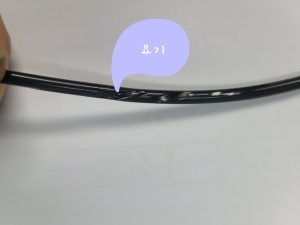
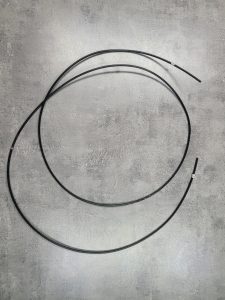
Problem solved after replacing the black ink tube connected from the main ink bottle to the board end.
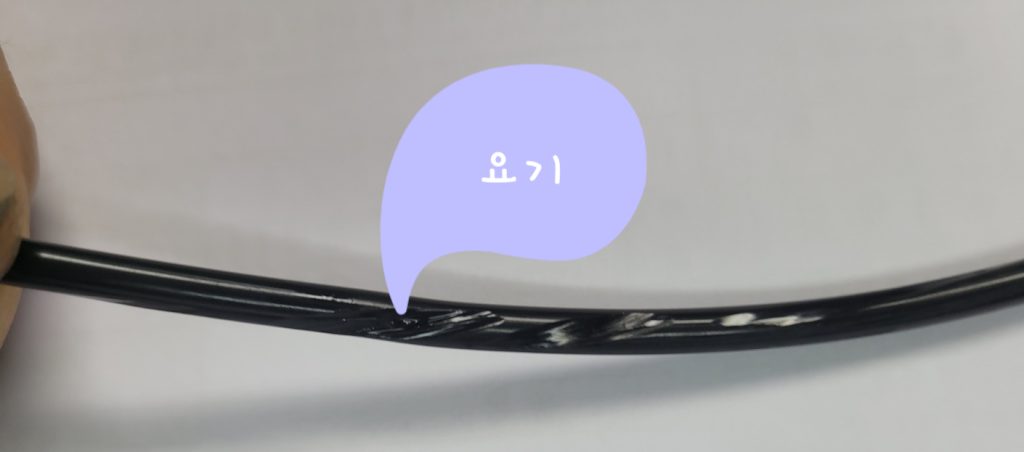
The cause of the problem is as follows, and in 4 years, the problem occurred only once at this location.
IV. Summary
When a specific channel does not come out during printing on the color print head, it is most likely a problem with the ink supply to that channel.
Ink flowing out of the waste ink tank through ink load (pumping) causes other ink to come out, so just because ink load (pumping) is good, it cannot be said that ink is supplied to the problem channel well.
First, check by pressing with your hand whether the damper is properly inserted into the print head. If the problem is still the same,
Second, you need to pull the damper from the print head and use a syringe to see if the ink comes out without air bubbles.
If ink comes out of the syringe like bubbles, check the connection between the damper and the ink line.
If only air comes out when pulled with a syringe, you should check the following.
* Is the damper itself torn? (I have experienced this twice as well)
* Is the fitting connected in the middle of the ink line properly connected to the ink line?
* Is the fitting itself broken? (So far, the same problem has occurred only once)
* Isn’t the ink line torn somewhere in the middle?
By separating the ink lines one by one starting from the top of the damper and pulling them with a syringe, you can check for any abnormalities in that part.
That’s it for today.