
ARTJET UV Printer Troubleshoot Ink Supply 17_Practice 12
ARTJET is a UV printer that uses three XP600 (FA1080-a1) print heads. Each print head color is as follows.
Print head 1 : CMYK Lc Lm 6 color,
Print head 2 : White 6 channel
Print head 3 : White 6 channel
This article covers inspection points for each part when the ARTJET UV Printer’s ink is not supplied, as well as ink supply problems and solutions that occur in actual consumer equipment.
The articles I write are:
Because we are dealing with the experience gained through ARTJET UV Printer TEST and QC for 4 years, and the problems and solutions that occurred at actual consumer sites,
Not only is it helpful to consumers who directly use the equipment, but it is especially optimal data for after-sales service staff at equipment sales companies.
For the list and links created so far, please refer to Title I.
Today, I will explain the causes and actions when white print head cleaning does not work well over time.
Troubleshooting related to ink supply is completed here, and updates will be made if any unknown problems arise in the future.
I. List of articles written so far
1. Episodes 1 to 5
When ink supply problems occur and ink load (pumping) does not work, check points for each part.
In part 1, Captop ARTJET UV Printer Troubleshoot Ink Supply 1
In part 2, Damper ARTJET UV Printer Troubleshoot Ink Supply 2
In parts 3, Peristaltic pump ARTJET UV Printer Troubleshoot Ink Supply 3
In Part 4, Captop and Print head locations ARTJET UV Printer Troubleshoot Ink Supply 4
In Part 5, we explained Captop replacement. ARTJET UV Printer Troubleshoot Ink Supply 5
2. From episode 6 onwards
It covers problems encountered during actual use of the equipment and their solutions.
In part 6, white density problem artjet-uv-printer-troubleshoot-ink-supply-6-practice-1/
In part 7, white print head inkload (pumping) did not work and how to solve it. artjet-uv-printer-troubleshoot-ink-supply-7_practice-2
In Part 8, we explained the difficulties experienced during white cleaning and how to restore the print head nozzle condition. artjet-uv-printer-troubleshoot-ink-supply-8_practice-3-2
In Part 9, Causes and solutions for why ink load (pumping) does not work even though the peristaltic pump motor runs well. artjet-uv-printer-troubleshoot-ink-supply-8_practice-4-2
In Part 10, I explained the cause and solution to the problem of pumping not working even after changing the captop and yellow tube and checking the location several times. artjet-uv-printer-troubleshoot-ink-supply-8_practice-5-2
In Part 11, I explained the cause and solution for why ink load (pumping) suddenly stopped working even though I used it without a problem yesterday. artjet-uv-printer-troubleshoot-ink-supply-11_practice-6-2
In Part 12, I explained the problem where white does not jetted in place in the image, but is blown around the image and falls. ARTJET UV Printer Troubleshoot Ink Supply 12_Practice 7
In Part 13, we explained the problem of white and ink load (pumping) working well and print head cleaning working well, but the nozzle pattern was not maintained and printing was not done properly even during printing. ARTJET UV Printer Troubleshoot Ink Supply 13_Practice 8
In Part 14, we talked about the cause and solution to the problem of ink not coming out even when the damper responsible for black ink is pulled with a syringe. ARTJET UV Printer Troubleshoot Ink Supply 14_Practice 9
In Part 15, we explained the problem that white does not come out properly even when printing the nozzle pattern, even after applying all the experiences so far and even replacing the ink. ARTJET UV Printer Troubleshoot Ink Supply 15_Practice 10
In part 16, inkload (pumping) and cleaning were normal, and the nozzle pattern was also normal. However, we explained an issue where certain colors suddenly disappeared after printing 5 to 7 times fine. ARTJET UV Printer Troubleshoot Ink Supply 16_Practice 11
II. Problem Symptoms
Other UV printers may be similar, but the color and varnish ink of the ARTJET UV Printer are quite stable.
For this reason, inkload (pumping) is only performed occasionally when there is a problem, and print head cleaning is not performed often.
As for my demo equipment routine, if I used the printer the day before, I would not clean the color and varnish, just print the ARTJET Test image to set the nozzle status, and then move on to the main work.
In the case of white ink, compared to color or varnish, a lot of pigment is used to increase the white concentration, and the ink flow is not good because heavy particles remain in the ink.
For this reason, before printing, cleaning must be performed to maintain the condition of the white ink nozzle.
The problem is that white cleaning was done well at the time of installation, but as time passes, white cleaning does not work well and it takes time for the nozzle to recover.
Why does this phenomenon occur? We will explain what steps are needed to ensure successful cleaning.
III. Reasons why white cleaning does not work well
1. Damper not 1:1 through main ink
The ARTJET UV Printer’s white main ink container consists of two.
The first ink tank is connected to white channels 1, 2, and the second ink tank is connected to white channels 3, 4, 5, and 6.
For this reason, when cleaning does not work well, most of the time it is not a problem for one channel at a time.
Depending on channels 1 and 2 or channels 3, 4, 5 and 6, the overall nozzle condition will be poor.
If you are curious about the structure of the ink line, see below.
ARTJET UV Printer Troubleshoot Ink Supply 2
2. Print head cleaning Process
To explain the cause of the problem, you need to know what tasks are performed when you press the print head cleaning button.
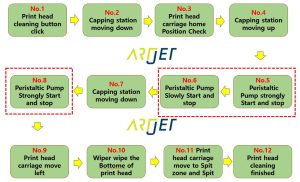
After the captop is in close contact with the bottom of the print head, suck the ink from the damper twice as shown in No.5 and No.6.
Like this, some of the sucked ink flows into the waste ink tank, but not all of it flows out and some ink remains on the Captop.
NO.8 is an operation that flows the ink remaining on the Captop into the waste ink tank.
If the nozzle condition is not restored even after white print head cleaning, the problem occurs because No.5 and No.6 do not work as well as before.
3. Peristaltic pump tube lifespan!!
When you press the peristaltic pump tube, it becomes soft.
As the soft tube is pressed, liquid is released and the liquid once released is sent in one direction.
This is the principle by which the ink in the damper flows through the print head and into the waste ink tank.
But,
The softness of the peristaltic pump tube hardens depending on the frequency of use, and the tube itself shrinks, making the tube smaller.
In other words, the more you use it, the more it physically changes.
Even though it has been physically changed, if ink load (pumping) is performed with the same power and operating time, the original operating state cannot be maintained.
Over time, this can cause cleaning to become difficult.
For more information on how peristaltic pumping works, please refer to the following.
ARTJET UV Printer Troubleshoot Ink Supply 3
IV. Three options for solving the problem
1. Peristaltic pump tube replacement
UV Printer manufacturer recommendation is periodic replacement every 3 months.
Based on ARTJET UV Printer demo equipment for 4 years,
* In the case of white print head tube, it is best to replace it every 3 months.
* There were no major problems with color and varnish even after using it for about 6 months.
In the case of white, as the white pump is used more frequently, it can be understood that replacement time is sooner than other print heads.
For peristaltic pump tube replacement, please refer to the video on the site below.
ARTJET UV Printer Troubleshoot Ink Supply 3
2. Increase inkload (pumping) time when cleaning print head
Of course, if the pump is not running well, you can improve the problem by increasing the inkload (pumping) time during print head cleaning.
However, if the pump does not run well even after increasing the time, the peristaltic pump tube must be replaced.
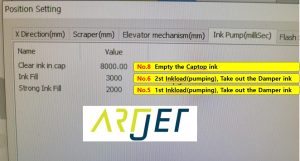
When cleaning the print head, that is, the time for No. 5 and No. 6 in the picture above can be adjusted through the software function below.
When you click Menu at the bottom left of ARTJET SW=> Print head cleaning , you can see the menu below.
In our demo equipment, when No. 5 was increased from 2,000 to 3,000 and No. 6 was increased from 3,000 to 5,000, the white print head cleaning performance was improved.
At now, it is the original value since I increased the pump motor power instead of time.
No.8 is an operation to send the ink remaining in the captop to the waste ink tank and does not require any additional changes.
3. Peristaltic pump Motor power Up
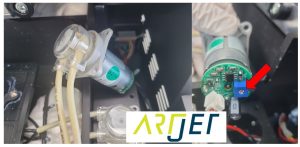
You can increase the inkload (pumping) time, but you can also increase the pump motor power to ensure that ink is sucked in better during print head cleaning.
In the picture below, you can increase the pump motor power, or rotation speed, by turning the blue block marked with a red arrow and the adjustment screw inside it clockwise.
In my experience, the pump motor operates faster when I turn it 45 to 90 degrees.
V. Summary
The reason why the nozzle does not recover well even after white print head cleaning is because the ink extraction action is not performed properly during cleaning.
The reason the ink removal operation does not work properly is because the peristaltic pump tube (yellow tube) hardens and shrinks depending on the frequency and time of use.
The best way is to periodically replace the peristaltic pump tube.
You can improve the problem by increasing the ink extraction time during print head cleaning in software without any physical manipulation, but if that does not work, you should consider replacing the tube.
Alternatively, you can improve the problem by increasing the speed of the peristaltic pump motor, but if this does not work, you should consider replacing the tube.
That’s it for today.